April 19, 2026
·
9 min read
5 keyword research mistakes killing rankings
A practical troubleshooter for diagnosing keyword search mistakes that tank SEO performance—run a fast triage checklist, align content to real SERP intent, prevent cannibalization with query clustering, avoid search-volume traps, and fix weak keyword-to-page mapping with tool-and-SERP validation.

Your rankings drop, impressions flatten, and you do “more keyword research”—but the page still won’t move. Often, the issue isn’t effort; it’s a few recurring keyword-search mistakes that quietly steer your content toward the wrong target.
This troubleshooter helps you pinpoint the failure fast. You’ll triage symptoms, sanity-check intent against the live SERP, spot cannibalization, avoid misleading volume signals, and correct tool blind spots—then translate it all into a clean keyword-to-page map you can execute.
Fast Triage Checklist
Keyword research mistakes usually show up as predictable patterns in your data. You’re not guessing. You’re matching symptoms to the fastest proof.
Ranking Symptom Map
Use this to map what you see to the most likely keyword-search mistake.
| Symptom | What you’ll see | Likely cause | “Good” looks like |
|---|---|---|---|
| Impressions down | Fewer query views | Indexing or relevance drift | Stable impressions, steady queries |
| CTR down | Same ranks, fewer clicks | Title mismatches intent | CTR rises on intent pages |
| Rankings volatile | Positions swing daily | Mixed intent targeting | Fewer swings, clearer winners |
| Traffic flat post-publish | New pages get no lift | Zero-demand keywords | Impressions within 2–4 weeks |
| Pages cannibalizing | Two URLs swap ranks | Overlapping targets | One URL owns query |
If you can tag three symptoms, you’re not dealing with “SEO vibes.” You’ve got a diagnosable keyword problem.
Data to Pull First
Open these before you change a single title tag. You want evidence, not a new hypothesis.
- GSC Performance: Queries + Pages
- GA4: Landing pages + conversions
- Keyword tool export: volume and difficulty
- SERP screenshots for top queries
- Crawl report: targets in titles/H1s
When you have these five, every next decision gets faster and less emotional.
Baseline Expectations
Look at a 28-day trend first, not yesterday’s spike. Use query buckets like “brand,” “money,” and “informational,” then track position bands like 1–3, 4–10, and 11–20.
CTR should match intent, so don’t compare “how-to” pages to “buy” pages. Conversions should be judged per landing page, because “more traffic” is meaningless if the wrong page ranks.
Decide the Root Cause
Run this in order, because it eliminates false positives quickly.
- Verify tracking by checking GSC and GA4 alignment on top landing pages.
- Confirm indexing by inspecting affected URLs and checking coverage status.
- Validate intent by comparing your page to the current top SERP results.
- Check cannibalization by filtering one query and listing ranking URLs.
- Assess authority by comparing linking domains to the top competitors.
Fix the system first. New keywords won’t save a broken pipeline.
Chasing Wrong Intent
You can nail the keyword and still lose the SERP. Google rewards the page that matches why people searched, not your preferred pitch.
Example: you target “best CRM for startups” with a product page, but the top results are comparisons and lists. If you want a deeper framework for matching content to search behavior, see this SEO guide for better rankings.
Intent Mismatch Signals
You can usually spot intent mismatch in Search Console and analytics before you ever open the SERP. The pattern looks like “Google tried you, users declined.”
- High impressions, low CTR
- Short dwell time, fast returns
- Ranking ceiling around 20–40
- SERP features you can’t satisfy
Treat these as a diagnosis, not a traffic problem.
SERP Reality Check
You need to confirm what Google thinks the query deserves. The top 10 results show the dominant intent in plain sight.
- Open the top 10 results in a clean browser.
- Label the content type: blog, category, tool, landing page.
- Note the format: list, template, calculator, tutorial.
- Capture the angle: “cheap,” “for beginners,” “2026,” “near me.”
- List must-have sections repeated across winners.
If seven of ten look the same, that’s the assignment.
Fix the Page Angle
Once you know the intent, rewrite the page to serve it first. Keep your business goal, but move it behind the user’s goal.
Change the title and H1 to match the winning angle, like “pricing,” “comparison,” or “steps.” Rebuild the outline to include the sections users expect, then shift CTAs to the moment they’re ready.
Keep the same URL when possible. History is leverage.
Validation After Changes
Intent fixes need time to be judged fairly. You’re watching for alignment signals, not day-to-day rank noise.
- Group related queries into clusters before and after.
- Track CTR changes on the same query set.
- Watch rank distribution, not one “money term.”
- Compare conversions from organic landing sessions.
- Wait two crawl/index cycles before calling it.
If CTR rises and rankings spread upward, Google agrees with your rewrite. Use Google’s own checklist for helpful, reliable, people-first content as a quick intent-fit gut check.
Overlapping Keyword Targets
Keyword overlap happens when you research ten “almost identical” queries, then assign them to ten pages. Google treats them as substitutes, so your pages compete, split links, and rotate rankings like a slot machine.
A common example is publishing separate pages for “best CRM for startups” and “top CRM for startups,” then watching both hover on page two. Fix the system first. Ideas are easy.
Cannibalization Red Flags
Cannibalization usually shows up as instability, not a clean drop. You want proof that two or more pages are fighting for the same job.
- Two URLs swap rankings weekly
- Multiple pages rank for one query
- Links spread across similar pages
- Internal anchors point everywhere
If you see three or more, you’re looking at a network.
Cluster the Queries
You’re not clustering words. You’re clustering SERPs and intent, because Google already decided what “belongs” together.
- Search each keyword and screenshot the top 10.
- Compare intent: guide, tool, category, or product page.
- Check SERP features: snippets, PAA, local, video.
- Group keywords with matching results and page types.
- Label one primary, then tag secondaries.
When the SERPs match, Google expects one page, not five.
Choose One Winner
Pick the page that can win fastest with the least risk. You’re choosing a canonical “home” for the topic.
Use simple rules: strongest backlinks, best engagement, best intent match, cleanest URL, and easiest content upgrades. If one page already earns “money” links, don’t bury it.
Once you pick, commit. Half-merges create new messes.
Merge or Differentiate
After you pick a winner, you either consolidate everything into it or make the others clearly different. Anything in-between keeps the fight going.
- Move unique sections into the winner and expand gaps.
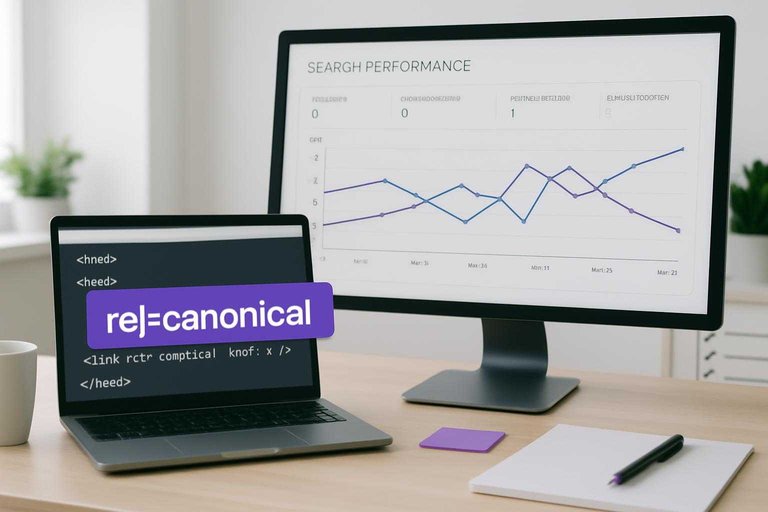
- 301 redirect dead duplicates, or set rel=canonical when needed.
- Rewrite overlapping pages to target a distinct intent.
- Update internal links to point to the winner.
- Standardize anchors so they reinforce one topic.
Google follows your internal signals first, so make them boring and consistent.
Ignoring Search Volume Traps
Search volume looks objective, so you trust it. Then you chase “10k searches” keywords that never rank or never convert.
Search tools estimate volume from sampled data, blended variants, and lagging trends. One month of “high volume” can be yesterday’s spike.
A better keyword search checks what the SERP rewards, not what the tool predicts.
Use this table to spot the trap and pick terms that actually move rankings and revenue.
| Volume trap signal | What it usually hides | What to check instead | Better keyword target |
|---|---|---|---|
| High volume, weak intent | Browsing, not buying | SERP pages type | “best” + specific model |
| Volume rounded to 1k/10k | Blended keyword variants | Exact SERP queries | Narrow long-tail phrase |
| Big volume, huge difficulty | Dominant brands, ads | Top 3 link profiles | Adjacent subtopic cluster |
| Stable volume, falling clicks | SERP steals clicks | Features above results | Problem-first query |
| Low volume, high value | High CPC, high intent | CPC + conversions | Pricing, comparison terms |
If the SERP says “research,” your volume is just noise.
Keyword Tool Blind Spots
Relying on one keyword tool makes your targeting look “data-driven,” but it often misses real demand. The result is thin coverage, wrong intents, and pages built for queries nobody actually types.
Tool Data Limitations
Most tools compress reality into neat numbers, and you end up optimizing for the spreadsheet. Grouped keywords hide distinct intents, sampled volume blurs seasonality, and trend data often shows up weeks late.
Local modifiers get dropped, personalized SERPs don’t match your view, and brand-heavy results skew difficulty. You think you found “best running shoes,” but your audience searches “best running shoes for flat feet under $100.”
It also doesn’t help that some queries are withheld/anonymized in GSC (especially long-tail), so your “real demand” view can be incomplete even when you’re using first-party data.
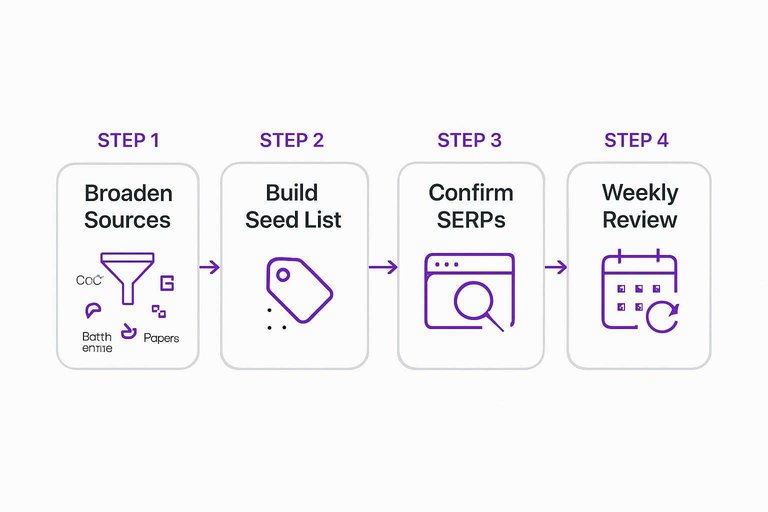
Broaden the Sources
One tool can’t see the whole market, so you need inputs from where searches actually happen.
- Pull real queries from Google Search Console
- Mine internal site search for wording
- Expand with People Also Ask questions
- Scan Reddit and forums for language
- Reverse-engineer competitor page topics
Do this weekly, and you’ll spot demand before your tools “confirm” it. If you want help systematizing that process, use these resources to simplify SEO workflows.
Build a Better Seed List
A strong seed list prevents you from building pages around vague head terms.
- Extract modifiers like price, location, and audience.
- Map entities: brands, models, standards, and use-cases.
- Add questions and comparisons users ask.
- Collect synonyms and “same thing” phrasing.
- Dedupe by intent and SERP overlap.
If two queries trigger the same SERP, treat them as one fight.
Confirm With Real SERPs
Before you write, open the live SERP and sanity-check your plan. Look for the dominant format, like listicles, product pages, or tools, and check whether the winners have brand gravity you can’t match.
If the SERP screams “shopping” and you publish a blog post, you’re choosing to lose. Adjust the target, or change the asset.
Weak Keyword-to-Page Mapping
You can research great keywords and still lose rankings if no page owns them. The result is orphan topics, bloated blogs, and pages that try to rank for everything.
- Export your keyword list with intent, volume, and difficulty columns.
- List every indexable URL and its primary query in a single sheet.
- Assign one primary keyword and 2–4 close variants per page.
- Create new pages for unassigned high-intent keywords, not new posts by default.
- Merge or redirect pages where two URLs target the same query.
If a keyword can’t “point” to one URL, you don’t have an SEO plan yet.
Run the Fix in Order (and Don’t Skip Validation)
- Start with the triage checklist: pull GSC queries/pages, confirm the ranking symptom, and set a realistic baseline.
- Validate intent on the live SERP, then adjust the page angle, format, and headings to match what’s winning.
- Check for overlapping targets: cluster similar queries, pick one primary “winner” URL, and merge or differentiate the rest.
- Sanity-check volume and tool data: look for traps, broaden sources, and confirm with real SERPs.
- Lock in a keyword-to-page map with one primary topic per URL, then re-check rankings, CTR, and query distribution 2–4 weeks after changes.
Frequently Asked Questions
- Does keyword search in SEO still matter in 2026 with AI Overviews and LLM search?
- Yes—keyword search in SEO still matters because it reveals demand and intent signals that shape your page’s topic, headings, and internal linking. Most teams now pair keywords with entities and intent clusters to align with both classic SERPs and AI-generated answers.
- How do I measure whether my keyword search in SEO is actually improving rankings and traffic?
- Track a fixed keyword set in Google Search Console (Queries + Pages), then monitor impressions, average position, and click-through rate weekly for 4–8 weeks. Confirm impact by seeing more non-branded query impressions and new ranking terms landing on the intended page, not random URLs.
- How long does it take for keyword research changes to affect SEO rankings?
- You usually see early movement in 2–6 weeks after updating titles, headings, and on-page content, assuming the page is crawled and indexed quickly. More stable gains from revised targeting often take 8–12+ weeks as links, engagement, and relevance signals accumulate.
- Can I do keyword search in SEO without paid tools like Ahrefs or Semrush?
- Yes—use Google Search Console, Google Trends, Keyword Planner, and SERP autocomplete/“People also ask” to find real queries and validate intent. Paid tools mostly speed up competitor discovery and clustering, but they aren’t required to build a usable keyword set.
- How many keywords should I target per page when doing keyword search in SEO?
- Aim for one primary keyword and 3–8 closely related secondary terms that share the same intent, then cover them naturally in sections and FAQs. If terms require different content formats (e.g., “how to” vs “pricing”), they should usually be separate pages.
Turn Keyword Research Into Rankings
Fixing intent mismatches, overlap, volume traps, and weak keyword-to-page mapping is straightforward on paper—but hard to execute consistently at publishing speed.
Skribra turns keyword search in SEO into daily, optimized articles with built-in meta, formatting, and WordPress publishing—plus a backlink network to reinforce authority. Start with the 3-Day Free Trial.
Written by
Skribra
This article was crafted with AI-powered content generation. Skribra creates SEO-optimized articles that rank.
Share: