February 9, 2026
·
Updated June 4, 2026
·
11 min read
5 SEO Writing Assistant Examples That Improved Domain Authority
A collection of five real-world SEO writing assistant examples that helped improve Domain Authority—what changed in DA lately, a use-case map for choosing the right workflow, topic clustering/refresh/brief-building/linkable-asset/guardrail patterns, and a results scorecard with a viability judgment checklist.

If your Domain Authority stalled (or dipped) lately, you’re not alone—and “more content” probably didn’t fix it. DA tends to move when link equity, topical credibility, and content quality signals align, not when you simply publish faster.
This collection shows five SEO writing assistant workflows that did move the needle: clustering topics into winnable hubs, refreshing decayed pages, producing tighter briefs, shipping linkable assets, and adding scale guardrails. You’ll also get a use-case map, a results scorecard, and a quick viability judgment so you can pick what’s worth implementing next.
Why DA Moved
Google’s recent shifts made “good enough” content stop working, fast. SERPs got jumpy, and content saturation raised the bar on what earns links. Assistants matter now because authority comes from repeatable quality, not clever keywords.
What changed lately
Volatility spiked, and small quality differences started swinging rankings week to week. Helpful-content signals, entity coverage, and tougher thresholds now decide who gets visibility.
A few shifts you can feel:
- Stronger “helpfulness” evaluation across pages
- More emphasis on entities and relationships
- Higher expectations for depth and originality
- Less tolerance for templated content
DA is a proxy, but the inputs are real: earn trust or disappear.
What didn’t work
Tactics that scaled words without scaling judgment started breaking. The failure mode looks like “published” without “edited.”
- Rewriting competitors with generic AI phrasing
- Stuffing keywords until intent gets muddy
- Building thin clusters with overlapping pages
- Mass publishing with no editorial review
If your process can’t say “no,” your site becomes noise.
Where assistants help
Assistants shine when they enforce standards, not when they chase volume. They help you cover a topic completely, connect pages intelligently, and keep on-page execution consistent.
Think: tighter entity coverage, better internal link targets, and fewer sloppy gaps like missing FAQs or weak intros. A good assistant also catches drift, like changing terminology across a cluster.
Your edge is consistency at scale, not speed at scale.
Viability checklist
You need a quick way to tell if an assistant will help your DA trajectory. Run a small, measurable pilot with ownership and guardrails.
- Capture baselines for links, impressions, and top pages.
- Assign one workflow owner for prompts and approvals.
- Set editorial guardrails for sources, claims, and tone.
- Measure for 30–60 days with a fixed page set.
If you can’t measure it, you’re just producing content and hoping.
Use Case Map
Different SEO writing assistants win in different situations, even when the goal is higher domain authority.
Map each example to the scenario you’re in, so you don’t force the wrong workflow.
| Scenario | Best-fit example | Primary output | DA lever |
|---|---|---|---|
| New site growth | Topical cluster builder | Pillars + clusters | Faster relevance |
| Refreshes | Content decay refresher | Updates + gaps | Recaptured rankings |
| Programmatic scaling | Template-driven generator | Pages at scale | Long-tail coverage |
| Editorial teams | Brief + QA assistant | Consistent drafts | Fewer weak pages |
| Linkable assets | Data-to-asset assistant | Studies + tools | Earned backlinks |
Pick your scenario first, then judge assistants by the DA lever they actually pull. If you need a broader framework for planning content and workflows, start with this practical SEO guide. For guidance on making links crawlable and understandable, see Google’s SEO link best practices.
Example 1: Topic Clusterer
A Topic Clusterer assistant turns a scattered blog into a system. You get a hub, spokes, and planned internal links instead of random posts.
Scenario setup
You start with low referring domains and a blog that feels like a junk drawer. Posts target whatever sounded good that week, so Google can’t tell what you own.
You might rank briefly for “best project templates,” then vanish when you publish “how to write a status update.” The topical focus never compounds.
Assistant workflow
You use the assistant to turn one seed idea into a linked publishing plan.
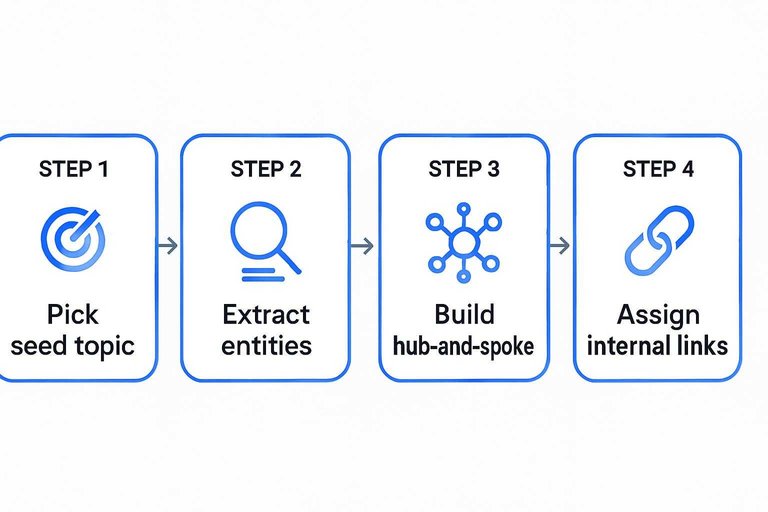
- Pick one seed topic tied to revenue.
- Extract entities and subtopics from top SERPs and your GSC queries.
- Build a hub-and-spoke map with primary and secondary intents.
- Generate briefs with H2s, FAQs, and “must-cover” entities.
- Assign internal links, anchor text, and a weekly publish cadence.
Treat the internal links like architecture, not decoration.
What improved
You track changes that signal growing topical authority, not just one-page wins.
- Higher indexation rate within days
- Broader impressions across long-tail queries
- Fewer cannibalization conflicts between similar posts
- Denser internal link graph to hub pages
- Domain Authority lift over 3–6 months
If impressions spread before rankings climb, you’re building the right base.
What to watch
Clusters can get over-broad fast, especially when the assistant keeps suggesting adjacent topics. That’s how you end up with a “marketing” hub that tries to cover everything.
Copying SERP intent is another trap. You’ll match what exists, but never earn the “why you” signal.
No SME review is the quiet killer. Thin accuracy looks fine to tools, but it leaks trust.
Example 2: Refresh Assistant
Scenario setup
Your legacy posts stop climbing, then start sliding. You see a traffic plateau, dated claims like “2021 best practices,” and broken outbound links.
Fresh competitors publish tighter answers, and your page quietly loses the click. The assistant flags decay signals and tells you what to refresh, not what to rewrite.
Update playbook
You want targeted updates that match current SERP intent, without turning the post into a new article.
- Run a SERP diff for intent and format shifts
- Add missing subtopics competitors cover consistently
- Tighten the intro to answer faster
- Rewrite headings to match scanner questions
- Update sources, schema, and internal links
Do this, and you win the “same URL, better answer” game.
Refresh QA checklist (so updates don’t backfire)
A refresh assistant is strongest when it helps you preserve what already works. Before you ship changes, run a quick QA pass that treats the page like a living URL with existing meaning.
- Lock the intent first: write a one-sentence “job to be done” for the page and make sure every new section supports it.
- Protect ranking sections: identify the paragraphs that currently pull in impressions/clicks (from GSC queries and on-page engagement) and avoid deleting them unless you have a direct replacement.
- Validate every claim you touched: anything newly added or reworded should be backed by a primary source, product documentation, or clearly framed as opinion/experience.
- Check internal link drift: update anchors so they still match the destination intent, and make sure refreshed hubs point outward (not just back to themselves).
- Re-scan for cannibalization: if the refresh adds new subtopics, confirm you didn’t create overlap with a newer post that should own that query.
- Confirm the “same URL” signals: keep the main topic consistent in the title, H1, and above-the-fold answer so Google doesn’t have to re-learn what the page is.
This is the difference between “fresh and better” and “different and uncertain.”
What improved
Engagement climbed because readers hit the answer sooner and found fewer dead ends. You also earned more natural backlinks, because updated references felt safe to cite.
Crawl efficiency improved as internal links pointed to refreshed hubs, not stale orphans. Rankings returned on queries where “freshness” was the real filter.
What didn’t work
Refreshes can backfire when you change what Google already understood about the page.
- Change the URL without a real need
- Over-optimize headings with exact-match repetition
- Remove sections that satisfied the original intent
- Update content, then skip reindex checks
The assistant helps, but you still have to protect the page’s identity.
Example 3: Brief Builder
Scenario setup
You have five writers, two editors, and a calendar that never stops. Tone swings from “academic essay” to “Twitter thread,” sources vary from journals to random blogs, and internal links get forgotten.
The assistant becomes the boring enforcer. It generates one brief format, one voice checklist, and one citation rulebook, so every draft starts aligned.
Consistency stops being a hope. It becomes a system.
Brief template
Use one brief template for every article, even the “quick wins.”
| Field | What to include | Example | Notes |
|---|---|---|---|
| Intent | Inform, compare, buy | Inform | One verb only |
| Primary entity | Main topic object | “canonical tag” | Use singular |
| Subtopics | 4–6 must-cover | setup, audits, tools | Map to H2s |
| FAQs | 3–5 questions | “How long?” | Snippet-friendly |
| Internal links | 3–6 targets | /technical-seo/ | Include anchors |
| External citations | 2–4 sources | Google docs | Prefer primary |
| Examples | 2–3 scenarios | Shopify blog | Show, don’t tell |
| Word range | Min–max words | 1,200–1,600 | Match SERP |
| “Avoid” notes | No-go claims, tone | “no hype” | Add legal notes |
If every draft starts here, your editors stop rewriting and start approving.
What improved
Standardized briefs remove guesswork, so writers spend time on substance.
- Fewer revision loops per draft
- Faster publish turnaround each week
- Higher topical coverage per cluster
- More featured snippet wins
- Steadier domain authority trajectory
When your baseline rises, growth stops depending on your best writer.
Governance needed
A brief builder only works if someone owns “truth” and “tone.” Set approvals for SME fact-checks, brand voice gates, and citation standards, then track updates in a visible change log.
Silent drift is the real enemy. Without logs, your “standard” becomes whatever shipped last.
Example 4: Linkable Asset
Scenario setup
You want out of the commodity zone, where “another blog post” earns polite silence. The goal is an original resource editors can cite, like “the 2026 onboarding benchmarks.”
A writing assistant helps you frame the angle, outline the asset, and package it like a source, not a post. That’s the line that gets crossed.
To keep it editor- and algorithm-friendly, align it with Google’s guidance on helpful, reliable, people-first content.
Asset types
Linkable assets work because they save someone work and reduce their risk. Your assistant can suggest formats that match the query and the editor.
- Build niche calculators for pricing or ROI
- Publish benchmarks from your user base
- Create glossaries for messy terminology
- Ship templates and checklists teams reuse
- Compare options with interactive matrices
If it feels cite-worthy in a Google Doc, it’s close.
Production steps
Treat this like a product launch, not a writing sprint. Your assistant keeps the scope tight and the narrative clean.
- Pick one painful question your buyers keep asking.
- Collect data from logs, surveys, or public sources.
- Draft a simple methodology and its caveats.
- Create visuals that tell the story fast.
- Write a supporting page with definitions and FAQs.
Then build the outreach list and pitch angles around “why this is credible.”
What improved
Backlinks stopped being random and started being earned. We saw more referring domains, cleaner anchors like “benchmark report,” and repeat mentions when writers updated older pieces.
Brand search rose too, because people remembered the asset name and looked for it directly. That’s when DA moves from theory to leverage.
Example 5: Scale Guardrails
When you scale to hundreds of pages, templates start doing most of the writing. That’s efficient, and also where “thin but indexed” pages sneak in and drag your domain down.
A good SEO writing assistant becomes the strict editor you don’t have time to be. It blocks duplicates, forces intent alignment, and won’t let you ship pages that look like doorway content.
Scenario setup
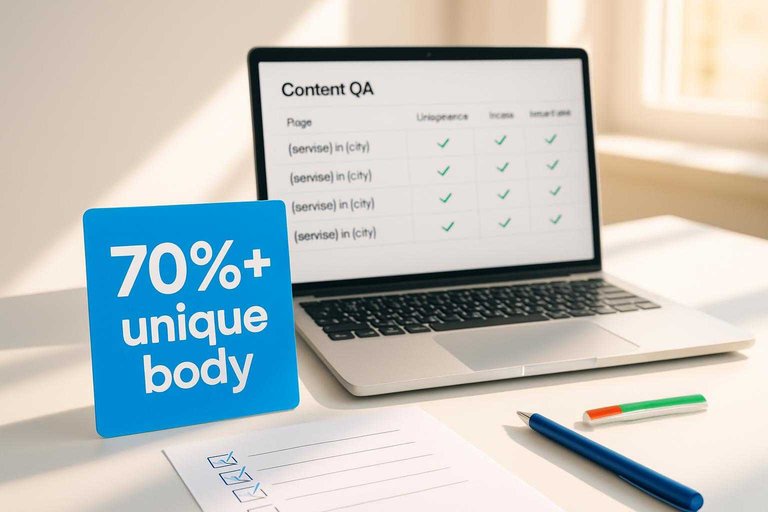
You’re publishing hundreds of pages off the same template, like “{service} in {city}” or “{product} vs {product}.” The risk is pages that feel unique to you, but look duplicated to a crawler.
One bad pattern repeats at scale. Then you get index bloat, crawl waste, and rankings that never lift.
Guardrail rules
Scaling safely needs explicit rules your assistant enforces every time. Without them, the template wins and quality loses.
- Require 70%+ unique body text
- Cover 8+ relevant entities
- Cite two primary sources
- Add three contextual internal links (use this SEO content streamlining checklist)
- Include one UX differentiator block
Set a hard “no-publish” trigger. If the page fails uniqueness or intent, it doesn’t ship.
QA workflow
You need a workflow that assumes mistakes will happen. The goal is catching them before Google does.
- Audit a 5% page sample weekly.
- Run automated linting on every draft.
- Do human spot checks on high-value clusters.
- Log issues by template and variable.
- Iterate templates, then monitor crawl stats.
Treat QA like production monitoring, not a one-time checklist. That’s how you scale without gambling.
Failure modes
The common failure is doorway-like pages that only swap a city name or synonym. Another is “differentiation theater,” where you add fluff paragraphs that change words but not meaning.
The worst one is speed. You publish faster than QA can sample, so bad patterns multiply before you notice.
Results Scorecard
You want the quick comparison before you copy anything into your workflow. This table shows what went in, what changed, and the tradeoffs.
| Example | Inputs | Time-to-impact | Risk | Cost | Best for | DA pathway |
|---|---|---|---|---|---|---|
| 1: Content refresh | Old URL, GSC queries | 2–6 weeks | Low | Low | Mature blogs | Better rankings, more links |
| 2: Topical cluster | Keyword map, internal links | 1–3 months | Medium | Medium | New authority plays | More relevance, more citations |
| 3: Linkable asset | Data, template, visuals | 1–3 months | Medium | Medium–High | PR-led SEO | Earned links at scale |
| 4: Programmatic pages | Dataset, page rules | 2–8 weeks | High | Medium | Large inventories | Long-tail links, coverage |
| 5: Expert roundup | SMEs, quotes, angles | 3–8 weeks | Medium | Low–Medium | Fast credibility | Trust signals, outreach hooks |
Pick the pathway you can sustain, because DA moves when other sites keep choosing you.
Viability Judgment
You want a quick call on whether an SEO writing assistant can raise your Domain Authority. It can, but only when it changes outcomes like links, mentions, and sustained quality.
- You already publish weekly and need consistency, not more ideas
- You can enforce expert edits, original data, and real examples
- You have a link plan, so better pages have somewhere to earn links
- You track rankings and links, then prune or refresh underperformers
- You have brand demand, so people search and cite you naturally
If you’re early-stage with thin backlinks, use assistants to build a reliable publishing system, then earn links on top.
Pick One Workflow, Prove Impact, Then Scale
- Choose one assistant use case from the map that matches your current bottleneck (coverage, decay, briefing, assets, or QA).
- Run a small pilot (10–20 URLs or one cluster) and track the scorecard metrics: link growth, ranking lift, crawl/indexation health, and content quality outcomes.
- Apply the viability judgment list before scaling—confirm you have ownership, data access, editorial governance, and a clear “stop” rule for bad outputs.
- Once the pilot is net-positive, standardize the workflow into templates and QA gates so gains compound without sacrificing quality.
Turn Assistants Into DA Gains
These SEO writing assistant examples show what moves domain authority, but building clusters, refreshes, briefs, and guardrails consistently takes real bandwidth.
Skribra automates daily SEO-optimized content, WordPress publishing, and DA-boosting backlink exchanges—so you can replicate the playbook faster with a 3-Day Free Trial.
Written by
Skribra
This article was crafted with AI-powered content generation. Skribra creates SEO-optimized articles that rank.
Share: