May 15, 2026
·
9 min read
7 AI ranking mistakes costing you organic clicks
A hands-on troubleshooter for diagnosing AI-era ranking drops and click loss—triage real declines, fix cannibalization, rewrite for answer extraction, close E-E-A-T gaps, and correct misleading schema/internal links so the right page wins.

Your rankings didn’t “just dip”—AI-driven SERPs often reshuffle which page ranks, what gets extracted, and whether anyone clicks at all. If you’re staring at lower impressions, vanishing snippets, or traffic sliding without a clear cause, you’re probably fixing the wrong thing.
This troubleshooter helps you isolate the real failure fast: confirm the decline, separate AI-style queries, pick test pages, and then correct the seven mistakes that quietly bleed clicks—cannibalization, answer-first misses, weak trust signals, bad schema, and internal link gaps.
Triage the Drop
Clicks can fall because Google changed the results page, not because your content got worse.
Confirm the decline is real, then isolate the exact queries and pages before you touch anything.
Treat “maybe it’s tracking” as a hypothesis, not a comfort blanket.
Verify real decline
Use GSC first, because it’s the source of truth for organic clicks.
Work query-first, then page-first.
- Compare clicks, impressions, and position for the same dates week-over-week.
- Split by query and page, then find the largest click deltas.
- Check seasonality with a 28-day and 3-month view.
- Rule out indexing shifts in Coverage and Page indexing reports.
- Audit analytics tags, consent, and redirects for recent changes.
If clicks fell but impressions rose, you’re losing the SERP, not demand.
Segment AI queries
You need to separate “AI/overview SERPs” from normal blue-link SERPs.
Otherwise you’ll ship fixes for the wrong problem.
- Filter queries showing AI Overviews or featured snippets.
- Tag intent as informational, navigational, or transactional.
- Separate branded queries from non-branded queries.
- Split head terms from long-tail variants.
- Flag queries with sudden CTR drops.
If informational queries crater first, your snippet is competing with a summary, not another page.
Pick test pages
Pick a small set so you can see cause and effect.
Three to five pages is enough to learn fast without sitewide noise.
Choose pages with stable rankings, clear intent, and a single primary query, like “how to reset X” versus “best X software.”
Your goal is a clean read on impact, not a heroic redesign.
Snapshot baseline
Document what Google sees today, not what you think is live.
You’ll need a before-state to debug wins and losses.
- Record title tag, H1, and key headings for each page.
- Copy the current meta description and visible intro text.
- Capture schema types and key properties in use.
- Map internal links pointing in and out, with anchor text.
- Note SERP features present for the target query.
Without a baseline, every change feels like progress and nothing is provable.
Keyword Cannibalization
Keyword cannibalization happens when two or more pages answer the same intent. Rankers split signals, and AI summaries may quote the “wrong” URL for the query.
Spot competing URLs
Use Google Search Console to catch one query driving impressions to multiple pages. You’re looking for alternating clicks and positions, like a weekly “URL swap.”
- Open GSC → Search results → Queries.
- Click a target query, then open the Pages tab.
- Sort by clicks, then compare positions across URLs.
- Flag queries where two URLs trade clicks week to week.
- Export and repeat for your top 20 queries.
If two URLs keep rotating, Google is asking you to pick one.
Choose a primary page
Pick the page that best satisfies the intent in the first 10 seconds. If one page answers “pricing” and the other is a “features” detour, the detour loses.
Use this filter:
- Best intent match for the query.
- Strongest external links and mentions.
- Most up-to-date, complete information.
- Clean UX with obvious next step.
Make one page the obvious destination, and every other page becomes support.
Consolidate signals
Once you’ve chosen, you need every signal to agree. Mixed signals are how you get cited for the wrong page.
- 301 redirect true duplicates to the primary page.
- Add canonical tags where redirects are risky.
- Merge overlapping sections into the primary page.
- Update internal links and anchors to match intent.
- Refresh titles and H1s to avoid near-duplicates.
Consistency is the ranking factor you control completely. (See Google’s guidance on specifying a canonical with rel=“canonical”.
Recheck SERP mapping
Give it a couple crawls, then verify the mapping changed. Watch the query’s Pages report and also spot-check the live SERP for which URL wins.
Search your target query set and look at AI overviews, featured snippets, and “cited sources.” If the primary page isn’t the one showing, you still have competing intent on-site.
When the right URL wins, optimization stops being guesswork.
Answer-First Failure
You’re losing clicks when your page makes readers hunt for the answer. AI systems do the same, then pick a clearer page to quote.
If your first screen is “context” instead of “constraint + answer,” you trained the model to ignore you.
Lead with the outcome
Put the outcome at the top so both users and AI can extract it fast.
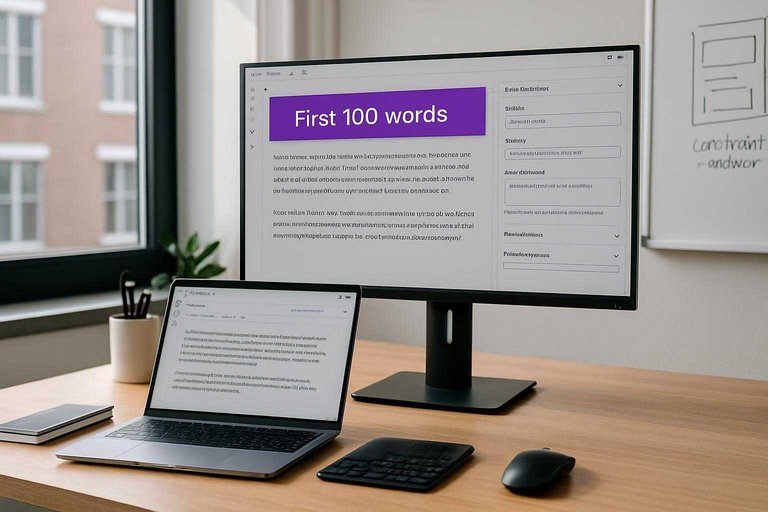
- Write a 1–2 sentence answer in the first 100 words.
- Mirror the query language, including units, timeframes, and limits.
- Add one key caveat, like “varies by state” or “for 2026.”
- Link to the section that proves the claim.
When the answer is immediate and bounded, you become the safest source to cite. If you want a repeatable way to audit this across pages, use an essential AI content checklist.
Format for extraction
Make your page quotable without losing meaning.
- Use one-idea paragraphs, under three lines.
- Add label lines, like “Best for:” or “Definition:”.
- Write tight lists with parallel verbs.
- Put numbers in numerals, not words.
- Keep headers literal, not clever.
If a snippet can stand alone, it can also win the click.
Cover follow-up questions
A top-of-page answer is table stakes, but it rarely completes the job. You need the next questions answered fast, like “cost,” “exceptions,” or “how long.”
For example, after “How long does it take to index a page?” add short blocks like “Typical range,” “What speeds it up,” “What slows it down,” and “When to worry.”
That’s how you keep the reader after the summary, and that’s where the clicks compound.
Add click-worthy depth
Give value that summaries can’t fully compress.
- Show a worked example with real numbers.
- Provide a copy-paste template or checklist.
- Include an edge-case section, like “If you’re migrating domains.”
- Add a simple calculator, even if it’s manual.
- Cite one primary source with a direct quote.
AI can paraphrase your page, but it can’t replace your tools.
E-E-A-T Signal Gaps
AI systems look for credibility patterns before they quote you. Users do the same before they click, especially on YMYL topics. If your page reads like “anonymous SEO copy,” you lose both.
Show real authorship
Authorship is a ranking and citation filter, not a vanity badge. Give evaluators a real person with a real reason to know this topic.
- Add an author bio with title, employer, and topic-specific credentials.
- Link to the author’s LinkedIn, Google Scholar, GitHub, or portfolio.
- Add 2–5 relevant bylines or projects under “Previous work.”
- Match the author’s role to the claim scope, like MD for medical.
- Add an editor or fact-checker line for higher-risk pages.
If a reader can’t answer “who wrote this?” in five seconds, AI won’t either.
Cite primary sources
Secondary summaries get ignored when AI can fetch the original. Use sources that settle disputes, not sources that repeat them.
- Link official docs and standards first.
- Quote statistics with exact numbers and dates.
- Cite the original study, not a news recap.
- Use stable URLs, DOI links, or archived copies.
- Add a short note on methodology limits.
When your sources are the “source of truth,” you become cite-worthy by association.
Prove first-hand experience
Experience is the missing signal on most AI-targeted pages. Show evidence that you ran the test, shipped the fix, or used the product.
Add screenshots of the exact settings you changed. Include a small original benchmark, like “we tested 20 pages and saw X.” Drop a photo, a repo link, or a step-by-step workflow you actually followed.
Receipts beat rhetoric, and they travel well in AI citations. (See Google’s guidance on helpful, reliable, people-first content.)
Tighten trust hygiene
Trust dies in the footer, not the headline. Clean signals remove doubt, which raises both clicks and citations.
- Make About and Contact pages visible from every page.
- Publish an editorial policy and a corrections process.
- Show “Last updated” dates and update logs on key pages.
- Add business details, like address, legal name, and policies.
- Remove or reduce ads that interrupt reading or mimic UI.
If the site feels sketchy, every claim becomes negotiable.
Schema That Misleads
Schema should clarify what your page is so Google can show the right feature. Bad schema does the opposite. You get the “wrong” snippet, or none at all.
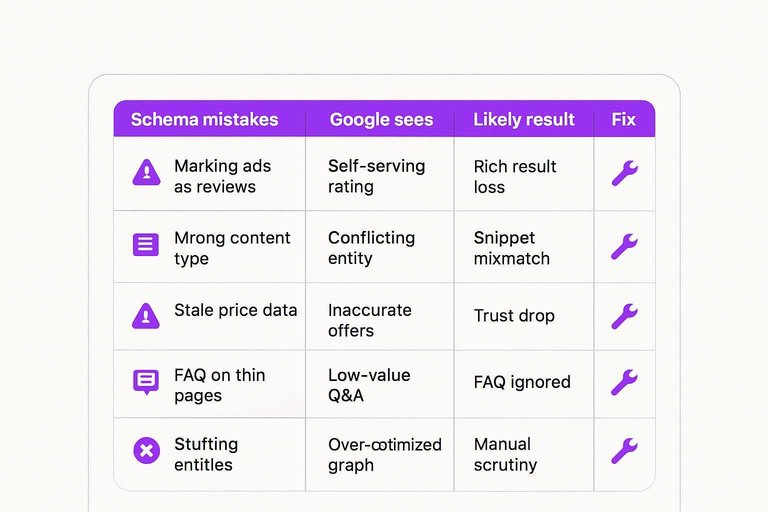
Use this table to spot the schema mistakes that quietly kill eligibility and trust.
| Mistake | What Google sees | Likely result | Fix |
|---|---|---|---|
| Marking ads as reviews | Self-serving rating | Rich result loss | Remove Review schema |
| Wrong content type | Conflicting entity | Snippet mismatch | Use correct schema |
| Stale price data | Inaccurate offers | Trust drop | Sync from source |
| FAQ on thin pages | Low-value Q&A | FAQ ignored | Expand main content |
| Stuffing entities | Over-optimized graph | Manual scrutiny | Keep it truthful |
Treat schema like a contract, not a hack, and your snippets stop fighting your page.
Internal Link Blind Spots
You can publish your best page and still bury it. Weak internal links keep crawlers on thin nodes and split authority across near-duplicate hubs.
- Map your “money pages” and confirm each gets at least 5 internal links.
- Add links from high-traffic pages using descriptive anchors, not “click here.”
- Collapse competing pages by redirecting, then link to one canonical target.
- Build a tight hub: 1 pillar page linking to 6–12 supporting pages.
- Re-crawl your site and verify the target pages move closer to the homepage.
If your best page needs four clicks to reach, it’s not a ranking problem. It’s a routing problem—use a complete SEO guide to audit and fix the paths that matter.
Run the Fixes in Order, Then Measure the Right Outcome
- Start with triage: verify the drop is real, segment AI-style queries, choose test pages, and snapshot a baseline.
- Resolve conflicts next: fix cannibalization, correct SERP-to-URL mapping, and clean up misleading schema so one page is the clear winner.
- Only then rewrite for clicks: lead with the outcome, format for extraction, add follow-up coverage and depth, and strengthen E-E-A-T plus internal links.
- Recheck after 7–14 days using page-level impressions, ranking URL stability, and organic clicks (not just average position).
Frequently Asked Questions
- Does traditional SEO still matter for AI ranking in 2026?
- Yes—AI ranking is usually built on the same crawl, index, and relevance signals as classic SEO, then filtered through AI answer systems. If your pages aren’t discoverable, clearly relevant, and trusted, they’re unlikely to be cited or clicked.
- How do I measure whether AI ranking changes are costing me organic clicks?
- Compare Google Search Console clicks/CTR for affected queries and pages before vs. after the drop, and segment by query patterns that trigger AI Overviews. Use GSC, server logs, and a SERP tracker that flags AI features to confirm the timing and impact.
- How long does it take to recover after fixing AI ranking issues?
- Most sites see early movement in 2–6 weeks as recrawls happen, with more stable gains in 8–12 weeks once enough queries re-evaluate your pages. Faster improvements usually come from content clarity and internal linking, while authority signals take longer to compound.
- Do I need to optimize every page for AI ranking, or just key pages?
- Focus on a small set of “citation-worthy” pages per topic—usually the top 5–20 URLs that drive the most impressions or support your money pages. Strengthening those hubs typically lifts related pages through improved topical authority and internal link flow.
- Can I use AI-generated content to improve AI ranking without getting hit?
- Yes, if it’s edited for accuracy, originality, and first-hand expertise and supported with references and clear authorship. Thin rewrites and unverified claims often lead to poor engagement and fewer citations, which hurts AI ranking over time.
Fix AI Ranking at Scale
Catching drops, reducing cannibalization, and strengthening E-E-A-T signals is doable—but keeping it consistent across every new page is where most teams lose momentum.
Skribra streamlines SEO content production with keyword-focused briefs, clean structure, WordPress publishing, and built-in backlink exchanges—so you can correct these AI ranking mistakes faster with a 3-Day Free Trial.
Written by
Skribra
This article was crafted with AI-powered content generation. Skribra creates SEO-optimized articles that rank.
Share: