April 2, 2026
·
8 min read
7 website ranking mistakes that stall new pages
A practical troubleshooter for diagnosing why new pages don’t rank — triage indexing and relevance, fix intent mismatches, strengthen thin content, resolve cannibalization, improve internal linking, and remove crawl blocks and URL bloat.

Your new page is live, indexed, and… nothing happens. No impressions, no clicks, and the ranking graph stays flat long after the “Google just needs time” window has passed.
This troubleshooter helps you pinpoint what’s actually stalling the page. You’ll triage indexing and query fit, match the intent Google is rewarding, add the specificity that earns trust, stop competing with your own URLs, build internal paths that pass signals, and remove crawl issues that keep important pages from being seen.
Triage Your Stall
Before you change copy or chase links, find the bottleneck. Most stalled pages fail on one of three basics: indexing, relevance, or authority.
Verify indexing status
You’re not ranking if you’re not eligible to show. Run three fast checks to confirm Google can actually surface the URL.
- Use Search Console URL Inspection and check “Indexing allowed” signals.
- Run a
site:yourdomain.com "partial title"query to sanity-check discovery. - Check robots.txt, meta robots, and HTTP headers for
noindexor blocks. - Confirm canonical points to itself, not a different page.
- Look for soft-404 or “Crawled — currently not indexed” statuses.
If any of these fail, stop everything and fix access first.
Assess query relevance
Google ranks the page it thinks you wrote, not the page you meant. Compare your target keyword to the current SERP and your own framing.
Open the top results and label intent: “buy,” “learn,” “compare,” or “navigate.” Then check your page for matching cues: title promise, H1 language, and first 100 words. If your intro reads like “A complete guide to…” but the SERP is product pages, you’re mismatched.
Align intent before you add more words.
Spot authority gaps
Sometimes the page is fine, but Google doesn’t trust it yet. You can usually spot that by comparing signals, not vibes.
- Count internal links pointing to the page from relevant hubs.
- Check anchor text for specificity, not “click here.”
- Look for external mentions, even unlinked brand citations.
- Compare referring domains of top competitors.
- Identify stronger internal pages competing for the same query.
If competitors win on links and you win on content, you’re looking at an authority problem.
Targeting the Wrong Intent
You can write a “good” page and still rank nowhere if it answers the wrong question. Intent is the contract your title and snippet sign with the searcher.
Intent mismatch symptoms
If your page targets one intent but attracts another, Google tests you and quickly moves on. The clues show up in Search Console and behavior metrics.
- Low impressions for the main query
- Impressions for “side” queries
- Short dwell time after clicks
- Low CTR versus position
- Snippet unlike top results
When three of these stack up, you’re not losing on SEO. You’re losing on relevance.
Align to SERP patterns
Use the SERP as your brief, not your imagination. You’re matching what Google already rewards for that query.
- Open the top 5 results in a clean browser.
- Note the dominant format: guide, list, tool, product, or definition.
- Identify the shared angle: “for beginners,” “best,” “template,” “near me.”
- Mirror the common subtopics in your H2s, in your own words.
- Rewrite your title and H1 to match the delivered outcome.
If you need a broader map of how intent fits into on-page decisions, see this SEO guide for beginners.
Do this before you “add more content.” Otherwise, you polish the wrong deliverable.
Rebuild the intro promise
Your first 150 words decide whether the click turns into a satisfied search. Write it like a clear on-page promise: “If you’re X and need Y, this gives you Z.”
Cut throat-clearing lines like “In today’s digital world” or “SEO is important.” That fluff signals a different intent than the SERP expects.
For a grounding framework on what Google looks for, review people-first content guidance.
Thin, Generic Content
Thin content is when your page says “we do X” but never earns trust. It repeats what’s already ranking, then wonders why Google ignores it.
Picture a “best email tools” post with five vague bullets and no real testing. Readers bounce fast. So does your chance to rank.
Coverage gaps checklist
If your draft feels short, it’s usually missing the subtopics the query demands. Scan the first-page results and look for repeated sections you don’t have.
- Define key terms early
- Show steps or a process
- Include real examples or templates
- Name tools and when to use them
- Add caveats and comparisons
When three top results share a section, Google likely expects it—use this SEO content streamlining checklist to spot what your draft is missing fast.
Add proof and specificity
Generic advice doesn’t rank because anyone could write it. Add proof that shows you did the work, even if it’s small.
Use one original screenshot, one measured data point, and one clear recommendation. Say “Do X for Y reason,” not “consider trying X.”
Specificity is the shortcut to credibility, and credibility is the ranking lever.
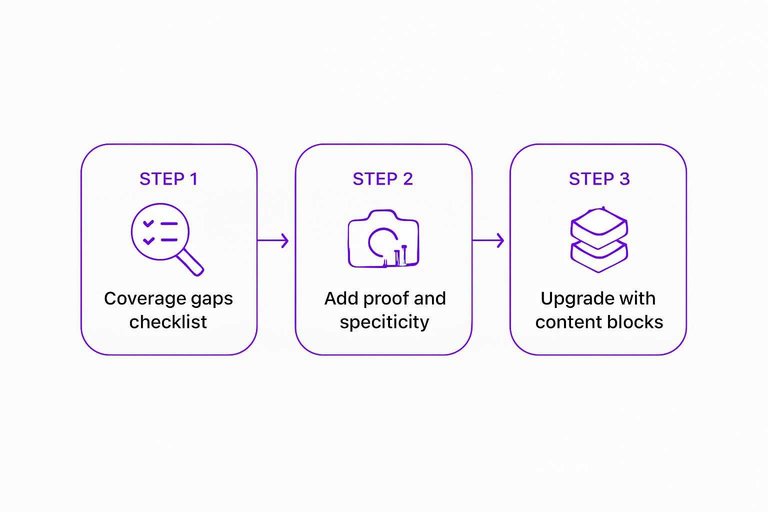
Upgrade with content blocks
Intent is layered, so your page should be too. Add blocks that answer fast questions and deeper objections.
- Add a “Who this is for” box.
- Add a quick-start list with 3–5 steps.
- Add an FAQ section from real questions.
- Add a troubleshooting section for common failures.
- Add a comparison block for top alternatives.
Do this once, and your page stops competing on word count.
Keyword Cannibalization Trap
Keyword cannibalization happens when two or more of your pages target the same query. Google hesitates, rankings bounce, and none of the URLs fully wins. It shows up as “the wrong page ranks” or a page that peaks, then fades.
Find competing URLs
You need proof of overlap before you change anything. Use three angles so you don’t miss “silent” cannibals.
- Check Search Console for one query, then list every ranking URL.
- Run
site:yourdomain.com "keyword"and note similar titles. - Search the query in an incognito window and record your ranking pages.
- Compare the pages’ intent, not just the exact wording.
If two pages solve the same job, Google treats them as substitutes.
Choose a primary page
Pick one URL to be the “home” for that query. You’re choosing the page you want links, internal anchors, and relevance to accumulate on.
Use a quick scorecard:
- Backlinks and quality referring domains
- Search Console impressions and average position
- Content freshness and update history
- Conversion value, leads, or revenue
Then rewrite the other pages’ purpose so they target a different intent, like “pricing” versus “setup” or “templates” versus “examples.” That decision is the line between focus and self-competition.
Consolidate and redirect
Once you’ve picked a primary page, reduce overlap fast. Keep what’s unique, and remove what splits signals.
- Merge unique sections into the primary page, preserving the best examples.
- 301 redirect true duplicates to the primary page.
- Add a canonical when both pages must exist but one should rank.
- Update internal links to point anchors at the primary page.
- Adjust titles and H1s so secondary pages target their new intent.
Do this cleanly and you turn “two weak signals” into one strong one. Google’s documentation on consolidating duplicate URLs is a solid reference for canonicals and consolidation methods.
Internal Linking Dead Ends
You can publish a great page and still hide it from Google and people. Dead-end internal linking is the “no one can find it” problem.
| Dead-end pattern | What crawlers infer | User impact | Fix fast |
|---|---|---|---|
| Only in sitemap | Low internal priority | Never discovers it | Add contextual links |
| Orphan page | Not part of graph | Zero path to it | Link from hubs |
| Buried 5+ clicks | Weak importance signal | Drops off journey | Reduce click depth |
| No descriptive anchors | Unclear topic relevance | Low confidence click | Use specific anchors |
| Footer-only links | Template noise signal | Looks like clutter | Move into body |
If your page needs the sitemap to be found, it’s already losing the ranking race.

Crawl Blocks and Bloat
New pages stall when crawlers hit barriers or drown in junk URLs. You want Google spending budget on real pages, not “/filter=blue&sort=price” clones.
Fix blockers first. Then cut the noise.
Common blocking culprits
Most crawl problems come from a few repeat offenders. They look harmless in isolation, then compound across templates.
- Robots.txt disallows critical paths
- Meta noindex on new templates
- Canonicals pointing to the wrong URL
- Parameter and faceted URLs exploding crawl space
- Soft-404 pages returning 200
If you see three versions of one page, you’re training Google to hesitate.
Speed and rendering issues
Crawlers don’t “wait around” for your page to become usable. If your content arrives after heavy JavaScript, indexing slows and first-visit signals suffer.
Look for these patterns:
- JS-only content that needs client rendering
- Slow TTFB from the origin or middleware
- Overweight images, fonts, and third-party tags
Make the first HTML response carry real content, and crawling gets cheaper overnight.
Clean up URL duplication
URL duplication steals crawl budget and splits ranking signals. Pick one version, enforce it, and make every internal link obey.
- Standardize http vs https and www vs non-www.
- Choose trailing slash or no slash, then 301 the rest.
- Strip or rewrite query parameters that don’t change content.
- Set canonicals to the final, indexable target URL.
- Resubmit priority URLs in Search Console after deploy.
Once every path collapses to one URL, trust consolidates fast.
Run a 30‑Minute Fix Sprint
- Confirm the page is indexable and indexed, then validate it targets a query your site can realistically win.
- Compare your page to the current SERP: match the dominant intent, rewrite the opening to deliver that promise fast, and fill the coverage gaps with specific examples, data, and clear content blocks.
- Eliminate self-competition by selecting one primary URL, consolidating overlapping content, and redirecting or canonicalizing the rest.
- Add 3–10 relevant internal links from authoritative pages using descriptive anchors, then remove crawl blockers and clean duplicate/parameter URLs so Google can crawl and prioritize the right version.
Frequently Asked Questions
- How long does it usually take a new page to start ranking in Google?
- Most new pages show early movement in 2 to 6 weeks and more stable rankings in 8 to 12+ weeks, assuming the page is indexed and the site has some existing authority. Use Google Search Console to confirm impressions and average position trends rather than waiting for “page 1.”
- Does website ranking still depend on backlinks in 2026, or can content alone rank?
- Backlinks still matter for competitive queries because they’re a major authority signal, but strong content can rank without new links for low-competition or long-tail searches. In practice, most pages need a mix of relevance (content) and authority (links/brand signals) to win consistently.
- How do I measure whether a new page is improving its website ranking without obsessing over daily positions?
- Track Google Search Console impressions, clicks, and average position weekly, plus query-level changes for the top 10–20 terms. Pair that with index coverage and crawl stats to spot growth even when rankings fluctuate day to day.
- Can I improve website ranking by updating an old page instead of publishing a new one?
- Yes—updating and expanding an existing page often wins faster because it already has history, links, and crawl priority. Consolidate related content into the strongest URL when topics overlap to avoid splitting signals across multiple pages.
- What should I do if my page is indexed but still has zero impressions or rankings?
- Usually the page doesn’t match a query Google thinks users want, or it’s not strong enough to compete; start by checking the exact queries the SERP rewards and rewriting the headline, intro, and structure to match that format. Then strengthen the page with unique insights/data and a few relevant internal links from high-traffic pages to help it get tested in search.
Unblock Rankings With Consistent SEO
Fixing intent, content depth, cannibalization, internal links, and crawl issues is straightforward—but keeping every new page optimized and published consistently is the hard part.
Skribra generates SEO-focused articles with the right structure, metadata, images, and WordPress publishing built in, so new pages don’t stall—start with the 3-Day Free Trial.
Written by
Skribra
This article was crafted with AI-powered content generation. Skribra creates SEO-optimized articles that rank.
Share: