March 29, 2026
·
9 min read
9 Tools in SEO: Use Each When
A practical collection for picking the right SEO tool for the job — match goals to workflows, compare a stack snapshot, and apply fast wins in Google Search Console, GA4, Screaming Frog, Ahrefs, Semrush, and Surfer SEO.

Ever feel like SEO “tool choice” is really just guessing which tab might contain the answer? When traffic drops, a launch is looming, or a refresh sprint is overdue, using the wrong platform costs you days—not insights.
This collection maps common SEO goals to the specific tools that resolve them fastest. You’ll get a simple stack snapshot, clear “use it when / avoid it when” guidance, and ready-to-run workflows—so you can move from data to decisions without bouncing between dashboards.
Choose by goal
Your tool choice should match the decision you need to make. Pick the tool that answers your question fastest, with the least guesswork.
New site launch
Use Screaming Frog when you need proof your launch won’t break SEO. It crawls like a bot, so you can spot bad redirects, wrong canonicals, and template-wide indexability issues before Google does.
Run a crawl pre-launch and again right after DNS flips, then diff the outputs like a checklist. If you can’t reproduce “200, indexable, canonical to self” at scale, you’re not ready to ship.
Traffic drop triage
Use Google Search Console when traffic drops and you need a cause, not a hunch.
Content refresh sprint
Use Ahrefs when you want quick wins from pages that used to perform. You’re hunting for decay, missed intent, and links that justify a refresh.
Competitive catch-up
Use Semrush when you need to close a gap fast. You’re looking for what competitors rank for, where you don’t, and what changed.
Local visibility push
Use BrightLocal when local performance is the goal, not national rankings. It helps you spot inconsistent citations, track map-pack movement, and keep reviews from becoming a blind spot.
Treat it like local QA: fix duplicates, align NAP, and respond to review trends weekly. Local SEO rewards maintenance more than heroics.
Reporting for stakeholders
Use Looker Studio when you need SEO to be legible to other teams.
Tool stack snapshot
Pick tools by the job, not the logo. One “all-in-one” suite rarely wins every workflow.
| Tool | Best for | Strongest features | Key limitation | Ideal user | Starting price tier |
|---|---|---|---|---|---|
| Google Search Console | Search performance, indexing | Queries, coverage, sitemaps | Limited competitor view | Site owners | Free |
| Google Analytics 4 | Behavior, conversion tracking | Events, funnels, audiences | SEO detail is thin | Growth teams | Free |
| Screaming Frog | Technical audits, crawling | Custom extraction, JavaScript crawl | Runs on your machine | Technical SEOs | Low |
| Ahrefs | Backlinks, keyword research | Link index, content gaps | Expensive at scale | Content + SEO leads | High |
| Semrush | Competitive research, PPC overlap | SERP features, tool breadth | Can feel noisy | In-house marketers | High |
| SurferSEO | On-page optimization | Content editor, NLP terms | Can overfit templates | Writers, editors | Mid |
| Clearscope | Content briefs, relevance | Keyword clusters, grading | Fewer technical tools | Content teams | High |
| PageSpeed Insights | Performance diagnostics | Core Web Vitals, lab data | Not a crawl tool | Developers | Free |
| Looker Studio | Reporting dashboards | Blended sources, sharing | Setup takes time | Analysts, leads | Free |
Build your stack around one crawl tool, one research suite, and one reporting layer—then use this SEO guide and Looker Studio connectors to pull data into stakeholder-friendly dashboards.
Google Search Console
Google Search Console is your closest view of what Google sees and trusts. Use it for coverage, queries, pages, enhancements, and penalties, like spotting a “Crawled — currently not indexed” spike after a migration.
Use it when
You need Google-side signals that don’t require guesswork. It’s the fastest way to answer “Is Google indexing this, and why?”
- Check indexing and coverage status
- Track query and page performance trends
- Debug a single query or URL drop
- Review CWV and page experience flags
- Monitor sitemap submissions and errors
When the question is “What does Google say?”, this is the source of truth.
Avoid it when
Search Console won’t tell you what the broader market is doing. It only reports on your verified properties.
If you need third-party keyword volumes, competitor research, or deep backlink discovery, use dedicated tools instead.
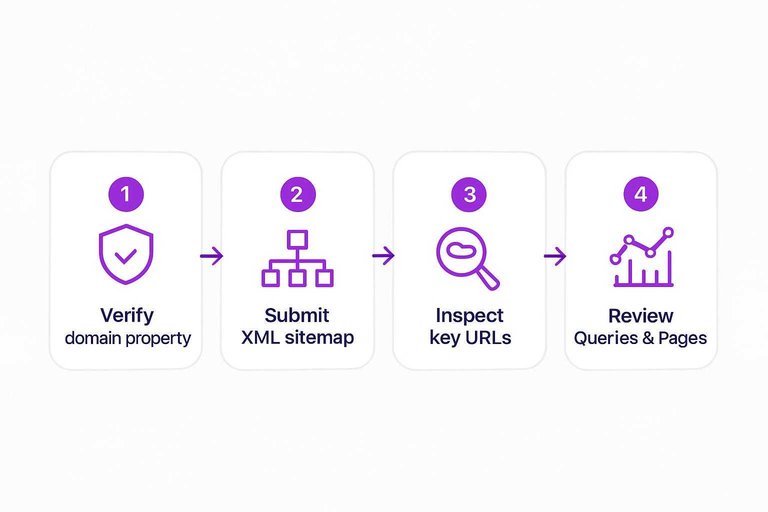
Quick win workflow
Do this once, then keep it on a weekly cadence.
- Verify your domain property.
- Submit your XML sitemap.
- Inspect your key URLs and request indexing.
- Fix Coverage issues that block indexing.
- Review Queries and Pages every week.
The win is consistency: small weekly checks prevent big SEO surprises.
Google Analytics 4
GA4 is the tool you use when rankings aren’t the question. You need to know what organic visitors do after they land, like whether the “best running shoes” page actually sells shoes.
Use it when
You use GA4 when your SEO decision depends on behavior, not position.
Your north star is outcomes like signups, leads, or revenue.
- Measuring organic conversions by landing page
- Checking landing page quality via engagement rate
- Comparing engagement across templates and sections
- Tracking cohort shifts after releases and updates
- Finding drop-offs in key user paths
If you can’t tie traffic to value, you’re guessing.
Pitfalls to watch
GA4 can make clean SEO stories look true when they’re not. One “organic” win might be paid, email, or cross-domain noise.
Channel groupings can change without you noticing, especially with auto-tagging and rule edits. Thresholding and modeling can hide small segments, and attribution can pull conversions away from organic sessions.
Decision checklist
Run this before you ship an SEO conclusion.
- Define conversions you actually trust.
- Validate tracking with real test sessions.
- Segment to Organic Search traffic only.
- Compare periods and control for seasonality.
- Annotate launches, migrations, and content releases.
Turn the findings into backlog items, not opinions.
Screaming Frog SEO Spider
Screaming Frog is your fast, repeatable technical crawl when you need facts, not vibes. It surfaces structural issues and on-page inconsistencies in minutes, like a sudden spike in 404s after a migration.
Use it when
You use it when you need to locate specific technical problems quickly. One crawl can expose patterns you’ll miss in spot checks.
- Finding broken internal and external links
- Mapping redirect chains and loops
- Auditing canonical tags for conflicts
- Spotting thin titles and meta descriptions
- Detecting orphan pages via internal links
If the issue repeats across many URLs, it’s usually a template problem—and a crawl like this pairs well with an SEO content streamlining checklist to keep production clean while you fix the underlying issues.
If the issue repeats across many URLs, it’s usually a template problem.
Best paired with
Screaming Frog tells you what’s happening on the site. Other tools tell you what Google saw and what it cost you.
Pair it with Google Search Console for index coverage and URL inspection. Add GA4 to quantify traffic and conversion impact, then validate fixes with PageSpeed tools for performance and Core Web Vitals.
The crawl finds the leak, but these tools tell you which leak matters first.
Runbook crawl
Use this when you need a clean, repeatable crawl you can compare week to week.
- Set crawl limits and include or exclude URL patterns.
- Enable JavaScript rendering when the content is client-side.
- Export key issue reports and affected URL lists.
- Group problems by template, not by individual URL.
- Re-crawl after fixes and diff the results.
Treat the second crawl like a test, not a victory lap.
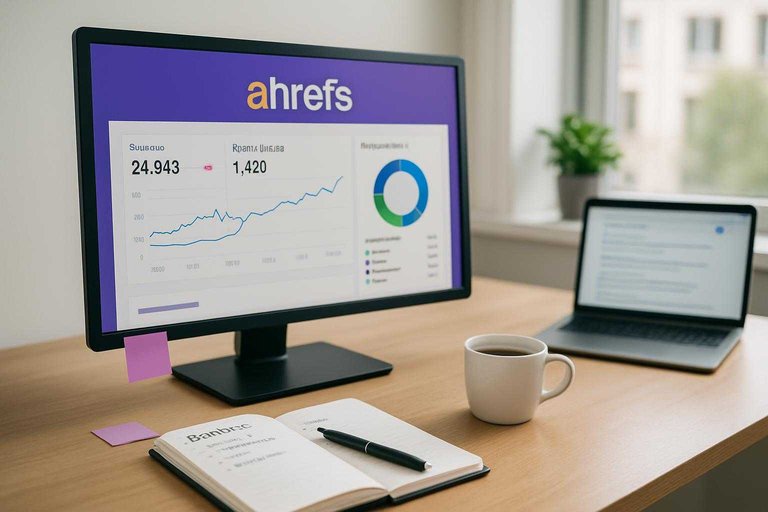
Ahrefs
Ahrefs is your growth tool when backlinks and content opportunities move the needle. It shines at link research, content gaps, and quick SERP reality checks. If you’re asking, “Who links to them, and why not us?”, this is the fastest way to answer.
Use it when
You use Ahrefs when you need outside-in SEO intelligence fast.
- Prospecting links at scale
- Auditing toxic or risky backlinks
- Finding content gaps and topics
- Analyzing SERP intent quickly
- Estimating keyword difficulty pragmatically
If growth is constrained by authority or topic coverage, Ahrefs is your lever.
Not ideal when
Ahrefs won’t replace Google’s first-party diagnostics. If you need Search Console coverage issues, indexing errors, or Core Web Vitals root causes, you’ll be blind without Google tools.
It’s also not built for pure local citation management workflows. For “NAP cleanup” and directory syncing, you want a local-first platform.
Use Ahrefs for market truth, then confirm with Google where it counts.
Backlink sprint
Run this when you need links in weeks, not quarters.
- Identify linkable assets worth citing on your site.
- Find competitors earning links to similar pages.
- Build a prospect list from those linking domains.
- Outreach with a specific, page-level pitch.
- Track new and lost links weekly.
The real win is compounding: one good asset can earn links for years.
Semrush
Semrush is the suite you open when you need one workspace for competitors, content, and technical checks. Think “one login, many answers” for keyword research, site audits, and visibility tracking.
Use it when
You reach for Semrush when you want fast competitive coverage, plus reporting you can hand to a client or boss.
- Run keyword gap analysis by competitor set
- Build topic clusters from keyword groups
- Track ranks across locations and devices
- Export site audit reports for fixes
- Compare PPC and SEO overlap insights
If you need decisions and deliverables in the same tool, this is it.
Choose it over Ahrefs
Choose Semrush when you care more about integrated rank tracking and a broader marketing toolkit. Pick it when your day includes “show me movement” and “prove impact,” not just link digging.
Gap-to-brief workflow
Use this when you want to turn competitor gaps into publishable content without losing the thread.
- Pull a keyword gap against your closest competitors.
- Filter keywords by intent and realistic difficulty.
- Map each cluster to a page or a new URL.
- Create briefs with headings, questions, and SERP angles.
- Publish, then track positions weekly.
The win is speed: the same dataset powers research, production, and accountability.
Surfer SEO
Surfer SEO is for on-page decisions when you want SERP-aligned guidance, not vibes. You use it to mirror common structures, term coverage, and section depth for a query like “best running shoes.” The goal is fewer content guesses and faster iteration.
Use it when
You reach for Surfer when a page needs clearer on-page direction, fast.
- Refreshing pages that lost rankings
- Building outlines from top SERP patterns
- Filling topical gaps for priority keywords
- Standardizing coverage across a content cluster
Use it to reduce uncertainty, not to outsource thinking.
Use carefully when
Chasing a perfect score can push you into keyword-stuffed, samey copy. Keep your voice, and treat the tool like a second opinion, not the editor.
If the page reads like it was written for an algorithm, users will bounce first.
Optimization loop
Run Surfer as a loop, not a one-time checklist.
- Pick one target query with clear intent.
- Analyze the live SERP and competitors.
- Adjust headings, sections, and key terms.
- Improve internal links to and from the page.
- Re-check rankings and iterate weekly.
If you can’t measure movement, you’re just “optimizing” for comfort.
Pick your goal, pick your tool, ship the next action
- Start with the outcome: launch validation, drop triage, refresh sprint, catch-up research, local push, or stakeholder reporting.
- Open the tool that answers that question fastest (GSC for search visibility issues, GA4 for behavior and conversion signals, Screaming Frog for crawlable reality, Ahrefs/Semrush for competitive and link intelligence, Surfer for on-page iteration).
- Run one “quick win” workflow end-to-end before expanding the stack—then document what changed, what didn’t, and what you’ll test next.
Frequently Asked Questions
- Do I need multiple tools in SEO, or can I do everything with one platform like Semrush or Ahrefs?
- Most sites need at least 2–3 tools in SEO because no single suite replaces Google Search Console/GA4 data and a dedicated crawler. A common lean stack is GSC + GA4 + one paid suite (Semrush or Ahrefs), then add specialized tools only when you hit a specific bottleneck.
- Are free tools in SEO enough for a small business in 2026?
- Often yes for basics: Google Search Console + Google Analytics 4 can cover indexing, queries, and conversion tracking. You usually add a paid tool when you need scalable keyword research, competitive tracking, or backlink analysis beyond what Google provides.
- How do I measure ROI from tools in SEO without obsessing over rankings?
- Track organic conversions and revenue in GA4 and connect them to landing pages and queries from Search Console. A practical benchmark is monitoring month-over-month growth in organic sessions, leads/sales, and non-brand clicks rather than single keyword positions.
- How often should I run an SEO audit with tools like Screaming Frog or a site audit tool?
- Run a full crawl monthly for most sites and weekly for large or frequently updated sites (ecommerce, news, marketplaces). Also re-crawl immediately after major releases like migrations, template changes, or CMS/plugin updates.
- What tools in SEO should I use if I can’t afford Ahrefs or Semrush?
- Start with Google Search Console, GA4, and a crawler (Screaming Frog free up to 500 URLs, or Sitebulb trial) plus a keyword tool like Google Keyword Planner. For competitor and SERP checks, use manual Google SERP review and low-cost options like Ubersuggest until budget allows an all-in-one suite.
Turn SEO Tools Into Output
Knowing when to use GSC, GA4, Screaming Frog, and Ahrefs is useful—but turning those insights into consistent, optimized articles is where most teams stall.
Skribra turns your keyword and audit findings into daily SEO-ready posts with WordPress publishing, meta formatting, images, and backlink support—start with the 3-Day Free Trial.
Written by
Skribra
This article was crafted with AI-powered content generation. Skribra creates SEO-optimized articles that rank.
Share: