March 17, 2026
·
Updated July 28, 2026
·
8 min read
Add Keywords to Your Website in 20 Minutes
A 20-minute, page-by-page guide to adding keywords to your website without overthinking—choose one intent-driven keyword, build a tight primary/secondary set, place terms in the highest-impact on-page elements, and validate changes with a fast checklist and before/after examples.

You don’t need a full-site overhaul to improve rankings—you need one page, one keyword, and a short, focused edit. Most “keyword optimization” fails because it’s vague, bloated, or turns into stuffing.
This guide gives you a 20-minute gameplan you can repeat on any important page. You’ll pick a keyword that matches real intent, expand it into a sensible keyword set, and place terms where they actually matter (titles, headers, openings, links, and images), then confirm you’re done with a quick checklist.
20-Minute Gameplan
Your outcome is simple: one live page that targets one topic with one primary keyword. You’ll work in a timer box, like a “20 minutes, then ship” sprint. Example mindset: “Good enough today beats perfect next week.”
Pick one page
You’ll move faster if you only touch one page. Pick the page most likely to earn clicks or revenue.
- Choose a high-intent service page you want to rank
- Choose your homepage if it’s your main entry point
- Choose a post already getting impressions in Search Console
- Choose the page with the clearest single-topic focus
- Avoid pages that cover three unrelated offers
Pick the page where one better sentence could change your next lead.
Set the timer
Split the 20 minutes, then stop when the timer ends.
| Minutes | Phase | What you do | Output |
|---|---|---|---|
| 0–3 | Research | Pick primary keyword | One phrase |
| 3–15 | Edits | Add keyword in key spots | Updated copy |
| 15–20 | QA + publish | Read aloud, fix, publish | Live page |
Stopping at 20 forces clarity, not corners cut.
Know success
Success is a page that clearly targets one topic and uses the primary keyword like a human wrote it. You’ll know it’s working if you can read it aloud without tripping over the phrase.
If it sounds natural out loud, it will usually scan well on screen too.
Choose One Keyword
You need one primary keyword per page, or your copy turns into a compromise. Start with the exact words customers use, like “emergency AC repair” or “invoice approval software,” then sanity-check it in search. Skip the deep research loop for now; speed wins when you’re shipping.
If you want a fuller framework later, follow our SEO guide for getting started.
Start with intent
Pick the page’s job first, because intent decides the keyword shape. A “buy” page wants money-phrasing, while a “learn” page wants question-phrasing.
Map your page to one intent:
- Buy: “pricing,” “buy,” “near me,” “book,” “order”
- Compare: “best,” “vs,” “alternatives,” “reviews”
- Learn: “how to,” “what is,” “guide,” “examples”
- Contact: “phone number,” “support,” “hours,” “address”
When intent and phrasing match, Google stops guessing and starts ranking.
Use Google hints
Google will hand you real queries in under two minutes. You’re collecting candidates, not debating them.
- Type your service into Google and note autocomplete phrases.
- Open 2–3 top results and scan the “People Also Ask” questions.
- Scroll to the bottom and copy “related searches” phrases.
- Repeat once with a close synonym or your city modifier.
- Save 5–8 candidates in a short list.
If you can’t find 5 candidates fast, your wording is too internal.
Quick viability check
Run each candidate search and judge the page types on page one. If you’re building a service page but results are all blog posts, drop it.
Look for two signals:
- Intent match: service pages vs guides vs category pages
- Competitiveness: similar businesses, not only giants like Yelp or Wikipedia
Reject mismatched intent immediately, then optimize for the best “good enough” fit.
Build a Keyword Set
You need a small set you can actually use today, not a spreadsheet you avoid tomorrow. Pick one primary phrase, then add 4–8 close secondary terms so your page sounds natural, like “same-day HVAC repair” instead of “HVAC repair service HVAC repair service.”
Pick the primary
Select one phrase that matches intent and matches customer language.
- Write the page’s job in one sentence, like “book a leak repair.”
- List 3–5 phrases customers would say out loud.
- Pick the one that fits best and feels most natural.
- Copy the exact wording into your notes.
Your primary keyword is the anchor; everything else should support it.

Add secondary terms
You’re looking for close relatives, not distant cousins. Keep every term tightly tied to the same intent.
- Add key features customers ask about
- Add common locations you serve
- Add typical use-cases and problems
- Add plain-English synonyms and phrasing
- Add “near me” style variants
If a term changes the searcher’s goal, it doesn’t belong on this page.
Prevent keyword stuffing
Keyword stuffing happens when you write for bots and humans can tell. Your rule can be simple: one exact-match in the title area, then write naturally using variations.
If you catch yourself repeating the same phrase twice in one paragraph, swap one for a synonym or delete it.
For more guidance, follow Google’s advice to focus on helpful content over “tricks.”
Place Keywords Fast
Add keywords where Google and humans both look first. You’ll touch a few visible elements that carry most of the ranking and click signal.
Think “headline, snippet, opening, structure, links, images.” Fast. High leverage.
Edit the H1
Pick one primary keyword for this page. Use it once in the H1, then make it sound like a human wrote it.
- Find the current H1 at the top of the page.
- Rewrite it to include the primary keyword once.
- Add a specific modifier like “pricing,” “template,” or “for teams.”
- Remove filler like “Welcome to” or “Best ever.”
If the H1 reads clean out loud, you’re doing SEO and UX together.
Fix title and meta
Your title and meta decide the click. You’re writing a tiny ad that also signals relevance.
- Write an SEO title with the primary keyword near the front.
- Add one secondary keyword where it fits naturally.
- Draft a meta description that promises an outcome and hints at proof.
- Include a soft CTA like “Get,” “See,” or “Compare.”
- Remove duplicate wording across pages.
If your snippet sounds worth clicking, rankings can turn into traffic.
Update first paragraph
Put the primary keyword in the first 1–2 sentences. Then use a synonym or close variant right after.
Example: “This project management checklist helps you ship on time. Use it as a task planning guide for weekly sprints.”
That opening should state the page value plainly, like a product label. Confident. Specific.
When the first paragraph matches intent, bounce drops before rankings even move.
Add two subheads
Add 1–2 H2s that use secondary terms people actually search. Use them to answer the two biggest questions fast.
- “Project management checklist: What to include”
- “Weekly sprint planning checklist template”
- “Checklist vs. project plan: Key differences”
- “Common checklist mistakes to avoid”
If your H2s mirror real questions, your page starts earning long-tail clicks.
Strengthen internal links
Internal links move authority and clarify topic relationships. You’re making it easy for crawlers and readers to continue.
- Add 2–3 links from this page to closely related pages.
- Add 1–2 links from those pages back to this page.
- Use descriptive anchors like “sprint planning template,” not “click here.”
- Keep anchors short and specific, 2–6 words.
- Avoid repeating the exact same anchor everywhere.
If you can’t find pages to link, you have a content gap, not a link problem.
Optimize images
Images are small SEO wins that stack. One clean filename and one accurate alt can reinforce the topic.
- Pick the most relevant on-page image, usually near the top.
- Rename the file to something descriptive like “project-management-checklist.png.”
- Write alt text that describes the image, not keywords stuffed.
- Confirm the image supports the section topic, not generic decoration.
If the image wouldn’t help a screen-reader user, it won’t help your SEO either.
On-Page Checklist
Do one fast pass so your keyword placements stick and nothing snaps. Set a five-minute timer and treat it like a pre-flight check.
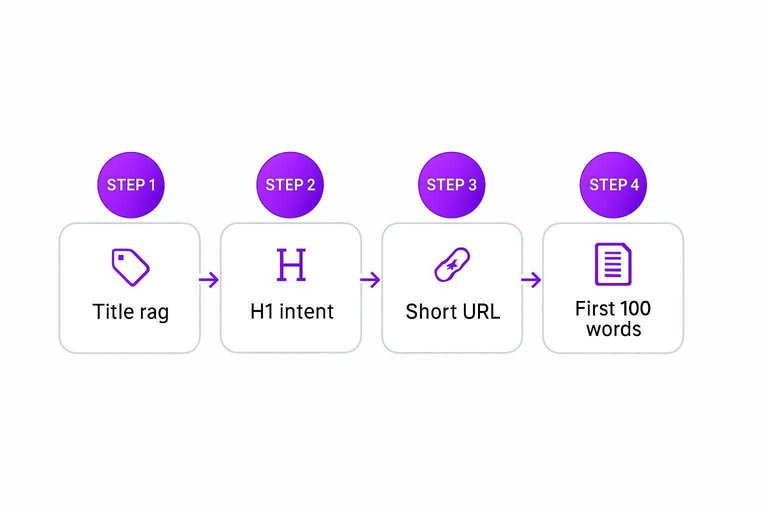
- Title tag reads naturally, keyword once near the front
- H1 matches page intent, not stuffed or duplicated
- URL is short, lowercase, and includes the primary keyword
- First 100 words mention the keyword in a normal sentence
- One internal link added with sensible, non-exact-match anchor (see the ultimate SEO content checklist)
If any item feels forced, rewrite the sentence, not the keyword.
Examples: Before/After
Use one keyword set, then rewrite three spots: title tag, H1, and your opening paragraph.
| Page element | Before | After | Keyword set |
|---|---|---|---|
| Title tag | Home | Apex Roofing | Roof Repair in Austin | Apex Roofing | austin roof repair, emergency roofing |
| H1 | Welcome to Apex Roofing | Austin Roof Repair for Leaks and Storm Damage | austin roof repair, roof leak |
| Opening paragraph | We’re a family-owned company providing quality service. Call today for a free estimate. | Need Austin roof repair fast? We fix roof leaks, storm damage, and emergency issues, with clear pricing and quick scheduling. | austin roof repair, roof leaks, storm damage |
If your keyword set reads naturally in all three, you’re done.
Repeat the 20-Minute Win on Your Next Page
- Pick the next highest-value page (money page, top traffic, or near-page-one).
- Choose one intent-matched keyword, then build a small set: 1 primary + 3–8 natural secondary terms.
- Apply the fast placements (title, H1, first paragraph, two subheads, internal links, images) and run the on-page checklist.
- Track results for 2–4 weeks, then either refine (if impressions rise but clicks don’t) or move on to the next page and repeat.
Frequently Asked Questions
- Do keywords in a website still matter in 2026, or does Google just understand topics now?
- Yes—keywords still matter because they help Google and users confirm relevance fast, especially in titles, headings, and anchor text. Topic understanding works best when your page uses the same language searchers use.
- How many keywords should I put in one webpage without keyword stuffing?
- Usually aim for 1 primary keyword plus 4–8 closely related secondary terms used naturally across the page. If the copy sounds repetitive or awkward, you’ve added too many.
- Where should I put keywords in a website if I only have 10 minutes?
- Prioritize the title tag, H1, first 100 words, one or two subheadings, and a descriptive internal link anchor. Those spots typically influence both rankings and click-through rate the most.
- How do I measure if adding keywords to my website worked?
- Track Google Search Console for changes in impressions, average position, and clicks for the target query over the next 2–4 weeks. Also watch CTR for the page—better keyword alignment in the title often lifts clicks even before rankings move.
- Can I use AI to add keywords to my website without hurting SEO?
- Yes, if you use AI to rewrite for clarity and relevance, then manually verify accuracy, brand voice, and that the keyword usage reads naturally. Always re-check the title tag, H1, and first paragraph after AI edits to avoid awkward repetition.
Turn Keywords Into Traffic
The 20-minute gameplan works, but keeping your keyword set fresh and placed consistently across new pages is where most sites stall.
Skribra generates SEO-optimized articles with built-in keywords, meta descriptions, and formatting—and publishes to WordPress for you; start with the 3-Day Free Trial.
Written by
Skribra
This article was crafted with AI-powered content generation. Skribra creates SEO-optimized articles that rank.
Share: