April 24, 2026
·
14 min read
Advanced SEO for one-page websites: what works
An advanced pillar guide to SEO for one-page websites that can still compete—match search intent, make sections indexable, design entity-first content, handle technical edge cases, and earn links when everything points to one URL.

Trying to rank a one-page site can feel like playing SEO on hard mode: one URL, dozens of topics, and no obvious way to build topical depth without creating a mess.
This guide shows what actually works when you’re committed to a single page. You’ll learn how to align intent, structure sections so search engines can understand them, use entities and SERP features to expand coverage without cannibalization, and avoid technical traps (rendering, lazy-load, CWV). You’ll also get practical substitutes for internal linking, schema that helps, and link strategies tailored to one URL.
One-page SEO realities
A one-page site can rank, but it plays by different rules than a multi-URL site. You have one indexable target, section-based relevance, and more dependence on how Google renders and interprets anchors.
Classic architecture tactics like deep internal linking, siloing, and “supporting pages” don’t translate cleanly. Your real constraints are limited URLs, limited crawl signals, and limited ways to separate intent.
Search intent fit
One-page sites win when the intent is tight and the path is short. They lose when the query expects a library, not a brochure.
- Navigational: brand or product name
- Branded: “pricing”, “login”, “reviews”
- Local: single location + clear NAP
- Niche transactional: one offer, one audience
- Broad informational: multi-angle “how to” queries
If the SERP rewards depth and variety, your single URL fights uphill.
Ranking ceiling causes
The ceiling usually isn’t “Google hates one-pagers.” It’s that one page can’t cleanly separate competing topics and signals.
- Topic breadth dilutes relevance
- Internal links can’t shape priority
- Snippets favor specialized pages
- Freshness signals are weaker
- Fewer indexable targets exist
You’re not competing page-to-page; you’re competing with whole site graphs.
Success mental model
Treat the page like a set of blocks, not a single article. Each section should earn a query cluster, a few entities, and one conversion action.
Think “Pricing” block, “Use cases” block, “FAQ” block, each written like a mini-landing page. The URL stays the same, but the intent shifts by section.
If a section can’t stand alone, it won’t pull its own rankings either.
When to split pages
Split when the SERP asks for separation, not when you feel like “more pages = more SEO.” Use intent and competition as the trigger.
- Map each major section to its top query and SERP features.
- Split if two sections target distinct intents or audiences.
- Split if one section needs heavy FAQs, guides, or comparisons.
- Split for multiple locations, services, or compliance needs.
- Split when you need separate backlinks and anchor themes.
When linkers need a specific target, a dedicated URL stops the leakage.
Make sections indexable
A one-page site can rank, but only if each scroll section becomes a clear, crawlable “content unit.” Do that with predictable IDs, anchor links, and URL states that don’t confuse bots or your analytics.
Anchorable headings
You want every section linkable, readable in isolation, and consistent across releases.
- Assign a stable, human ID to each section, like
id="pricing". - Keep a single H1 for the page, then use one H2 per section block.
- Write each H2 like a query, such as “Pricing for teams,” not “Our pricing.”
- Enforce unique IDs across templates, even in reused components.
- Add visible anchor links, like “Copy link,” next to key H2s.
If your IDs change, your backlinks rot and your “indexable sections” stop existing.
Fragment URL strategy
Hash anchors (/#pricing) are great for sharing and UX, but they’re weird for measurement.
Some crawlers ignore fragments, and many analytics setups treat them as the same page.
Use hashes for simple jump links, use query params for measurable states (?tab=api), and use the History API when you need both clean URLs and trackable events.
Pick one state model per page, or your reports become fiction.
Above-fold prioritization
Your first screen decides whether users scroll and whether bots infer relevance fast.
Order sections by intent value, not by internal org structure.
- Put the primary entity and promise first.
- Show the offer and differentiation next.
- Add proof early: logos, numbers, or a sharp testimonial.
- Place a primary CTA before deep explanations.
- Push secondary details and edge cases below.
If the first 600 pixels don’t answer “what is this,” you’re bleeding qualified traffic.
Section duplication traps
Repeated copy across blocks looks safe, but it blurs topical signals.
You end up with five mini-sections that all say “fast, secure, easy,” and none of them rank.
Consolidate overlapping benefits into one strong section, merge FAQs that share answers, and keep testimonials distinct by tying each to one claim.
Make every block earn its space, or your page reads like a loop.
Entity-first content design
One-page SEO breaks when you chase keywords instead of covering entities. Treat your URL like a mini knowledge base, where each section answers a distinct question with distinct evidence.
Entity map creation
Start with one core entity, then expand until every section has a job. You’re preventing overlap before you write a single headline.
- Name the core entity and its primary definition.
- List attributes, components, and measurable specs users compare.
- List problems, jobs-to-be-done, and failure modes.
- List alternatives, competitors, and adjacent categories.
- Add qualifiers like location, audience, constraints, and use-cases.
When each entity gets a dedicated slot, your page stops sounding like a loop.
SERP feature targeting
Pick SERP features first, then shape sections to match their formats. You’re optimizing for how Google displays answers, not just how it indexes them.
- Write a 40–60 word definition block.
- Add a short numbered “how to” list.
- Include a tight comparison table.
- State pricing or ranges with conditions.
- Add pros/cons bullets and a real FAQ.
If the feature has a template, follow it cleanly and earn the layout.
Avoid cannibalized phrasing
Repeated headings and lead sentences look like soft-duplicate content, even on one URL. Fix it by giving each block a different promise, like “How it works” versus “When it fails” versus “What it costs.”
Rewrite with different verbs, different entities, and different proof types, such as metrics, quotes, or screenshots. That’s how you create depth without echoing yourself.
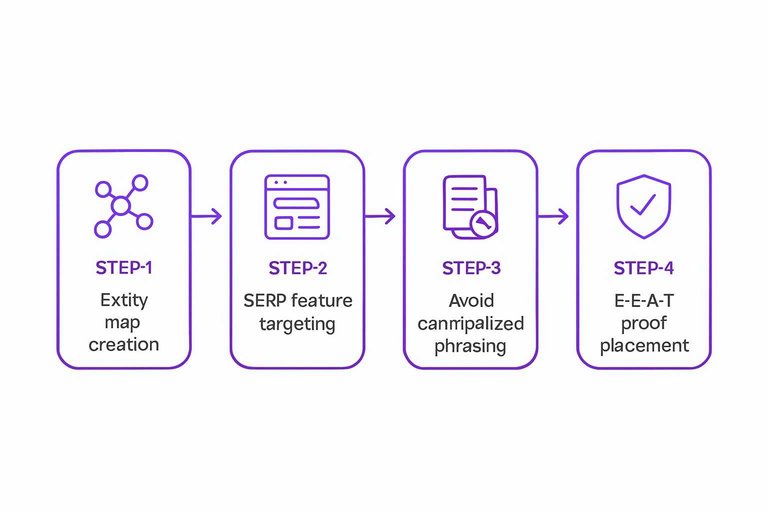
E-E-A-T proof placement
Place trust signals where skepticism spikes, not in a giant credibility dump at the top. You want proof to act like a footnote to the claim it supports.
- Add a short author bio near the intro.
- Put credentials beside “why trust this” claims.
- Attach citations directly under factual statements.
- Place case results next to the method section.
- Add update notes near the FAQ or footer.
Proof should feel like support, not decoration.
Technical SEO edge cases
One-page sites fail in weird ways because everything rides on one URL and one render path. If Google sees a skeleton, you rank like a skeleton.
Rendering strategy
Pick a rendering approach based on what Googlebot must see on first fetch.
| Strategy | What Googlebot gets | Typical risk | How to test |
|---|---|---|---|
| SSR | Full HTML content | Cache bugs | Live URL test |
| SSG | Full static HTML | Stale deploys | View source diff |
| Hydration | HTML then JS | Empty shell | Rendered HTML compare |
| CSR-only | JS-built DOM | Missed indexing | Block JS to verify |
Treat rendering like a contract: if it’s not in initial HTML, assume it’s invisible. (See Google’s JavaScript SEO basics for how rendering impacts indexing.)
Lazy-load hazards
Lazy-load is fine for images, not for meaning.
- Hide headings behind tabs or accordions
- Gate copy behind “Load more” clicks
- Use infinite scroll without paginated URLs
- Inject main text after long timeouts
- Render sections only on intersection
If your core text needs a gesture, Google may never meet it.
Core Web Vitals tuning
Long pages amplify small performance mistakes.
- Set an LCP budget for hero image size and format.
- Preload critical fonts and swap, or you’ll pay CLS.
- Delay third-party scripts until after meaningful paint.
- Defer below-the-fold sections with server-rendered placeholders.
- Break up long tasks to cut INP on interactions.
Performance work is prioritization disguised as engineering.
Canonical and indexing
Set your canonical to the one true URL, and keep it boring. That means the clean path, not a UTM-tagged share link or a parameterized variant like “?ref=partner”.
Handle variants deliberately: use consistent canonicals across language or region versions, and avoid letting “/” and “/index.html” compete. Also check your build pipeline for a stray noindex, because on a one-pager it’s not “one page lost”, it’s the whole site gone. For a fuller framework, see this technical SEO guide.
The fastest way to disappear is to tell Google, politely, to ignore your only URL.
Internal linking substitutes
One-page sites don’t get the natural “page-to-page” internal links that help Google understand structure. You can replace that signal with intentional anchors, jump links, and navigation that crawls cleanly—especially when paired with resources to simplify SEO workflows.
Anchor link taxonomy
You’re building a mini internal link graph inside one URL. The goal is clear meaning, not more links.
- Use intent labels: “Pricing,” not “Best cheap pricing”
- Keep anchors unique across the page
- Reuse only for primary sections
- Link from nav, TOC, and body
- Match anchor text to the H2
If your anchors read like a sitemap, crawlers treat them like one.
Clickable TOC pattern
A TOC can be a usability feature or an SEO liability. Make it feel like a map, not a keyword menu.
Use concise, human titles like “How it works” and “FAQs.” Make it sticky only after scroll, and collapse it on mobile. Avoid sitewide TOC anchors that repeat on every template.
Build it for scanning first, and the SEO benefit follows.
Contextual jump links
Jump links work best when they answer the user’s next question. Place them where intent shifts.
- Add 2–4 “learn more” links inside dense sections.
- Point each link to the next logical H2, not random depth.
- Write anchor text as a promise: “See integrations,” not “Click here.”
- Keep one jump link per paragraph block, max.
- Test scroll targets so headings aren’t hidden by sticky nav.
Done right, you turn scrolling into guided discovery, not pogo-sticking.
Footer link discipline
Your footer is the easiest place to look manipulative. Treat it like utilities, not rankings.
- Include contact, address, and support
- Include privacy, terms, and cookies
- Include key socials and profiles
- Avoid giant keyword link blocks
- Avoid repeating every section anchor
A clean footer keeps trust high and anchor signals sharp.
Schema that actually helps
Structured data works when it settles identity and eligibility, not when it tries to game the page. On a one-page site, you want Google to confidently connect “this site” to “this entity,” then unlock valid enhancements.
Primary entity schema
Pick one primary schema type and make it the anchor for everything else.
- Choose Organization, LocalBusiness, Person, or Product as your root entity.
- Add stable identifiers: name, url, logo, and a consistent @id.
- Populate sameAs with official profiles, not directory spam.
- Add address and geo only if they match visible page content.
- Include offers or price specs only when a real offer exists.
Your goal is entity reconciliation, not “more markup.”
FAQ and HowTo limits
FAQ and HowTo markup still works when it reflects real, helpful page content. It stops working when it becomes filler, like “Do you offer great service?” asked five ways.
Google expects visible questions, direct answers, and steps that match what users can actually do. Unsupported promises, repeated Q&As, or hidden accordion content that says nothing will get ignored or flagged.
Treat these schemas as eligibility labels for good content, not as content substitutes. (Worth noting the FAQ and HowTo rich results changes so you don’t over-invest for minimal visibility.)
Review markup pitfalls
Review markup is tightly policed because it’s easy to abuse.
- Avoid “self-serving” reviews about your own business.
- Use Review schema only for eligible item types.
- Show rating sources and review details on-page.
- Prefer third-party review pages when possible.
- Use testimonials without Review schema as a safe fallback.
If the reviews primarily benefit you, Google treats them as marketing, not evidence.
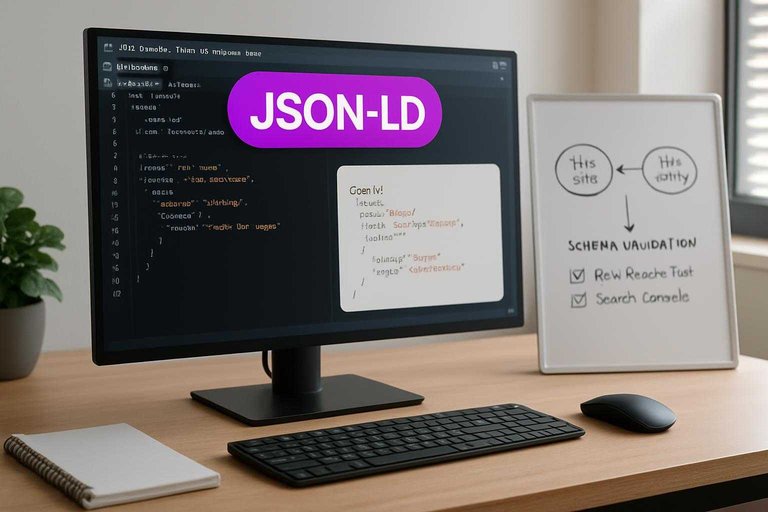
Schema validation workflow
Treat schema like code, not a one-time snippet.
- Place JSON-LD once, near the end of the body or in head.
- Run Rich Results Test and fix eligibility errors first.
- Monitor Search Console enhancements for drops and warnings.
- Re-test after every deploy that touches templates or copy.
- Keep a changelog of schema edits and test results.
Most schema “mysteries” are just regressions you didn’t catch.
Backlinks for one URL
One-page sites still need a backlink profile that looks natural and earns clicks, not just “authority.” The trick is giving people multiple reasons to link while keeping every link technically pointing to one URL.
Linkable block design
You need more than a hero section and a CTA if you want varied links. Build blocks people can quote, screenshot, or reference in their own work.
- Publish original numbers with dates and a methodology note
- Add benchmarks with a clear “source” line
- Offer a template users can copy in minutes
- Write a tight definition with a one-sentence example
- Include a visual summary made for embedding
If your page has five citeable blocks, you can earn five different link intents.
Anchor text diversification
One destination doesn’t mean one anchor pattern. Decide your anchor mix before outreach starts.
- List 30–50 realistic anchor variants from real-world phrasing.
- Assign buckets: branded, URL, partial-match, topical, generic.
- Cap exact-match usage at a low single-digit percentage.
- Match anchor to the section’s promise, not your money keyword.
- Review monthly and adjust based on new links.
Control the pattern early, or Google will notice the pattern for you.
Digital PR angles
Digital PR works for one-pagers when the pitch is about an asset, not your brand story. Put the asset mid-page and make it easy to reference with a stable jump link.
Use hooks like “2026 benchmarks from 312 sites,” a one-screen industry checklist, a simple calculator, or a clean comparison table people can cite. Add a short intro above it that answers “what is this and who is it for?”
If the asset earns links, the whole page earns rank by association.
Unlinked mention capture
Mentions are the easiest links you’ll ever earn. Treat them like a pipeline with clear notes.
- Monitor mentions with alerts and weekly searches.
- Confirm the page is relevant and already cites you.
- Reply with a simple request and a specific section anchor.
- Offer a paste-ready link sentence with natural anchor text.
- Log outcome and timing in annotated outreach notes.
Your best link building is often just asking for credit, quickly.
International and local variants
hreflang constraints
If your one-page site must serve multiple languages, your first constraint is URLs. hreflang needs stable, indexable URLs, not “#/es” fragments.
Use one clean URL per language, like /en/ and /es/, even if each stays one page. If you can’t split URLs, skip hreflang and make the language switcher obvious, like “Español”.
Treat hreflang like plumbing. If the URLs aren’t real, the signals won’t carry.
Multi-location approach
One page can target multiple locations, but only if each location is genuinely supported. Thin clones with swapped city names trigger doorway vibes fast.
- Build distinct location sections with unique proof and offers
- Create separate pages when services, teams, or regulations differ
- Keep NAP identical wherever the same entity is referenced
- Use one canonical brand name across footer and schema
- Link to location sections from a persistent “Locations” jump menu
If you can’t add unique evidence per city, you’re better off not targeting it.
Geo modifiers placement
Geo intent should show up where humans expect it, not everywhere. You’re writing for buyers, not regex.
- Add the primary city to the H1 or hero subhead once.
- Put regions in service headings where scope actually changes.
- Place city mentions inside offers, like “Same-day in Austin”.
- Add location details in testimonials, with names and neighborhoods.
- Include area served in schema, not repeated body copy.
You want one strong signal per section, not twenty weak ones.
Maps and citations
Local trust is mostly off-page, then confirmed on-page. Your one page should connect those dots without slowing the site.
- Embed your GBP map only near contact, not above the fold
- Use a static map image with a “View on Google Maps” link
- Add consistent citations on major directories, then niche ones
- Show matching NAP in the footer and contact block
- Display trust elements: licenses, photos, local reviews excerpts
Speed is a ranking factor too. A heavy map embed can erase your local gains.
Run a One-Page SEO Playbook (and Know When to Break the Rule)
- Validate intent fit first: if the SERP rewards multiple distinct pages (pricing, use cases, locations), plan a split instead of forcing one URL.
- Make sections “addressable”: use consistent H2/H3s, a clickable TOC, and clean jump-link patterns—then prioritize above-the-fold content and remove duplicated section templates.
- Build an entity map and place proof where it matters: cover core entities, target specific SERP features, avoid near-duplicate phrasing across sections, and add E-E-A-T signals next to the claims they support.
- Lock down technicals: render critical content server-side, audit lazy-load and CWV, and confirm canonical/indexing behavior is exactly what you intend.
- Earn links to blocks, not just the page: create linkable modules, diversify anchors through PR angles, and capture unlinked mentions—then revisit international/local needs (hreflang, geo modifiers, citations) before you scale.
Frequently Asked Questions
- Can a one-page website rank for multiple keywords without creating separate pages?
- Yes. Most one-page sites rank best when they target one primary intent plus a small cluster of closely related queries, using distinct on-page sections and varied SERP features (FAQ, reviews, video) to capture long-tail demand.
- How do I track SEO performance for a one-page website if everything is on one URL?
- Use Google Search Console for query/page data and add event-based tracking in GA4 (e.g., scroll depth, section jump clicks, form starts) so you can tie rankings to engagement and conversions by section.
- How long does SEO for a one page website take to show results?
- Expect early movement in 4–8 weeks (indexing, query impressions, technical stabilization) and clearer ranking gains in 3–6 months, assuming you publish updates and earn a few relevant links to the page.
- Is a one-page website bad for SEO in 2026, especially with AI Overviews and zero-click searches?
- No. One-page sites often work well for branded, local, and single-offer searches, but they usually struggle to win broad informational coverage because AI-driven results favor deep topical breadth across multiple documents.
- What if I can’t add more content—can a one-page website still build authority?
- Yes. Strengthen authority by earning links to specific assets on the page (tools, calculators, data, templates), adding original proof (case studies, benchmarks, reviews), and updating the page regularly to keep it competitive.
Turn One-Page SEO Into Growth
These one-page SEO tactics work best when you can publish supporting content and earn backlinks consistently—without turning your site into a complicated rebuild.
Skribra helps you scale SEO-ready supporting articles, schema-friendly structure, and consistent publishing to strengthen rankings for a single URL—plus a backlink exchange network and a 3-Day Free Trial.
Written by
Skribra
This article was crafted with AI-powered content generation. Skribra creates SEO-optimized articles that rank.
Share: