February 23, 2026
·
14 min read
AI SEO Tools Missing Keywords in Audits
A step-by-step troubleshooter for when AI SEO tools “miss” keywords in audits—triage what “missing” really means, use a root-cause matrix to isolate inputs vs. settings, validate database (location/language/device/engine) alignment, and resolve crawl/GSC/volume/tool-limit issues before you re-audit with a controlled test.


Your audit says you’re “missing” hundreds of keywords—but you know you rank, you see impressions in Search Console, and your content hasn’t vanished. So where did the keywords go?
This troubleshooter helps you pinpoint whether the gap is a definition problem, a filter or data-source mismatch, a database setting issue, crawl/indexing reality, or a hard tool limit. You’ll run a quick triage, work through a root-cause matrix, and finish with a controlled re-audit that proves coverage is actually restored.
Triage the Audit
Before you debug a “missing keywords” audit, confirm the gap is real. Tools hide data through filters, views, and sampling. Your job is to define “missing” for this site, then lock a baseline you can compare later.
Define “missing”
“Missing” can mean three different failures, and each one has a different fix. Get explicit, or you’ll chase ghosts.
For this site, define missing as one of these:
- Absent from the audit export entirely
- Dropped from the tracked keyword set
- Present, but misclassified or hidden in a view
Write the definition in the ticket as a quoted phrase like “missing = absent from CSV export.”
Freeze a baseline
Capture one snapshot you can re-run and diff later.
- Note tool name, plan tier, and project ID.
- Record date range, database, device, and language.
- Record location settings and any geo overrides.
- Export raw outputs: CSV, JSON, and screenshots.
- Store everything in one dated folder.
If you can’t reproduce the exact run, you can’t prove it’s broken.
Rule out UI filters
Most “missing keywords” reports are just a filtered view.
- Clear search boxes and reset saved views.
- Remove tags, segments, and status filters.
- Disable intent, difficulty, and SERP-feature filters.
- Turn off “opportunities only” and similar toggles.
- Re-check totals after each change.
If the count jumps after one toggle, you found the culprit.
Confirm data source
You can’t audit missing keywords until you know where the tool thinks keywords come from. One project might mix GSC queries, rank-tracked terms, and crawl-extracted phrases.
Check the source label and ingestion method:
- GSC queries for the property
- Rank tracker keyword list
- Crawl extraction from titles and headings
- Competitor discovery database
- LLM-suggested keyword ideas
When sources differ, “missing” is often a mismatch in ingestion, not a ranking problem.
Fast Root-Cause Matrix
Use this matrix when an AI audit says “no keyword usage” but you can see the terms on-page.
| Symptom pattern | Likely cause | Next best test | Fast fix |
|---|---|---|---|
| Keywords visible, audit says missing | JS-rendered text | View page source | Add SSR text |
| Some pages pass, templates fail | Blocked crawl paths | Test robots + logs | Unblock key URLs |
| Audit misses H1, sees body | DOM injection timing | Run rendered HTML check | Move H1 server-side |
| Audit finds brand only | Wrong locale targeting | Check hreflang + SERP | Align locale signals |
| Audit flags duplicates everywhere | Canonical mismatch | Compare canonicals | Fix canonical rules |
Run the “next best test” first, then change one thing, then re-audit. If you need a quick refresher on the underlying checks, see this technical SEO audit guide.
Check Keyword Inputs
AI SEO audits often miss keywords because your inputs are incomplete, not because the model is “wrong.” Your seed lists, tracking set, and import rules decide what the tool is allowed to see and store. If “electric standing desk uk” never enters the system, it can’t show up in the audit.
Inspect seed lists
Your seed list is your tool’s worldview. Compare it to your canonical list before you trust any gaps.
- Flag missing topic clusters and subcategories
- Add brand, product, and SKU variants
- Capture long-tail modifiers and questions
- Include locales, slang, and regional phrasing
- Check competitors’ shared head terms
If entire clusters are absent, you’re looking at an input problem, not a ranking problem.
Validate imports
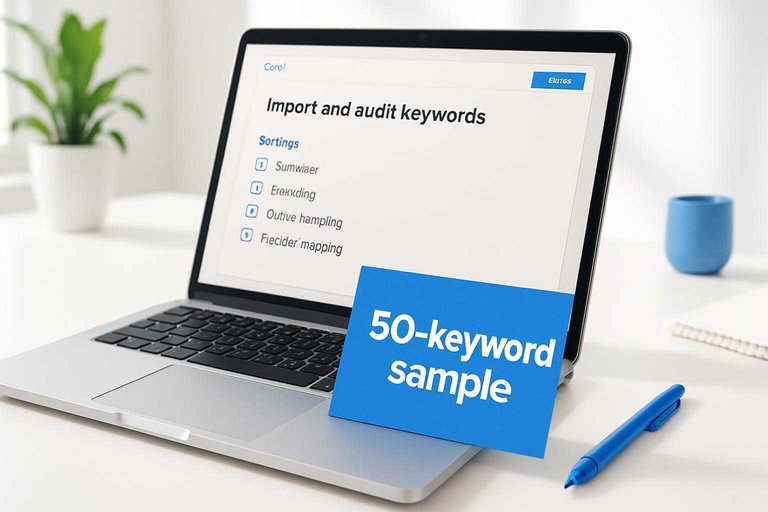
Most keyword loss happens at upload time, quietly. Run a controlled import so you can see what breaks.
- Export a 50-keyword sample with known edge cases.
- Confirm delimiter, encoding, and quote handling match the tool.
- Map headers explicitly, not “auto-detect.”
- Check duplicate handling and max-row limits after import.
- Re-import the sample, then compare counts and missing terms.
If the sample fails, fix the pipeline before you scale the upload.
Normalize formatting
Small formatting differences create “new” keywords or hide real ones. Standardize before you judge coverage.
Treat “CRM software,” “crm software,” and “CRM-software” as one intent when your strategy calls for it. Keep plurals and typos separate if you optimize them separately.
Check keyword rules
Filters can delete your best opportunities without telling you. Audit every exclusion rule like it’s a redirect map.
- Disable “low volume” if you target long-tail
- Review “adult” and sensitive-category flags
- Check “brand-only” and brand protection settings
- Inspect stopword removal and tokenization rules
- Lower minimum word-count thresholds for short queries
Rules are strategy in disguise, so set them intentionally or they’ll set your roadmap for you.
Verify Database Settings
Your audit is only as good as its query settings. One wrong toggle and your “missing keywords” are simply in a different database slice, like “US mobile Google” versus “UK desktop Bing.”
Location mismatch
Wrong locale hides rankings fast, especially for local packs and city-level intent. Confirm your configured market matches where you expect visibility.
- Write your expected market: country, state, city, and ZIP radius.
- Open the tool settings and note its locale and geo granularity.
- Rerun the audit in the correct locale with the same keyword list.
- Compare “missing” keywords before and after, and log what reappears.
If keywords come back after a locale change, you found configuration drift, not a content gap.
Language mismatch
Language settings can exclude results you still see manually. Mixed-language SERPs make the mismatch even easier to miss.
- Check the project’s language setting and any “strict language” filters.
- Search a few “missing” keywords and note the SERP language mix.
- Build a 10-keyword bilingual sample set from your real queries.
- Run two audits: one per language, then compare keyword presence.
If one language view “finds” the keyword, your issue is targeting, not indexing.
Device differences
Mobile and desktop SERPs can behave like different products. Your tool may be showing only one index, or blending positions in a way that hides volatility.
Check whether your project tracks both devices separately. Then verify the report you’re reading isn’t filtered to one device, like “mobile only.”
When the device split changes the answer, treat it as a SERP design problem, not a ranking mystery.
Engine variations
Google and Bing disagree more than you think, and “Google” sometimes means a partner network. If your tool uses a different engine than your spot checks, your audit will look broken.
Confirm the engine setting at the project level and at the report level. Also check for options like “Google partner results” or regional variants that change the index.
When engines differ, align the source first, then argue about performance.
Audit Crawl & Indexing
When AI SEO tools “miss” keywords, the cause is often mechanical, not semantic. If a page never gets crawled, indexed, or tied to the right URL, the keyword disappears from the audit like it never existed.
Crawl coverage check
Confirm the tool can actually see the pages that should carry the missing keywords.
- Compare the crawl URL count to your sitemap and GSC “Discovered” totals.
- Check robots.txt, meta robots, and X-Robots-Tag for accidental blocking.
- Render key templates with JS enabled and spot missing internal links.
- Validate canonicals and redirects so the crawler keeps the intended URLs.
- Audit blocked folders and parameter rules that hide whole sections.
If the crawler can’t reach the page, your “missing keyword” is just invisible data.
Indexation evidence
Prove the page is eligible to rank, not just published.
- Check GSC Indexing reports for “Indexed” vs “Excluded” patterns.
- Use URL Inspection to confirm canonical, last crawl, and index status.
- Run targeted site: queries for key directories and templates.
- Compare sitemap submitted vs indexed counts for drift.
- Spot “Crawled — currently not indexed” clusters on thin pages.
If Google won’t index it, the tool can’t reliably assign it keywords.
Page-keyword mapping
Most tools don’t “understand” your site map the way you do. They assign a keyword to the URL they believe ranks, often the canonical, a redirect target, or the strongest internal-link destination.
A common failure mode is collapsing multiple similar URLs into one “primary” page, so keywords that belong on /pricing/us/ get attributed to /pricing/ instead. Check the tool’s chosen target URL for each missing term, then verify it matches the page you intended.
Fix the mapping, and the keyword often reappears without changing a word of content.
Duplicate/canonical issues
Find the technical patterns that erase keyword-to-page relationships.
- Canonical points to a different URL than the one you optimize.
- Redirect chains send crawlers to a generic destination.
- Near-duplicate pages trigger clustering into one “representative” URL.
- Parameter versions outrank the clean URL in tool data.
- Internal links favor the wrong variant across templates.
Your tool isn’t “missing” the keyword; it’s following your signals to a different page.
GSC Integration Pitfalls
Your AI audit can “miss keywords” even when Google Search Console has them. The culprit is usually a data pull problem, not an analysis problem, like connecting the wrong property or hitting a row cap.
Permission scope
Bad permissions look like bad SEO data. Confirm the tool is reading the same property you inspect in GSC.
- Verify you selected the correct property type (Domain vs URL-prefix).
- Confirm your account is a Verified Owner, not just a delegated user.
- Check the connector has Search Console API access enabled.
- Re-authenticate the integration, then re-pull the same date range.
- Compare top queries in GSC UI versus the tool’s import.
If the numbers diverge here, your audit is grading the wrong dataset.
For details on ownership levels and access, see Google’s update on Search Console users and permissions.
Date & filters
Most “missing queries” are filtered out by accident. One hidden regex or wrong search type can erase rows.
- Match the exact date range used in your audit and in GSC.
- Confirm search type: Web, Image, Video, or News.
- Clear page and query filters, then re-run the export.
- Review regex exclusions for unintended matches like “.blog.”.
- Check country and device filters for mismatched segments.
If you can’t reproduce the loss with filters cleared, your tool is filtering, not GSC.
If you need a refresher on regex and report filtering behavior, Google covers it in Performance report data filtering.
Row limits
GSC exports don’t give you “everything.” The UI commonly caps at 1,000 rows, and many API pulls cap at 5,000 rows unless you paginate.
If your site has lots of long-tail traffic, those caps hide the exact queries your audit expects to see. Use API pagination where possible, or narrow the pull by page, country, or directory so long-tail terms rise into the returned set.
When the tool only ingests the first N rows, it’s auditing popularity, not coverage.
To pull beyond default caps, use the Search Analytics API pagination pattern in Google’s guide on getting your performance data.
Anonymized queries
Some queries will never show in GSC, even if they drove impressions. Google suppresses “rare” queries and privacy-sensitive terms, so you’ll see totals that don’t reconcile with the visible rows.
Set expectations early: “missing” can mean “withheld,” not “untracked.” To approximate coverage, map on-page entities and headings to the pages receiving impressions, then infer likely query classes instead of chasing exact strings.
If you see a big delta between totals and rows, you’re looking at anonymization, not an integration bug.
Google explains this behavior in its performance data deep dive.
Volume & SERP Availability
Your audit tool can “miss” keywords for reasons that have nothing to do with your site. It often drops terms when volume looks like zero, or when the SERP is hard to parse.
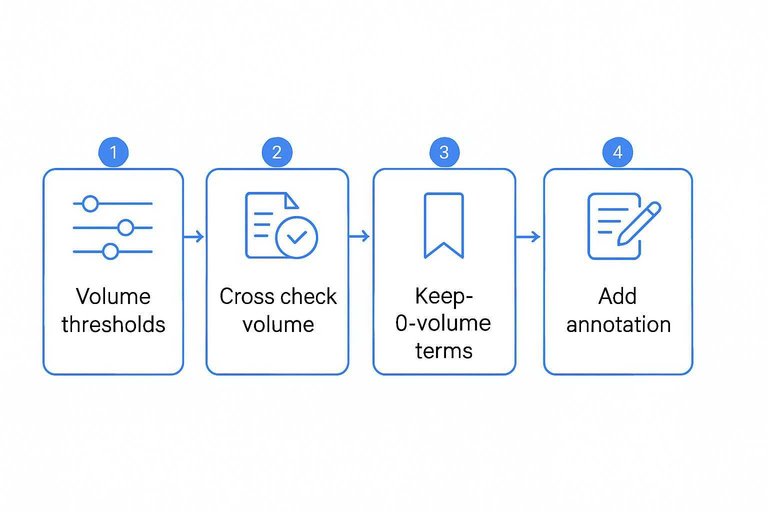
Low-volume drops
Tools usually have a silent cutoff for “no data” or “0 volume,” especially in smaller markets. You still need those terms when they match intent, like “SOC 2 policy template.”
- Find the tool’s settings for volume thresholds and “no data” handling.
- Export dropped keywords and flag those with brand, product, or high-intent modifiers.
- Cross-check volume in two sources, like GSC and an external keyword tool.
- Keep strategic terms tracked, even if they show 0 volume.
- Add an annotation explaining why you kept them.
Treat 0-volume as “uncertain volume,” not “no opportunity.”
SERP weirdness
Some keywords don’t produce a normal SERP, so the tool can’t classify or even fetch results. That happens a lot with local intent and fast-changing features.
- Check for local packs hiding organic links.
- Watch for AI Overviews reshaping top results.
- Note “no results” or ultra-thin SERPs.
- Test incognito searches with location set.
- Retry in another engine or country.
If the SERP is unstable, your audit data is unstable too.
Keyword clustering side-effects
Clustering can merge similar queries and only report one “primary” keyword. You’ll see “best time tracking software,” but not variants like “time tracking app for contractors.”
That’s fine for reporting, but risky for audits. You can miss intent edges and page-target mismatches.
Refresh cadence
Your tool’s keyword and SERP databases update on a schedule, not in real time. New pages, fresh rankings, and newly recognized keywords often appear one refresh later.
- Confirm the tool’s update frequency for rankings and keyword volume.
- Check whether your project is set to daily, weekly, or manual updates.
- Force a rerun, recrawl, or “refresh keyword data” action.
- Recheck after the next scheduled refresh window.
- Log what changed, including newly surfaced pages and terms.
When timing is the issue, waiting one cycle beats rewriting your whole strategy.
Tool-Specific Limits
Some “missing keywords” aren’t missing. They’re filtered out by plan limits, usage caps, or a default project setting you didn’t notice—especially if you’re running multiple platforms or AI tools to boost organic traffic side by side.
| Limit type | Where it hides | What it excludes | Quick fix |
|---|---|---|---|
| Plan keyword cap | Pricing tier | Long-tail terms | Upgrade or rotate sets |
| Project keyword limit | Project settings | New additions | Split into projects |
| Crawl page cap | Crawl settings | Deep URLs | Raise limit, add sitemap |
| Query credits cap | Usage dashboard | Fresh suggestions | Schedule, reduce frequency |
| Language/region cap | Location settings | Local variants | Add markets, duplicate project |
Treat “missing” as a quota symptom first. Then decide if you pay, split, or narrow scope.
Fix and Re-Audit
Treat this like debugging, not a makeover. Change one thing, rerun the audit, and watch whether your “missing” keywords return. Example: switch only the locale from “US” to “UK” and see what snaps back.
Run a controlled test
You need a small, known dataset to prove what changed and why. Build a test project with fixed inputs, then vary one setting per run.
- Create a project with 20 pre-verified keywords and a saved export.
- Run the audit once and export the keyword list as your baseline.
- Change one variable only, like locale, device, or source connector.
- Rerun the audit and export again using the same format.
- Repeat until one change restores the missing keywords.
Once you can reproduce it, you can fix it fast.
Verify restored coverage
Don’t trust the UI counts. Compare exports so you can measure recovery and catch new exclusions.
| Check | Before | After | Pass rule |
|---|---|---|---|
| Total keywords | Baseline count | New count | Matches expected |
| Missing list | Exported IDs | Exported IDs | Shrinks to zero |
| New exclusions | None expected | Excluded IDs | No new items |
| Source coverage | Connector name | Connector name | Same connector |
If “recovered” introduces exclusions, you fixed the symptom, not the pipeline.
Lock in settings
Once coverage is back, make it hard to regress. Capture the exact configuration and add guardrails.
- Save the final project settings as a template.
- Record locale, device, and search engine choices.
- Log connector accounts, scopes, and quota limits.
- Add alerts for API failures and rate caps.
- Monitor weekly keyword-count drops by segment.
Boring is good. Boring ships. Boring doesn’t lose keywords again.
When to escalate
Escalate when results are reproducible and still wrong. Support moves faster when you send proof, not guesses.
Include a ticket checklist: before/after exports, project settings screenshots, connector and API logs, and exact reproduction steps. Quote the failing run, like “Audit run 2026-02-22 14:10 UTC drops 37 keywords.”
Your goal is a bug report they can run on their side in five minutes.
Run a Controlled Re-Audit and Lock the Fix In
- Run a controlled test: pick 20–50 “missing” keywords you can verify elsewhere, then rerun the audit with the same date range, source (tool DB vs. GSC), and filters cleared.
- Verify restored coverage: confirm the keywords appear with the expected location/language/device/engine, and that they map to the correct landing pages (watch for canonicals and duplicates).
- Lock in settings: save a preset for database settings, input formatting rules, and GSC view/property so future audits are comparable.
- Escalate with evidence: if gaps remain, send support/export logs showing the keyword list, exact settings, timestamps, and examples of queries/pages that should be present but aren’t.
Frequently Asked Questions
- Are AI SEO tools less accurate than traditional SEO tools for keyword audits?
- Usually not—most AI SEO tools use the same underlying data sources (rank databases, SERP scraping, GSC, backlinks) and AI mainly changes how insights are summarized and prioritized. Accuracy depends more on data coverage, settings, and limits than on the “AI” label.
- How do I validate missing keywords outside my AI SEO tool?
- Cross-check with Google Search Console (Performance queries), a manual Google SERP check in the correct location/device, and a second rank tracker like Semrush or Ahrefs. If two independent sources show the query, the issue is almost always in tool configuration or data ingestion.
- Do AI SEO tools miss long-tail keywords more often?
- Yes, long-tail queries are often underreported because they’re volatile, have low/hidden volume, and can be anonymized or sampled in GSC. Track long-tail via page-level query groups in GSC and use dedicated rank tracking for a curated subset of critical long-tail terms.
- Should I rely on AI SEO tools for keyword discovery if audits are missing keywords?
- Use AI SEO tools for ideation, clustering, and prioritization, but build a “source-of-truth” keyword list from GSC, internal site search, paid search query reports, and competitor gap tools. Then import and track that list explicitly rather than expecting the audit to auto-detect everything.
- How often should I rerun AI SEO tool audits to catch missing keywords quickly?
- Most sites should run weekly audits and daily/biweekly rank tracking for priority keywords, especially after migrations, template changes, or major content pushes. Set alerts for sudden drops in tracked keyword count or page coverage so missing-keyword issues surface immediately.
Turn Audits Into Output
Once you’ve triaged missing keywords, checked inputs, and validated GSC and crawl settings, the real win is publishing consistently with the right terms baked in.
Skribra generates SEO-optimized articles with relevant keywords, meta descriptions, and WordPress publishing built in—so you can fix gaps and re-audit faster with a 3-Day Free Trial.
Written by
Skribra
This article was crafted with AI-powered content generation. Skribra creates SEO-optimized articles that rank.
Share: