April 1, 2026
·
12 min read
Build an AI SEO agency workflow in 7 days
A 7-day, step-by-step guide to building an AI-powered SEO agency workflow—scope your niche and deliverables, assemble a secure tech stack, systemize client intake, run a repeatable research engine, ship content through a production pipeline, and automate reporting ops with dashboards and alerts.


If your SEO delivery still lives in scattered docs, one-off prompts, and “we’ll remember next time,” you don’t have a workflow—you have a scramble. That’s why timelines slip, quality varies, and clients feel the chaos.
In the next 7 days, you’ll turn your agency into a system: clear scope and success metrics, a connected tool stack with templates and permissions, an intake process that captures what matters, a research engine that maps topics to pages, a production pipeline with QA, and reporting that runs on autopilot.
Day 1: Scope
Day 1 is where you decide what you sell, who you sell to, and what “done” looks like. If you can’t fit it on one page, you’re not scoped yet.
Example scope line: “We increase qualified organic demos for seed-stage B2B SaaS in 90 days.”
Pick niche
You need one niche and one core offer so your workflow can repeat. Specific wins faster than “we do SEO for everyone.”
- Pick one niche you can name in seven words.
- Choose one core offer: “AI-assisted content system” or “technical SEO cleanup.”
- Define the target client: size, budget, and decision maker.
- Write the primary pain in their words: “traffic is up, demos aren’t.”
- Set one measurable outcome: leads, trials, calls, or revenue.
If you can’t say no to a prospect fast, your niche is still a wish.
Define deliverables
Deliverables are your product, not your effort. Put limits on volume and time so you stay profitable.
- Technical audit: 5 business days, one site, 25 pages sampled.
- Keyword + SERP brief pack: 48 hours, up to 10 topics.
- Content drafts: 5 business days, up to 4 pieces.
- Link plan + outreach list: weekly, 30 targets, no guarantees.
- Reporting: monthly, one dashboard, 30-minute call.
Your limits protect quality, and quality protects retention.
Set success metrics
Pick KPIs you can influence, and lock a baseline before you touch anything. Use a simple cadence so clients feel progress without daily noise.
Scorecard template:
- North Star: Qualified organic leads/month
- Leading: Top-10 keywords (tracked set)
- Leading: Organic demo page CTR
- Health: Index coverage errors
- Health: Core Web Vitals pass rate
- Cadence: Weekly async update, monthly review call
- Baseline date: ____ / ____ / ____
When the scorecard is stable, your experiments get bolder.
Map the workflow
A workflow map stops scope creep because it shows what happens, when, and by who. Keep it to one page so it can live in the client folder.
- Intake: access, goals, analytics, and content inventory.
- Diagnose: audit, SERP review, and opportunity list.
- Plan: roadmap, briefs, and sprint backlog.
- Execute: content, on-page, internal links, and fixes.
- Report: scorecard, insights, and next sprint.
Turn this into a single diagram, then paste it into your scope statement.
Day 2 — Tech Stack
Today you pick your tools, connect accounts, and build a workspace you can reuse.
Your goal is a “one link” project hub where audits, briefs, and reporting live together.
Choose tools
You’re choosing a stack you can run weekly, not a pile of trials.
Document each tool’s job and cost so you can price retainers cleanly.
| Category | Tool | Purpose | Cost |
|---|---|---|---|
| AI | ChatGPT / Claude | Draft, rewrite, QA | $20–$30/mo |
| SEO suite | Ahrefs / Semrush | Keywords, backlinks | $129+/mo |
| Analytics | GA4 + Looker | KPIs, dashboards | Free |
| PM + docs | Notion / ClickUp | Tasks, briefs | $0–$12/user |
| Automation | Zapier / Make | Sync, alerts | $0–$29/mo |
If you’re still deciding, see best AI content tools for 2024.
If a tool doesn’t save an hour a week, it’s a tax.
Create templates
Templates stop you from reinventing “the brief” every Tuesday.
Build them inside your project space so every client starts the same.
- Create a client folder:
01-Audit / 02-Plan / 03-Content / 04-Reporting. - Save a content brief with H1, intent, entities, internal links, sources.
- Save an audit doc: tech, on-page, internal links, backlinks, quick wins.
- Save a monthly report: goals, wins, losses, next actions, KPI table.
- Add a “Definition of Done” checklist to every template.
Your future self will bill faster because setup becomes copy-paste.
Connect data
Your workflow only works if the numbers flow without manual exports.
Connect once, then test with a known property before inviting clients.
- Add Google Search Console and verify ownership for a test site.
- Link GA4 to the same property and confirm conversions exist.
- Connect rank tracking to your target country and device defaults.
- Connect your crawl tool and run a crawl to populate issues.
- Validate one KPI per source: clicks, sessions, ranks, crawl errors.
If the test property looks wrong, client data will look worse.
Set permissions
Permissions are where agencies leak data and lose trust.
Decide roles first, then grant the minimum access that still lets work ship.
Permission checklist:
- Client: view reports, comment on briefs, no access to other clients.
- Editor: edit docs, suggest changes, no billing or automation access.
- Contractor: access only assigned tasks and a single client folder.
- Admin: manage integrations, automations, and workspace settings.
- Offboarding: revoke accounts, transfer files, rotate shared links.
Tight access isn’t paranoia. It’s a deliverable.
Day 3: Intake System
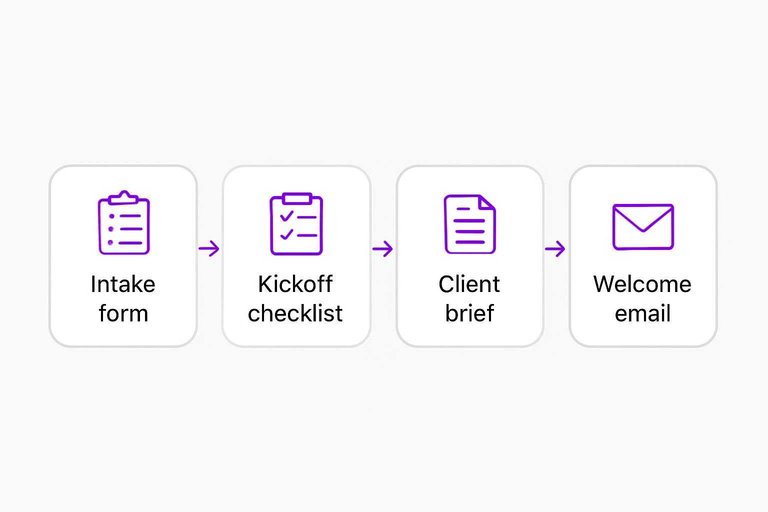
Day 3 is about removing back-and-forth from onboarding. You want every project to start the same way, even when clients don’t. A clean intake turns “we need SEO” into clear goals, access, and a kickoff plan.
Intake form
Build one form that captures strategy inputs and access needs in one pass. You’re aiming for answers you can act on, not a generic questionnaire.
- Define outcomes: revenue targets, leads, or rankings by page.
- Capture scope: priority pages, products, and markets.
- Collect intel: top competitors and “brands you admire.”
- Lock brand rules: voice, claims, compliance, and no-go topics.
- Request access: GA4, GSC, CMS, ads, and rank tools.
If a client can’t complete step 5, you don’t have a project yet.
Kickoff checklist
The first 48 hours decide momentum. Your checklist should front-load access, tracking, and baseline evidence.
- Confirm GA4 and GSC permissions
- Verify conversion events and key funnels
- Export baselines: pages, queries, rankings
- Snapshot tech: crawl, index, templates
- Capture stakeholder notes and approvals
Do this fast, and every later win has a before-and-after.
Client brief
Turn intake answers into a one-page brief you can share and sign off. It prevents silent assumptions, like “we only care about enterprise buyers.”
Include: primary goal, secondary goal, target pages, ICP, brand rules, constraints, owners, and a 30/60/90-day timeline. Add a single “Definition of done” line.
Once this is approved, scope creep has to announce itself.
Welcome email
Send a short sequence that sets expectations and gets access quickly. Your tone should feel like, “Here’s what happens next.”
- Confirmation: recap goal, link form, timeline
- Access request: exact tools, permissions, deadline
- Meeting agenda: decisions needed, attendees, pre-reads
- SLA note: response times, office hours, escalation path
- Next steps: first deliverable date, what you need now
The email is your first boundary document, so write it like one. For reporting expectations, it helps to note that Search Console metrics can lag—see Google’s guidance on getting your performance data.
Day 4: Research Engine
Today you turn “keyword research” into a repeatable production line. Your goal is a prioritized keyword universe and a page plan you can hand to writers without debate. Think: one spreadsheet, clear scores, and a simple rule like “one page, one primary intent.”
Seed keywords
You need seed keywords because every good expansion starts with the right roots. Pull them from what you sell, what hurts, and who already ranks.
- List products, features, and use-cases in customer language.
- List pains and triggers, like “reduce churn” or “stop 404 errors.”
- Pull competitor categories and H1s, not their entire sitemap.
- Generate modifiers: “best,” “pricing,” “template,” “vs,” “for [role].”
- Bucket seeds by theme: Product, Problem, Competitor, Use-case, Tooling.
If your buckets don’t map to revenue or retention, your seeds are noise.
SERP patterns
You read SERPs to avoid writing the wrong page for the right keyword. The fastest way is a notes template you fill out in five minutes per query.
Use this SERP notes template:
- Query + country/device: “ai seo workflow” / US / desktop
- Intent: Informational, commercial, transactional, navigational
- Dominant content type: Blog, landing page, tool page, category
- Format pattern: Listicle, comparison, tutorial, template, definition
- Trust signals: Author bio, case studies, citations, brand strength
- Freshness: Dates visible, “updated,” recent examples
- On-page commonalities: Word count range, TOC, visuals, FAQs
- Link pattern: DR range, referring domains, internal link depth
- Weak spots: Thin sections, missing examples, outdated screenshots
Example callouts:
- “Best + category” SERPs usually demand comparisons and tables.
- “Template” SERPs reward downloads, previews, and copy-ready blocks.
When your page type mismatches the SERP, you’re fighting the current.
Prioritize topics
You can’t do everything, so you score keywords the same way every time. Keep the model simple enough that your team actually uses it.
| Keyword | Value (1-5) | Difficulty (1-5) | Next action |
|---|---|---|---|
| ai seo workflow | 5 | 3 | Draft new page |
| seo automation tools | 4 | 4 | Refresh existing |
| content brief template | 3 | 2 | Create template |
| agency seo checklist | 4 | 2 | Build hub page |
| programmatic seo vs | 3 | 3 | Add comparison |
Treat “Next action” as the decision, not the score. Scores just justify it.
Page mapping
Mapping prevents cannibalization and forces one clear promise per URL. You’re assigning a primary term and a short list of supporting terms.
- Export current URLs with titles, H1s, and organic queries.
- Assign one primary keyword per URL based on dominant intent.
- Add 3–5 secondary terms that share the same intent.
- Flag conflicts where two URLs target the same primary term.
- Mark gaps as “new page” with a draft slug and page type.
If two pages chase one intent, you don’t have a content strategy. You have a knife fight.
Day 5: Production Pipeline
Today you build the assembly line. Briefs in, publish-ready pages out.
Your goal is one clean workflow for briefs, writing, optimization, and QA. One piece ships today, not “almost done.”
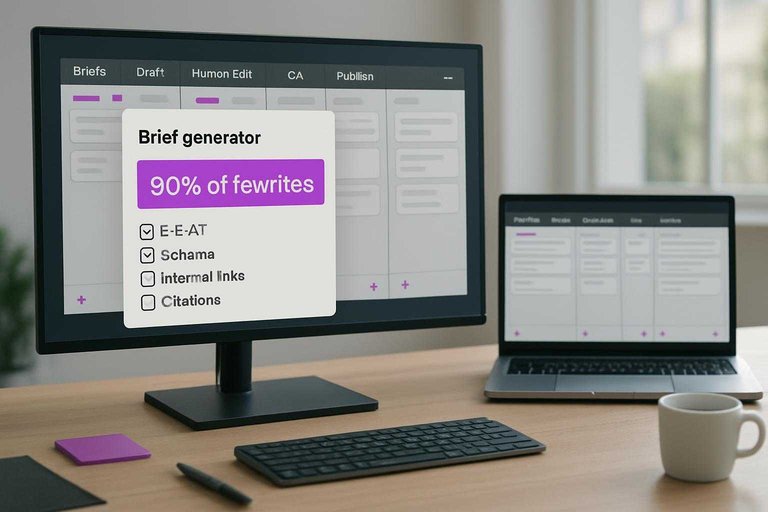
Brief generator
A good brief prevents 80% of rewrites. Your AI should fill a fixed template, not freestyle.
- Create a one-page brief template with required fields and word counts.
- Write a brief prompt that outputs: outline, entities, FAQs, and tone rules.
- Add a second prompt for internal links: 5 targets, anchors, and placements.
- Add a third prompt for sources: 5 citations, URLs, and “why credible.”
- Test all prompts on one topic and lock the template.
If your brief can’t drive a clean outline, your draft will wander.
Draft workflow
You need a repeatable path from AI draft to human-approved page. The handoffs matter more than the model.
- Generate an AI draft from the approved brief, section by section.
- Do a human edit for clarity, structure, and “sounds like us.”
- Fact-check every claim that has a number, comparison, or “best.”
- Run a brand pass: terminology, compliance notes, and forbidden phrases.
- Do plagiarism and on-page optimization: title, Hs, links, and intent match.
Treat “human edit” as ownership, not cleanup.
QA checklist
QA is where you stop shipping weak pages. Make it fast, binary, and reusable.
- Confirm E-E-A-T: author, sources, and firsthand signals.
- Validate headings: one H1, logical H2s, no skipped levels.
- Check schema: correct type, required fields, no errors.
- Verify links and images: working URLs, alt text, compression.
- Review metadata and readability: title, description, scannable paragraphs.
If you can’t check it in two minutes, you won’t check it. Use Google’s criteria for helpful, reliable, people-first content as a final QA bar—and keep an SEO content streamlining checklist handy to catch repeatable misses before publish.
Publish package
Publishing stalls when assets live in five places. You want one packet your CMS uploader can follow without questions.
Include: final doc, title tag and meta description, JSON-LD schema, image specs and alt text notes, plus internal links with exact anchors. Add a “last checked” timestamp and the source list, so updates are painless.
When the package is complete, publishing becomes clerical work. That’s the point.
Day 6 — Reporting Ops
Reporting is where your agency stops guessing and starts compounding. One clean baseline plus a repeatable weekly format keeps clients calm and your team fast. Aim for “one source of truth,” not “a prettier spreadsheet.”
Baseline capture
You need a frozen snapshot before you change anything. It keeps every future result honest.
- Export keyword rankings by segment and location.
- Export traffic and conversions for the last 28–90 days.
- Export top landing pages with clicks, sessions, and revenue.
- Save all exports into a dated, client-named folder.
- Record tool versions and filters in a README.
Without this, every win becomes an argument about the starting line.
Dashboard build
Your dashboard should answer questions in under 60 seconds. Keep it boring and reliable.
- Pick 6–10 KPIs: traffic, conversions, revenue, rankings, coverage, CTR.
- Add filters for brand vs non-brand and key page groups.
- Create an annotations log for releases, migrations, and content pushes.
- Validate each KPI against the source tool once.
- Confirm refresh cadence and ownership in writing.
If the numbers change without an annotation, you don’t have reporting. You have noise.
Weekly update
Clients don’t want a data dump. They want a tight story they can forward.
Use a four-block template: wins, issues, next actions, asks. Pull each line from the dashboard, like “Non-brand clicks +12% WoW” or “/pricing dropped 9 positions after template change.” End with one ask that unblocks you, like access, approvals, or dev time.
Alert rules
Alerts catch problems early, when fixes are cheap. Tie every trigger to a person and a clock.
- Traffic drops >20% day-over-day, excluding weekends
- Index coverage errors spike, or pages deindexed
- Rank volatility >X positions across core keyword set
- Conversion rate drops after release or test
- Tracking breaks: tags missing or goals flatline
Route alerts to one owner first, then escalate after a set window. That’s how you prevent Slack panic.
Launch the system and lock in repeatability
- Pick one pilot client (or your own site) and run the full workflow end-to-end in a single sprint.
- Turn every repeat action into an asset: templates, checklists, prompt libraries, and SOPs stored in one workspace.
- Set two review cadences—weekly for delivery/alerts, monthly for strategy—then update the workflow based on what moved the metrics.
- Don’t scale headcount first; scale throughput by tightening scope, improving QA, and automating reporting before adding more clients.
Frequently Asked Questions
- Do I need a team to start an AI SEO agency, or can I run it solo in the first month?
- You can run an AI SEO agency solo at first if you keep deliverables productized (e.g., 4 content updates + 2 new pages/month) and use AI for drafting and QA. Most solo operators add a writer or editor once they reach ~5–10 retainer clients to maintain turnaround time.
- How much should an AI SEO agency charge for monthly retainers in 2026?
- Most AI SEO agency retainers land between $1,500 and $7,500/month, with common entry packages around $2,000–$3,500 for local/SMB and $5,000+ for competitive SaaS/ecommerce. Price around outcomes and workload (pages shipped, technical fixes, links/digital PR), not “AI content volume.”
- How long does it take an AI SEO agency to get measurable SEO results for a new client?
- Expect early signals in 4–8 weeks (indexation, rankings for long-tail terms, CTR improvements) and meaningful traffic/leads in about 3–6 months. Competitive niches and new domains often take 6–9 months for noticeable momentum.
- What KPIs should an AI SEO agency report to clients beyond traffic and rankings?
- Report business-tied KPIs like qualified leads, pipeline/revenue attribution, and conversion rate from organic, plus SEO health metrics such as index coverage, crawl errors, topical coverage, and share of voice. Tools like Google Search Console, GA4, Looker Studio, and Ahrefs/Semrush make these easy to standardize.
- Can an AI SEO agency replace link building with AI content alone?
- Usually not—AI content helps scale relevance, but authority still needs earned links, partnerships, or digital PR for competitive queries. A practical alternative is “link-light SEO”: prioritize internal linking, content consolidation, and low-friction link acquisition (HARO/Qwoted, partner pages, resource outreach).
Operationalize Your AI SEO Agency
Building a 7-day workflow is the easy part; maintaining consistent research, production, and reporting without bottlenecks is what determines whether your agency scales.
Skribra automates SEO research-to-publish with daily optimized articles, WordPress publishing, images, and a backlink exchange network—so your pipeline stays full and predictable. Start with the 3-Day Free Trial.
Written by
Skribra
This article was crafted with AI-powered content generation. Skribra creates SEO-optimized articles that rank.
Share: