May 12, 2026
·
8 min read
Build internal links for a 50-page site in 2 hours
A fast, step-by-step guide to building internal links for a 50-page site in a single two-hour sprint—set a linking game plan, run a quick inventory, map topic clusters and hub pages, follow a time-boxed schedule, and add hub-to-support plus support cross-links that boost relevance without cluttering pages.


If your 50-page site feels “finished” but rankings won’t budge, the problem is often simple: your pages aren’t connected in a way Google (or visitors) can follow.
In the next two hours, you’ll turn scattered content into clear topic paths. You’ll pick target pages, set rules so links stay consistent, inventory what you already have, map quick clusters with hubs, then add high-impact hub-to-support and support-to-support links—without overthinking anchors or drowning your copy in blue text.
Linking game plan
Your two-hour session needs a tight definition of “done.” Otherwise you’ll chase random links and miss the pages that matter.
The goal is simple: every priority page gets reliable internal links from relevant pages. Think “at least 3 good links in,” not “a bunch of links everywhere.” If you need a broader reference point while you work, keep this SEO guide for internal linking handy.
Pick target pages
Choose 10–15 pages you actually want to rank, convert, or support. Labeling forces tradeoffs, so you don’t treat every URL like a “money” page.
- Export all indexable URLs from your crawl or CMS.
- Pick 5–8 “money” pages tied to revenue or signups.
- Pick 4–6 “support” pages that explain, compare, or answer objections.
- Pick 1–3 “utility” pages like pricing, contact, docs, or login.
- Add a label to each target in your sheet.
If you can’t name the role, you shouldn’t spend links on it yet.
Set linking rules
Rules prevent over-linking and keep anchors readable. You’re building a system, not sprinkling keywords.
- Cap links at 3–8 per page.
- Use natural anchors, not exact-match spam.
- Link once per target, per page.
- Prefer contextual links over nav links.
- Reserve nofollow for login or legal.
When rules are clear, you move fast without second-guessing every link.
Create tracking sheet
You need one place to see what’s done and what’s missing. A simple sheet beats memory, every time.
Use four columns: Source URL, Target URL, Anchor text, Status. Status can be “Planned,” “Added,” or “Checked.”
The sheet becomes your checklist and your audit trail when rankings move.
Quick site inventory
You can’t build internal links fast without a clean page map. A simple sheet beats “I’ll remember” every time. For example, one orphaned pricing page can drain conversions all week.
Export URL list
You need one definitive list of indexable pages. Pull it from sources you already trust, then dedupe it once.
- Export all URLs from your XML sitemap.
- Export published pages from your CMS as a second source.
- Crawl the site to catch strays and parameter junk.
- Merge lists, then remove duplicates and non-200 URLs.
- Keep only canonicals and indexable pages.
If your list is wrong, every link you add is aimed at the wrong target.
Tag page intent
You’re building links to shape journeys, not just PageRank. Add intent tags so each link has a job.
- Assign one primary topic or query per URL.
- Label the funnel stage: TOFU, MOFU, or BOFU.
- Note the format: guide, category, feature, or landing.
- Add one “next best click” destination per page.
- Flag any page with mixed or unclear intent.
When intent is clear, anchor text and destinations pick themselves.
Baseline link counts
Record inlinks and outlinks for each page so you can spot problems fast. In your sheet, add two columns: internal inlinks and internal outlinks. Use your crawl report or Search Console link data, then sort ascending to find orphans and thinly connected pages. Sort descending to find hubs that can pass authority with minimal edits.
Your fastest wins come from pages that already receive links but point nowhere useful.
Topic clusters map
You’re building a linking map, not a pile of links. Clusters give each page a “home,” like a hub called “Email marketing” with support pages like “welcome sequence” and “subject lines.” Do this first and the rest becomes a fast, repeatable insert job.
Cluster by keyword
Group URLs into a few tight clusters so links feel inevitable, not forced.
- Export all URLs with titles
- Highlight shared keyword stems
- Separate by intent, not synonyms
- Cap clusters at 6–10 pages
- Park oddballs in “misc”
If a page doesn’t fit anywhere, your site structure is lying to you.
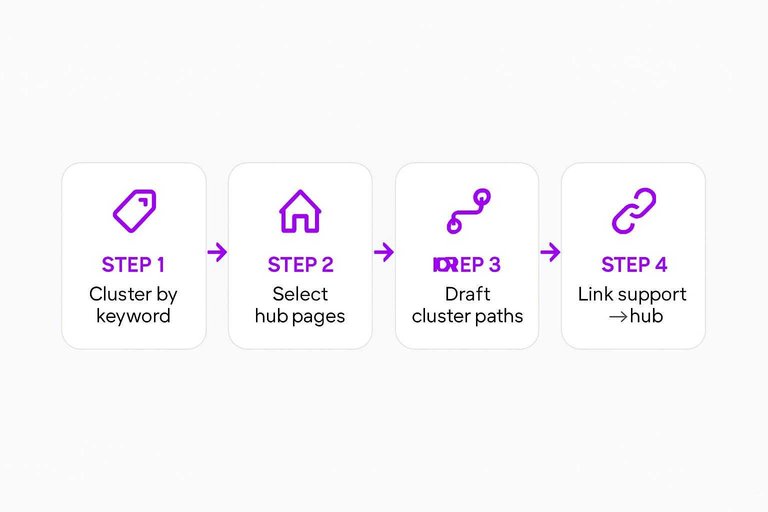
Select hub pages
Each cluster needs one obvious “home” page that can absorb links without looking spammy. The hub should match the broad intent, like “Project management software” versus a narrow page like “Kanban templates.”
If your hub can’t honestly answer “what is this topic?”, you picked a support page by mistake.
Draft cluster paths
Define the paths once so implementation becomes mechanical.
- Link every support page to its hub using descriptive anchors.
- Link the hub back to every support page in a visible module.
- Add 1–2 lateral links between the closest support pages.
- Avoid linking across clusters unless intent truly overlaps.
- Note the exact placement spot for each link.
When the paths are clear, adding 150 links feels like data entry, not strategy.
For a quick refresher on the pillar↔cluster pattern, see Semrush’s guide to topic clusters for SEO.
Two-hour sprint schedule
You need a timer-driven plan so you link every page, then verify, before you run out of energy. If you need a structured process to keep the sprint tight, use this ultimate checklist for streamlining SEO content.
| Timebox | Task | Output | Done when |
|---|---|---|---|
| 0–10 min | Prep sheet | Page list | 50 URLs captured |
| 10–55 min | Add links | Draft links | 25 pages updated |
| 55–100 min | Add links | Draft links | All pages updated |
| 100–115 min | QA pass | Fixes applied | No broken links |
| 115–120 min | Ship + notes | Change log | Next sprint queued |
When the clock ends, you stop and ship the best complete pass, not a perfect half-site.
Add hub-to-support links
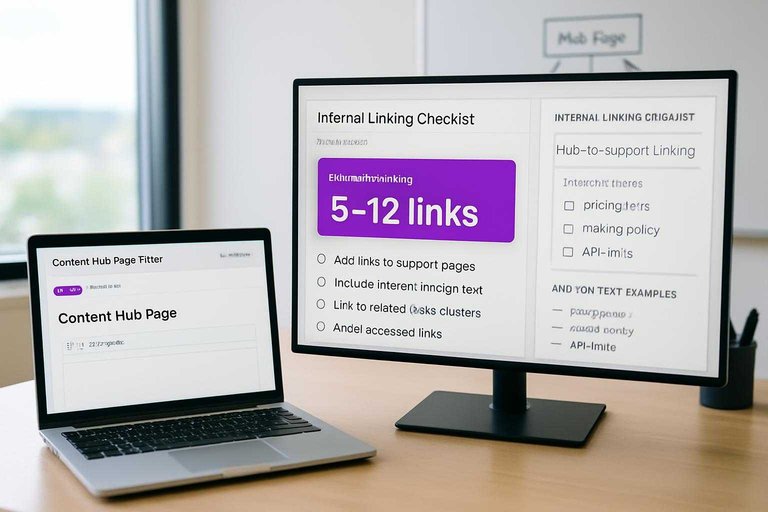
Your first pass is simple: each hub page links out to every key support page it owns. Do it with clean anchors in-body, like “pricing tiers” instead of “click here,” and you’ll shape crawl paths fast.
Place link blocks
Pick one hub and add contextual link blocks inside the sections where readers already expect “next steps.” Avoid footers and boilerplate areas that look templated.
- Scan the hub for 2–4 natural sections to host links.
- Add 5–12 links across those sections, not one big pile.
- Place links after a definition, example, or decision point.
- Keep each link within the paragraph that mentions the topic.
- Repeat for each hub until every support page is linked.
If links only live at the bottom, you’re building decoration, not navigation.
Write natural anchors
Your anchors should read like part of the sentence, not a keyword stunt. Use the words your page already uses when it’s being helpful.
- Use descriptive nouns, like “refund policy” or “API limits.”
- Vary phrasing, like “how billing works” vs “billing details.”
- Match intent, like “compare plans” for decision pages.
- Avoid exact-match repetition across multiple links.
- Skip filler, like “read more” or “learn here.”
When anchors look human, Google treats your links like guidance, not manipulation—its guidance on useful anchor text for links aligns with that.
Log changes fast
You’ll move too fast to remember what you touched without a log. Track each new hub-to-support link the moment you add it, or you’ll create duplicates and miss stragglers.
In your sheet, mark the hub row, the support page, the anchor used, and the exact section you placed it. A quick “done” checkbox beats a perfect audit later.
The sheet is your second brain. Treat it like one.
Add support cross-links
Support pages should link sideways, not just up to hubs. It’s how you turn 50 isolated answers into a usable knowledge web. Think: “refund window” linking to “return shipping” and “order changes.”
Find closest neighbors
Pick siblings that solve the next likely question. You want tight topical overlap, not random cross-promotions.
- List each support page with its primary intent in five words.
- Select 2–3 pages sharing the same customer moment.
- Prefer pages using the same terms and product names.
- Exclude pages from different workflows or audiences.
- Save the picks in a simple mapping sheet.
If you can’t pick three siblings fast, your cluster boundaries are fuzzy.
Insert contextual mentions
Add links where readers already pause to understand a concept. Anchor text should match the phrase they’re scanning for.
- Scan for definitions, comparisons, and “if/then” statements.
- Link the first clear mention of the related concept.
- Use specific anchors like “processing time,” not “click here.”
- Place links mid-sentence when it reads naturally.
- Skip linking the same target twice on one page.
A good support link feels like a footnote, not a detour.
Keep it readable
Support content lives or dies on scan speed. Too many links make paragraphs look like a directory, and readers stop trusting the emphasis. A good rule is one link per short paragraph, or two in a longer section, like linking “warranty coverage” once and moving on.
Treat links like seasoning. Enough to guide, not enough to change the flavor.
Lock in the wins and keep your link system alive
- QA in 10 minutes: Spot-check each hub page for a complete link block, no broken URLs, and anchors that read naturally in the sentence.
- Recount and compare: Update your sheet with new internal link counts to confirm every target page gained links from its hub and at least one neighbor.
- Nudge discovery: Re-submit your XML sitemap (or request indexing for key hubs) so crawlers hit the new paths sooner.
- Maintain the system: Once per month, add 2–3 links when you publish or refresh content—always hub → support first, then one contextual cross-link to the closest related page.
Frequently Asked Questions
- How many internal links should a 50-page site have per page?
- Most 50-page sites do well with 5–15 contextual internal links per page, plus consistent navigation links. Prioritize linking to the most important commercial and hub pages rather than chasing a fixed number.
- Do internal links still matter for SEO in 2026 with AI search results?
- Yes—internal links remain a primary way Google discovers pages, understands relationships, and distributes authority across your site. They also improve user journeys, which often correlates with better organic performance.
- How do I measure whether my internal links work after I add them?
- Track changes in crawl and indexation (Google Search Console), internal link counts and click paths (GA4), and rankings/CTR for linked pages. You should usually see crawl improvements in days to weeks and performance movement in 4–8 weeks.
- Can I use breadcrumbs or navigation menus instead of contextual internal links?
- No—breadcrumbs and menus help structure, but contextual internal links in the main content provide stronger topical relevance and better anchor context. Use all three, with contextual links doing the heavy SEO lifting.
- What should I avoid when adding internal links quickly across a small site?
- Avoid over-optimizing anchors (repeating the exact same keyword), linking every mention, and pointing links to irrelevant pages. Also fix or prevent chains and orphan pages by ensuring every key page has at least 2–3 meaningful internal links in and out.
Automate Your Internal Linking
A two-hour internal linking sprint works best when you can keep publishing cluster-ready pages without adding more manual upkeep each week.
Skribra helps you generate SEO-optimized articles designed for hubs and supporting pages, so your internal links scale as your site grows—start with the 3-Day Free Trial.
Written by
Skribra
This article was crafted with AI-powered content generation. Skribra creates SEO-optimized articles that rank.
Share: