April 16, 2026
·
11 min read
How to Improve Domain Authority (Without Quick Fixes)
A practical guide to improving domain authority without shortcuts — understand what DA measures, fix crawl/index issues, strengthen internal linking, publish linkable assets, earn quality backlinks, and build durable brand signals.


If your Domain Authority isn’t moving, it’s rarely because you need a “DA hack.” It’s usually because search engines and other sites don’t see enough consistent signals that your pages are worth crawling, indexing, and citing.
This guide walks you through the levers that actually compound over time: setting a clean baseline, fixing technical blockers, tightening internal links, creating assets people reference, earning legitimate backlinks, and building brand credibility that turns mentions into links.
Set your baseline
Domain Authority (DA) is only useful when you treat it like a benchmark, not a verdict. You’re setting a snapshot you can compare against after real work ships.
Clarify what DA is
DA is a third-party score that estimates your site’s relative link strength versus other sites. It moves because the index updates, competitors gain links, and the model recalibrates. Google doesn’t use DA directly, but DA often tracks with the kind of authority Google can reward.
Pick one tool
Pick one provider and stick with it so your trend line stays clean.
- Moz Domain Authority (DA)
- Ahrefs Domain Rating (DR)
- Semrush Authority Score
- Majestic Trust Flow
Consistency beats accuracy debates when you’re measuring progress.
Record starting numbers
Capture today’s baseline in one place so you can measure change later.
- Write down your current authority score from your chosen tool.
- Record linking root domains and total backlinks.
- Export your top-linked pages and their referring domains.
- Note any obvious link spikes or drops in the last month.
If you can’t reproduce the snapshot, you can’t trust the story it tells.
Set realistic targets
Pick a horizon long enough to reflect compounding work, not a lucky link. Aim for directional goals tied to inputs you control, like publishing useful pages, earning relevant links, and fixing crawl or indexing blockers. Track actions weekly, and review DA monthly so you don’t chase noise.
Fix crawl and index
Remove technical blockers so pages can be discovered, understood, and consolidated into a clean index footprint.
Run a crawl
A crawl shows what search engines can actually reach. It also exposes structural problems your analytics won’t reveal.
- Crawl with your preferred crawler and export key reports.
- Pull broken links, redirect chains, and 4xx/5xx URLs.
- Identify orphan pages with zero internal links.
- Flag duplicate titles, duplicate meta, and near-duplicate pages.
- Surface thin pages by low word count or missing main content.
If you can’t crawl it cleanly, you can’t consolidate authority cleanly.
Clean indexing signals
Indexing problems usually come from conflicting signals. Your job is to make one URL the obvious winner.
- Check robots.txt for blocked sections that should be crawlable.
- Audit noindex tags and headers on pages you want indexed.
- Verify canonicals point to the preferred, indexable URL.
- Submit sitemaps that list only canonical, 200-status URLs.
- Strengthen internal links to preferred URLs, not alternates.
When signals disagree, Google hesitates, and hesitation kills momentum.
Resolve duplication
Duplication splits relevance and link equity across multiple URLs. You want one canonical page per intent, not five versions competing.
Pick a canonical version for each cluster, then enforce it everywhere. Merge near-duplicates where the intent matches, and 301 redirect or canonicalize the rest. Standardize URL parameters, trailing slashes, and protocol or hostname variants so the same page stops multiplying.
Every duplicate you retire concentrates signals into fewer, stronger pages—use a consistent process like the one outlined in this technical SEO guide.
For Google’s guidance, see how to specify a canonical URL.
Improve core templates
Templates create most of your URLs and most of your SEO debt. Fix them once, and thousands of pages get better overnight.
- Simplify navigation to reduce dead ends.
- Implement pagination that crawls and indexes cleanly.
- Control faceted filters with rules and canonicals.
- Add basic schema for key page types.
- Normalize headings and titles across templates.
Template fixes are leverage, not polish.
Strengthen internal links
A strong internal link structure moves authority where you need it. It also helps search engines and humans discover your best pages sooner.
Think of your site like a library. Without shelves and labels, even great books stay unread.
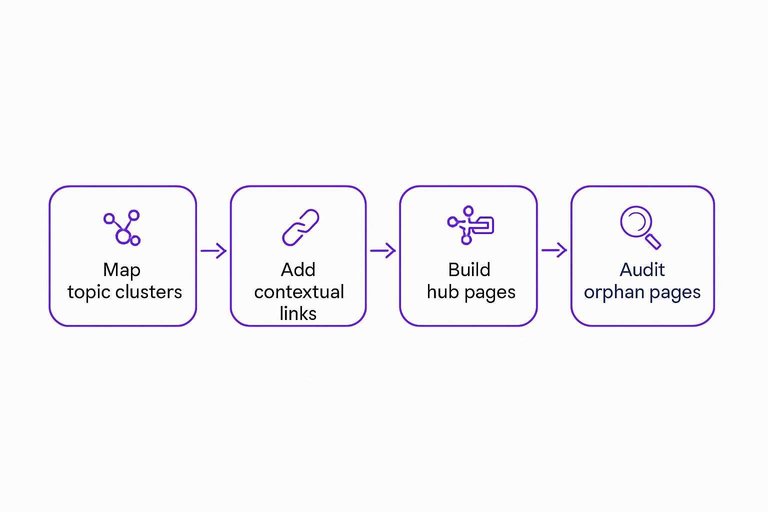
Map topic clusters
Topic clusters keep your content from scattering authority across unrelated pages. You want a few clear pillars, then supporting pages that feed them.
Start with:
- A short list of core topics you want to own
- One pillar page per topic
- Supporting articles that answer sub-questions
- A rule: supports link up, pillars link across
If your links don’t reflect your topics, your authority won’t either.
Add contextual links
Contextual links pass value and send relevance signals. They work best when they appear where the reader expects help.
- Pick 5–10 pages with steady organic or referral traffic.
- Find 2–3 spots where a link would genuinely help.
- Link to a priority page using specific, descriptive anchor text.
- Add a second link to a supporting resource when it fits.
- Recheck the page for readability and intent.
If the link feels like a helpful footnote, you’re doing it right.
Build hub pages
Hub pages create a clear path through a topic. They reduce pogo-sticking and make your internal structure obvious.
- Choose a topic with many related pages and mixed search intents.
- Write a short overview that sets scope and terminology.
- Add a logically ordered list of subpages with one-line descriptions.
- Link each subpage once, using consistent naming.
- Add hub links from navigation, relevant posts, and your pillar.
A good hub turns “searching” into “browsing,” and browsing compounds authority.
Audit orphan pages
Orphan pages waste effort because nothing points to them. You want every useful page to have a job in the structure.
- Crawl the site and flag zero in-links
- Decide whether to keep, merge, or remove
- Add links from relevant hubs and pillars
- Add links from high-traffic related pages
- Surface key pages in navigation modules
If a page can’t earn a link internally, it probably shouldn’t exist as a standalone URL.
Publish linkable assets
Linkable assets are pages people reference because they save time or settle questions. They give your outreach a real destination, not a hollow pitch. Imagine a niche calculator that answers the exact question every forum thread argues about.
Choose asset types
Pick assets that make other writers’ work easier or safer.
- Original research roundup
- Templates and checklists
- Simple calculators and estimators
- Glossaries and term maps
- Definitive guides and playbooks
If it reduces someone’s risk of being wrong, it earns citations.
Draft the first asset
Build one asset with a single job and a clear audience.
- Define the question it answers and who asks it.
- Outline with skimmable headings and decision points.
- Write the core content with examples and edge cases.
- Design the page for scanning: callouts, tables, anchors.
- Add a shareable takeaway: checklist, embed, or summary.
Your first asset should be boringly useful, not creatively impressive.
Add proof and UX
People link to what they trust and what loads fast. Make the page feel reference-ready in the first ten seconds.
Use citations for claims, show a worked example, and add visuals that clarify steps. Keep it clean, accessible, and quick on mobile.
Outreach gets easier when your page looks like a source, not a blog post.
Create supporting posts
Supporting posts create multiple entry points and funnel readers to the asset.
- List adjacent questions from Search Console, sales calls, and forums.
- Write one post per question with a narrow, practical answer.
- Link to the asset where it naturally solves the next step.
- Add a hub section that points back to the asset.
- Update older posts to include the new centerpiece link.
You’re building a small system that keeps sending signals to one page—use an ultimate SEO content checklist to standardize how each supporting post connects back to the core asset.
To keep links discoverable, follow Google’s SEO link best practices.
Earn quality backlinks
Quality backlinks come from editorial decisions, not transactions. Your job is to make the link the obvious, helpful choice for their readers. Platforms that support consistent, well-structured publishing can make that job easier by giving editors something genuinely useful to reference—especially when each piece is built around clear search intent, proper formatting, and the context needed to cite it responsibly.
Build a prospect list
Start with relevance and real editorial pages, then narrow to the few who could actually link. A smaller list with strong fit beats a huge spreadsheet of maybes.
- Pull targets from SERPs, competitor links, and topical newsletters.
- Tag each prospect by topic, audience, and content type.
- Note the likely link path: editor, author, or resources curator.
- Score fit fast: strong, medium, weak.
- Capture the exact URL where a link could live.
If you can’t point to a page where the link belongs, it’s not a prospect yet.
Tip: if you publish frequently, segment prospects by the specific kind of asset they tend to link to (guides, definitions, statistics, how-tos) so you can match them to the right page as your library grows—tools like Skribra that help maintain a steady cadence of SEO-focused posts make that mapping easier to keep current.
Write outreach angles
You need a few repeatable angles that work across many prospects. Keep them value-first and easy to verify.
- Resource inclusion: fill a missing, relevant gap.
- Broken-link replacement: fix a dead reference with your page.
- Expert contribution: add a specific insight or quote.
- Data clarification: explain methodology, limits, and context.
- Visual asset offer: provide a clean chart or diagram.
Your best angle is the one that reduces their work, not boosts your ego.
When you’re pitching, it helps if your page already looks “editor-ready”: clear headings, a tight meta description, and scannable formatting that makes it easy for someone to validate the claim and cite it. That’s the kind of baseline consistency an SEO content platform can support.
Send and follow up
Treat outreach like an experiment, not a blast. Small batches keep your messaging honest and your learning fast.
- Send 10–30 emails with one clear ask and one link.
- Track outcomes: delivered, opened, replied, linked, ignored.
- Follow up once with a shorter email and a new detail.
- Log objections and patterns in a simple notes field.
- Adjust the list or angle, then run the next batch.
If you aren’t logging outcomes, you’re doing vibes, not outreach.
It also helps to keep publishing while you run batches: each new, relevant page gives you more legitimate reasons to reach back out with a better-fit reference. If your workflow includes WordPress publishing automation (for example, Skribra’s integration), you can keep that cadence without turning outreach into a stop-start cycle.

Avoid risky tactics
Some links “work” until they don’t, and then you’re stuck cleaning up a mess you paid for. Skip anything that exists mainly to manufacture links, because it rarely has durable editorial value.
Paid link schemes, PBNs, spammy guest-post farms, and irrelevant directories all share the same smell: the link is the product. That’s the line that gets crossed.
Even with “networks,” the standard should stay the same: prioritize placements that make sense to a real audience and would survive editorial scrutiny. Any backlink exchange should be approached cautiously and evaluated like an editorial partnership—not a volume play—so you don’t drift into the same patterns search engines consistently devalue.
Build brand signals
Brand signals raise trust before anyone clicks.
They also make mentions feel safer, which turns into links more often.
Standardize citations
Inconsistent listings confuse users and crawlers, especially for local and service businesses.
Fix the basics once, then keep them clean.
- Pick a canonical format for your name, address, and phone.
- Update your website footer, contact page, and schema to match.
- Fix major profiles first: Google Business, socials, key directories.
- Audit industry listings and local aggregators where you actually appear.
- Track changes in a simple sheet and review quarterly.
You’re not chasing “SEO points.” You’re removing doubt at the moment of trust.
Improve author credibility
If your content gives advice or influences money, readers look for accountability.
Give them clear signals that real experts stand behind your pages.
Add these E-E-A-T cues where they matter most:
- Author bio with relevant experience and scope
- Links to profiles or prior work you control
- Editorial policy and fact-checking approach
- Clear contact page with responsible inbox
- Update dates and change notes on key guides
Do this well and outreach gets easier, because you look like a lower-risk citation.
Grow repeat distribution
New assets need an initial push, even when the content is great.
Build a repeatable distribution loop you can run every publish.
- Send a short newsletter with one clear takeaway
- Post a consistent social format, same days weekly
- Share in relevant communities, then answer follow-ups
- Repurpose into a thread, clip, or checklist
- Keep an archive page for past issues
The goal is familiarity, not virality, and familiarity earns mentions.
Convert mentions to links
Unlinked mentions are the closest thing to “easy mode” in link building.
The person already chose to talk about you.
- Find mentions with search operators, alerts, and backlink tools.
- Filter for pages that look maintained and contextually relevant.
- Pick the best destination: homepage, about, or a specific resource.
- Email the editor with a one-line request and the exact URL.
- Record outcomes and follow up once, then move on.
If they mentioned you without prompting, a polite nudge often closes the loop.
Turn DA Improvement Into a Repeatable System
- Pick one DA tool, record today’s baseline, and set expectations around months—not days.
- Clear technical friction first: crawl your site, fix indexation signals and duplication, and shore up core templates.
- Make authority flow: build topic clusters, add contextual internal links, publish hubs, and eliminate orphan pages.
- Create and promote link-worthy assets, then run steady outreach while strengthening brand signals so mentions become links.
Frequently Asked Questions
- Is website domain authority the same thing as Google’s ranking system?
- No—website domain authority is a third-party metric (commonly from Moz) that estimates link equity and competitiveness, while Google doesn’t use “Domain Authority” as a ranking factor. Use it as a benchmarking tool alongside Search Console performance and real keyword rankings.
- What’s a realistic way to track website domain authority improvements over time?
- Track your DA/DR trend monthly, but validate progress with leading indicators like new referring domains, link quality/relevance, indexed pages, and movement on a fixed set of target keywords. Keep annotations for major site changes (migrations, content launches, link campaigns) so spikes and dips are explainable.
- Can improving website domain authority hurt my rankings if I focus on the wrong links?
- Yes—chasing low-quality or irrelevant backlinks can create a spammy link profile and waste crawl/attention even if the metric moves. Prioritize editorially placed links from relevant sites, natural anchor text, and pages that actually earn traffic and references.
- How do I improve website domain authority if my niche is “boring” and no one links to it?
- Create “linkable” resources tied to your niche’s workflows—templates, calculators, original data, glossaries, or definitive comparisons—and pitch them to partners, associations, and tools your audience already uses. You can also earn links via case studies, supplier/customer pages, and expert quotes where your business has real credibility.
- Do I need to publish more content to increase website domain authority, or is updating old pages enough?
- Both help: updating and consolidating strong existing pages improves quality signals and linkability, while new content expands the set of pages that can attract links and branded searches. If you need consistent publishing without shortcuts, a tool like Skribra can help you maintain an SEO-focused content cadence while you continue earning relevant links.
Turn Authority Into Momentum
Raising website domain authority takes consistent execution—publishing linkable assets, tightening internal links, and earning quality backlinks without cutting corners.
Skribra helps you sustain that cadence with daily SEO-optimized articles, WordPress publishing, and a backlink exchange network—plus a 3-Day Free Trial to get started.
Written by
Skribra
This article was crafted with AI-powered content generation. Skribra creates SEO-optimized articles that rank.
Share: