February 22, 2026
·
Updated September 2, 2026
·
18 min read
CMS SEO: How to optimize content and templates
A pillar guide to CMS SEO that aligns content and templates for consistent organic growth—choose platform prerequisites, design scalable information architecture, enforce template metadata/canonical rules, operationalize structured data, and de-risk migrations with sitemaps, redirects, and Core Web Vitals controls.

Your CMS can quietly sabotage SEO even when your content is “good”—through broken rendering, rigid templates, messy URLs, and governance gaps no one owns.
This pillar breaks CMS SEO into the decisions you control: platform requirements, information architecture, and repeatable systems for content, templates, schema, media, international setups, and migrations. You’ll leave with a practical map of what to standardize, what to automate, and what to monitor so every page ships optimized by default—not by heroics.
CMS SEO Map
CMS SEO is the system that turns good content into consistent rankings. It covers content, templates, platform settings, and governance that keeps shipping clean pages. Think “the CMS makes the right thing easy,” like defaulting every new page to indexable, fast, and properly titled.
What CMS SEO Means
CMS SEO sits between on-page SEO and technical SEO. On-page is what you write and place on a page, like a better H1 or tighter internal links. Technical SEO is site infrastructure, like crawlability, rendering, and performance that often lives outside the CMS. CMS SEO is the repeatable middle: templates, fields, defaults, and publishing workflows that decide what gets output every time.
Two-Layer Model
You optimize in two layers because scale changes everything. The content layer is page-specific work, like rewriting a title or adding FAQs to one article. The template layer is shared output, like fixing canonical tags or heading order across a content type. One template fix can clean up thousands of URLs overnight.
Ownership and Access
CMS SEO fails when the right people can’t touch the right levers. You need clear roles and permissions across the pipeline.
- Editors: manage fields, headings, links
- SEO: define rules, review releases, run audits
- Developers: change templates, schema, rendering
- Design: enforce UI patterns, component rules
- Analytics and ops: monitor, alert, roll back
If nobody owns the template layer, your “SEO wins” stay trapped at the page level.
Platform Prerequisites
Your CMS sets your SEO ceiling before you write a word. Rendering, routing, metadata, and extensibility decide what Google can crawl and what you can control.
Rendering and Indexing
Rendering decides what bots see on first request and how consistent your HTML stays. If your CMS ships empty HTML and “fills it in later,” you’re betting on perfect JS execution.
SSR returns complete HTML per request, which crawlers parse immediately. SSG prebuilds HTML, which is fast and stable at scale. CSR often serves a shell plus JavaScript, which risks delayed rendering, missing internal links, and mismatched canonicals.
If your critical content isn’t in the initial HTML, you’re building on a crawl budget tax.
URL and Routing Control
You need URL control because URLs become your index keys and your internal link graph. Weak routing creates duplicates, crawl traps, and redirect chains.
- Create clean, readable URLs
- Edit slugs without breaking links
- Manage 301/302 redirects in bulk
- Control locales and hreflang paths
- Handle pagination and parameters
If you can’t predict every URL variant, Google will index the wrong one.
Template Metadata Support
Templates should set metadata by default, then allow per-page overrides when needed. Otherwise you ship “Home | Brand” everywhere and wonder why clicks stall.
You need first-class fields for title, meta description, canonical URL, robots directives, Open Graph, and schema properties. You also need rules per template, like product pages emitting Product schema and blog posts emitting Article.
If metadata isn’t modeled, it won’t stay consistent when your site grows.
Extensibility Hooks
SEO work turns into engineering work the moment you need automation. Hooks are how you ship fixes once, not page by page.
- Add middleware for redirects and headers
- Control head tags with a single source
- Generate sitemaps programmatically
- Trigger rebuilds via webhooks
- Expose content through APIs
If you can’t extend the platform, you’ll patch symptoms forever.
Information Architecture
A CMS can publish fast, but it can also sprawl fast. Your job is to make every page feel like it “belongs somewhere” for both users and crawlers.
Aim for a structure where a searcher can predict the URL before they click. When your URLs, hubs, and internal links match intent, rankings stick longer.
Topic-to-URL Design
You’re designing a map, not a pile of pages. Hubs collect demand, spokes satisfy specific intent, and depth limits keep authority from leaking.
Use stable paths like “/guides/technical-seo/” and “/guides/technical-seo/canonical-tags/” instead of date-stamped or CMS-generated slugs. Map one primary keyword cluster to one hub URL, then assign each supporting query to a spoke under that hub.
If you can’t explain the URL hierarchy in one breath, your IA is doing extra work.
Navigation and Taxonomy
Your navigation should reflect how people think, not how your CMS stores content. Keep archives useful, unique, and intentionally linked.
- Keep top-level menus under seven items
- Use categories for intent, not departments
- Treat tags as controlled vocabularies, not ad-hoc labels
- Block or noindex thin archive pages
- Avoid duplicate filter-generated archives
If your tag pages don’t deserve links, they don’t deserve indexing.
Facets and Filters
Facets can create SEO gold or infinite crawl traps. The difference is whether a filtered view matches real search demand.
Index faceted pages only when they target a stable query, like “black linen sofa,” and you can maintain unique copy and internal links. Otherwise, keep them crawlable for users but constrain bots with parameter rules, canonicals to the parent category, and a limited set of “allowed” facet combinations.
If you don’t set rules, Google will set them for you—by wasting crawl budget.
Content Optimization System
Your CMS is where SEO either becomes repeatable or becomes guesswork. Standardize page writing, structure, and updates so every publish improves rankings, not randomness.
Treat content like a product. Ship it with checks, components, and clear intent.
Search Intent Matching
Match the query intent to a single page type and a single conversion goal. If you mix intents, you confuse users and weaken relevance.
Example: “best project management tools” wants a comparison page, not a product signup page. “Asana pricing” wants pricing details, not a broad category roundup.
One page. One job. Rankings follow clarity.
On-Page Checklist
Use the same on-page checks for every template and every writer. Your goal is boring consistency that still reads human.
If you need a starting point to standardize reviews, use this AI content checklist for marketers.
- Map one H1, then logical H2 sections
- State the answer in the first 100 words
- Cover key entities and related terms
- Add descriptive images with useful alt text
- Include FAQs that match real questions
- Link to the next best internal pages
- Update facts, dates, and screenshots regularly
When you enforce this, “good SEO” stops being a person-dependent skill.
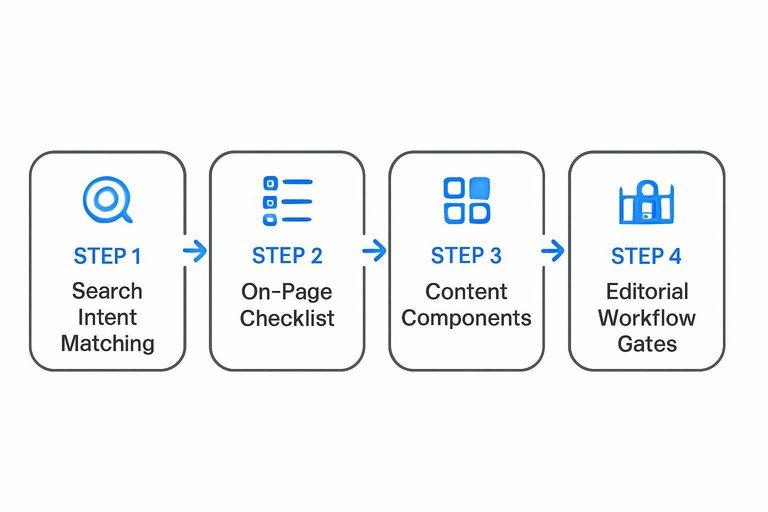
Content Components
Reusable blocks turn quality into a system, not a hero effort. They also make schema easier because your CMS knows what each block is.
Use components like FAQ, pros/cons, step-by-step, product specs, pricing tables, and “who this is for”. Writers fill in fields instead of reinventing structure each time.
Build the blocks once, then scale accuracy and markup across the whole site.
Editorial Workflow Gates
Add publish gates so SEO quality is enforced by the process, not reminders in Slack. Each gate should block shipping until it’s true.
- Require key fields before publish
- Run an SEO review against the checklist
- Preview on mobile and desktop
- Route approvals to the right owners
- Keep versioning and rollback ready
If your workflow can’t prevent bad pages, it will eventually create them.
Template SEO Essentials
Your templates are your SEO factory. One bad default can replicate across thousands of pages, like a sitewide “Home” title or missing canonicals. Get the rules right once, then let publishing scale safely. If you need a baseline checklist to align your template rules, start with this SEO guide for templates.
Title and Description Rules
You need predictable metadata that still feels page-specific. Otherwise your SERP snippet turns into “Category | Brand” everywhere, and CTR tanks.
Use templating rules by page type:
- Articles:
{headline} | {brand}; fallback to{category} | {brand} - Categories:
{category} – {top value prop} | {brand}; fallback to{category} | {brand} - Products:
{product} – {primary attribute} | {brand}; fallback to{product} | {brand} - Locations:
{service} in {city} | {brand}; fallback to{city} {service} | {brand}
Set guardrails:
- Truncation: cut at word boundary, keep keyword and brand
- Uniqueness: append
{site section}when collisions happen - Descriptions: synthesize from lead paragraph; fallback to curated excerpt
Your goal is boring consistency with smart escape hatches, not “creative” metadata roulette.
Heading and Layout Defaults
Headings and layout defaults prevent accidental chaos at scale. One extra H1 in a template can silently break hundreds of pages.
- Enforce exactly one H1 per page
- Keep heading order logical and accessible
- Render breadcrumbs near the top
- Add related content below the main body
- Standardize TOC on long pages
When templates enforce structure, editors stop fighting HTML and start shipping content.
Canonical and Robots Logic
Canonical and robots tags need a strict decision tree. If you “guess” on every page, you will create duplicate clusters and waste crawl budget.
A workable template logic looks like this:
- If the page is the primary version, set
rel=canonicalto its clean URL. - If filters or parameters change content meaningfully, canonical to the parameterized URL.
- If parameters are tracking-only, canonical to the clean URL.
- If the page is a duplicate variant, canonical to the primary and consider
noindex,follow. - If pagination exists, canonical each page to itself, not page 1.
Treat canonicals like routing rules, not editorial opinions, and your index becomes predictable.
Internal Linking Modules
You want internal links that scale without hand-editing every page. Modules do that, as long as they’re relevant and consistent.
- Related posts by shared entities
- Popular content by site section
- Next/previous within a series
- Breadcrumbs for hierarchy links
- Contextual suggestions from key terms
Build modules that earn clicks, not just links, and the rankings usually follow.
Structured Data Strategy
Implement schema through CMS fields and templates so markup stays consistent, scalable, and hard to “forget.” Instead of hand-coding JSON-LD per page, you map each template to a schema type and feed it from validated fields. Think “structured data as product,” not a one-off SEO task.
Schema by Page Type
Start with your templates, because templates control repeatable truth. Each template should emit one primary type, plus shared supporting types, so Google sees stable patterns.
A practical mapping looks like this:
- Article template →
Article(orNewsArticle), with author, date, image. - Product detail template →
Product, with offers, price, availability. - FAQ page/module →
FAQPage, with real questions and answers. - Tutorial template →
HowTo, with steps, tools, and time. - Site-wide footer/header →
Organization, with logo and sameAs. - Any navigable page →
BreadcrumbList, matching visible breadcrumbs.
When one template reliably outputs one “main entity,” your rich results become an engineering outcome, not an editorial gamble.
Field Requirements
Define fields once in the CMS, because schema quality is mostly input quality. Your rules should protect against missing essentials and “SEO creativity.”
- Required: page name, canonical URL, primary image, publish/updated dates.
- Optional: author entity, section/category, speakable, video, citations.
- Validation: URL format, image minimums, price is numeric, ISO currency.
- Constraints: one FAQ answer per question, no keyword stuffing, no hidden content.
- Guidance: markup must match visible copy, like “same question on page.”
If your CMS blocks spammy markup at entry, you avoid manual policing later.
Validation Workflow
Validation needs a human check and an automated check, or it won’t stick. You test new templates in Rich Results Test, confirm syntax in Schema.org validators, then lock it down with CI.
Use this workflow:
- Rich Results Test for eligibility and warnings.
- Schema.org validator for coverage beyond Google features.
- Automated tests that render pages and snapshot JSON-LD output.
- CI gates that fail builds on missing required properties.
Treat schema like an API contract. Break it, and the build should break too.
Media and Assets
Your CMS is your media factory. If it ships bloated, unindexable assets, every page slows down and rankings leak.
Set sane defaults once, then let editors publish without breaking performance. That’s how you scale content without scaling problems.
Image SEO Defaults
Images quietly decide your speed, accessibility, and long-tail traffic. Defaults in your CMS keep editors from reinventing the same rules.
- Enforce descriptive filenames, not “IMG_1234”.
- Require alt text, with clear “when to skip” rules.
- Generate responsive srcset sizes per breakpoint.
- Lazy-load below the fold, eager-load the hero.
- Enable captions and image sitemaps when relevant.
If your CMS can’t enforce these, your SEO becomes an editing contest.
Video Indexing
Video can rank in its own vertical, but only when Google can understand the page. Treat video like a first-class content type, not a blob embed.
Use VideoObject schema when the video is the main content, and include a readable transcript on the page. Provide a stable, crawlable thumbnail, and use a video sitemap when you host many videos or pages rely on video discovery.
If the transcript and thumbnail are missing, you’re publishing watch time without search demand.
Asset Governance
CMS media libraries turn into junk drawers fast. Governance prevents duplicate files, broken links, and stale assets that never die.
Deduplicate by hash or canonical ID so the same PDF isn’t uploaded five times. Serve assets from consistent CDN paths with long cache headers and versioned filenames, then block deletion of in-use files while flagging orphans for cleanup.
If you can’t track “where used,” you can’t safely ship updates.
International and Multisite
International SEO breaks when your CMS reuses pages without telling Google which audience each URL serves. One wrong canonical or missing hreflang can turn “/en/” into your only indexed version. Your job is simple: map every locale cleanly, then keep templates from leaking signals across sites.
Hreflang Implementation
Hreflang is a contract between equivalent pages, not a hint you can half-apply. Each localized URL must point to every other localized equivalent, include a self-referencing hreflang, and use exactly matching language-region codes like “en-US”.
Keep URL mappings consistent across all pages in the set, and only include URLs that return 200 and are indexable. Add x-default for your global selector or fallback page, like a “Choose your country” URL, not a random market page.
When hreflang sets disagree across URLs, Google stops trusting the whole cluster.
Locale URL Patterns
Your URL structure locks in how you scale, migrate, and report performance. Choose the pattern that matches your org, not your hopes.
Locale URL Patterns
- Subfolders (/en/, /fr/): shared authority, simpler ops, harder geo-separation
- Subdomains (en.example.com): clearer separation, extra setup, authority splits
- ccTLDs (example.fr): strongest geo-signal, highest cost, most moving parts
- Mixed patterns: flexible for M&A, messy analytics, frequent canonical mistakes
- Migration note: keep 1:1 redirects, preserve hreflang maps, re-validate indexing
Locale URL Patterns
Pick one pattern per brand, then enforce it in routing and sitemaps.
Shared Template Risks
Shared templates fail when they reuse the wrong signals across sites. The classic bug is a global canonical pointing every locale back to the US URL, or a title like “Buy in English” showing on your German pages.
Audit templates for locale-bound fields: canonical, hreflang, meta robots, Open Graph, and structured data. Your Organization, product priceCurrency, availability, and address markup must match the page’s locale and entity, not whatever the default site uses.
If templates aren’t locale-aware, your CMS will manufacture duplicate pages at scale.
Sitemaps and Feeds
Discovery files are your CMS’s contract with crawlers and downstream systems. When they’re segmented well and updated on real events, you stop shipping stale URLs like “/old-pricing” for weeks.
Treat sitemaps, feeds, and content APIs as production artifacts. If they lie, everything built on them drifts.
Sitemap Architecture
A sitemap isn’t one file. It’s a map of your site’s structure, change cadence, and crawl intent.
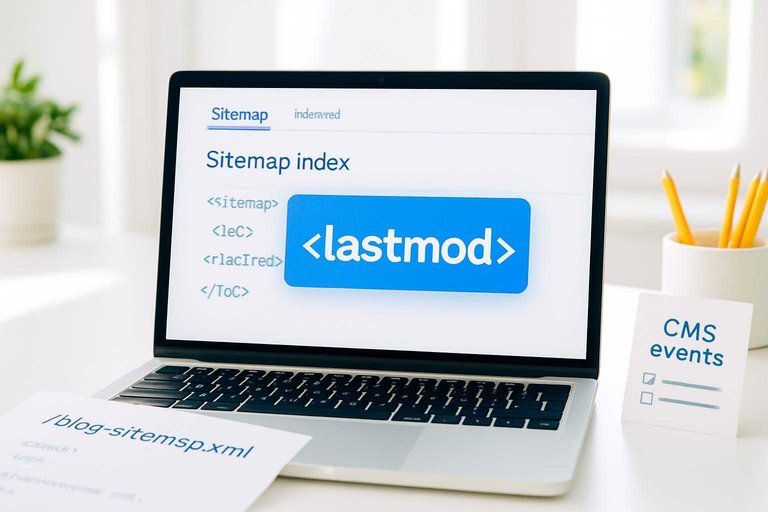
Split sitemaps by content type or site section, like /blog-sitemap.xml and /docs-sitemap.xml. Use a sitemap index that lists each child file, with one job: help bots find the right bundle fast. Keep
Priority and changefreq are hints at best. Use them only when they encode real differences, like “docs change weekly, blog changes monthly.”
Accurate
Automation Triggers
Regenerate or update discovery files when the URL set or meaning changes. If you wait for cron, you’ll leak stale pages.
- Publish, update, or unpublish a page
- Add, change, or remove a redirect
- Change canonical, robots, or indexability
- Update media URLs or media metadata
- Change URL slugs or content type
Wire these to CMS events, not deploys. That’s how you keep Google and your team reading the same site.
RSS and APIs
RSS feeds and content APIs aren’t “legacy.” They’re lightweight discovery layers for humans, bots, and your own QA.
A feed like “/blog/rss.xml” supports syndication, alerts, and quick recrawl nudges when a new post ships. A content inventory API supports internal search, partner distribution, and audits, like “show me every indexable page missing a canonical.” Both are also a sanity check: if the feed says an article exists but the sitemap doesn’t, your CMS pipeline is broken.
Use feeds and APIs as truth probes. They surface drift before rankings do.
Redirects and Migrations
URL changes are where SEO wins get deleted fast. Your job is to make every move observable, reversible, and owned by someone.
Treat redirects like code. When templates or platforms shift, you want a clean mapping and a fast rollback.
Redirect Policy
Redirects protect rankings when URLs change, and they protect users from dead ends. Without a policy, your CMS becomes a “just add another redirect” machine.
Use this baseline:
- 301 for permanent moves, including migrations and slug changes.
- 302 only for truly temporary tests or short-lived campaigns.
- Zero tolerance for chains; map old URL directly to the final URL.
- Zero tolerance for loops; they waste crawl budget and break rendering.
- Assign redirect ownership in the CMS, like “SEO owns rules, dev owns logic.”
If redirects don’t have an owner, they’ll become your slowest, quietest traffic leak.
Migration Checklist
Migrations fail in the gaps between “we launched” and “Google agrees.” Use a checklist that forces evidence at each step.
- Inventory every indexable URL, plus top landing pages and backlinks.
- Map each old URL to one best new URL, and document exceptions.
- Crawl staging to catch chains, 404s, canonicals, and blocked templates.
- Run parity checks for titles, canonicals, status codes, and indexability.
- Launch with monitoring for 404 spikes, traffic drops, and redirect drift.
Your rollback plan is the difference between a bad day and a lost quarter.
Change Impact Testing
Every release changes more than you think. You need before-and-after diffs, not vibes.
Diff the pages that matter:
- Titles and meta robots, especially “noindex” accidents.
- Canonical targets, including protocol and trailing slash changes.
- Indexability signals like status codes, blocked resources, and redirects.
- Internal links, especially nav, breadcrumbs, and related content modules.
If you can’t diff it, you can’t prove it, and you can’t fix it fast.
Core Web Vitals
Core Web Vitals rise or fall on two things you can control in a CMS: templates and publishing habits. If your homepage template is heavy, every new page inherits the problem.
Template Performance Levers
Your template decides what ships on every request, even when the content is tiny. One extra library or tag can turn “fast enough” into a site-wide LCP problem.
Critical CSS: inline only what renders above the fold, then defer the rest.
JS bundling: ship one small bundle per template, not five per feature.
Hydration: avoid hydrating static regions; hydrate only interactive islands.
Font loading: preload one primary font, use swap, and limit variants.
Third-party tags: gate them by template, consent, and real business value.
Treat the template like infrastructure, because that’s where performance becomes a repeatable outcome.
Content Weight Controls
Editors can accidentally break CWV with one paste from a slide deck or ad partner. Give them guardrails that make the fast choice the easy one.
- Compress and resize images before upload
- Replace heavy embeds with lightweight previews
- Restrict iframes to approved providers
- Cap ad slots per template and breakpoint
- Limit above-the-fold modules to essentials
If you can’t enforce it in the CMS, you’ll keep debugging it in production.
Measurement Cadence
Lab tests catch regressions early, but field data is what users and Google feel. You need both, or you’ll optimize the wrong thing.
Use lab tooling for every release: Lighthouse, WebPageTest, and CI budgets per template.
Use field data for truth: CrUX, RUM, and segmented dashboards by device and connection.
Set template thresholds: LCP, INP, and CLS targets that match your business pages.
Add alerts for drift: spikes in LCP after tag changes, or INP after component releases.
Measure per template, not per URL, and you’ll fix the cause instead of chasing symptoms.
Indexability Quick Table
Use this table when a CMS page can exist in multiple states, like “draft,” “preview,” or “filtered.” The goal is simple: only index pages that should rank, and block everything else cleanly.
| CMS page state | Index? | Crawl? | Required directives |
|---|---|---|---|
| Published canonical page | Yes | Yes | 200, self-canonical |
| Draft or staging URL | No | Optional | noindex, auth/IP allow |
| Preview link | No | Yes | noindex, follow |
| Faceted or filtered results | No | Maybe | noindex, robots rules |
| Parameter duplicates (UTM/sort) | No | Yes | canonical, param handling |
Treat “noindex” as your safety catch, and canonical as your duplicate clamp.
AI Search and LLM Readiness
Search is no longer only “10 blue links.” Modern SERPs increasingly blend classic results with AI-generated answers, and new crawlers (including LLM-oriented bots) may fetch your content for model outputs, previews, or citations. CMS SEO now needs a layer of entity/semantic clarity, snippet-ready formatting, and controlled access—implemented at the template, content, and metadata levels.
This section focuses on what you can do inside a CMS (and its templates) to improve:
- Eligibility and usefulness for AI-style results (without relying on specific SERP features)
- Entity understanding (so systems can connect your pages to the right concepts)
- Citation readiness (so your content is easy to quote, attribute, and verify)
- Bot governance (so you can decide what AI/LLM crawlers can access)
Write for extraction: make answers easy to lift without losing context
AI-style results tend to favor content that is easy to parse, segment, and verify. You’re not “writing for bots”—you’re removing ambiguity for both humans and machines.
CMS actions (content standards + templates):
- Add an “answer first” pattern to relevant pages:
- Start with a 1–3 sentence direct answer.
- Follow with detail, edge cases, and examples.
- Use explicit question headings (H2/H3) that match real queries:
- Good: “What is X?”, “How to do Y”, “X vs Y”, “Is X worth it?”
- Prefer scannable structures that convert cleanly to snippets:
- Short paragraphs (2–4 lines)
- Ordered steps for processes
- Simple comparison tables (with clear row/column labels)
- Define terms in-place the first time they appear:
- Provide a one-sentence definition close to the first mention.
- Avoid “floating references” (“this,” “it,” “they”) in key definitions and steps.
Template actions:
- Ensure headings are not visually “styled” but semantically wrong (e.g., divs masquerading as headings).
- Make sure expandable UI (accordions/tabs) renders content in the HTML (not only after user interaction), unless you intentionally want it de-emphasized.
Entity and semantic optimization inside a CMS
Traditional keyword targeting is not enough when systems try to understand entities (people, products, organizations, places, concepts) and their relationships. Your CMS should help you express those entities consistently across pages.
Practical entity workflow:
- Create a canonical entity name and stick to it:
- One preferred spelling (including capitalization)
- Consistent naming in titles, headings, and on-page mentions
- Use “synonyms with intent” instead of random variations:
- Introduce alternatives intentionally (“also called…”) and clarify when they differ.
- Add an “About/definition” block on key pages (especially category, service, and pillar pages):
- What it is
- Who it’s for
- Key attributes/features
- Common alternatives or related concepts
- Connect related entities with internal links that explain the relationship:
- Not just “read more,” but “See also: [entity] pricing,” “[entity] setup,” “[entity] alternatives.”
CMS structure suggestions:
- Use custom fields for things like product name, brand, SKU, author role, service area, or primary topic—then reuse them in templates to keep language consistent.
- Maintain topic hubs where child pages roll up under a parent entity/topic page (and ensure both directions of internal linking exist).
Note: Your structured data strategy covers schema implementation; the key addition here is the editorial + IA discipline that makes your entities unambiguous even without relying on markup.
Citation readiness: make your content quotable and attributable
Whether a system is generating an overview, summarizing a page, or selecting a citation, it helps when the page makes authorship, dates, and claims easy to verify.
On-page citation readiness checklist:
- Put the most citable claims in stable, standalone sentences.
- Avoid burying the key point in a long paragraph.
- Add source attribution for non-obvious claims (especially on YMYL-adjacent topics):
- Link to primary sources where possible
- Use consistent citation formatting (even if it’s lightweight)
- Show clear authorship and accountability:
- Visible author name
- A short author bio or link to it (especially for advice content)
- An editorial contact path (e.g., “report an issue” or contact page)
- Include meaningful timestamps only when maintained:
- If you display “updated” dates, pair them with a real update process.
- Make quotations and definitions easy to extract:
- Use blockquotes for actual quotes
- Use definition-style formatting for key terms
Template considerations:
- Ensure author, date, and citations are in the server-rendered HTML (not injected in a way that bots might miss).
- For long pages, add a table of contents with anchored headings to improve navigability for both users and systems.
Govern access: AI/LLM crawlers, previews, and content controls
CMS SEO also includes deciding what can be accessed and reused. Some teams want maximum discovery; others must limit training or reuse of certain sections.
Controls to implement at the CMS / template level:
- Robots directives:
- Use
robots.txtfor crawl paths and broad bot access rules. - Use
meta name="robots"on pages fornoindex,nofollow, ornosnippetwhere appropriate. - Preview/snippet management:
- Where your CMS supports it, use page-level controls to limit snippets or previews (use sparingly—these can reduce visibility).
- Segment what’s public vs. restricted:
- Keep thin “teaser” pages out of the index if the full content is gated.
- Don’t let internal search, filter combinations, or user-generated thin pages become a training/crawl sink.
Operational guidance:
- Define a simple policy: which content types are fully crawlable, which are indexable, and which must never be exposed.
- Document the rule in your CMS so editors don’t accidentally publish restricted content without the right directives.
Turn CMS SEO Into Defaults, Not Fire Drills
- Start with the two-layer CMS SEO map: name owners for platform, templates, and publishing access—and document what each role can change.
- Lock in non-negotiable prerequisites: renderable/indexable pages, clean routing, metadata fields, extensibility hooks, and predictable sitemap + redirect automation.
- Standardize page-type templates: title/description rules, headings/layout defaults, canonical/robots logic, internal-link modules, and schema requirements with a validation gate.
- Operationalize quality: an on-page checklist in the editor, workflow approvals, and a measurement cadence for indexability, sitemaps, redirects, and Core Web Vitals—then use the indexability quick table to triage issues weekly.
Frequently Asked Questions
- Is CMS SEO the same as technical SEO, or does it include content too?
- CMS SEO covers both technical SEO and content operations inside your CMS—templates, fields, workflows, and publishing controls that affect crawling, indexing, and relevance at scale.
- Do I need a headless CMS to get good CMS SEO in 2026?
- No—most sites can achieve strong CMS SEO on traditional or hybrid CMS platforms as long as you can control server rendering, URLs, metadata, canonicals, and robots directives consistently.
- How do I audit CMS SEO without crawling the entire site?
- Start with a template-and-field audit: review the top 10–20 page types, their CMS inputs (title, description, canonicals, schema fields), and test a sample of 50–100 URLs in Screaming Frog or Sitebulb plus Google Search Console for coverage and enhancements.
- What CMS SEO results should I expect after fixing templates and defaults?
- Most sites see faster improvements in indexation quality and CTR within 2–6 weeks, and more durable ranking gains in 2–4 months as new pages inherit correct SEO defaults and internal signals consolidate.
- Can I do CMS SEO without developer support or plugins?
- You can improve on-page content and some metadata, but scaling CMS SEO usually requires developer help to enforce template logic, structured data output, canonical rules, and automated redirects across page types.
Automate Your CMS SEO Engine
Building a CMS SEO system across templates, structured data, and Core Web Vitals is doable—but keeping it consistent at publishing speed is the real challenge.
Skribra generates SEO-optimized articles with keywords, metadata, images, and WordPress publishing so your CMS stays aligned—plus a backlink network to strengthen authority; start with the 3-Day Free Trial.
Written by
Skribra
This article was crafted with AI-powered content generation. Skribra creates SEO-optimized articles that rank.
Share: