April 5, 2026
·
9 min read
CMS SEO Case Study: 45-Day Results Breakdown
A 45-day CMS SEO case study that shows what can realistically change—and what can’t—by mapping baseline benchmarks, CMS template and content-model fixes, measurement setup, early signals, and the true costs and constraints behind the work.

If you’ve ever shipped “SEO improvements” in a CMS and then stared at flat charts, you’re not alone. The hard part isn’t doing the work—it’s knowing what a fair timeline looks like, what to measure, and which changes actually move the needle.
This case study breaks down a 45-day window end to end: the starting baseline, the exact CMS changes, how tracking was set up to avoid false positives, and the early signals worth paying attention to. You’ll also see the hidden friction—engineering time, content ops drag, and CMS limitations—so you can plan smarter.
Why 45 Days Matters
A 45-day window is long enough to see whether your CMS SEO foundation is working. It is not long enough to prove durable ranking gains, especially for competitive queries.
Treat it like a cost-vs-benefit checkpoint. You are validating the system you built, not claiming the final outcome.
Valid expectations
In 45 days, you are looking for early signals that your CMS changes are being understood by crawlers. You are also checking whether your publishing machine can run without breaking templates.
You can usually validate:
- Indexing coverage trends and obvious gaps
- Crawl health and waste patterns
- Template stability across key page types
- Content production velocity and QA throughput
If these are shaky, rankings are noise. Fix the pipeline first.
Effort categories
45 days forces you to see where time actually goes. You want clean buckets, because each one has a different ROI curve.
- CMS configuration and permissions
- Technical SEO fixes and monitoring
- Template SEO and internal linking rules
- Content operations and editorial QA
- Analytics, reporting, and alerts
If coordination is the biggest bucket, you do not have an SEO problem. You have an operating model problem.
Decision criteria
The real question is not “did rankings move.” It is “does this CMS SEO approach earn the right to keep investing.”
A practical go/no-go test looks like this: are you seeing lower SEO friction per release, cleaner crawl behavior, and faster content shipping. If those benefits do not show up, spend your next dollar elsewhere.
Starting Baseline
You need a clean snapshot before you touch the CMS. Otherwise, you’ll confuse real gains with measurement noise.
- Export the technical baseline: indexation, crawl errors, templates, redirects, and canonical patterns.
- Inventory content: URL list, intent, status codes, internal links, and duplicate or thin pages.
- Confirm tracking readiness: analytics tags, consent behavior, search console access, and event coverage.
- Document constraints: release cadence, plugins, theme limits, governance, and who can approve changes.
- Save “before” artifacts: crawls, sitemaps, key templates, and configuration screenshots.
Your baseline is the control group, so protect it like evidence.
CMS Changes Made
We treated the CMS like an SEO delivery system, not a publishing tool. The work focused on removing template-level ambiguity, adding the right editorial controls, and making URLs and links predictable. When CMS rules are consistent, every new page ships with fewer SEO defects by default.
Template fixes
We standardized what each core template is allowed to output, then enforced it with rules. That removed the common conflicts that quietly break indexing and relevance.
Titles and headings:
- One page title source, one H1 per page.
- H1 mirrors intent, not navigation labels.
- H2+ follows a consistent hierarchy.
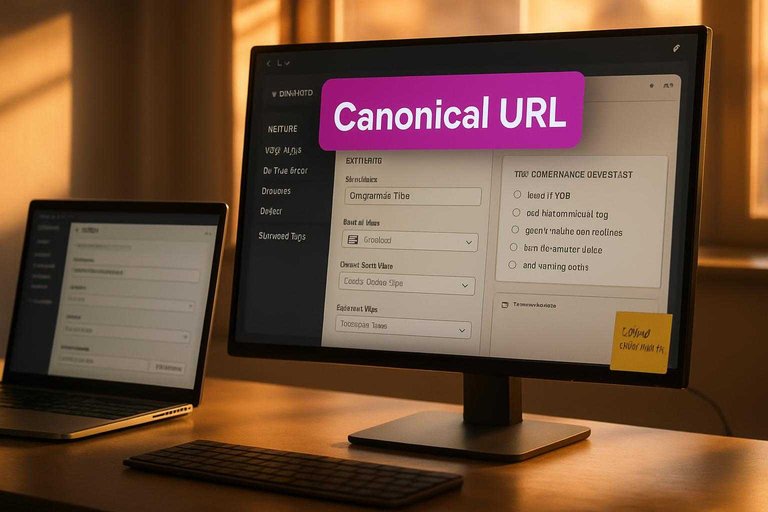
Indexation and canonicals:
- Canonical points to the preferred clean URL.
- Pagination uses consistent URL patterns and index rules.
- Index/noindex directives match page purpose.
That’s where “SEO errors” stop being tickets and start being guardrails.
Content model updates
We updated the content model so editors can set SEO-critical values without hacks. Each field has a single owner and a clear fallback.
- Meta title and description fields
- Open Graph title and image fields
- Breadcrumb label and hierarchy fields
- Schema input fields per template
- Author and date visibility controls
If the model is clean, your templates stay boring. Boring ships.
URL governance
We wrote URL rules that editors can follow and developers can enforce. Then we mapped old URLs to new ones, so changes did not strand equity.
Redirects and slugs:
- Redirect map for known changes and merges.
- Slug rules for case, separators, and reserved words.
- Trailing slash policy applied everywhere.
Duplicates and environments:
- One canonical host and protocol.
- Non-production blocked from indexing.
- Duplicate paths resolved with canonicals or redirects.
Most SEO “volatility” is just URL ambiguity showing up late.
For redirect behavior details, follow Google’s guidance on redirects and Google Search.
Performance basics
We improved what the CMS could realistically control during the window. The goal was fewer heavy pages, fewer surprises, and cleaner loading behavior.
- Resize and compress images on upload
- Prefer modern formats when available
- Enable page and asset caching
- Remove unused scripts and tags
- Defer non-critical third-party code
You rarely need perfection. You need fewer self-inflicted wounds.
Internal linking
We used CMS-driven components to create links that scale with publishing. That reduced reliance on manual “remember to link it” editorial steps, as outlined in our SEO guide for internal linking.
Navigation and discovery:
- Breadcrumbs aligned to real hierarchy.
- Category and hub pages wired to child content.
- Related-content modules added to key templates.
Orphan prevention:
- Required at least one parent or hub association.
- Automated “included in” blocks where appropriate.
If a page can be created without a path to it, you will create orphans. Guaranteed.
Measurement Setup
Attribution fails when your tracking is fuzzy. You need clean inputs, clear change logs, and stable comparisons — especially when you are publishing frequently or scaling output with tools like Skribra.
The goal is simple. When traffic moves, you can point to a cause, not a coincidence.
Tracking checklist
Before you judge results, lock down the basics. Otherwise, you will measure your tooling, not your SEO — and that matters even more if content is being published automatically via a WordPress integration.
- Verify Google Search Console ownership
- Submit XML sitemaps for key sections
- Validate robots.txt rules and coverage
- Configure analytics events for key actions
- Secure server logs or crawl tooling access
If one item is missing, your “lift” might be a tracking artifact.
Segments to compare
Overall averages lie. Segments let you isolate what changed from what stayed the same.
Compare cohorts like these:
- Old templates vs new templates
- Updated pages vs untouched pages
- Branded queries vs nonbranded queries
- Key directories like /blog/ vs /product/
If you are ramping up publishing volume (for example, with daily SEO-focused articles), add another cut: AI-assisted content vs manually produced content, or posts published before vs after a new workflow. When one cohort moves and the control holds, you have a real signal.
Quality controls
CMS changes can create fake wins and fake losses. Run a few sanity checks before you trust any chart — particularly when new pages, images, or metadata are being generated and deployed at scale.
- Filter known bots and internal traffic consistently.
- Annotate rollout dates and pauses in every tool.
- QA tags and events on new and old templates.
- Confirm canonicals, indexability, and redirects match intent.
If canonicals drift or indexing flips, your dashboards will blame the wrong thing.
45-Day Signals
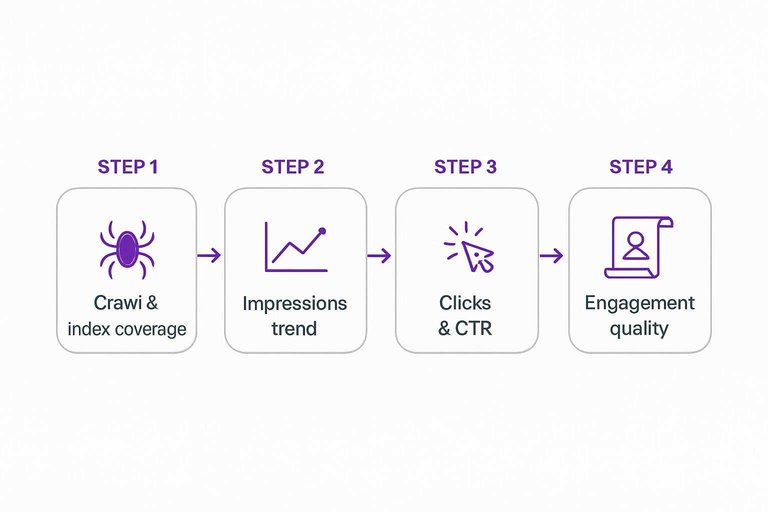
In the first 45 days, you’re not proving “SEO worked.” You’re checking whether your CMS changes removed friction for crawlers and users.
| Signal | Where to check | What “good” looks like | Common red flag |
|---|---|---|---|
| Crawl & index coverage | Search Console reports | Fewer excluded surprises | Spike in “discovered” only |
| Impressions trend | Search performance | More queries showing | Flat with new pages |
| Clicks & CTR | Search performance | CTR steady or rising | CTR drops on key pages |
| Engagement quality | Analytics events | Scrolls, depth, returns | Bounces on templates |
| Template error reduction | Logs, monitoring, GSC | Errors trending down | Repeated render failures |
Treat these like a systems check, not a scoreboard, then fix the bottleneck you see first.
To interpret coverage changes, use the Page indexing report.
Costs and Friction
CMS SEO work rarely fails on ideas. It fails on the effort you didn’t price in: coordination, risk, and upkeep inside the CMS.
Engineering time
Most CMS SEO changes touch more than a template. They trigger dev, QA, and release coordination that stretch a “small” sprint.
A typical cycle includes: engineering to implement, QA to validate edge cases, and a deployment window that avoids peak traffic. Risk shows up fast. One incorrect canonical, broken sitemap index, or cache mismatch can ripple across thousands of URLs. Dependencies add silent cost too. You may need design sign-off, analytics updates, security review, or platform approvals before anything ships.
Treat engineering time as a delivery system cost, not a single ticket.
Content operations
The CMS makes SEO scalable, but only if your ops cadence matches the scale.
- Populate fields for titles, descriptions, schema, and FAQs
- Update internal links when pages move or clusters change
- Refresh pages to match intent and product changes
- Audit templates for missing metadata and indexability
- Enforce governance to prevent regressions
If no one owns these loops, your best fixes decay quietly—use an SEO content streamlining checklist to keep the recurring work consistent.
Tooling overhead
SEO improvements drift without tools that keep you honest. Your CMS won’t warn you when editors override templates, plugins change output, or redirects pile up.
Expect a stack that includes crawling or auditing, log visibility or monitoring, and a workflow for issue triage. Add subscriptions, onboarding time, and training for writers and editors. Then budget for ongoing review. New features, new content types, and new teams will reintroduce old problems.
If the tooling is optional, the regression is inevitable.
Hidden CMS limits
CMS SEO roadblocks are rarely “SEO problems.” They’re platform constraints that turn simple requests into long threads.
- Rigid templates that block per-page overrides
- Plugin conflicts that change output unexpectedly
- Hosting constraints around caching and headers
- Multilingual quirks with hreflang and slugs
- Permission workflows that slow publishing and fixes
Identify these constraints early, or your timeline will be set by the CMS, not your plan.
Use the 45-Day Readout to Choose Your Next Move
- Classify what you changed (template, content model, URLs, performance, internal linking) and match it to the effort category you can sustain.
- Anchor on the baseline and segments you set up—compare like-for-like (templates, directories, page types) before you interpret movement.
- Treat 45-day signals as direction, not a verdict: validate with quality controls (indexing, canonicalization, tracking integrity) before scaling the pattern.
- Decide the next sprint using your decision criteria: double down where signals are clean and repeatable, and document CMS limits where progress is structurally blocked.
Turn CMS Changes Into Growth
Your 45-day breakdown makes it clear what moves the needle in CMS SEO—now the challenge is executing those changes and publishing consistently without adding friction.
Skribra generates and publishes SEO-optimized articles to WordPress with the metadata and formatting your CMS needs, so you can compound results faster—start with the 3-Day Free Trial.
Written by
Skribra
This article was crafted with AI-powered content generation. Skribra creates SEO-optimized articles that rank.
Share: