May 9, 2026
·
8 min read
Competitor keywords look wrong? Debug your inputs
A practical troubleshooter for when competitor keyword reports look off — run a fast triage checklist, validate true SERP-based competitors, audit seed keywords and filters, fix location/device mismatches, sanity-check live SERPs and features, and resolve URL mapping issues like canonicals, redirects, and indexability.

Your competitor keyword list says you’re losing to sites you’ve never heard of—or it’s missing the competitors you see every day in Google. That usually isn’t “the tool being wrong”; it’s an input or scope mismatch that quietly skews the output.
This troubleshooter helps you pinpoint where the distortion starts. You’ll learn how to define what “wrong” means, verify real SERP competitors, audit seed keywords and filter rules, align location/device settings, confirm intent and SERP features in live results, and catch URL mapping errors like canonicals and redirects.
Fast Triage Checklist
You don’t fix “wrong keywords” until you define what “wrong” means for your use case. Your goal is to separate bad inputs from bad expectations, fast.
Define “wrong” precisely
“Wrong” can mean five different failures, and each has a different fix. Write the failure in one line, like: “UK mobile shows US terms,” or “blog ranks, but intent is off.”
Common definitions that matter:
- Missing head terms you know you rank for
- Irrelevant intent, like “jobs” or “templates”
- Wrong geography, like US instead of AU
- Outdated SERP view, from last quarter’s results
- Brand bleed, where competitor brand terms dominate
- Mismatched competitor set, like marketplaces vs SaaS
Once you name the failure, you’ve already narrowed the root cause by half.
Capture a baseline sample
Pull a small, auditable set so you can compare before and after.
- Export 20 suspect keywords from the competitor report.
- Include ranking URL, position, volume, locale, and capture date.
- Add device type and SERP features shown, if available.
- Save screenshots or a CSV in a dated folder.
- Repeat the same export after each change.
Without a baseline, every “fix” becomes an argument instead of evidence.
Check tool scope
Most “wrong” competitor keywords are just mismatched scope. One toggle, like device or location, can flip the keyword set entirely.
Confirm these inputs:
- Database and keyword universe used
- Device, like desktop vs mobile
- Location granularity, like city vs country
- Language setting and hreflang handling
- Freshness window and last crawl date
Sampling, clickstream bias, and index lag still apply even with perfect settings. If you’re outside the tool’s coverage, you’re debugging a mirage.
Verify Competitor Selection
Your competitor keyword set looks “wrong” when your competitor list is wrong. A brand you fear in meetings can be irrelevant in the SERPs.
Treat competitors as “who ranks for my queries,” not “who sells something similar.”
SERP-based competitors
Start from rankings, because rankings define the battlefield. Your goal is overlap, not reputation.
- Pick 20–50 core queries tied to your revenue pages.
- Export the top-10 ranking URLs for each query.
- Roll URLs up to root domains and count overlaps.
- Keep domains with repeat appearances across your query set.
- Replace your list of “industry names” with these domains.
If a domain shows up across many queries, it’s a real rival, even if you’ve never heard of it.
For a tool-driven example of this overlap approach, see Ahrefs’ explanation of the Organic competitors report.
Exclude false rivals
Some sites rank for everything but convert for nothing. Keep them only if they block you on your core intents.
- Exclude directories and listicles with thin intent match.
- Exclude resellers and coupon partners you can’t out-position.
- Exclude forums and community threads with one-off rankings.
- Exclude news sites spiking on trends, not evergreen queries.
- Exclude UGC pages unless they consistently win your targets.
If they don’t steal your clicks repeatedly, they’re noise, not competition.
Handle subdomains and regions
Subdomains and country paths can quietly poison your comparisons. You need one clear rule before you trust any “gap” report.
For example, mixing /uk/ keywords with /us/ keywords makes “missed opportunities” look huge. They’re often just different markets.
Choose a canonical view, then enforce it everywhere. That’s how you stop cross-market keyword contamination.
Debug Input Keywords
Competitor keywords often look “wrong” because your seeds and filters are doing quiet damage. A single broad seed like “security” can flood the set with consumer, IT, and physical safety terms.
Seed quality audit
Your seed list defines the universe you’ll analyze, so mixed intent seeds create mixed results. Audit seeds before you blame the tool.
- Flag mixed intents in one seed
- Remove internal jargon outsiders never search
- Split broad heads into specific modifiers
- Cluster by job-to-be-done intent
- Keep one meaning per cluster
If your seeds contain three intents, your output will, too. For a broader framework, reference this SEO guide for keyword research.
Filter logic review
Filters are easy to over-trust, especially regex and topic categories. Prove the rules work on real rows.
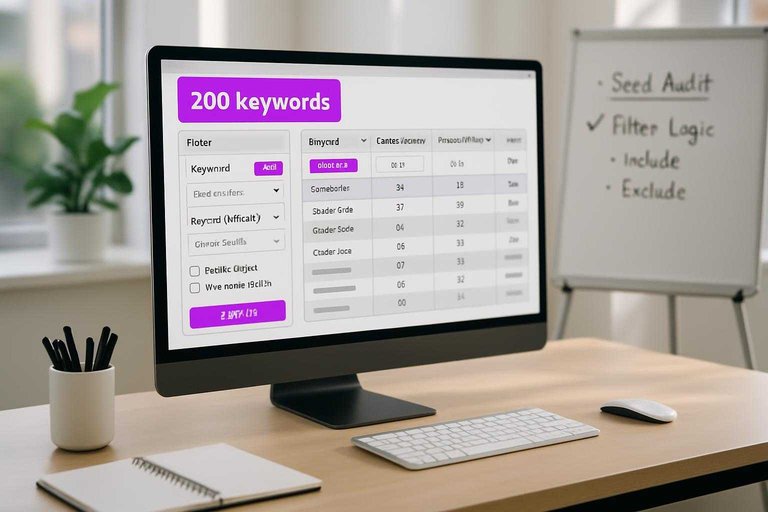
- Export a small sample, like 200 keywords.
- Apply includes and excludes, then count what survives.
- Spot-check edge cases, like plurals and misspellings.
- Test regex against known “should pass” terms.
- Re-run with one filter removed to find the culprit.
When one filter silently drops “money terms,” your whole view tilts.
Brand and entity rules
Brands, products, and people names behave like magnets in keyword data. Decide up front if “{Competitor} pricing” belongs with commercial intent, or in a separate brand bucket.
Build explicit allowlists and blocklists for brands, product lines, executives, and acronyms. Then document one rule: when brand terms stay mixed, and when they get split out.
If you don’t set the rule, your dataset will set it for you.
Location and Device Mismatches
Most “wrong competitor keywords” are just the wrong lens. Your tool is pulling a different country, city, or device mix than your real buyers.
| Symptom you see | Likely mismatch | Quick check | Fix |
|---|---|---|---|
| “Why are results in another language?” | Country / language | Compare SERP language | Set country + language |
| “Keywords feel irrelevant locally.” | City / proximity | Search from target ZIP | Use local grid tracking |
| “They rank on mobile, not desktop.” | Device | Compare mobile vs desktop | Split reporting by device |
| “Traffic estimates don’t match.” | Carrier / mobile context | Test on LTE vs Wi‑Fi | Track on real devices |
| “Competitors differ by neighborhood.” | Map pack / geo radius | Check map pack pins | Add multiple geo points |
If the geo and device don’t match reality, you’re not doing analysis. You’re doing astrology.
SERP Reality Check
Competitor keyword reports often look “wrong” because they blend live rankings with modelled guesses. A quick SERP reality check separates tool artifacts from real visibility and real intent shifts. Treat the SERP as the source of truth, not the export.
Live SERP sampling
Pick a small sample so you can move fast and stay honest.
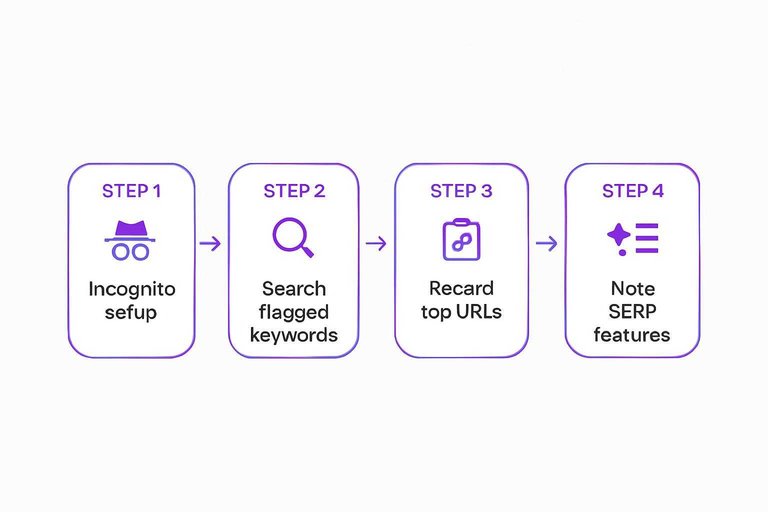
- Open incognito and set the correct location and language.
- Search 10–15 flagged keywords from the report.
- Record the top ranking URL for you and the competitor.
- Note SERP features and the visible intent type.
- Save screenshots or SERP links for later review.
If you can’t reproduce it live, it’s probably not a “competitor keyword.” (Google also notes that Search results might differ based on factors like location and device.)
Intent mismatch signals
A competitor can “rank” for a term while solving a different job than your page does. You’ll see it when the SERP rewards formats you don’t offer, like “best X” lists or “X vs Y” comparisons.
Common tells: a local pack dominates, the top results are templates, or guides win over product pages. That’s not a keyword gap. It’s an intent gap.
SERP feature capture
SERP features can hijack clicks and confuse rank trackers.
- AI overview answers the query without a click.
- People Also Ask expands long-tail coverage.
- Video carousel outranks traditional blue links.
- Shopping results replace commercial listings.
- Local pack wins “near me” intent.
When features dominate, tools often credit “ownership” to whoever appears anywhere, not who earns clicks—use resources to simplify SEO workflows to keep verification and tracking steps consistent.
URL Mapping Errors
Competitor keyword sets go sideways when the tool maps queries to the wrong URL. One bad canonical, redirect chain, or duplicate cluster can make a “product page” look like it ranks for random blog terms.
Canonical and redirects
Bad URL resolution is the fastest way to poison relevance. You’re checking whether the ranking URL is the canonical you think it is.
- Fetch the ranking URL and note the final URL after redirects.
- Inspect the canonical tag on the final HTML response.
- Trace any 301 chain and remove hops with inconsistent targets.
- Compare parameter variants and pick one canonical pattern.
- Re-check the tool’s “ranking URL” against the canonical target.
If the canonical and the tool disagree, your keyword map is already lying.
Duplicate and near-duplicate pages
Keyword tools often merge “similar enough” pages into one blob. Your job is to spot URL patterns that create fake breadth.
- Faceted filters generating indexable variants
- Pagination splitting one intent across many URLs
- Tag pages cannibalizing category coverage
- Sort parameters creating shallow duplicates
- Printer or AMP versions leaking keywords
Choose one page per intent, or you’ll optimize for a ghost cluster.
Indexability edge cases
Some URLs “rank” in tools while being blocked, noindexed, or effectively gone. That happens because many datasets lag, mix signals, or attribute queries to the last stable URL.
Check robots.txt blocks, meta robots noindex, and X-Robots-Tag headers. Verify hreflang doesn’t swap the URL you’re expecting. Look for soft-404 behavior, like thin pages returning 200 with “not found” copy.
Stabilize the URL first, then trust the keywords.
Fix the Inputs, Then Trust the Output
- Re-run the report only after you’ve locked competitor selection (SERP-based, region-appropriate, no false rivals) and cleaned your seed keywords, filters, and brand/entity rules.
- Align settings that silently change results—location, language, device, and search engine—then validate with a small live SERP sample.
- Confirm your URL mapping is accurate (canonicals, redirects, indexability, duplicates) so rankings and gaps attach to the right pages.
- Save the “known-good” configuration as a template, and baseline a 20–50 keyword sample each time you change tools, markets, or site architecture.
Frequently Asked Questions
- Why do competitor keyword tools show my competitors ranking for keywords that don’t match their content?
- Most often the tool is attributing rankings to the wrong URL, mixing subdomains, or pulling keywords from a different SERP feature (People Also Ask, images, local). Cross-check a handful of keywords in Google and confirm the exact ranking URL before trusting the list.
- How many competitors should I analyze when I want to find keywords of competitors?
- Start with 3 to 5 true organic competitors per topic cluster, then expand to 10 if you need broader coverage. Too many competitors usually introduces noise from directories, publishers, and marketplaces that don’t share your business model.
- What’s the fastest way to validate competitor keywords without manually checking hundreds of SERPs?
- Spot-check 20–30 keywords across head terms and long-tail, then compare against Google Search Console (Queries) for your site and a rank tracker like Ahrefs/SEMrush/Sistrix for consistency. If more than ~20% of the sample looks off, treat the full export as untrusted and re-run with tighter inputs.
- Can I find keywords of competitors for free, and how accurate are the results?
- Yes—use Google Keyword Planner, Search results + autocomplete, and limited free tiers of tools like Ahrefs/SEMrush, but the coverage is usually smaller and less fresh. Free methods are good for directional ideas, not reliable share-of-voice or full keyword gap analysis.
- How often should I refresh competitor keyword research to catch changes in rankings and intent?
- Most sites should refresh monthly for core pages and quarterly for the full keyword set. In volatile niches (news, SaaS, ecom promos), weekly tracking for top 50–200 keywords catches shifts early.
Turn Competitor Data Into Content
Once your competitor keyword inputs are clean, the next challenge is turning those insights into consistent pages that actually rank and match real SERP intent.
Skribra converts competitor keyword research into SEO-optimized articles with the right structure, metadata, and formatting—then publishes to WordPress automatically. Keep your pipeline moving with a 3-Day Free Trial.
Written by
Skribra
This article was crafted with AI-powered content generation. Skribra creates SEO-optimized articles that rank.
Share: