April 25, 2026
·
Updated July 28, 2026
·
11 min read
Create an SEO content brief with free AI tools
A step-by-step guide to creating an SEO content brief using free AI tools—define the target page, validate intent with SERP evidence, build complete topic coverage, draft an H1–H3 outline with outputs and internal links, and finish with on-page basics plus reusable prompts.


Your content brief says “write a blog post about X,” and the draft that comes back is generic, misaligned with intent, and impossible to optimize. The problem usually isn’t the writer—it’s that the brief didn’t translate SEO requirements into clear decisions.
In this guide, you’ll build a brief with proof from the SERP, a coverage plan that avoids gaps, and an outline that assigns outputs section by section. You’ll also leave with free AI prompts that generate structure, first drafts, and a clean editing pass.
Define the target page
Lock the one page you are briefing before you touch outlines or headings. Otherwise, you’ll write “helpful” content that ranks for the wrong query.
Write a single line like: “/blog/seo-content-brief-free-ai-tools → rank for ‘SEO content brief’ and drive email signups.”
Pick one keyword
Pick one primary query and one close variant, then ignore everything else for now.
- Type your topic into Google and capture Autocomplete phrasing.
- Open People Also Ask and note repeated wording patterns.
- Check related searches for near-synonyms and modifiers.
- Validate with Search Console queries if you have data.
- Choose one primary and one variant with the same intent.
If the variant changes intent, it’s a different page, not a “bonus keyword.”
Set intent and goal
Decide what the searcher is trying to do, then decide what you want them to do.
Intent: informational, commercial, transactional, or navigational.
Goal: the conversion action, like “start a trial” or “download the template.”
Page promise: one sentence, quoted, that you must deliver.
Example page promise: “You’ll leave with a one-page brief you can paste into Docs today.”
If you can’t write the promise cleanly, your page goal is still fuzzy.
List reader constraints
Constraints prevent scope creep when the research gets exciting.
- Specify audience level: beginner, intermediate, expert.
- Set region and language: US, UK, global English.
- Define brand voice: “direct, no hype.”
- List must-include points: tools, examples, template.
- List hard avoids: jargon, pricing claims, competitor comparisons.
Constraints are your guardrails when you’re tempted to write a second article.
Collect SERP evidence
You’re borrowing reality, not guessing. Pull patterns from the live SERP so your brief matches what Google is rewarding today.
For example, if three of the top five results are “templates,” you’re not writing an opinion essay.
Snapshot the SERP
Capture what ranks and how it’s presented, while it’s still current. Use a notes doc or sheet so you can compare results fast.
- Search in an incognito window, with location noted.
- Paste the top 10 URLs and label page type.
- Record SERP features: PAA, videos, snippets, images.
- Screenshot above-the-fold for layout and messaging.
- Note titles that repeat phrases like “free” or “template.”
When the SERP shifts, your screenshots become your receipts.
Map competitor angles
Ranking pages usually sell slightly different outcomes. Naming those angles shows you where the market is crowded.
- Lead with speed: “in 10 minutes” positioning
- Lead with tools: “free AI tools” promise
- Lead with templates: “copy-paste brief” hook
- Lead with process: “step-by-step workflow” framing
- Lead with proof: “real SERP example” credibility
If everyone promises the same win, your hook has to change the game.
Extract content patterns
Look for repeated blocks and depth signals across top results. Those repeats are often the baseline Google expects.
You’ll usually see sections like tool lists, brief templates, SERP-check steps, and examples of a finished brief. Watch for media patterns too. Screenshots of SERPs, downloadable templates, and checklists often show up when intent is practical.
Match the baseline, then add one asset competitors skipped.
Build topic coverage
You need full topic coverage before you write a single paragraph. Otherwise you’ll miss the “also” questions that steal clicks, like “Is this free?” or “Does it work for B2B?”
Your goal is a tight set of subtopics plus an entity checklist. That combo keeps your draft comprehensive without turning into a 4,000-word wander.
Harvest questions fast
Pull question signals straight from the SERP because they reflect real demand. Then cluster them so your outline matches how people think.
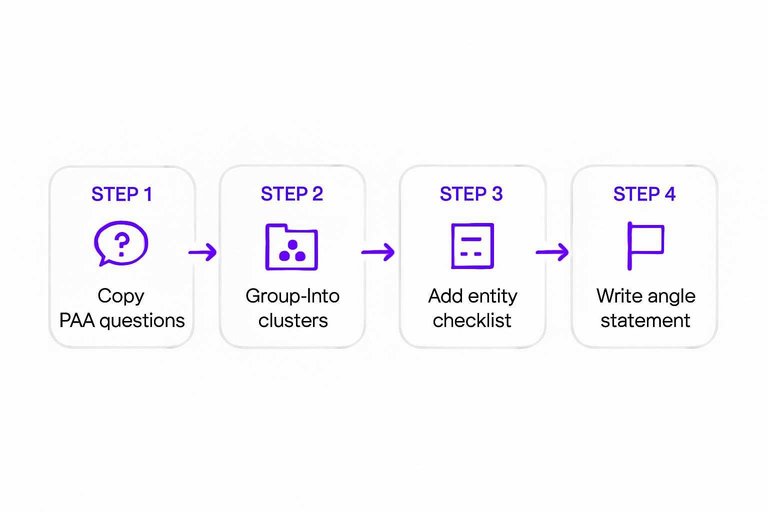
- Copy People Also Ask questions into a doc or sheet.
- Copy Related Searches and autocomplete variants from the bottom.
- Skim Reddit, Quora, and niche forums for repeated thread titles.
- Group items into 3–6 clusters by shared intent.
- Name each cluster as a section, using the exact phrasing.
When one cluster holds 8+ questions, it’s a section competitors usually under-build.
Add entity checklist
Entities help you prove relevance without keyword stuffing. Use free LLMs for ideas, then let the SERP decide what stays.
- Ask an LLM for entities tied to the query.
- Add tools, standards, and key definitions.
- Cross-check each item against top-ranking pages.
- Keep only entities with visible SERP evidence.
- Note missing entities competitors ignore.
If you can’t point to SERP proof, it’s opinion, not coverage.
Write the angle statement
Your brief needs a single promise that guides every section. Aim for an angle competitors dodge, like “free tools only” or “no Chrome extensions.”
Example: “This brief shows how to build complete topic coverage using only free SERP data and free AI tools. You’ll leave with clustered subtopics, a SERP-backed entity checklist, and an outline that answers ‘People Also Ask’ without fluff.”
Draft the SEO outline
You have topic clusters. Now you need a structure a writer can actually draft from.
Think “H2 = one user job.” For example: “Pick a free AI tool stack” or “Build an outline from clusters.”
Create H1–H3 map
Start with one clear promise in the H1. Then turn each cluster into an H2 that answers one question.
- Set H1: Create an SEO content brief with free AI tools
- Draft 6–10 H2s from clusters: intent, tools, process, examples, QA
- Add H3s where choices appear: tool options, templates, tradeoffs
- Add H3s where steps matter: prompts, checks, handoff flow
- Add H3s where proof helps: screenshots, sample brief, before/after
If an H2 can’t be finished in one sitting, split it into two jobs.
Assign section outputs
Every heading needs an output, not just information. Write the output as a deliverable, like “copy this prompt” or “choose from these options.”
Example outputs you can assign per heading:
- Tools overview → “Pick your free stack” decision
- Keyword + intent → “Primary keyword + SERP intent label” you can paste
- Topic cluster → “Cluster table” you can reuse later
- Outline + headings → “H1–H3 map” ready for a doc
- Proof points → “3 sources or examples” to include in draft
- Handoff → “Writer checklist” for drafting and QA
When outputs are explicit, your brief becomes a spec, not a suggestion.
Add internal link targets
Internal links should complete a job, not just boost a page. Pair each link with an anchor idea and the task it supports.
- Keyword research guide — anchor: “free keyword research” — job: pick target terms
- Search intent breakdown — anchor: “match search intent” — job: choose format
- Content brief template — anchor: “content brief template” — job: copy structure
- Topic cluster tutorial — anchor: “build topic clusters” — job: expand coverage
- On-page SEO checklist — anchor: “on-page checklist” — job: publish-ready QA
If you can’t name the user job, the link is filler.
Specify on-page basics
You need on-page basics that remove guesswork and stop “I wasn’t sure” edits later.
Use this table as the writer’s exact checklist, then paste it into your brief.
| On-page item | Requirement | Target / Example | Notes |
|---|---|---|---|
| Primary keyword | Use in H1 + first 100 words | “SEO content brief” | Exact phrase once |
| Title tag | 50–60 chars, lead keyword | Create an SEO Content Brief (Free AI Tools) | No pipes |
| Meta description | 145–160 chars, benefit-led | Build an SEO brief fast with free AI tools and a clear on-page checklist. | Add one CTA |
| URL slug | 4–8 words, lowercase | seo-content-brief-free-ai-tools | No stopwords |
| H2 structure | 5–7 H2s, question-led | What to include in a brief? | One intent per H2 |
| Internal links | 2–4 links, descriptive anchors | ultimate SEO content checklist | No “click here” |
| External links | 1–2 authoritative sources | Google Search Central | Avoid competitors |
| Images | 1–3, each with alt text | Alt: “SEO brief template” | Compress under 200KB |
| Schema | Article + FAQ if eligible | FAQ: 3 questions | Only true FAQs |
| CTA placement | 1 mid, 1 end | “Download the template” | One action only |
Lock these in before drafting.
Then you can write fast without reopening decisions.
Create free AI prompts
Free AI is only useful when your prompts force structure, evidence, and limits. Otherwise you get confident filler like “boost rankings overnight.” Your goal is copy-paste prompts that make the model show its work and stay inside your brief. If you want more context on what to delegate (and what not to) as these tools evolve, see how AI transforms SEO content creation.
Prompt for structure
Use this when you want a clean outline that matches your H2 plan and doesn’t invent facts.
-
Paste this prompt into your AI tool:
-
PROMPT — Outline generator (copy-paste):
You are an SEO content strategist.
Topic: [TOPIC]
Primary keyword: [PRIMARY KEYWORD]
Audience: [AUDIENCE]
Angle: [ANGLE / POV]
Constraints:- No unsupported claims.
- If a claim needs data, mark it as [NEEDS SOURCE].
- Prefer concrete examples like “e.g., a plumber in Austin.”
- Use plain English, no hype.
Required H2s (use exactly, in this order):
- [H2 #1]
- [H2 #2]
- [H2 #3]
- [H2 #4]
Output format (follow exactly):
- H1
- For each H2:
- 3–5 H3s
- For each H3: 2–3 bullet talking points
- 1 “proof plan” bullet listing what evidence is needed
- FAQs:
- 6–8 questions people ask
- Include 1–2 “comparison” questions
- “Claims to verify” list with any [NEEDS SOURCE] items
Do not add new H2s.
Do not write paragraphs. -
Replace the bracketed fields, then run it.
-
If it adds claims, rerun and ask: “Remove anything marked [NEEDS SOURCE].”
A strict outline is your guardrail against plausible nonsense.
Prompt for section drafts
Use this for any section draft, so every paragraph lands your points and proves them.
-
Paste this prompt into your AI tool:
-
PROMPT — Section draft template (copy-paste):
You are writing one section of an SEO article.
Article title: [TITLE]
Section heading (H2): [H2]
Search intent: [INFORMATIONAL / COMMERCIAL / TASK]
Audience: [AUDIENCE]
Voice: [VOICE NOTES, e.g., “direct, practical, slightly opinionated”]Angle to enforce:
- [ONE SENTENCE ANGLE]
Must include points (do not skip):
- [POINT 1]
- [POINT 2]
- [POINT 3]
Required examples:
- Include 1 specific scenario: [EXAMPLE SEED]
- Include 1 mini “bad vs good” contrast.
Evidence rules:
- If you state a fact that needs a source, tag it [NEEDS SOURCE].
- If you are unsure, say “I’m not certain” and tag [NEEDS SOURCE].
- Do not cite fake studies or invented numbers.
Output requirements:
- 250–400 words.
- Short paragraphs, max 3 sentences each.
- Include one short checklist (3–5 bullets).
Self-check pass (append at end):
- List each “Must include point” and confirm it appears.
- List every [NEEDS SOURCE] claim.
- Suggest one missing entity or term to add.
Write the draft now.
-
Swap in your points and example seed, then generate.
-
Keep the self-check in your doc until you verify sources.
The self-check is the part that stops drift.
Prompt for editing pass
Use this after you have a draft and want it tighter, safer, and more SEO-complete. It should catch the lines that sound true but can’t be proven.
PROMPT — Editing and verification pass (copy-paste):
You are an expert editor for SEO content.
Input draft:
[PASTE DRAFT]
Editing goals (in order):
- Tighten clarity and remove fluff.
- Enforce this voice: [VOICE NOTES].
- Add missing entities and specifics a reader expects for this topic.
- Flag unverifiable statements and risky claims.
Rules:
- Keep meaning, but reduce wordiness.
- Max 20 words per sentence when possible.
- Prefer concrete nouns and active verbs.
- Do not add new statistics.
- Any claim needing proof must be tagged [VERIFY].
- If a claim is likely wrong, tag [POSSIBLY WRONG].
Output format:
A) Revised draft.
B) “Entities to consider adding” list (5–10 items).
C) “Verification list” with each [VERIFY] item and what source is needed.
Return only A, B, and C.
Run edits, then decide which [VERIFY] lines deserve real sources before publishing.
Turn the Brief Into a Repeatable Workflow
- Start with one keyword, one intent, and clear reader constraints so the page has a single job.
- Validate the job in the SERP—capture competitor angles and patterns, then translate them into required sections.
- Lock topic coverage with questions, entities, and a one-sentence angle statement, then build your H1–H3 map with defined outputs and internal links.
- Finish by filling the on-page basics table and running the free AI prompts for structure, section drafts, and an editing pass before publishing.
Frequently Asked Questions
- Are free SEO AI tools good enough to create a complete content brief in 2026?
- Usually yes for research, outlines, and drafting prompts, as long as you validate claims against the live SERP and your own analytics. Paid tools mainly add scale, automation, and deeper competitive datasets.
- What are the best free SEO AI tools for content briefs (ChatGPT alternatives included)?
- Common free options include Google Gemini, Microsoft Copilot, Perplexity, and the free tiers of ChatGPT and Claude for synthesis and drafting. Pair them with Google Search, Google Trends, and Google Search Console for real query and performance data.
- How do I check if a free AI SEO tool is making up facts in my content brief?
- Require source URLs for any statistics or claims, then spot-check them manually in the cited pages. For query and performance details, rely on Google Search Console exports rather than AI-generated numbers.
- Can I use free SEO AI tools instead of paid SEO platforms like Ahrefs or Semrush?
- You can replace many briefing tasks with free tools, but you’ll miss robust backlink data, keyword difficulty at scale, and competitive gap reports. Most teams use free AI tools for drafting and reasoning, then add a paid platform when they need repeatable analysis across many pages.
- How long does it take to build a content brief using free SEO AI tools?
- A solid brief for one page usually takes 60 to 120 minutes when you’re validating SERP patterns and documenting requirements. Once you have a reusable template and prompt set, many briefs drop to 30 to 60 minutes.
Automate Your SEO Briefs
Free SEO AI tools can take you far, but turning SERP evidence and prompts into consistent, publish-ready articles still takes real execution time.
Skribra turns your brief inputs into daily, SEO-optimized articles with WordPress publishing, images, and on-page essentials built in—start with the 3-Day Free Trial.
Written by
Skribra
This article was crafted with AI-powered content generation. Skribra creates SEO-optimized articles that rank.
Share: