January 15, 2026
·
19 min read
Why Automate Your Blog?
When I first started automating my blog, I can honestly say I didn’t expect to feel that much relief—it practically caught me off guard. Suddenly, all those hours lost to mindless busywork were just… available. I’ve run everything from one-person projects to tiny content teams, and automation always landed more in the “do this or burn out” category than anything optional. The reality: boring stuff creeps into every process—formatting each post for every channel, chasing people for edits, scrambling to scrape up research. Automation peeled a lot of that junk right off my desk, and my pace (and, let’s be real, mood) improved overnight.
Unlock Hidden Potential
The first time I ran a batch through a scheduler instead of manually queuing posts, the wasted time was borderline embarrassing. Whole afternoons suddenly opened up, which I dumped straight into developing better ideas—and, for once, chatting with my readers instead of dealing with admin. These days, I glue things together with tools like Zapier for social sharing, Notion for smooth handoffs, and even a couple AI scrapers to gather some basic research grunt work. After that shift, my attention went from babysitting tedious tasks to actually planning and writing what matters. I know it sounds like everyone says automation “unlocks growth,” but seriously—it frees up your brain for the stuff that moves the needle.
Common Content Bottlenecks
It’s always the tiny clogs that kill a content workflow—never the big flashy problems. Topic research would drag on and on, keyword mining was a slog, and formatting reviews never ended. I can’t count how many times I burned out trying to keep a just-in-time content schedule, terrified that one misstep would blow a deadline. The only answer was to get brutally honest about which pieces wore me down and stitch in automations where it hurt the most—stuff like Trello boards for planning, automated grammar passes, and Google Sheets-backed reminders. I just knocked out the friction, bit by bit. Suddenly, posts started going live like clockwork, and I could actually breathe. Weirdly enough, that was the sign I’d finally set things up right.
Real Success Stories
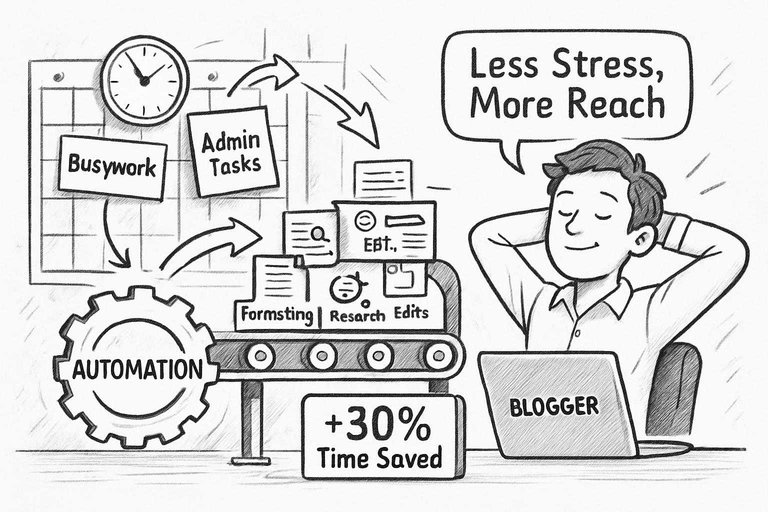
I’ve seen entire companies change course once somebody finally bought into automation. One solo finance blogger I know said that connecting BuzzSumo and Buffer let him quit the hamster wheel—he could queue months of content and get back to the business he actually liked. On a bigger scale, an agency I worked with chopped at least a third off launch timelines by wiring approvals through Slack and Google Docs. There’s nothing heroic about the drudge work that vanishes, but the benefits stick out: less stress, more reach, and—don’t laugh—workdays that end when they’re supposed to.
Mapping Your Content Workflow
When I sat down to map out every step in my blog pipeline, I ended up buried in sticky notes—honestly, it was a mess. But forcing myself to look at how things actually worked (not how I wished they worked) was the only way to make smart changes. Skip the details here—trust me, I’ve tried—and you’ll just end up with automations that don’t fit, creating a whole new mess to deal with. Learned that one the tough way.
Start With the End in Mind
Every time I rolled out a tool that made things harder or slower, it was because I didn’t know what done was supposed to look like.
Blindly automating things is pointless and, frankly, a waste. I needed clarity on what ‘good’ meant for my team: reliable quality, fewer steps passed between people, and less waiting for things to move. So now I jot down each step—topic, draft, review, visuals, polish, publish—and flag the ones that stall us. Only then does automation earn its keep. Do it backwards and you’ll just waste more time, plain and simple.
Breaking Down the Blog Process
Nobody’s editorial process runs smooth start to finish; mine sure doesn’t. There are overlaps, last-minute rewrites, the odd fire drill. But mapping out every phase—brainstorming, outlining, drafting, editing, visuals, SEO, posting—made it clear where we were getting bogged down and who owned what. Last year, after drawing this out, editing stuck out like a sore thumb: it was taking twice as long as it needed to. Running grammar passes automatically and reviewing drafts at the same time chipped weeks off our schedule. If you’re seeing your workflow as just ‘writing a post,’ you’re definitely missing the real opportunity to fix things.
Pinpoint Automation Hotspots
Here’s the truth: you can’t automate away all the annoying bits. I tried and hit a brick wall every single time I took it too far. The smart play is to target the stuff that’s dull, repetitive, and easy to mess up—think keyword grouping, squishing big images, scheduling posts. But when it comes to finessing headlines or nailing a post’s voice, nothing beats a person. A common misconception is that automation always leads to more efficiency, but too much can actually slow you down or quietly introduce new errors if deployed recklessly. I underline steps that make me sigh (resizing images, copying metadata, chasing broken links) and then test one automation at a time. It becomes pretty clear, pretty quickly, what actually helps and what just layers on more busywork.
Choosing Smart Tools
Picking automation tools for blogging isn’t as straightforward as grabbing the top-rated app from the latest roundup article. You’d think someone would finally make a tool that does everything, but all-in-ones have burned hours I didn’t have—half the time they just stack on more pointless screens. Over the years, I’ve had to remind myself to quit chasing the “Swiss army knife” and just get something that fits where I actually work: brainstorming, writing, editing, hitting publish. If you’re looking for ideas on which solutions cut through the clutter, this guide on top tools to supercharge content workflows offers a great starting point. When I stick to solving one actual pain-in-the-neck problem at a time, my workflow noticeably snaps into shape and my dashboard stress level drops.
Essential Automation Software
Let’s be blunt: there’s way too much shiny AI on the market, and most of it ends up gathering dust. I hang onto what really chips away at my to-dos. ChatGPT and, if I’m restless, Copy.ai usually get me past blank-page dread or make my old topics less boring. Jasper or Rytr can slap together a draft in no time, though their tone is still dead obvious without a solid rewrite. For editing, Hermann and Grammarly are open all day—one for sense, one for style. Publishing mostly lives in WordPress, and Buffer? I’ve dodged dozens of missed posts thanks to it this year. I reached my limit with manual link pasting and finally wired up a Zapier flow—every published piece moves to socials as soon as it’s live. Here’s the thing: too many tools and nothing gets easier. My rule is pretty cut-throat—a tool has to prove it pulls its weight.
No-Code vs. Code: What’s Best?
I wasted months convinced I needed to learn Python just to automate basic stuff. Turns out, nobody’s got patience for endless Stack Overflow threads just to get a Google Doc into WordPress. No-code platforms like Zapier, Make, and Pabbly cover 90% of my needs. That Google Docs-to-WordPress handoff? Ten minutes with Zapier, honestly. Sure, strange formatting or edge cases break it, and then I’ll roll up my sleeves for a quick script if I have to. But most days, I trust the visual tools and skip the headache. Coding for routine automation? I barely bother now.
Zapier, Make & Beyond
The day I ditched my ten-spreadsheet mess and started with Zapier’s prebuilt templates was basically a holiday. I set up a simple automation so my editor stops pinging me for new drafts—Slack just lets him know when Google Docs updates. If you’re willing to go a bit deeper, Make lets you string more steps together—I once needed to compress images automatically and Make actually handled it, to my surprise. Automate.io and Pabbly are there if you want a different flavor, but honestly, Zapier’s user forums have already bailed me out more times than I can count. A couple of hours spent building flows freed me from clipboard hell, and now I mostly show up to do the work only humans can do. For more about how blog automation can streamline your workflow and improve efficiency, check out this overview of why blog automation is important.
Step-by-Step Automation Playbook
A truly automated blog isn’t just for tech geeks. Honestly, it’s the main reason I haven’t run screaming from content management after three different teams and way too many late nights. Anytime I slashed a repetitive task (like endless topic brainstorms or the nightmare of handoffs and image uploads), I bought back time—and sanity. If you’re looking to level up your systems, it’s worth exploring essential resources for effortless content automation to jumpstart your journey. Here’s the not-so-magical secret: automate the slowest part first, and don’t touch the shiny stuff until your foundation works.
Automated Topic Generation
Coming up with blog topics almost broke me, and that isn’t an exaggeration. Now, keyword-driven tools do the heavy lifting—SEMrush keeps the trending topics steady, while a simple AI script pipes headline ideas into a Sheet that stays glued to my to-do list. It’s far from perfect; some days I get more offbeat than gold, but I haven’t had a late-night topic crisis since setting up this circuit.
Content Drafts on Autopilot
The first time I watched an AI tool fill in a draft for me, I rolled my eyes. Then I realized starting with a rough outline beats stalling at a blank doc. My flow is simple: mark a topic as “approved” and the AI fills stuff out, Slack notifies me when it’s ready. Despite what many believe, relying on AI for drafts doesn’t kill creativity; in fact, it can actually make it easier to get your unique perspective on the page faster. I’m still rewriting entire sections most weeks, but it’s way easier to fix than to start cold. Just remember, the work is still yours to polish—robots don’t know your inside jokes or exactly how you’d say things.
Image Sourcing Magic
Manually searching for stock photos is one of my least favorite chores. Connect an image API to Make, though, and you’ll get three solid visual options any time you open a draft, queued up for sign-off. I once had to approve images for ten blog posts—what used to wipe out half a day took me less than an hour. You’ll still run into the occasional dud, but it beats scrolling hundreds of thumbnails.
Effortless Editing & Optimization
I dragged my feet on using automated editors, but I don’t argue with time saved. Now every draft gets spooled through Grammarly and SurferSEO without me doing a thing—the automation kicks off the second a file hits the review folder. Instant feedback means my real editing energy goes into style, not chasing typos or basic SEO misses. I still spot-check everything, but the busywork is gone.
Streamlined Scheduling & Publishing
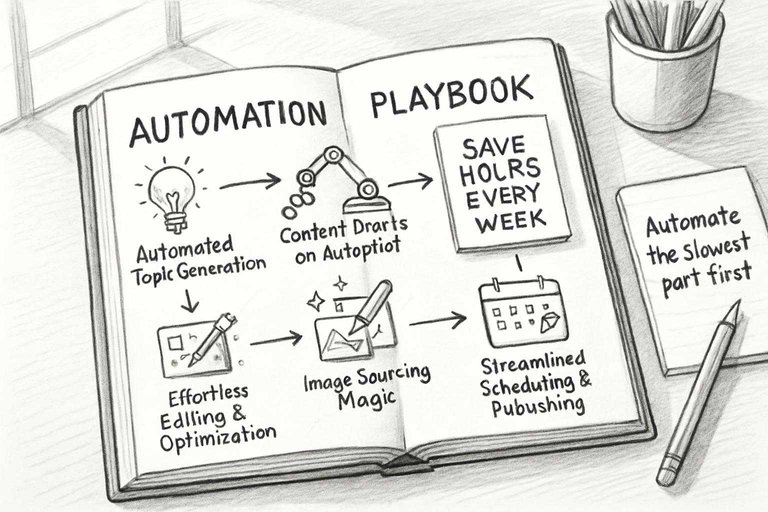
Publishing bottlenecks nearly derailed my calendar—nothing like a backlog of half-ready posts haunting your dashboard. Buffer and CoSchedule plugged right into my CMS, so anything marked finished pops right onto my calendar and publishes even if I’m not staring at the screen. The initial setup isn’t the fun part, but now things roll even when I’m logged off or on vacation. It finally feels like the blog is running itself, at least a little.
Quality Control Without Headaches
There’s honestly nothing like scaling a content pipeline to teach you how fast errors compound. The early days were just a whirlwind of headaches. But here’s the thing—quality control doesn’t have to be an endless grind of checklists and late-night anxiety. Once I figured out a workflow that didn’t clash with the way my team naturally operated, the whole process just got lighter. I started spotting issues before they ballooned, kept our tone on track, and actually had the bandwidth to make things better—instead of fighting fires all week. No silver bullets here. Honestly, if someone tells you there is, they’re selling something. But these strategies kept us steady even when our content volume doubled overnight.
Catch Errors Before They Happen
If you think you can catch every typo yourself, you’re probably dreaming. I learned to stop trusting my own eyes, let alone the rest of the team’s—stuff slips through. Automated tools like Grammarly and LanguageTool ended up saving us a stupid amount of time. We’d run bulk checks across everything before hitting publish. I even coded in those words our team always botched—looking at you, “complementary” versus “complimentary.” There was even a week where a plagiarism checker saved us from nearly posting a chunk that, somehow, was almost word-for-word from a competitor. These systems still let things slip, especially if you put total faith in them. But with this guardrail up, I could stop wasting my energy on typos and focus on whether the draft actually made sense.
Maintain Brand Voice
I’ll just say it: letting an unchecked AI draft go straight to the blog is a recipe for mediocrity. I’ve been there, and it only takes one awkward headline to realize nobody actually wants generic copy. So now, even with all this automation in the mix, I treat good templates like gold. That’s templates for intros, must-use phrases, even the sentence length we want. I got so granular with AI prompts that, if you just told ChatGPT to knock out a post, it came out bland. Feed in a winning post and some specifics, and suddenly the new drafts have actual personality. None of this matters, though, if a real person never looks at the draft. I make sure we have regular review slots—yes, scheduled, on purpose—to catch anything that’s off. If there’s a post that feels robotic, it gets flagged. No fancy system will save you if you let your standards drop while scaling.
Feedback Loops That Work
With five people chopping through twenty posts a week, feedback just got lost. We’d end up nitpicking the same issues week after week. So I forced structure on everyone: review steps live in Trello now, with drafts flagged and edits checklist’d directly in the board. Slack drags the right person in automatically, so no more guessing who needs to weigh in. I still scan for neglected drafts every week—somehow, something always sneaks by. Revisiting old posts as standards shift is built in too. The real win here? Actually seeing less email clutter and fewer pointless feedback circles. It isn’t pretty, but it moves things forward and keeps the team from draining themselves.
Pitfalls and Pro Hacks
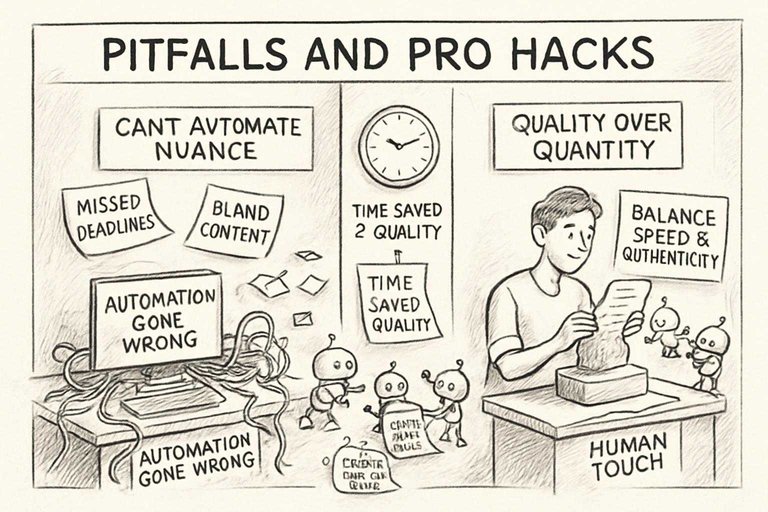
Automation is great—until it runs face-first into the need for actual quality work. I’ve spent more nights than I’d like to admit wrangling automation promises that just didn’t pan out. Tech saves hours, no question. But you quickly find out what should be automated and what can’t be on autopilot if you want your content to actually stand out. Here’s what I figured out after plenty of mess-ups—and, yes, some wins—just trying to keep teams on track as everything scales up.
What Can’t You Automate?
Honestly, automating outlines and headlines barely feels like work now—I cranked out more headline drafts than I could ever use. But automation falls flat when you try to have it handle anything that needs nuance or empathy. Letting a bot draft a post on a sensitive subject? Don’t. One time, an AI churned out a clean, totally tone-deaf piece on layoffs and skipped the human side entirely. That’s when I cut off automation for anything but the formulaic stuff: lists, canned schedules, anything that’s just structure. The minute you need research, a strong opinion, or real insight, you need a human touch—mine or someone from the team who actually knows the turf. Bots free up our time, but they can’t replicate what brings people back to your content. If you’re weighing the pros and cons of blog automation for your workflow, it’s worth reviewing this guide on the advantages and disadvantages of auto blogging.
Balance Speed and Authenticity
The fix? Block out a chunk of time every week to throw in something personal: stories from my projects, a stat nobody else has, anything real.
I’ve made the mistake of prioritizing volume—just blasting out content with bulk edits—and the results were as bland as you’d expect. Letting the system toss in keywords or generate summaries is fine, but you can spot a soulless paragraph from a mile away. Sometimes just a single example turns a dry post around. I don’t hand articles over to the bots and walk away; instead, AI drafts are just rough clay, and the team or I sculpt them into something you’d actually want to read. That extra effort is always a pain, but it’s why people reply to our stuff.
Scaling Up, Staying Sane
Trying to scale up without process is just asking for things to fly off the rails. I’ve lost posts, missed deadlines, and spent hours tracking feedback across a dozen email chains. The only thing that ever put a lid on the chaos was nailing down a routine—Airtable for keeping posts straight, Google Docs for the real work, Zapier pushing things live. Every month, I make myself check random published posts for errors—somehow, they still slip through. Contrary to popular belief, simply adding more tools or automation doesn’t guarantee smoother scaling; without consistent hands-on oversight, those tools can just amplify chaos. The time saved with automation isn’t a convenience, it’s the only way to train new writers or refresh busted systems when scaling crushes your old way of working. The whole setup only works as long as someone actually drives it. Take your hand off the wheel and things get messy, fast.
Fresh Content, Less Stress
Listen, if you’ve run blogs for any real stretch of time, you know the grind—cranking out new posts, always feeling like you’re behind, and losing entire evenings to manual edits. Early on, I obsessed over everything: fiddling with formatting, triple-checking the same headline, scheduling posts at weird, inconvenient times. It’s exhausting. Automation saved me, but not all at once. At first, it was just Buffer and a couple Zapier zaps; suddenly, I could walk the dog without worrying about hitting ‘publish’ from my phone. Half the stress was just gone, overnight. Automation made writing feel normal again—less firefighting, more steady progress.
And just to be clear, getting automation dialed in doesn’t mean you’re phoning in quality. It means you focus your energy where it counts and actually get to enjoy writing again, instead of grinding yourself into dust.
Kaizen Your Workflow
Honestly, I’ve wasted too many Saturdays chasing the perfect automation flow—only to realize I’d made a Rube Goldberg machine that nobody needed. It never works out as smoothly as you hope. Turns out, minor monthly tweaks do way more than overhauls. For example, I noticed my roundup posts had bounce rates that were kind of embarrassing. I checked the analytics, dropped the junk sources, rewired my editorial queue, and—bam—traffic started sticking around, and I was editing half as much as before. Most people ignore these small signals. That’s a mistake.
Grammar checks? Those can betray you, too. Wildly enough, my fancy spellchecker once mangled bullet points in automated posts for weeks until I realized my template was the culprit. Just switching the structure and the problem vanished. Now I spend a little time each month reviewing things—not a big audit, just enough to catch issues before they balloon. Automation becomes less likely to crater on you, and your sanity stays mostly intact, even when the rest of the industry is losing its mind.
Custom Templates for Every Niche
Let me be blunt. Generic templates? Nobody cares about those, and they’re killing your results. I watched a travel blog tank because I used the same stock template for every post. But a single custom template—built just for travel itineraries—shot user engagement through the roof. Sometimes you just need evidence before it sticks.
So now, every time I spot a post that actually drives comments or sales, I reverse-engineer it. I map out what worked—layout, voice, even how the images land. Then I make templates that mimic those patterns: one for reviews, one for news, sometimes another for teachable content. Platforms like WordPress and Ghost make storing and assigning templates easy, so I’m not arguing with new writers about formatting. And, honestly, it cuts way down on clean-up after the fact. More time building, less time fixing.
Beyond Blogging: Repurposing Power
I was way too slow to realize my blog shouldn’t just stop at the post. But the big wakeup call was completely missing a newsletter send—not once, but twice. That stings. So, I rigged up my automations to scrape highlights from new posts, drop them into a Mailchimp draft, and even schedule Twitter threads. All off the same source material. No more manual copy-paste marathons.
The difference is obvious. I look like I’m everywhere (newsletter, socials, whatever), but I’m not chained to my desk any extra hours. Stuff like Make.com and Zapier did most of the heavy lifting—connecting my blog to wherever my audience is. And freeing up those hours? That’s how you finally get time for actual improvements instead of just dog-paddling to keep up.
Written by
Skribra
This article was crafted with AI-powered content generation. Skribra creates SEO-optimized articles that rank.
Share: