March 16, 2026
·
8 min read
Fix on-page SEO issues: 12-check triage
A 12-check on-page SEO triage checklist to quickly diagnose and fix underperforming pages—baseline tracking, indexing/canonical validation, intent and rendering checks, plus title/meta/heading rewrites and thin-content gap fills without bloat.

Your page can be “optimized” and still lose—because one invisible blocker (noindex, bad canonical, broken rendering) can nullify every tweak you make.
This checklist helps you triage on-page SEO like a repair job: pick the right pages, capture baselines, then run fast failure checks before rewriting titles, meta descriptions, and headings. You’ll also spot thin-content gaps and add depth safely, so fixes translate into crawlability, better snippets, and rankings you can actually measure.
Triage Setup
Triage is where you decide what you’re fixing, and how you’ll prove it worked. Grab a small, representative URL set and lock in “before” metrics, like you’re creating a rollback point.
Pick broken pages
Start with a small batch so you can isolate cause and effect. Aim for pages where you can say, “This used to work,” or “This should work but doesn’t.”
- Select 2–5 top-traffic URLs
- Select 2–5 top-converting URLs
- Select 2–5 recently edited URLs
- Select 2–5 pages with ranking drops
- Select 2–5 pages with indexing issues
If you can’t name why each URL is in the set, you’ll chase noise.
Record baselines
Capture baselines so every fix has a measurable delta.
| URL | Query / page | Impr / clicks | Index / speed |
|---|---|---|---|
| /example-a | “primary keyword” | 12k / 340 | Indexed / 72 |
| /example-b | “brand + product” | 4k / 90 | Not indexed / 61 |
| /example-c | “category term” | 25k / 510 | Indexed / 48 |
| /example-d | “problem query” | 1.2k / 12 | Crawled / 83 |
When results move, you’ll know if you fixed pages or just changed the weather.
Confirm constraints
Constraints decide what’s possible this week, not what’s theoretically correct. Write down who owns what, like “Marketing owns titles,” or “Engineering owns canonicals,” before you touch anything.
That’s the difference between a triage plan and a wishlist.
Fast Failure Signals
Fast failures are the issues that nuke rankings overnight. You’re hunting anything that stops indexing, splits signals, or fails intent.
Example: a page “works for users” but ships a hidden noindex. That’s the line that gets crossed.
If you need a broader framework to audit these issues end-to-end, follow this technical SEO troubleshooting guide alongside the checks below.
Indexing blockers
Indexing dies when Google can’t fetch, render, or is told not to index. Check the page like a crawler, not like a human.
- Confirm no
noindexin meta robots andX-Robots-Tag. - Verify robots.txt doesn’t disallow the URL or its key resources.
- Test for password walls, geo blocks, or consent gates.
- Check HTTP status for 4xx/5xx, including canonical target.
- Compare live fetch vs browser to catch edge caching issues.
Fix the blocker first. Content changes won’t matter until the page can be indexed.
For reference, review Google’s robots meta tags specifications to confirm which directives are supported and how they’re interpreted.
Canonical conflicts
Canonical mistakes don’t always deindex you. They often just move credit somewhere else.
- Ensure a self-referencing canonical exists on the indexable version.
- Check for cross-canonicals pointing to a different page or template.
- Audit parameter URLs canonically pointing to the wrong clean URL.
- Confirm HTTP/HTTPS, trailing slash, and www rules match canonicals.
- Validate canonicals return 200 and aren’t redirected.
If canonicals disagree with internal links, Google picks a side. You might not like it.
Intent mismatch
A page can be “optimized” and still fail because it answers the wrong question. Match the query’s job-to-be-done, then make the answer obvious.
If the SERP is listicles and you ship a product page, you’re fighting format. If your primary answer shows up halfway down, you’re bleeding clicks and trust. Fix the first-screen promise, or you’ll keep ranking for the wrong terms.
Rendering problems
Rendering issues hide content from crawlers or users. You want the important stuff in the initial render.
- Hide primary content behind client-side JS
- Lazy-load headings or body text
- Block CSS/JS resources in robots.txt
- Shift hero content with CLS jumps
If your main content isn’t stable and visible fast, you’re optimizing a ghost.
Title Tag Breaks
Title tags can quietly kill clicks, even when your content is strong. A title like “Home | ACME” tells Google nothing, and tells users less.
Common failure patterns
You’re hunting for titles that either hide the topic or trip duplication signals. These usually show up on your money pages first.
- Missing or empty title tags
- Duplicate titles across templates
- Truncated titles in SERPs
- Keyword-stuffed, unreadable phrases
- Brand-first titles that bury topic
If you see duplicates at scale, it’s a templating problem, not a writing problem.
Rewrite checklist
Write titles the way a decisive searcher scans. Keep it human, but make the topic unmissable.
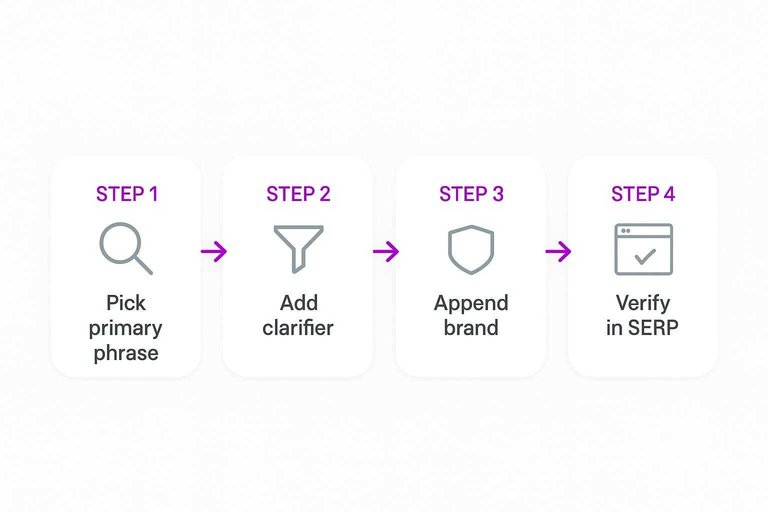
- Pick one primary phrase that matches the query.
- Add one clarifier that narrows intent or audience.
- Append the brand only if it earns trust.
- Keep every critical page title unique.
- Align wording with the H1 and on-page promise.
When the title and H1 disagree, Google rewrites, and you lose control.
Verify in SERP
A rewrite isn’t done until you’ve seen it live in the results. Search your target query, then confirm your page shows the title you wrote, not a Google-generated remix.
Check Search Console after a few days for CTR movement on the exact queries you targeted. If Google keeps rewriting, your title is fighting your headings or your site name rules.
Meta Description Issues
Repair snippets that tank CTR or misrepresent the page content. The goal is a description that matches the page and earns the click, not a “keyword dump” that gets rewritten.
When it matters
Prioritize pages that already earn impressions but lose clicks. For example, a page with 20,000 impressions and 0.6% CTR is bleeding demand. Skip anything noindex, canonicalized away, or buried so deep it never shows.
Snippet repair rules
Use this when you want control, not hope.
- Lead with the outcome, not the feature.
- Add proof like numbers, names, or “in-stock today”.
- Include a next step: “Compare”, “See pricing”, “Get template”.
- Remove duplicates across similar pages.
- Match on-page claims and current availability.
If your description promises something the page can’t deliver, Google will rewrite it anyway.
Rewrite traps
These patterns invite rewrites or angry bounces.
- Promising discounts that don’t exist
- Listing prices that change weekly
- Using !!! or ALL CAPS
- Repeating the same keyword phrase
- Claiming features not on-page
Your best snippet is the one that stays true after the click.
Heading Structure Errors
Your heading structure is your page’s table of contents for humans and crawlers. When H1–H3 is messy, topical coverage looks accidental, like a page that can’t keep a promise.
H1 triage
Check the H1 first, because it anchors the query and the page promise.
- Ensure exactly one H1 exists on the page.
- If missing, promote the true page title to H1.
- If multiple, keep the most specific and demote the rest.
- Rewrite H1 to match the primary query and intent.
- Confirm H1 matches the title tag’s promise.
If your H1 and title tag disagree, your CTR and relevance both wobble.
See Google’s guidance on influencing title links to understand how headings and prominent on-page text can impact what’s shown in the SERP.
Hierarchy rules
Use headings to express structure, not styling.
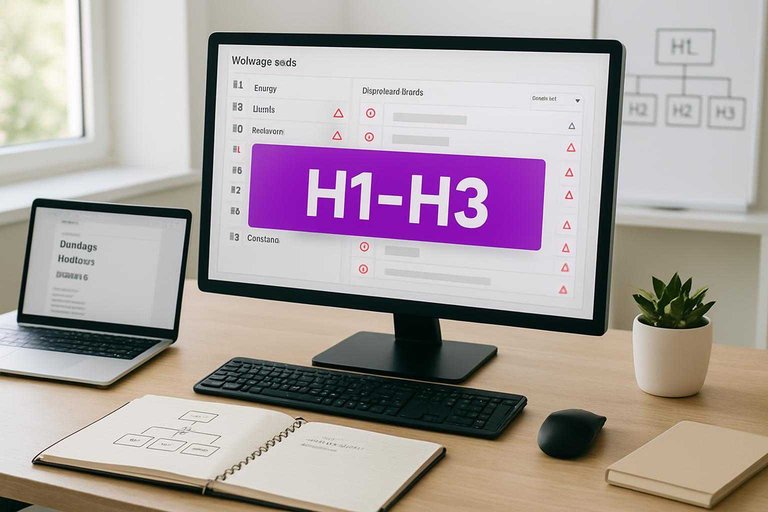
- Use H2 for major sections.
- Use H3 for subsections.
- Skip levels only for a reason.
- Remove decorative “headings” used for design.
- Never mark nav items as headings.
If a heading doesn’t introduce content, it’s noise, not hierarchy.
Quick validation
Validate the outline, because it reveals gaps fast. Do a quick scroll and ask, “Would this outline make sense in a doc?”
Check your key sections appear above the fold, like “Pricing,” “How it works,” or “Steps.” That’s where intent gets confirmed.
If the outline reads like a clean briefing, you’re signaling authority before a single paragraph lands.
Thin Content Gaps
Thin content gaps happen when your page skips the exact pieces users came for. You’ll see it when competitors answer “one more question” you ignored, like constraints or edge cases.
Gap detection
Pick your top three ranking competitors and treat them like a checklist for intent coverage.
- Outline each competitor’s H2/H3 topics in a single doc.
- Mark missing items: definitions, steps, FAQs, constraints.
- Note “proof blocks” they use: examples, data, screenshots.
- Map each missing item to a searcher question you can answer.
- Prioritize gaps that block action, like prerequisites or limits.
If you find the same missing topic in all three, it’s table stakes. If you need a process to tighten this up end-to-end, use this checklist for streamlining SEO content.
Add depth safely
Depth helps only when it stays checkable and current, not “trust me bro” content.
- Add one concrete example per key claim
- Include screenshots of critical steps
- Use dated stats with sources
- Cover edge cases and exceptions
- Define constraints and prerequisites
Your safest moat is specificity you can defend next month.
Avoid bloat
More words won’t save a page that drifts off-intent. If a paragraph doesn’t help the reader decide or do, it’s clutter.
Cut repeated explanations like “what is SEO” in three sections. Merge overlapping blocks into one clear “how-to” path.
Your goal is completion, not length.
Run the 12 checks, then ship one clean update
- Choose 3–5 pages with the biggest traffic or conversion upside, record baseline metrics, and note any platform constraints.
- Clear “fast failure” issues first: indexing blockers, canonical conflicts, intent mismatch, and rendering problems.
- Only then rewrite titles, meta descriptions, and heading structure using the checklists, and fill thin-content gaps with targeted sections (not fluff).
- Republish, request reindexing if needed, and verify outcomes in the SERP and in your baseline report after 7–14 days.
Frequently Asked Questions
- Does on page SEO optimization still matter in 2026 with AI Overviews and zero-click results?
- Yes—on page SEO optimization still drives rankings and visibility because Google needs clear topical signals, crawlable content, and strong UX to trust and surface your pages. It also improves snippet eligibility (FAQs, rich results) and helps you win clicks when users do leave the SERP.
- Do I need technical SEO before I start on page SEO optimization fixes?
- You can start on-page fixes immediately, but confirm basics first: the page returns 200 OK, isn’t blocked by robots.txt/noindex, and is canonicalized correctly. If those are broken, on page SEO optimization changes often won’t be seen or credited.
- How do I measure on page SEO optimization improvements after making changes?
- Track a before/after baseline using Google Search Console (queries, impressions, CTR, average position) plus crawl data from Screaming Frog or Sitebulb for indexability and tag coverage. Most pages show early movement in 2–6 weeks, with stronger trendlines in 6–12 weeks depending on crawl frequency and competition.
- Can I use AI tools to speed up on page SEO optimization without risking quality?
- Yes—use AI for drafts and gap-filling, then enforce a human QA checklist for accuracy, intent match, internal links, and brand tone. Tools like ChatGPT, Surfer, Clearscope, and Frase work best when you feed the target query set and a strict outline, then edit for specificity and uniqueness.
- Should I do on page SEO optimization on every page, or only the pages that already rank?
- Prioritize pages with existing impressions, positions 5–30, or high-conversion intent because they usually produce the fastest ROI. Then expand to new or low-visibility pages once your templates, internal linking, and content standards are consistent sitewide.
Turn Triage Into Rankings
A 12-check on-page SEO triage is only valuable if you can fix title tags, meta descriptions, headings, and thin content consistently across every page.
Skribra generates SEO-optimized articles with clean structure, keyword targeting, and ready-to-publish metadata—so your fixes scale. Keep momentum with the 3-Day Free Trial.
Written by
Skribra
This article was crafted with AI-powered content generation. Skribra creates SEO-optimized articles that rank.
Share: