May 13, 2026
·
10 min read
Free Google Ranking Stuck? 11-Fix Debug Checklist
A step-by-step debug checklist for when your Google rankings won’t move—triage the real symptom, verify indexing and crawl access, remove technical blockers, close on-page relevance gaps, strengthen internal linking, and rebuild authority/trust signals.

Your rankings haven’t budged for weeks—and every “SEO tip” you try feels like guessing in the dark. Is Google ignoring your pages, misreading them, or choosing a different URL to rank?
This checklist turns “stuck” into a diagnosable problem. You’ll quickly confirm what’s actually happening, pull baseline data, and then work through the highest-impact fixes: indexing and crawl issues, technical blockers, relevance gaps, internal links, and authority signals—so your next changes are measurable.
Quick triage map
You’re not fixing “SEO.” You’re debugging a specific failure mode.
Call it “stuck” when Google has enough time to react, but nothing moves.
Confirm the symptom
“Stuck” means your signals don’t change even after recrawls and weeks of exposure.
Look for flat impressions, flat average position, no new queries, or traffic sliding while pages stay indexed.
If you can’t name the symptom, you’ll keep applying random fixes.
Pick your scenario
Different stuck patterns point to different buckets of fixes.
Pick the closest match before you touch anything.
Collect baseline data
You need a before-state you can trust.
Pull it from Google Search Console, not your analytics.
Rule out seasonality
Sometimes rankings aren’t stuck. Demand is.
Check query trends and last-year periods before blaming your site.
If impressions fall across the whole query set, it’s likely seasonality, not penalties.
Indexing and crawl
If Google can’t reliably discover, crawl, and index the right URL, rankings stall fast. Treat this like debugging a delivery pipeline: find the choke point, then remove it. If you need a broader framework, follow this step-by-step SEO guide alongside the checks below.
Check index status
You need proof of what Google indexed, not what you published. URL Inspection plus a quick site: check shows the indexed URL, chosen canonical, and crawl recency.
- Run URL Inspection on the ranking URL and its main variant.
- Confirm “Google-selected canonical” matches your preferred URL.
- Check “Last crawl” and note whether it’s recent.
- Use
site:example.com "unique snippet"to find the indexed version. - Compare indexed URL to your internal links and sitemap entry.
If Google picked a different canonical, you’re optimizing the wrong page.
Fix robots blocks
Indexing fails silently when something tells bots to stay out. Check every layer where a “no” can happen, including templates and security gates.
- Blocked by robots.txt rules
- Blocked by meta robots
noindex - Blocked by
X-Robots-Tagheaders - Blocked by shared
noindextemplates - Blocked by staging passwords or IP allowlists
One accidental noindex on a template can wipe an entire section overnight.
Resolve canonicals
Canonicals tell Google which URL should win when multiple versions exist. If they point to the wrong place, Google will rank the wrong page.
Start with self-referential canonicals on every indexable page. Then fix canonicals that collapse parameters incorrectly, like forcing all filters to the root category. Finally, remove cross-domain canonicals unless you truly intend to transfer ranking to another site.
When canonicals disagree with your internal links, Google trusts the pattern, not your preference.
Handle duplicates
Duplicates split signals and waste crawl budget. You want one “main” URL per intent, with everything else folding into it.
- Identify duplicate sets: faceted URLs, print pages, and UTM variants.
- Pick the primary URL for each set and make it consistent.
- Canonical near-duplicates that must remain accessible.
- 301 redirect true duplicates you don’t need users to visit.
- Update internal links and sitemaps to only the primary URLs.
If you can’t name the one URL you want to rank, Google won’t guess correctly.
Technical ranking blockers
Your pages can be indexed and still underperform because Google can’t render, trust, or evaluate them cleanly. The usual symptom is “indexed, not ranking” even though the content looks fine in a browser.
Treat this like debugging a production incident, not “SEO tweaks.” Fix the blockers first, then judge content.
Speed and CWV
You’re competing on usability as much as relevance. When LCP, INP, or CLS fails, your page becomes the slower option.
- Fail LCP with oversized hero images
- Fail INP with heavy third-party scripts
- Fail CLS with late-loading fonts
- Block rendering with critical CSS missing
- Waste bytes with uncompressed images
If you see three or more, you’re looking at a system problem, not a page problem.
Mobile rendering
Google ranks what it can render on mobile. If your mobile view hides content or blocks resources, rankings stall.
- Run URL Inspection and click Live Test.
- Open View Tested Page and check the rendered HTML.
- Verify responsive breakpoints, tap targets, and font sizes.
- Check blocked CSS/JS in Page resources.
- Compare mobile vs desktop content parity.
If Live Test can’t see it, rankings won’t either. (See Google’s mobile-first indexing best practices.)
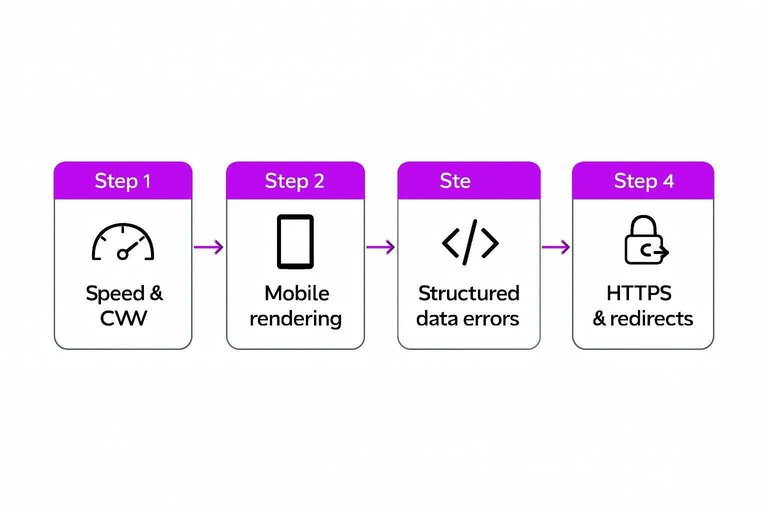
Structured data errors
Invalid schema won’t always stop ranking, but it can remove your rich results edge. “Valid with warnings” often means you’re missing required fields.
Fix types, properties, and required fields, then revalidate in Rich Results Test. Don’t mark up what users can’t see, like “5-star reviews” that aren’t on-page.
Rich results are a multiplier, not a miracle, so earn eligibility first.
HTTPS and redirects
Trust and canonical signals get messy when URLs split across protocols or hosts. Redirect chains and mixed content quietly bleed equity.
- Force one canonical host: https + www or non-www.
- Replace 302s with 301s for permanent moves.
- Remove redirect chains to a single hop.
- Fix mixed content by upgrading all HTTP assets.
- Align canonicals, sitemaps, and internal links.
When signals split, Google hedges, and hedging looks like “stuck.” (Reference: Redirects and Google Search.)
On-page relevance gaps
Your page can be “good” and still miss the exact job the searcher hired it for. This checklist helps you spot where intent, format, and coverage drift from what Google is ranking. For a broader, step-by-step framework, see the ultimate checklist for streamlining SEO content.
Intent mismatch signs
Intent mismatch usually looks like the wrong content shape for the query. Think “I asked for a calculator, you gave me an essay.”
Scan your SERP and watch for these gaps:
- Wrong format: listicle vs tool vs product page
- Wrong audience: beginner vs expert framing
- Missing transactional info: pricing, specs, availability
- Ignored SERP features: PAA, videos, comparisons
If the top 5 pages all behave the same way, that’s the contract you’re breaking.
Rewrite title/H1
Your title and H1 set expectations fast. Align them with the query and the dominant SERP pattern.
- Put the primary keyword first, then add a specific modifier.
- Match the SERP format word: “pricing,” “steps,” “template,” “comparison.”
- Make title and H1 distinct, but promise the same outcome.
- Add a concrete hook: year, use case, or constraint, not hype.
If your snippet promises one thing and your intro delivers another, you lose the click twice.
Fill missing subtopics
Google often rewards pages that answer the next question before the user asks it. Pull the shared sections from top results and close the obvious gaps.
- Quick definition and who it’s for
- Comparisons: alternatives, vs pages, tradeoffs
- Pricing, costs, or budget ranges
- Step-by-step process or checklist
- FAQs, limitations, and real examples
When multiple competitors cover the same subtopic, it’s no longer “extra.” It’s table stakes.
Refresh outdated content
Stale pages leak trust, even when the advice is still mostly right. Old screenshots, expired dates, and “2022” recommendations quietly signal neglect.
Update the proof points that age fastest: stats, UI screenshots, pricing, tool names, and policy references. Then add a visible freshness cue like “Updated May 2026” near the top.
Freshness isn’t a ranking trick. It’s a credibility baseline your competitors will exploit.
Internal linking fixes
Internal links are your site’s ranking signals in plain sight. When key pages are buried, orphaned, or fighting siblings, Google gets mixed instructions and picks the wrong winner. Google also uses internal linking signals to understand your structure, including how sitelinks are generated.
Find orphan pages
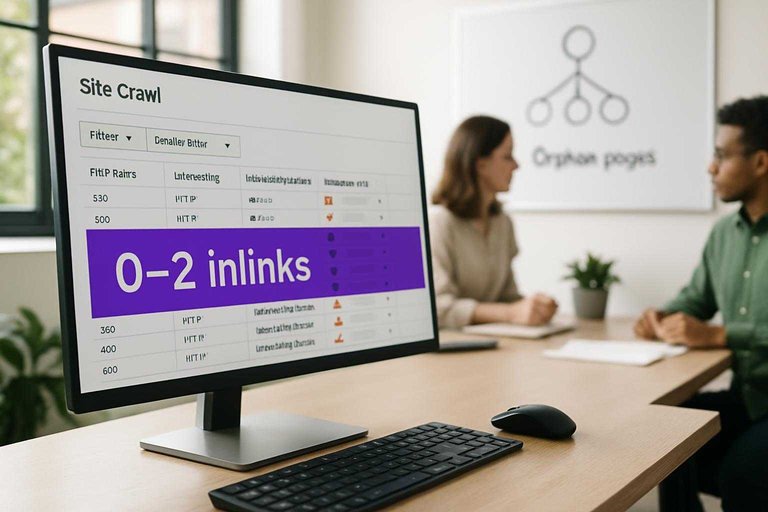
Orphan pages rarely rank because nothing on your site “vouches” for them. Use crawl data to find pages with zero or near-zero internal links, then add links where users actually navigate.
- Crawl your site and export inlinks per URL.
- Filter for pages with 0–2 internal inlinks.
- Add the page to a relevant hub and category path.
- Insert 2–5 contextual links from top related pages.
- Add a nav or footer link only if it’s truly core.
If a page has no path from your main content, Google treats it like an accident.
Anchor text tuning
Anchor text is the label you hand Google and readers. You want it specific and consistent, without sounding spammy or misleading.
- Use descriptive anchors with intent words.
- Use partial-match anchors, not repeats.
- Avoid generic anchors like “click here”.
- Avoid exact-match anchors sitewide.
- Avoid anchors that promise the wrong content.
When anchors lie or repeat too much, your internal links stop behaving like signals.
Stop cannibalization
Two pages targeting the same intent split links and confuse ranking. Pick a primary URL per query, then make every internal link point to that winner.
- Group pages by identical intent and keyword overlap.
- Choose the strongest URL as the primary target.
- Merge content where it improves one page.
- 301 redirect true duplicates to the primary.
- Canonicalize or re-scope near-duplicates.
If you don’t choose the winner, Google will, and it may pick the weaker page.
Strengthen hubs
Hubs turn scattered articles into a clear topic cluster Google can understand. Build one hub page that answers the broad question, then link out to supporting articles and back again using natural, specific anchors.
A good hub reads like “Start here,” while spokes go deep on subtopics like comparisons, how-tos, and FAQs. Bidirectional linking makes the cluster act like a single authority, not isolated posts.
If your best content doesn’t connect, you don’t have a site structure. You have a pile.
Authority and trust
Your page can be “good enough” and still stay capped if competitors look safer, cited, and endorsed. Off-page signals and trust cues act like a ceiling, especially in competitive SERPs.
Weak backlink profile
You need links when the SERP has a clear endorsement gap. If the top five results average 50+ referring domains and you have five, you’re not “almost there.”
Check three things:
- A visible referring-domain gap versus the top results
- A backlink mix dominated by directories and profile pages
- Few links to the exact page that should rank
If your only wins are “BestBusinessListings.biz,” Google sees noise, not votes.
Digital PR targets
You don’t need viral coverage. You need relevant, believable mentions that can actually be earned.
- Pitch niche blogs with expert quotes
- Get listed on supplier or manufacturer “where to buy” pages
- Partner with local chambers and nonprofits
- Join podcasts in your category
- Publish data and outreach journalists
One solid industry link can outvote fifty generic directories.
E-E-A-T upgrades
Trust upgrades are page-level work that compounds across your whole site.
- Add a real author bio with credentials and experience.
- Publish an editorial policy and updating schedule.
- Cite primary sources and link to standards.
- Show firsthand proof: photos, tests, screenshots, receipts.
- Strengthen About and Contact pages for sensitive topics.
If users can’t tell who wrote it and why, Google usually can’t either.
Reputation issues
Sometimes you’re not losing to SEO. You’re losing to perception.
Run three checks:
- Brand queries like “your brand + reviews” and “your brand + scam”
- Review profiles for rating drops, duplicates, and unresolved complaints
- Spammy mentions from scraped sites or fake “coupon” domains
Fix name, address, and phone inconsistencies, then respond publicly where it matters. If the bad stuff is false, document it and request removals or suppression with better coverage.
Run the Checklist, Document the Wins, and Repeat Monthly
- Start with the triage map: confirm the exact symptom (impressions, rankings, clicks, or conversions) and record baseline metrics per URL.
- Fix in this order: indexing/crawl → technical blockers → on-page relevance → internal linking → authority/trust, validating each change in Search Console and SERP checks.
- Keep a change log (date, URL, fix, expected impact) and re-measure at 7/14/28 days to spot what moved and what didn’t.
- If nothing improves after clean technical + relevance fixes, prioritize authority work (PR, links, E-E-A-T, reputation) and consolidate cannibalized pages into a stronger hub.
Frequently Asked Questions
- Is “free Google ranking” the same as “free website traffic” from Google?
- No. Free Google ranking is about earning positions in organic search results, while free traffic is the outcome—rankings can improve before traffic rises if search volume or CTR is low.
- Does free Google ranking still matter in 2026 with AI Overviews and zero-click results?
- Yes. Organic rankings still drive clicks, citations in AI answers, and long-tail discovery, especially for commercial and “how-to” queries where users want multiple sources.
- How do I measure if my free Google ranking is improving week to week?
- Track Google Search Console impressions, average position, and clicks for target queries, and confirm with a rank tracker like Ahrefs, Semrush, or SERPWatcher on a consistent location/device setting.
- How long does it usually take to see results from free Google ranking fixes?
- Most sites see early movement in 2 to 6 weeks and more reliable gains in 8 to 16 weeks, depending on crawl frequency, competition, and how much new content and links are needed.
- Can I improve free Google ranking without building backlinks?
- Often you can make meaningful gains with content upgrades, internal links, and better SERP alignment, but for competitive keywords you usually need some external authority (digital PR, partnerships, or earned mentions) to break into top positions.
Turn Fixes Into Rankings
Once you’ve cleared indexing issues, technical blockers, and relevance gaps, the real challenge is executing consistently with fresh, properly linked content and authority signals.
Skribra streamlines SEO content creation and publishing—keyword-focused articles, WordPress delivery, internal linking support, and built-in backlink exchange—so you can keep climbing from “free Google ranking” plateaus with a 3-Day Free Trial.
Written by
Skribra
This article was crafted with AI-powered content generation. Skribra creates SEO-optimized articles that rank.
Share: