April 11, 2026
·
Updated July 28, 2026
·
10 min read
Visibility vs indexability for SEO audits
A clear comparison for SEO audits that separates Google searchability from indexability—fast definitions, how URLs move through discovery/crawl/index gates, key audit signals, common breakpoints, tooling checks, and a practical prioritization rule of thumb.

If a page “isn’t on Google,” the fix depends on what’s actually failing: can Google find it, or can Google index it? Mixing up searchability and indexability turns audits into guesswork and leads you to chase the wrong settings.
This comparison helps you diagnose the right layer fast. You’ll map issues to Google’s URL processing steps, use the most reliable signals (not myths like site: queries), and apply a prioritization framework so you fix crawl blockers before you debate canonicals and duplicates.
Fast Definitions
Searchability is whether Google can find a URL. Indexability is whether Google will keep it.
They get confused because both failures look identical in dashboards: “not in Google.”
In audits, searchability issues block discovery. Indexability issues waste crawl and dilute rankings.
Searchability Meaning
A URL is searchable when Googlebot can reach it through real paths. Think links, sitemaps, and crawlable navigation.
If your product page only exists behind a form or a JS-only router, Google may never see it. Same for orphan pages with zero internal links.
Fix searchability first, because invisible pages can’t be evaluated or ranked.
Indexability Meaning
A URL is indexable when Google is allowed to store it and sees enough value to keep it. Think directives, canonicals, duplication, and “thin” content signals.
A page can be fully crawlable but still excluded by noindex, a canonical to another URL, or soft blocks like near-duplicate boilerplate. Sometimes it’s “Crawled — currently not indexed” because the page looks low-value.
Indexability is where you stop wasting crawl budget and start consolidating ranking signals.
Quick Memory Test
Use this gut-check to separate the two fast.
- Can Google reach it? Linked, sitemaped, not blocked.
- Can Google store it? No
noindex, correct canonical. - Searchability fail: orphan URL, “only in filters.”
- Indexability fail: duplicate page, canonicalized away.
- Mixed fail: 200 OK, but blocked by robots.
If reach fails, nothing else matters. If store fails, rankings leak into the wrong URL.
How Google Processes URLs
Google doesn’t “index a site.” It processes individual URLs through a pipeline.
Searchability mostly lives in discovery and crawling. Indexability starts when Google can interpret the page and decide it’s worth keeping.
Discovery Inputs
Discovery is how a URL enters Google’s queue. If the URL never shows up here, nothing downstream matters.
- Follow internal links from crawlable pages
- Encounter external links from other sites
- Read XML sitemaps and sitemap indexes
- Expand URL parameters into variants
If a URL isn’t discoverable, you don’t have an SEO problem. You have a navigation problem.
Crawl Access Gate
Crawling is Google trying to fetch your URL. If the server won’t serve it, Google can’t evaluate it.
A robots.txt disallow, an auth wall, or a geo block can make a URL “known” but unfetchable.
Rate limiting can also stall crawling by slowing responses or throwing 429 errors.
If Google can’t fetch it reliably, indexability is irrelevant because nothing gets evaluated.
Index Decision Gate
Indexing is a choice, not a guarantee. Google weighs your directives against what it actually finds.
A noindex is a direct exclusion request, while canonicals suggest which URL should represent a cluster.
Duplication and thin usefulness signals can still keep a crawlable URL out of the index.
The line between searchability and indexability is interpretation: once Google can parse meaning, it can say “no.”
Common Failure Points
Most audit “mysteries” are just stage mix-ups. Diagnose the pipeline stage first, then pick the fix.
- Orphan pages never discovered
- robots.txt blocks key templates
- Blocked assets break rendering
- JS gaps hide primary content
- Canonicals point to wrong URL
When you tag each issue to a stage, fixes stop being debates and start being engineering work.
If you need a broader framework for prioritizing these issues, start with this technical SEO guide.
For a full baseline on the pipeline, see Google’s overview of how Google Search works.
Audit Signals Compared
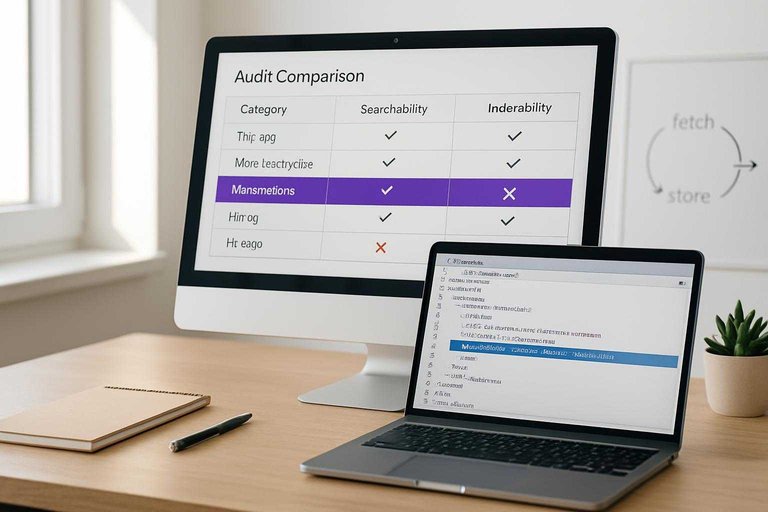
Use this table when you need a fast diagnosis during an SEO audit. It separates “Google can fetch it” from “Google will store and serve it.”
| Audit signal | Searchability points to | Indexability points to | Where to check |
|---|---|---|---|
| HTTP status | Server blocks access | Soft 404 handling | Crawl logs |
| robots.txt | Crawl disallowed | Not evaluated | robots.txt tester |
| Meta robots | Not blocked to fetch | noindex applied | Page source |
| Canonical tag | Crawl still happens | Chosen URL differs | URL Inspection |
| Sitemap presence | Discovery improved | Inclusion not guaranteed | XML sitemap |
If searchability looks clean but indexability fails, your “fetch” path works and your “store” signals conflict.
Searchability: What Breaks
Searchability fails when Google can’t reliably discover URLs or fetch the pages behind them. In audits, this shows up as “we have pages, but Google never finds them,” even with a clean sitemap.
Fix in this order: improve crawl paths first, remove hard blocks second, stabilize server responses third, then refine JavaScript delivery.
Internal Linking Gaps
Internal links are your crawl highways. When they’re missing or distorted, Google burns time and misses inventory.
- Orphan pages with zero internal links
- Deep pages buried beyond five clicks
- Faceted navigation creating crawl traps
- Pagination chains with broken continuity
- Filters generating endless URL variants
Fix crawl paths before tweaking sitemaps.
robots.txt Misfires
robots.txt breaks searchability fast because it blocks discovery at the door. One sloppy wildcard can turn “/” into “nothing,” and you won’t notice until traffic drops.
Look for Disallow rules that catch important directories, wildcard patterns that match more than intended, and blocked CSS/JS that prevents proper rendering. Unblock critical resources first, then tighten rules with explicit allowlists.
Server Response Issues
Google can’t crawl what your server can’t serve. Even short instability trains Google to back off.
- 5xx spikes during peak traffic
- Timeouts on slow templates or APIs
- DNS failures or flaky CDN edges
- 429 throttling for Googlebot bursts
- Redirect loops that never resolve
Stabilize hosting over crawl-budget tweaks.
JavaScript Discoverability
JavaScript breaks searchability when links only exist after execution. Google can render, but it doesn’t guarantee fast or complete discovery.
Client-side routing, infinite scroll without paginated URLs, and navigation hidden behind event handlers all reduce link graph coverage. Server-render key navigation and links, then use JS to enhance, not reveal.
Indexability: What Breaks
Crawling is just Google showing up. Indexing is Google deciding your page is worth storing and serving.
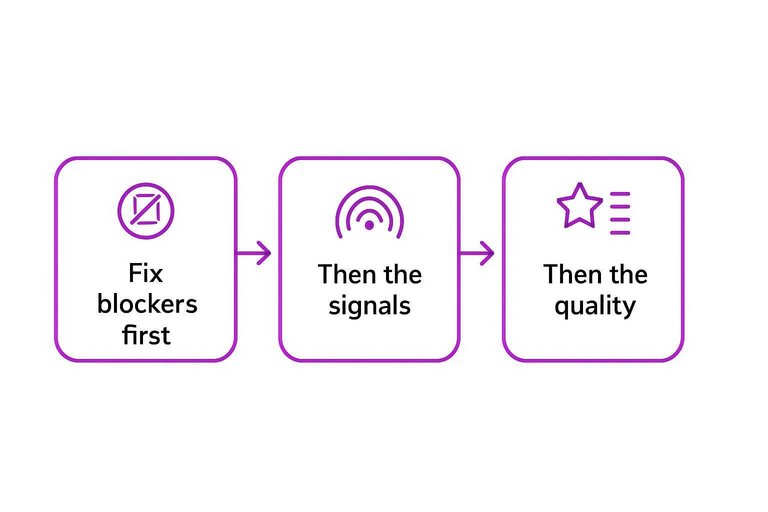
In audits, you’re hunting for the “crawled, not indexed” reasons you can actually fix fast. Fix the blockers first, then the signals, then the quality.
Noindex & X-Robots
This fails silently because crawling still happens. One stray directive can deindex thousands of URLs overnight.
Check three places:
- Meta robots tags in the HTML head, like “noindex, nofollow”.
- HTTP X-Robots-Tag headers on HTML or PDFs.
- Template inheritance where one layout change spreads sitewide.
Remove unintended noindex at scale first. It’s usually the highest-impact, lowest-effort fix.
Canonical Conflicts
Canonicals are indexing votes. Conflicts tell Google you don’t even agree with yourself.
- Use self-canonicals that match the indexed URL
- Avoid cross-domain canonicals unless intentionally syndicating
- Don’t canonical parameters to unrelated base pages
- Keep canonical, hreflang, and sitemap URLs consistent
Align canonicals with internal links. Google follows your links more than your hints.
Duplicate & Thin Pages
Google skips indexing when pages look interchangeable or empty. It’s common with faceted navigation, internal search pages, and “city + service” doorway sets.
Look for near-duplicate titles, repeated body blocks, and pages that answer nothing beyond “We offer X”. Merge duplicates, add unique value, or prune them from discovery.
Consolidate or upgrade content before requesting indexing. Otherwise you’re asking Google to store noise.
Render & Asset Blocks
Google indexes what it can render. If scripts or CSS are blocked, your page can get indexed as a blank shell.
- Allowlist JS and CSS paths in robots.txt
- Avoid 403/404 on critical assets
- Verify rendered HTML in URL Inspection
- Check lazy-loaded content without HTML fallbacks
Unblock assets and validate rendered HTML. If Google can’t see it, it won’t rank it.
Tooling Checklist
You need different tools for different questions. “Can Google find you?” and “Will Google index you?” are not the same problem.
Search Console Views
Use Search Console to separate discovery signals from indexing outcomes.
| GSC view | Best for Searchability | Best for Indexability | What it wins at |
|---|---|---|---|
| Pages / Indexing | Found URLs trends | Indexed vs not indexed | Reason-level labels |
| Crawl stats | Bot hits, bytes,timing | Crawl budget pressure | Real crawl volume |
| URL Inspection | Last crawl request | Indexing status | One-URL truth |
| Sitemaps report | Submission coverage | Sitemap index counts | Feed health checks |
| If URL Inspection says “Crawled” but “Not indexed,” stop hunting links and start hunting blockers. |
Log Files vs Crawlers
Logs answer “Did Googlebot actually fetch it?” Crawlers answer “Could a bot theoretically reach it?”
Logs win at truth: Googlebot IP hits, status codes, and crawl timing. Crawlers win at structure: internal link graph, template patterns, and orphan discovery from seed lists.
Use logs to validate reality, then use crawlers to fix the system that produced it. If you want more resources to simplify SEO workflows, prioritize tools that connect server logs, crawl data, and indexing outcomes.
Google’s own guidance on troubleshooting crawling errors reinforces using server logs to verify what Googlebot actually hit.
Site Queries Limits
The site: operator is a blunt instrument. It samples, clusters, and rewrites results based on intent.
Counts fluctuate, duplicates collapse, and canonicalization muddies what you think you’re measuring. Trust Search Console for index states and logs for crawling, not SERP math.
If you’re counting site: results, you’re debugging with a rumor.
Sitemaps Role
Sitemaps help Google discover what you want crawled. They rarely fix why something won’t index.
- Include only canonical, 200-status URLs
- Remove parameter and faceted variants
- Update lastmod when content changes
- Split large files by type or section
- Drop URLs blocked by robots or noindex
A clean sitemap is a crawl prioritization tool, not a pardon for thin or blocked pages.
Prioritization Framework
Searchability is your gate. If Googlebot can’t reach pages, indexability work is wasted effort.
Indexability is your ROI lever. When pages are reachable, directives and content decide what ranks and converts.
If Crawling Fails
Start with access, because everything else depends on it.
- Confirm robots.txt and auth aren’t blocking key paths.
- Fix 5xx errors and unstable origin responses.
- Repair internal links to restore crawl paths.
- Resubmit XML sitemaps with only valid URLs.
- Re-crawl with logs and a crawler to verify recovery.
Until crawling is stable, “noindex vs canonical” debates are just noise.
If Crawling Succeeds
Once Google can fetch pages reliably, switch to what gets indexed and chosen.
- Validate noindex tags and canonicals match your intent.
- Improve uniqueness on template-driven pages.
- Resolve duplication clusters with canonicals, redirects, or pruning.
- Ensure full rendering works for critical content and links.
- Request reindexing for priority URLs after changes ship.
Crawl is access; indexability is selection, and selection is where rankings happen.
Winner Rule of Thumb
Fix what breaks the most pages first. A single bad rule in a shared template can sink thousands of URLs.
Then go after high-value pages. Think “money pages” like top categories, service pages, and best-selling products.
Save long-tail cleanup for last. It’s rarely a blocker, and it often hides bigger systemic issues.
Diagnose the Gate, Then Fix the Right Layer
- Confirm discovery & crawl access first: if Google can’t reach the URL (internal links, robots.txt, server responses, JS discovery), indexability signals don’t matter yet.
- If crawling is happening, audit index decisions next: verify noindex/X-Robots, canonical alignment, duplication/thin content, and render/asset accessibility.
- Use the most trustworthy evidence: Search Console coverage/indexing views plus logs/crawler data beat assumptions and unreliable site: sampling.
- Rule of thumb: fix what blocks crawling before what influences indexing—then re-check signals after Google has had a chance to recrawl.
Frequently Asked Questions
- Is Google searchability the same as crawlability in an SEO audit?
- They overlap, but they’re not identical. Google searchability is the broader concept (discovery + access), while crawlability usually focuses on whether Googlebot can fetch URLs efficiently once it knows they exist.
- Do I need to fix Google searchability before working on indexing issues?
- Yes—searchability is a prerequisite for indexability because Google can’t index what it can’t reliably discover and crawl. Fix access blockers first, then tackle quality/duplication signals that affect index selection.
- How do I measure Google searchability across a large site without crawling every URL?
- Use Google Search Console Crawl stats plus server log analysis to see what Googlebot actually requests and where it fails. Pair that with sitemap coverage and internal link sampling to spot discovery gaps quickly.
- What results should I expect after improving Google searchability?
- You usually see faster discovery and more consistent crawling within 1–3 weeks, reflected in increased crawl activity and fewer fetch errors. Rankings and traffic only move after the newly accessible pages also get indexed and start competing in search.
- Can strong internal linking replace XML sitemaps for Google searchability?
- Often no—internal links help discovery, but XML sitemaps provide a scalable URL list and cleaner canonical signals for large or frequently updated sites. Most sites benefit from using both to maximize discovery and crawl efficiency.
Turn Audits Into Publishing
Once you’ve separated searchability from indexability, the next challenge is fixing issues fast and shipping optimized pages consistently without slowing your team down.
Skribra helps you turn audit insights into daily, SEO-optimized articles with clean metadata, formatting, images, and WordPress publishing—plus a backlink exchange network. Start with the 3-Day Free Trial to build momentum.
Written by
Skribra
This article was crafted with AI-powered content generation. Skribra creates SEO-optimized articles that rank.
Share: