April 29, 2026
·
10 min read
Rank tracking ROI after 30 days on 100 keywords
A practical case study of tracking 100 keywords over 30 days—how to set scope and rules, configure tools and grouping, monitor ranks/SERP features/competitors with annotations, and turn a daily/weekly workflow into cost-vs-benefit decisions and reliable lessons.

Rank tracking sounds simple until the same keyword flips URLs, the SERP adds a feature, and “movement” turns out to be noise. If you’ve ever stared at a chart and wondered what actually changed—and what you should do about it—this case study is for you.
You’ll see how a 100-keyword, 30-day tracking run was scoped, configured, and operated day to day. The goal isn’t perfect data; it’s a repeatable process that connects rankings to decisions, time spent, and interventions you can justify.
Why track rankings
You can’t improve what you don’t observe, but you can waste weeks watching the wrong signals. This 30-day, 100-keyword experiment asks one question: does rank tracking earn its keep versus the time and cost to run it?
Decision to make
Rank tracking helps when you need fast feedback on changes, and when rankings connect to real pages and real intent. It’s noise when you track vanity terms, ignore SERP features, or never act on what you see.
For this article, “worth it” means three things: you spot meaningful movement, you can explain likely causes, and you can choose a next action without guessing. If rankings can’t trigger a decision, you’re paying for a dashboard.
Scope and rules
To keep this test decision-grade, the rules stay tight.
- Track 100 predefined keywords, no swapping mid-test
- Use one site and one verified property
- Fix the same locations and devices each run
- Record daily positions and SERP notes
- Treat movement as “real” only past a set threshold
Set the threshold before you start, or you’ll rationalize every wobble as progress.
Limits and biases
Rank data is a model of reality, not reality. Personalization, SERP rewrites, feature injection, and tracker sampling can all move numbers without any durable change on your site.
Also, rankings don’t guarantee traffic, leads, or revenue. They just help you decide where to investigate, what to fix, and what to ignore. Use them like a smoke alarm, not a performance review.
Setup and tooling
Before day one, you need a tracker that matches how you actually ship SEO work. Otherwise, you’ll measure noise and call it progress.
The practical effort is front-loaded. Choose the tool, configure the project, group keywords for decisions, then lock a baseline snapshot. If you’re also publishing at a steady cadence, it helps when your content workflow and your tracking workflow can stay in sync—especially if you’re using something like Skribra to produce SEO-formatted posts regularly and want clean before/after comparisons. If you’re evaluating your stack, top tools for content workflows can help you identify what to standardize before you lock baselines.
Tool selection criteria
Pick for decision-making, not dashboards. You need features that survive edge cases like local packs and mobile SERPs.
- Location and device targeting
- SERP features tracking
- Scheduled refresh cadence
- Exports and API access
- Tagging and keyword labels
If your tool can’t segment reality, your “trend” is just averaging. And if you’re publishing frequently (for example via an automated WordPress workflow), exports/API access matters even more so you can tie ranking movement back to specific pages and publish dates.
Project configuration
Set the project once so daily checks are boring. Boring is good.
- Add your primary domain and preferred protocol.
- Set target location and device type.
- Import the 100 keywords from a clean sheet.
- Tag keywords into groups you’ll act on.
- Add direct competitors for side-by-side tracking.
If setup feels slow, good. You’re buying fewer false alarms later. This is also where it pays to note anything that changes your publishing velocity—if new content is going live automatically in WordPress, make sure your baseline snapshot is taken before that ramp-up so you can attribute lifts cleanly.
Cost inputs
Costs decide whether the tracker is a tool or a hobby. Track both what you pay and what you spend.
Direct costs include the subscription tier, add-on modules, and extra seats for teammates. Indirect costs include setup time, weekly review time, and the training needed to keep tagging consistent.
If you don’t price the minutes, you’ll overpay for “insights” you never act on. The same thinking applies to content ops: if you’re paying for a platform that generates and publishes SEO-ready articles (including metadata and formatting), the relevant comparison is often the hours you don’t spend drafting, briefing, and uploading—so your tracker reviews stay focused on decisions, not busywork.
Keyword grouping plan
Grouping turns 100 keywords into a workflow. Without it, you’ll chase rank changes with no plan.
- Intent buckets: informational, commercial, transactional
- Product and landing page targets
- Content clusters by topic
- Brand vs non-brand terms
- Priority tiers by business value
The group is the unit of action. Rankings are just the symptom. If you’re producing content at scale, align these groups to what you can reliably ship (e.g., clusters that map to your publishing pipeline), so each batch of articles has a clear keyword set and you can measure impact without guesswork. For a practical example of these capabilities, see Semrush’s overview of position tracking.
What gets tracked
A rank number alone hides the story. You need a small set of daily and weekly signals that explain why rankings move and whether clicks likely moved too.
Rank and visibility
Track the daily position for each keyword, then compute a rolling average to smooth noise. Add distribution buckets like Top 3, Top 10, and Top 20, because jumping between 9 and 11 matters more than 41 and 43.
Watch patterns, not single spikes: a one-day dip across many keywords is often volatility or tracking conditions, while a steady bucket shift usually reflects real competitiveness changes. The goal is to separate “wiggle” from “momentum” before you change anything.
SERP feature changes
SERP features change the click map even when your rank stays put. Track them so “rank up, traffic down” doesn’t become a mystery.
- Featured snippets appearing or switching owners
- People Also Ask expanding or collapsing
- Local pack showing for intent shifts
- Video results replacing blue links
- Image packs pulling attention upward
- Shopping modules crowding commercial queries
If features turn on, you can lose clicks without losing position. Or win them without moving.
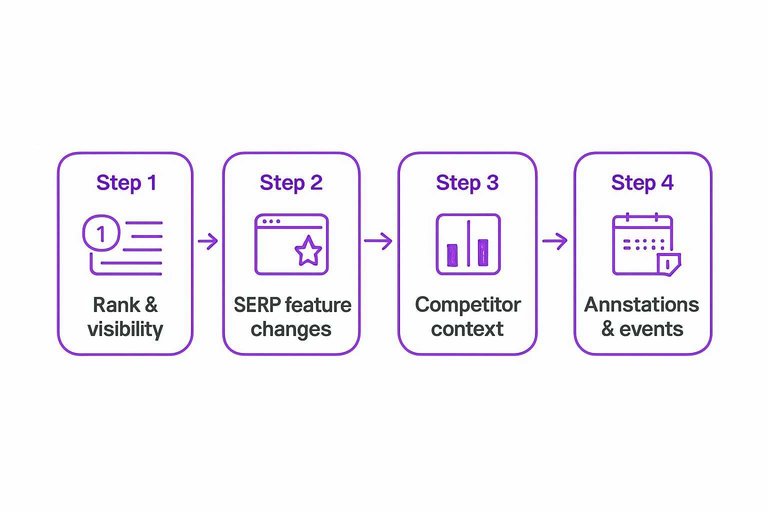
Competitor context
Track who wins and loses next to you for each keyword, not just where you land. Record new entrants into the top results, big jumps by a single domain, and your share-of-SERP across the tracked set.
A broad shift across many keywords often points to a market or algorithm change, not a single page problem. Context keeps you from “fixing” the wrong thing.
Annotations and events
Log changes as they happen so you can explain anomalies later.
- Note content edits, including title, headings, and intent changes.
- Record internal linking changes, including nav and hub pages.
- Log releases that affect templates, schema, and rendering. If you’re building a repeatable process, align these notes with a broader SEO guide for tracking changes so your team logs events consistently.
- Mark downtime, crawl blocks, or analytics outages.
- Add external events like confirmed Google updates.
Without annotations, you’ll blame Google for your own deploy. Or worse, you’ll undo a change that helped.
30-day workflow
You need a cadence that catches real movement without making rank checks your whole job. Treat the tracker like a smoke alarm, then investigate only when the signal persists.
Daily triage routine
Use a short daily pass to separate signal from noise.
- Scan alerts and anomalies, then ignore the rest.
- Review the biggest movers, up and down.
- Manually validate SERPs for the top changes.
- Tag likely causes: content, links, tech, or SERP shift.
- Park non-actionable fluctuations in a “watch” bucket.
Over time, your “watch” bucket becomes your early-warning system.
If you want a clearer mental model for why this churn happens, Ahrefs’ explainer on SERP volatility is a useful reference.
Weekly review meeting
A weekly meeting turns scattered observations into decisions.
- Group trends by topic cluster
- Spot page-level pattern repeats
- Note competitor entry or exits
- Track SERP feature appearance shifts
- Decide next week’s experiments and fixes
If nobody leaves with owners, it was just rank watching.
Action thresholds
You need rules that prevent panic edits and “SEO whack-a-mole.” Make actions trigger on patterns, not single-day moves.
Act when a drop holds for several checks and the SERP confirms a real reorder. Act fast when you lose a key SERP feature you previously owned, because the page often needs a format change. Act when the ranking URL no longer matches intent cues in the results, like a “guide” page in a “pricing” SERP. Act when two of your pages trade positions for the same query across multiple checks, because that’s usually cannibalization, not volatility.
The goal is simple: fewer edits, better edits.
Time budget reality
Your time won’t go to “checking ranks.” It will go to everything around the check.
- QA tracker settings and locations
- Investigate false positives and tracking gaps
- Answer stakeholder “why did this move” questions
- Build reporting that survives scrutiny
- Resist chasing tiny, irrelevant movements
Budget for the overhead, or the overhead will budget you.
Costs vs benefits
You pay in time, focus, and tool spend, then you earn it back in faster decisions and calmer execution.
| Cost type | Ongoing effort | Benefit gained | Practical decision impact |
|---|---|---|---|
| Tool subscription | Low | Centralized history | Avoid guesswork |
| Setup and tagging | Medium | Cleaner segments | Prioritize by intent |
| Weekly review time | Medium | Early trend signals | Act before dips |
| Alert tuning | Low | Fewer false alarms | Trust notifications |
| Reporting to stakeholders | Medium | Shared visibility | Reduce status meetings |
If tracking doesn’t change what you do next week, cut it or tighten the questions.

Lessons from the run
Thirty days of rank tracking teaches you one brutal truth: most movement is meaningless. The useful part is when many keywords move together, for long enough, to justify work.
Imagine 100 keywords split into five topic clusters. If one cluster slides for two weeks while a competitor climbs, you have a decision. If everything jitters daily, you have a dashboard.
Signals worth trusting
Rank trackers earn their keep when they show pattern, not position. You want signals that point to a concrete cause, then a concrete fix.
Cluster-level drift: many related keywords shift in the same direction.
Sustained change: the move holds across several checks.
Feature changes: you win or lose a snippet, PAA, or local pack.
Competitor displacement: one domain replaces you across multiple queries.
Treat those patterns like a diagnosis, not a score.
Common misreads
Most “ranking problems” are reading problems. The tracker is a sensor, and sensors need interpretation.
- Chasing daily swings like they’re trends
- Ignoring intent shifts in the SERP
- Overreacting to average position
- Blaming tracker glitches as site issues
- Treating one keyword as the market
If you can’t name the SERP change, don’t ship the fix.
Best interventions
Rank tracking helps most when it triggers small, reversible bets. You change one thing, then watch the cluster respond.
- Re-align the page to current intent, based on the top results.
- Rewrite titles to match the winning angle and promise.
- Add internal links from strong, relevant pages with specific anchors.
- Merge cannibal pages and redirect to the best single version.
- Re-check after indexing, then decide on the next lever.
Ship the boring fixes first, because they compound.
What not to do
Some movements aren’t signals. They’re weather.
Ignore isolated jumps that revert fast. Ignore low-value keywords that would never earn a click anyway.
Also ignore volatility when the SERP itself is unstable, or when clicks stay flat despite rank changes. Rankings are a proxy, and proxies don’t pay the bills.
Turn the Next 30 Days Into a Repeatable Ranking System
- Lock your rules before you start: define the keyword set, location/device, match intent assumptions, and what “actionable change” means so you don’t reinterpret the data mid-run.
- Track more than position: capture ranking URL changes, SERP features, key competitors, and annotations for releases/content/link events so you can explain movement, not just report it.
- Run a lightweight cadence: do daily triage for outliers and tracking errors, then hold a weekly review to decide interventions using clear thresholds and a fixed time budget.
- Judge the program like an investment: compare tool + labor costs against the decisions it enabled (refresh, consolidation, internal linking, content updates), and drop any metric that doesn’t change what you do.
Turn Ranking Data Into Growth
Tracking your Google website ranker results for 30 days shows what moves the needle—but turning those insights into consistent, optimized publishing is the real challenge.
Skribra creates daily SEO-optimized articles with keywords, meta descriptions, and WordPress publishing so you can test, learn, and climb faster—try the 3-Day Free Trial.
Written by
Skribra
This article was crafted with AI-powered content generation. Skribra creates SEO-optimized articles that rank.
Share: