April 26, 2026
·
11 min read
Rank tracker showing wrong positions: debug checklist
A practical troubleshooter for when a Google website rank tracker shows the “wrong” positions — triage the symptom, isolate SERP context (geo/device/features), audit tracker settings, validate data sources (GSC vs snapshots), and resolve URL/canonical mismatches with a quick diagnosis matrix.

Your rank tracker says you’re #12, but you can see #3 in Google—so which one is lying? Most “wrong position” scares come down to mismatched context: location, language, device, SERP features, or the URL Google is actually ranking.
This checklist helps you debug the discrepancy fast. You’ll set a clean SERP baseline, audit tracker configuration, cross-check against GSC and SERP snapshots, and pinpoint URL/canonical issues—so you can stop guessing and fix the real cause.
Triage the Symptom
“Wrong positions” can mean three different failures: the tool mis-read the SERP, your settings don’t match reality, or Google actually moved you. Example: a tracker says “#3,” but your manual check shows a local pack and your page is the first organic result.
Your job in triage is to define the exact claim, then recreate the SERP under controlled conditions. Once you can reproduce it, you can tell glitch from change.
Clarify the claim
You need a precise, reproducible report, not “rankings dropped.” Ambiguity creates fake incidents.
- List the exact keywords, including plurals and modifiers.
- Write the target URL and expected rank range.
- Specify the timeframe and last known “correct” date.
- Capture the tool name, project settings, and screenshots.
- Note device, locale, and search engine variant.
If you can’t reproduce the claim, you can’t debug the cause.
Set a baseline SERP
You need one “ground truth” SERP snapshot to compare against the tracker. Do it manually with controlled variables.
- Open an incognito window and sign out of Google.
- Set location and language to match the project.
- Search each keyword and record the top 20 results.
- Note any SERP features and their placement.
- Save evidence: screenshots and the timestamp.
Your baseline is your reference point, not the tool’s graph.
Identify SERP features
Google can change what “position” means without changing your underlying relevance. A tool may report “#1 organic,” while the visible first result is an AI Overview or local pack.
Local packs can sit above organic and steal the clicks. AI Overviews can push organic below the fold. Videos, carousels, and “Top stories” can occupy multiple slots. Sitelinks can make one result look like five.
When pixel position shifts, your tool’s rank math may still be “correct” and still misleading.
Check indexing first
Before you argue about rank, confirm Google can even show the URL. Indexing and canonical issues create phantom drops.
- Check URL Inspection for indexed status and canonical choice.
- Run a site: query and confirm the URL appears.
- Compare the reported canonical to your intended canonical.
- Review last crawl, fetch status, and any coverage warnings.
- Check cached/last-seen signals where available.
If the URL isn’t the canonical indexed page, “rank” is the wrong problem.
Rule out volatility
Sometimes the tool is right and you’re just watching live turbulence. Broad updates, intent shifts, and freshness tests can reorder results hourly.
Google may swap “informational” pages for “transactional” ones after a query intent shift. It may test newer pages for a day, then revert. Tools can lag, average, or sample different datacenters.
If the SERP is churning, treat rankings like a moving target and measure trends, not moments.
Common Root Causes
Rank trackers disagree because they measure different SERPs, not because one is “broken.” A “#3 in the tool” can be “#9 in your browser” when context changes.
Geo and language drift
Small location signals can flip the whole SERP, especially for local and ecommerce terms.
- Country and city targeting
- ZIP or precise coordinates
- Interface language setting
- Mobile carrier IP region
- Search domain and ccTLD
Lock geo, language, and domain first, or you’re comparing different universes.
Device and browser mode
Google serves different layouts and result mixes on mobile versus desktop, even for identical keywords.
- Mobile vs desktop index view
- SafeSearch on or off
- Logged-in vs logged-out state
- Incognito vs normal session
- Browser locale and region
If your tracker and your browser don’t match modes, the “wrong rank” is often correct.
Keyword normalization
Two queries that look the same to you can be different to Google, and tools normalize them differently. “Running shoe” vs “running shoes,” dropped stopwords like “for,” and close variants can trigger intent blending across shopping, local, and informational results.
If your tracker reports one variant while you manually test another, you’re not validating the same query.
URL mismatch issues
Your tool may watch one URL, while Google ranks another page from your site.
- Canonical points elsewhere
- Redirects change destination
- UTM or parameter variants
- Faceted or filtered URLs
- Homepage outranks inner page
Fix the mapping, or you’ll “lose rank” while still owning the SERP.
Tool update cadence
Rank data is often a snapshot, not a live feed, and tools refresh on schedules you don’t control. Some tools sample data centers, apply delayed refresh, and use “last seen” logic that keeps an old position until the next crawl.
When rank changes fast, freshness beats precision, so check the timestamp before you panic.
For more context on how SERPs work (and why these variables matter), see this SEO guide for beginners.
If you need a baseline for why results can vary, review Google’s notes on personalization & localized results.
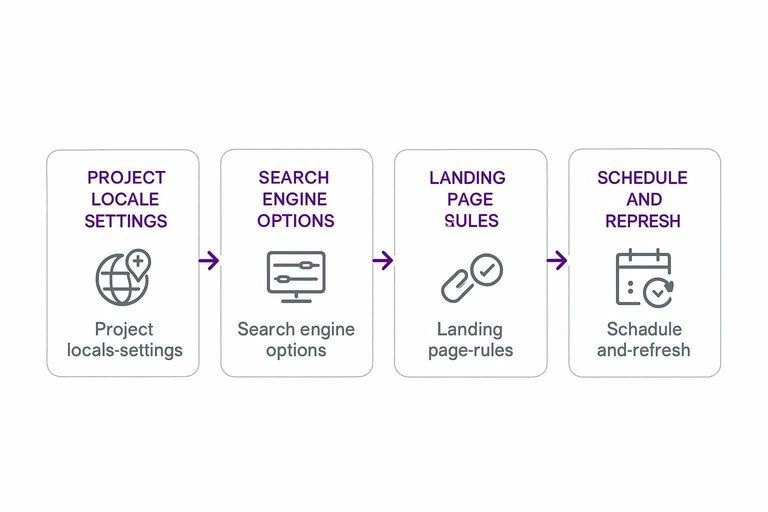
Tracker Settings Audit
Wrong rankings usually come from a tracker that is simulating a different search world than you are. Audit these settings first, because one mismatched toggle can shift the entire SERP and make your “baseline” meaningless.
Project locale settings
Your locale settings define which SERP you’re asking Google to return. If they don’t match your target market and manual checks, every position comparison will drift.
- Confirm the country matches your target market and billing region.
- Verify the city and coordinates match where you test manually.
- Check language settings, including interface and query language.
- Match the Google domain to your market (google.co.uk vs google.com).
- Re-run one keyword and compare against your manual baseline.
If your coordinates are off by miles, your “wrong rank” is often a different SERP.
If you’re juggling multiple projects and baselines, it can help to standardize your process with resources to simplify SEO workflows."
Search engine options
Rankers can track different SERP surfaces, even for the same keyword. Align these options with the exact scenario in the issue report.
- Confirm device type: desktop or mobile, not “both” by accident.
- Check SafeSearch level and keep it consistent with your baseline.
- Verify SERP type: web results vs news vs images.
- Confirm any personalization or “zero-click” features toggles.
- Re-check one keyword that is clearly device-sensitive.
If the issue only happens on mobile, a desktop project will never reproduce it.
Keyword and tags hygiene
Your tags are your expectations, so messy tags create fake “ranking problems.” Group keywords by intent and expected landing page, like “brand / homepage” versus “non-brand / product page,” and keep local modifiers like “near me” separate.
A classic failure is mixing “Acme login” with “best CRM software” and expecting one URL to win both.
Landing page rules
Landing page rules decide what the tracker counts as “your” ranking URL. Tighten these rules so “wrong URL” doesn’t get reported as “wrong rank.”
- Set the expected URL pattern (exact URL, folder, or regex).
- Choose canonical preference: canonical URL vs observed ranking URL.
- Decide how to treat parameters like ?utm= and session IDs.
- Define subdomain handling: include or exclude blog., support., m.
- Confirm http/https and trailing slash normalization.
If you don’t define URL equivalence, the tracker will punish harmless URL variants.
Schedule and refresh
Freshness problems look like ranking problems until you check the crawl schedule. Know when to force a re-check, and learn the signs of partial updates.
Force a re-check after major changes, like a migration, canonical update, or title rewrite. Track more frequently for volatile keywords, but don’t crank everything to hourly without capacity.
If you see mixed timestamps or long queue times, you’re not looking at new rankings yet.
Data Source Validation
Wrong ranks usually come from mismatched data sources, not “bad math.” One system reports a live SERP snapshot, another reports aggregated behavior, and your brain expects a single number.
Your job is to identify the ranker’s source of truth, then force every comparison to use the same query, time window, and URL rules.
GSC vs tracker ranking
GSC doesn’t show “your rank today.” It shows an impression-weighted average position across queries, devices, countries, and SERP layouts.
A tracker typically reports a single SERP snapshot rank for one keyword, one location, one device, at one time.
If you compare them, match these exactly:
- Date range and lag (GSC can trail).
- Search type (Web vs Image vs Video).
- Country, device, and query filters.
- Page filter (exact URL vs contains).
The moment you see “average position,” you’re in blended territory, not a fixed rank.
For a clearer breakdown, see this guide to GSC average position.
SERP snapshot comparison
Treat the tracker as a camera, then verify what it photographed.
- Export the tracker’s SERP capture for the keyword and timestamp.
- Manually run the same query with matching location and device.
- Note SERP features present in both views (maps, AI, videos, snippets).
- Compare domains and exact URL paths for results above you.
- Record any differences in query variant or spelling.
If the SERP layouts differ, your “rank” is not the same measurement.
Timeframe alignment
Ranks shift hourly, but your tools may round time differently.
- Last successful crawl time in the tracker
- Tracker timezone vs your timezone
- GSC data freshness and delay window
- Rolling average window (7/28 days)
- “Today” cutoff time (midnight vs last 24h)
Fix the time window first, or you’ll chase phantom deltas.
Sampling and clustering
Many rankers don’t track every keyword you think they track. They cluster similar terms, merge volumes, then assign a representative keyword to stand in for the group.
Example: a cluster like “best running shoes / top running shoes / running shoes best” may report one cluster rank, even if one term is #3 and another is #11.
That’s the line that gets crossed: you’re reading a cluster proxy as if it were a keyword fact.
URL and Canonical Checks
Your rank tracker can look “wrong” when Google is ranking a different URL than the one you expect. The fix is to prove which URL Google chose, then trace why.
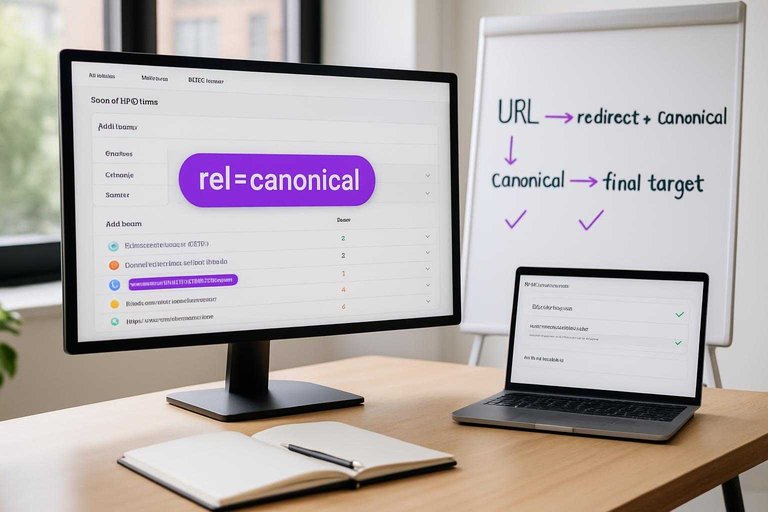
Canonical chain review
You’re checking whether your intended page is the canonical target Google should rank. Small leaks like redirects or internal links can flip the chosen URL.
- Confirm the live URL returns 200, not a redirect.
- Check rel=canonical points to the intended URL.
- Follow redirects and canonicals until the final target.
- Verify internal links mostly point to that final target.
- Inspect the ranked URL in Search Console URL Inspection.
If the chain ends somewhere else, your tracker is fine and your canonicals aren’t.
Indexing signals mismatch
Google can only rank URLs it’s willing to index and trust for the query. Mixed signals push it toward a “cleaner” alternative, even if it’s weaker.
Noindex tags, robots.txt blocks, hreflang conflicts, or soft-404 classification can disqualify your preferred URL. A classic case is a product page marked “noindex” in one template, while the category page stays indexable and wins.
SERP URL variants
Google often ranks a close variant of your URL, not your exact string. Your tracker must normalize variants the same way Google does.
- Trailing slash vs no slash
- http vs https
- URL parameters
- AMP versions
- UTM-tagged URLs
Pick one canonical format, then force everything else to resolve to it.
Intent-page mismatch
Google picks the page that matches search intent, not your org chart. For “best running shoes,” it may rank your guide, not your product SKU.
If the query is broad, Google leans toward categories and guides. If it’s local, it prefers location pages or a GBP-connected landing page. Either change your expectation, or optimize the page Google already wants to rank.
Quick Diagnosis Matrix
Use this matrix when your rank tracker says “Position 3” but your eyeballs say “nope.”
| Symptom | Most likely cause | Fastest check | What to do next |
|---|---|---|---|
| Rank jumps daily | Personalization, location | Incognito + query params | Lock to a locale |
| You rank, team doesn’t | Different geo, language | Compare uule + hl | Track per market |
| Tracker shows higher | Wrong canonical URL | Check Search Console page | Fix canonicals |
| Tracker misses keywords | Query intent mismatch | Check SERP features | Split keyword sets |
| Position stuck at 1 | Cache, stale dataset | Re-run on new device | Clear, rerun, verify |
If two rows match, assume your tracker setup is wrong first, not Google.
Lock the SERP Context, Then Fix the Cause
- Recreate the SERP baseline: same query format, same locale, same device, and note any SERP features that change what “position” means.
- Audit the tracker: project location/language, search engine options, keyword normalization, landing page rules, and refresh cadence.
- Validate the data source: compare tracker results to a saved SERP snapshot and GSC over the same date range, accounting for sampling and clustering.
- Resolve URL reality: confirm which URL Google ranks, then fix canonicals, indexing signals, and intent-to-page alignment—use the diagnosis matrix to choose the quickest path.
Frequently Asked Questions
- Does a google website ranker match the position I see in Google Search exactly?
- Usually not. Most rankers use depersonalized checks and fixed locations/devices, while your live SERP can change based on history, logged-in state, and real-time testing.
- How often should I update a google website ranker to avoid “wrong position” alerts?
- For most sites, daily tracking is enough; high-volatility keywords (news, ecommerce, local) often need 2–4 checks per day. More frequent checks reduce false alarms from short-term SERP flux.
- What ranking accuracy should I expect from a google website ranker (and what’s an acceptable error)?
- Expect frequent ±1–3 position variance even with correct settings, especially on mobile and local-intent queries. Treat larger swings (5+ positions) as worth investigating unless they revert within 24–48 hours.
- Can Google Search Console replace a google website ranker for position tracking?
- Not fully. Search Console is best for averaged performance by query/page over time, while a ranker is better for consistent “spot-check” positions on specific keywords and locations.
- What should I do if my google website ranker shows a big drop but traffic and clicks are stable?
- Prioritize business metrics over rank and validate with Search Console impressions/clicks and landing page sessions in GA4. If those are stable for 7–14 days, the drop is often a tracking artifact or short-term SERP reshuffle rather than a true visibility loss.
Turn Rank Data Into Growth
Once you’ve validated tracker settings, data sources, and canonicals, the next challenge is turning accurate rankings into consistent, measurable SEO momentum.
Skribra publishes SEO-optimized articles to your site on a reliable schedule—with WordPress integration, automated images, and backlinks support—so clean rank signals translate into traffic; start with the 3-Day Free Trial.
Written by
Skribra
This article was crafted with AI-powered content generation. Skribra creates SEO-optimized articles that rank.
Share: