May 1, 2026
·
Updated July 28, 2026
·
10 min read
Google website ranker tool vs manual checks for reporting
A clear comparison of Google website ranker tools versus manual ranking checks for reporting — weigh accuracy, scale, time/cost, reporting quality, and compliance risk so you choose a workflow that stands up to stakeholders and audits.

If your ranking report changes every time you refresh a browser, you’re not imagining it—personalization, location, and device differences can make “manual checks” feel like chasing ghosts.
This comparison helps you decide when a Google website ranker tool is worth it (and when it isn’t). You’ll get a fast decision snapshot, learn where accuracy breaks down, see how scale and automation affect coverage, and understand the reporting, compliance, and risk tradeoffs so your numbers are defensible.
Decision Snapshot
You’re choosing between a Google ranker tool and manual checks because reporting breaks fast at scale. A “good enough” method for 20 keywords becomes a mess at 2,000. Pick based on how many queries you track, how exact you must be, and who will challenge the numbers.
Who This Is For
If you own rank reporting, you feel the tradeoff between speed and trust. The pressure shows up when someone asks, “Why did we drop in Chicago on mobile?” This applies whether you report internally, to clients, or to executives.
In-house SEOs need repeatable weekly updates without turning into spreadsheet operators. Agencies need client-ready reports that survive scrutiny and churn. SMBs need a simple pulse check without paying enterprise rates. Enterprise teams need location, device, and SERP-feature tracking across markets and business units.
Your role decides your tolerance for “close enough” versus defensible proof.
Two Approaches Defined
A “Google website ranker tool” automates position tracking for a keyword set and stores history over time. You use it to monitor trends, segment by location or device, and export dashboards. Manual checks mean you run searches yourself and record what you see, often in a spreadsheet.
Tools typically measure a proxy of ranking from a configured location, device, and SERP type. They may also capture SERP features, competitors, and visibility metrics. Manual checks measure the live SERP you personally saw, including weirdness like local packs and personalization. Typical workflow: tool runs daily, you review deltas; manual checks happen on demand, you screenshot and log.
Tools win on repeatability. Manual wins on “show me exactly what Google showed.”
Reporting Goals Checklist
Get clear on what your reporting must deliver before you pick a method.
- Report daily, weekly, or monthly changes
- Track keyword count and keyword groups
- Segment by location and device
- Serve stakeholders with different trust levels
- Keep an auditable trail and screenshots
If you can’t state these goals, you’ll buy software to solve a people problem.
Quick Decision Signals
Some conditions make the choice obvious.
- Track 200+ keywords: favor tools
- Monitor volatile SERPs: favor tools
- Handle client disputes: favor manual screenshots
- Need compliance-grade proof: favor manual logs
- Report across many locations: favor tools
When volume rises, tools become a necessity. When trust is on the line, manual evidence becomes your backup plan.
Accuracy And Reliability
Rank data looks precise, but both tools and manual checks can lie to you. A “#3” in a report can be “#9” for your customer in another city. For a broader framework on interpreting SEO data responsibly, see our SEO guide.
Personalization Effects
Manual checks are shaped by who you are and where you are. Location, language, device, and past clicks can quietly rewrite the SERP you think you’re measuring.
A logged-in Chrome user in Austin may see different local packs than an iPhone user in London. Even ranker tools can skew when they use a generic data center, the wrong language, or a default device profile.
Treat any single view of Google as a personalized sample, not the truth.
For Google’s own explanation, see how Search can show personalized results and what controls affect them.
Sampling Vs Reality
Ranker tools don’t “look” the way you look. They sample specific datacenters, refresh on schedules, and sometimes approximate SERP features.
Manual checks are one timestamp on one setup, with all the volatility included. Tools may update daily or weekly, miss rapid tests, or lag behind a featured snippet swap that happened this morning.
When results diverge, time and SERP features are usually the culprit, not your sanity.
Common Error Sources
Most reporting errors come from assumptions, not math.
- Trusting incognito to remove personalization
- Using a VPN with location drift
- Accepting tool geo settings as “close enough”
- Mixing keyword variants and intent
- Ignoring SERP features pushing you down
Fix your inputs first, or you’ll argue about outputs forever.
Validation Habits
Use a repeatable routine to keep rankings honest.
- Spot-check priority terms on a set schedule.
- Use consistent locale, language, and device settings.
- Log SERP screenshots when changes look suspicious.
- Reconcile rank shifts with Search Console clicks and impressions.
If rankings move but Search Console doesn’t, you’re tracking noise or the wrong query.
Coverage And Scale
At small scale, manual rank checks feel “good enough” because you can eyeball results and move on. Scale changes the math fast. Keyword volume, markets, and competitor scope decide whether you’re reporting or just scrolling.
Keyword Volume Thresholds
Manual checks work when your list is small and the cadence is light. Past a point, you’re measuring your patience, not your rankings.
A practical rule of thumb:
- 1–25 keywords: manual checks are manageable for weekly reporting.
- 25–100 keywords: manual checks get fragile without strict templates.
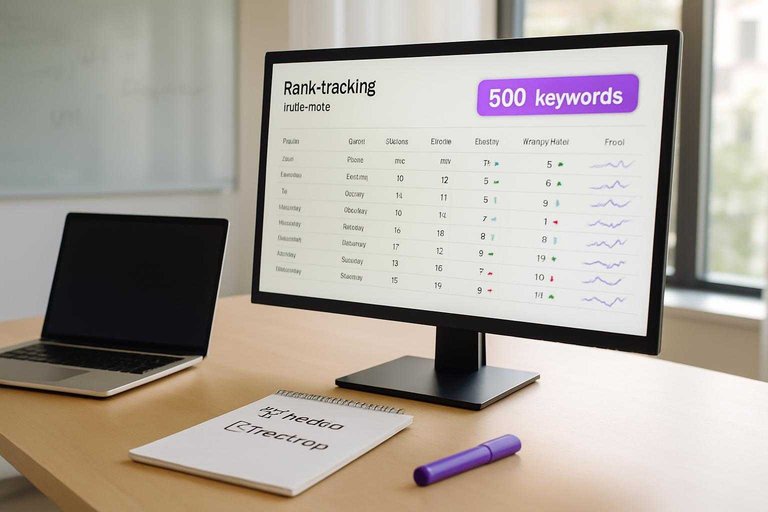
- 100–500 keywords: tools pay off, even with basic tracking.
- 500+ keywords: manual is a bottleneck, not a method.
If you’re spending more time collecting data than explaining it, you’re already late.
Local And Device Needs
Coverage explodes when you add locations, devices, or languages. A “simple” check becomes 10 checks, then 100.
Manual handling breaks down when you need:
- Multi-location tracking, like “plumber” across 20 suburbs.
- Mobile and desktop splits, because SERPs differ.
- Language and country variants, like en-GB vs en-US.
Tools handle this by saving contexts and re-running them on schedule. Manual checks force you to recreate context every time, which invites silent errors.
Competitor Tracking Depth
Competitor reporting sounds simple until you define “competitor” and “depth.” Tools win when the question shifts from “where are we?” to “what’s changing?”
- Compare share-of-voice across 50–500 keywords (tools) vs 5–20 (manual).
- Track competitor top pages per keyword (tools) vs ad hoc notes (manual).
- Capture SERP features presence and loss (tools) vs spot checks (manual).
- Maintain dynamic competitor sets by query cluster (tools) vs fixed list (manual).
Manual is fine for a rivalry. Tools are for a market.
Automation Opportunities
Automation is about removing repeat work, not removing judgment. You want your time on anomalies, not screenshots.
- Schedule rank pulls by market, device, and keyword set.
- Tag keywords by intent, page type, and priority.
- Set alerts for drops, new entrants, and SERP feature changes.
- Publish dashboards that update without slide edits.
- Run an exception review loop: investigate only flagged deltas.
When reporting runs itself, you finally have room to do the analysis your stakeholders assume you’re doing.
Time, Cost, And Effort
You’re choosing between repeatable automation and repeatable busywork. The real trade-off is not accuracy, but labor and overhead.
| Factor | Ranker tool | Manual checks | What you actually pay |
|---|---|---|---|
| Labor hours | Minutes weekly | Hours weekly | Your team time |
| Subscription cost | Monthly fee | $0 direct | Hidden wage cost |
| Setup overhead | One-time onboarding | None upfront | Process friction |
| Ongoing maintenance | Alerts, API updates | Repeat queries | Human attention |
| Reporting speed | Instant dashboards | Spreadsheet assembly | Deadline stress |
If reporting happens more than once a month, manual checks become a tax you keep renewing—especially if you’re not using resources to simplify SEO workflows.
Reporting Quality
Trustworthy reporting is less about “the rank” and more about repeatable evidence. Your goal is client-ready clarity and internal confidence, even when SERPs shift daily.
Stakeholder Expectations
Clients and executives want a clean story they can repeat in a meeting. They care about consistent methodology, visible trends, and plain-English takeaways like “non-brand clicks rose 18%.” Single-rank precision matters less than direction, volatility, and why it moved.
Contextual Metrics
Rank without outcomes is trivia, so anchor it to performance signals.
- Track clicks and impressions by query group
- Monitor CTR shifts on priority pages
- Attribute conversions to landing pages
- Segment brand vs non-brand demand
- Note SERP feature presence and loss
If rank rises and CTR falls, your snippet got worse, not your SEO.
For metric definitions and nuance, reference Google’s Performance report metrics (clicks, impressions, CTR, and average position).
Narrative And Insights
Tools make patterns visible because they segment at scale. You can break results by device, intent, location, or page type, then spot “winners” and “bleeders” fast. Manual checks still earn their keep for qualitative notes like “two Reddit results pushed us below the fold.”
Audit Trail Standards
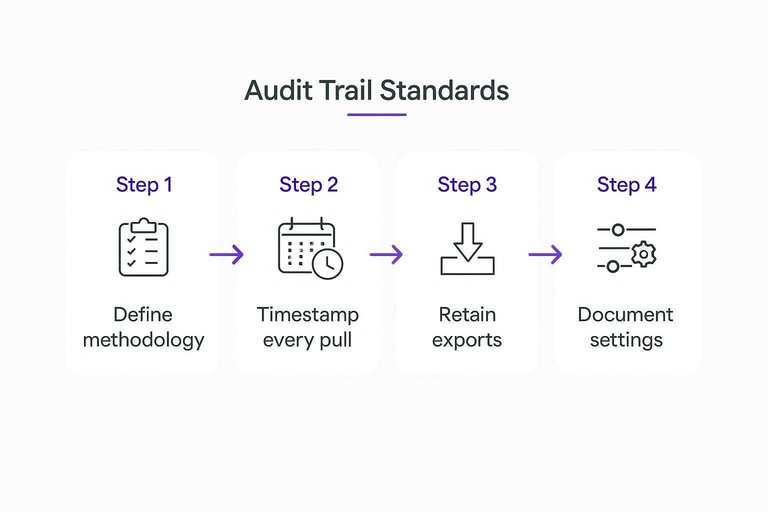
Make your reporting defensible before anyone questions it.
- Define your methodology and keyword set in writing.
- Timestamp every pull and label the reporting window.
- Retain exports, raw data, and screenshots for anomalies.
- Document locale, language, device, and personalization settings.
- Log tool updates or tracking configuration changes.
When results get challenged, your process becomes the proof.
Compliance And Risk
Reporting on Google rankings crosses policy, privacy, and operational lines fast. One “quick scrape” or shared login can turn a clean report into a contract problem.
Tool Policy Considerations
Rank tracking lives in the gap between what you can do and what you’re allowed to do. Google’s Terms, rate limits, and anti-bot systems make “just scrape it” a short-lived strategy.
Reputable vendors build around these constraints using documented APIs where possible, controlled collection methods, and account-safe workflows. If a tool needs your personal Google login, or runs headless browsers at scale from random IPs, you’re buying churn and escalation risk.
Longevity comes from boring compliance, not clever automation.
Manual Check Risks
Manual checks feel safer because they’re human. They’re also easier to contaminate without noticing.
- Use inconsistent query phrasing across reviewers
- Trigger personalization from signed-in accounts
- Forget locale, device, or language settings
- Produce results no one can reproduce
- Miss changes between check times
If you can’t replay the exact conditions, your “rank change” is a story, not evidence.
Data Security Basics
Treat rank reports like client data, not marketing fluff.
- Restrict access by role and project.
- Segregate client workspaces and storage.
- Enforce SSO and MFA on every account.
- Set retention rules for exports and screenshots.
- Audit downloads and shared links monthly.
If you can’t answer “who accessed what, when,” you don’t have control.
When Legal Matters
Some clients turn ranking data into regulated evidence. Think healthcare, finance, gambling, or any brand with strict procurement rules.
International work adds another layer. Cross-border access, subcontractors, and stored screenshots can trigger data handling requirements, even when the data feels “public.”
When compliance teams ask for your method and controls, “we checked in Incognito” won’t survive the questionnaire.
Best-Fit Scenarios
Use cases don’t pick sides, constraints do. Match the approach to your risk, speed needs, and who will read the report.
- Weekly client dashboards with trends
- Multi-location keyword packs at scale
- Quick one-off “did we move?” checks
- Post-migration spot audits and SERP sanity
- Disputed rankings where screenshots matter
If your report needs repeatability, use a tool; if it needs proof, go manual.
Choose Your Default Workflow—Then Add a Validation Loop
- Pick your default: use a ranker tool for ongoing, multi-keyword reporting and competitor tracking; use manual checks only for spot verification, demos, or one-off investigations.
- Define your reporting goal upfront (trend monitoring, local/device visibility, competitive movement, or campaign impact) so you don’t over-collect data you won’t use.
- Build a validation habit: periodically confirm a small sample of keywords with neutralized checks (incognito, fixed location/device, consistent settings) and document discrepancies.
- Ship reports with context: include location/device, date range, and notable SERP changes so stakeholders see what changed—and why it matters.
Frequently Asked Questions
- What is the best Google website ranker tool for local SEO (maps + organic) reporting?
- Use a rank tracker that supports geo-grids and map pack tracking (for example, BrightLocal, Local Falcon, or Whitespark) plus organic tracking in the same locations. Most teams pair map tracking with Google Search Console to validate real query impressions and clicks.
- Can a google website ranker track rankings for specific cities or ZIP codes without a VPN?
- Yes—most modern rank trackers let you set a precise location (city/ZIP, GPS point, or radius) and device type, then run checks from that location automatically. This usually produces more consistent local reporting than ad-hoc VPN + manual searches.
- How do I validate a google website ranker’s data against Google Search Console?
- Match keywords to Search Console queries and compare trends over the same date range, focusing on clicks/impressions and average position by page. If a tracker shows a big ranking jump but Search Console impressions stay flat, treat it as a potential measurement artifact.
- How often should I run google website ranker reports for clients or stakeholders?
- Weekly is the standard cadence for most SEO reporting, with daily tracking reserved for launches, penalties, or high-stakes keywords. Monthly summaries work best for exec reporting because they smooth out normal day-to-day volatility.
- What if my google website ranker tool doesn’t support certain markets, devices, or SERP features?
- Use manual spot checks only for the gaps (specific locales, mobile vs desktop, or features like People Also Ask) and keep the tool as the system of record for everything else. Most teams document the exceptions in the report so stakeholders know which metrics are tracker-based vs manually verified.
Turn Rankings Into Growth
Whether you use a Google website ranker tool or manual checks, the real challenge is turning those reports into consistent, scalable SEO wins.
Skribra publishes daily SEO-optimized articles, streamlines WordPress publishing, and supports authority-building backlinks—so you can act on ranking insights faster with a 3-Day Free Trial.
Written by
Skribra
This article was crafted with AI-powered content generation. Skribra creates SEO-optimized articles that rank.
Share: