February 24, 2026
·
Updated July 28, 2026
·
13 min read
CMS SEO: Headless vs Traditional CMS (Pros, Cons, Risks)
A side-by-side comparison of headless CMS vs traditional CMS for SEO—how each impacts rendering and indexing, information architecture, Core Web Vitals performance, workflow/governance, migration risk, and cost-to-team fit so you can choose confidently.

Choosing a CMS for “SEO” usually turns into a vague debate about flexibility versus simplicity—until your pages don’t index, templates sprawl, or Core Web Vitals slip and rankings follow.
This comparison breaks the decision into the parts Google actually feels: rendering and crawlability, information architecture control, performance levers, and editorial governance. You’ll see where headless shines, where traditional CMS wins, what typically breaks during migrations, and which option fits your team, budget, and growth plans.
Decision Snapshot
You’re not choosing “modern” versus “old.” You’re choosing what delivers SEO outcomes with your constraints. The right CMS is the one that ships indexable pages fast, keeps templates stable, and avoids “it works on staging” surprises.
Primary SEO goals
Pick goals first, because headless and traditional optimize different parts of the pipeline.
- Improve rankings for core pages
- Increase crawlability and indexation
- Reduce load time and CWV
- Publish more content, faster
- Scale international SEO cleanly
If your top goal is speed at scale, control beats convenience.
Site context variables
Your context decides the failure mode: blocked crawling, slow releases, or broken templates.
- High traffic or frequent spikes
- Many content types or layouts
- Limited developer capacity
- Heavy integrations and data sources
- Legacy platform and migration limits
When constraints stack up, the “best” CMS becomes the one you can operate safely.
How to decide
Use one lens: control, workflow, and risk.
If you need tight technical control and can fund engineering, headless wins. If you need reliable publishing with minimal dev risk, traditional wins. The tradeoff is where you want complexity to live: in the codebase or in the CMS UI.
SEO Fundamentals Impacted
Your CMS touches SEO in two places: what gets rendered for bots, and how consistently you publish signals. Think of it as “HTML output” plus “rules and governance,” because both decide what Google trusts.
Rendering and indexing
Rendering is the first SEO fork in the road, because it decides what a crawler sees on the first request. A classic trap is “It looks fine in the browser,” while Google got thin HTML.
SSR sends complete HTML per request, so crawling is straightforward and JS becomes optional. SSG prebuilds HTML, so indexing is clean and fast, but freshness depends on rebuilds. CSR ships a JS app first, which can delay or break indexing when rendering fails. Hybrid mixes routes, so you can SSR money pages and CSR the app-like parts.
If organic traffic matters, treat CSR as a deliberate constraint, not a default. For more detail, see Google’s guidance on JavaScript SEO basics.
Information architecture
Information architecture lives above the CMS, but the CMS enforces it through templates and taxonomies. If your content types cannot express “category, hub, spoke,” you end up with random linking.
Traditional CMS templates often hardwire URLs, archives, and breadcrumbs, which makes internal linking predictable. Headless systems can model richer taxonomies, but you must implement navigation, related content, and pagination yourself. Your choices shape crawl depth, link equity flow, and whether Google understands a topic cluster.
Good IA isn’t a content problem. It’s a template and routing problem.
Performance drivers
Speed comes from a chain of CMS decisions, not one “optimize images” checkbox. If you need a broader refresher on the foundations, start with this SEO guide for beginners before you tune specific CMS settings.
Control and governance
SEO control fails when it’s scattered across plugins, code, and tribal knowledge. You want one place to set rules, and clear permissions to prevent accidents.
Headless CMS Explained
A headless CMS stores content and ships it over an API. Your frontend, hosting, and build pipeline now own most SEO outcomes.
Think of the CMS as “content + workflow,” not “pages.” The page is assembled later by your app, then served by your platform.
Architecture overview
A headless setup delivers content via REST or GraphQL. Your frontend pulls that content into routes, templates, and components.
Common stacks look like Contentful + Next.js + Vercel, or Strapi + Nuxt + Cloudflare. Builds may be SSR, SSG, ISR, or a hybrid, with deploys handled by CI/CD.
SEO responsibilities shift with the rendering choice. If you control the renderer, you own the crawlable HTML.
SEO advantages
Headless gives you SEO leverage because you control the runtime. You can tune what matters, not what the CMS defaults.
- Choose SSR, SSG, ISR per page type
- Tune caching, headers, and edge delivery
- Generate custom schema and meta per template
- Reuse content across web, app, and email
You’re buying control. Use it to make your output predictable for crawlers.
SEO risks
Headless also removes guardrails. One bad implementation can hide content from both users and bots.
- Ship client-only rendering by accident
- Break previews and publish blind
- Split SEO work across too many tools
- Mismanage redirects and canonicals
Most failures are integration failures. Treat SEO as an engineering requirement, not an editorial checkbox.
Best-fit scenarios
Headless wins when your site needs custom behavior at scale. It also wins when content must power multiple surfaces.
If you’re running many sites, complex UX, or heavy performance goals, headless fits. It also fits teams where engineers can own rendering, routing, and release discipline.
If your team can’t own the pipeline, don’t buy the pipeline. Choose the CMS that matches your execution reality.
Traditional CMS Explained
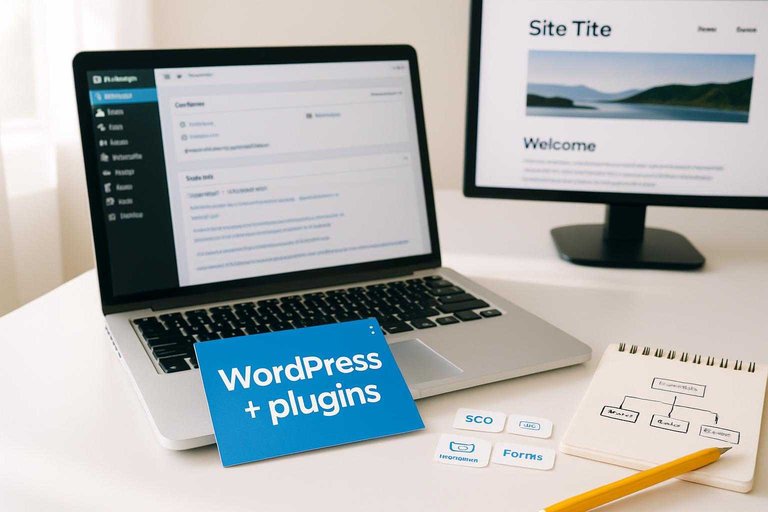
A traditional CMS bundles content editing and site rendering in one system. Think “WordPress + theme + plugins” running on a single host, with SEO handled inside the same admin.
That tight coupling makes common workflows fast. It also sets hard edges when you outgrow templates, plugin stacks, or shared hosting.
Architecture overview
Traditional CMSs couple authoring and presentation in one codebase. Your editors write content, and the CMS renders pages using themes or templates.
A typical stack looks like: core CMS, theme layer, then plugins for SEO, caching, and forms. Hosting is usually one server or managed platform, where PHP and the database live together.
That coupling is why changes feel easy at first. It’s also why large refactors get expensive.
SEO advantages
Traditional CMSs work well for SEO because the defaults are familiar and battle-tested. Most teams can follow “install plugin, fill fields, publish” without engineering help.
- Mature SEO plugins and proven configurations
- Editor-friendly title, meta, canonical fields
- Stable previews that match production HTML
- Standard sitemap, robots, redirect patterns
- Broad community troubleshooting and docs
You get speed through convention. That’s often the real SEO advantage.
SEO risks
Traditional CMS SEO can degrade when you keep stacking fixes on fixes. Each plugin solves a problem, then adds weight.
- Plugin bloat increasing page weight and queries
- Slower TTFB from server-side rendering load
- Limited flexibility for custom routing and schemas
- Security issues forcing emergency patch cycles
- Updates breaking pages and causing downtime
If SEO is your growth engine, stability beats “one more plugin.”
Best-fit scenarios
Traditional CMS wins when you need to publish fast with minimal engineering. A small team can ship landing pages, blogs, and basic marketing sites using standard themes.
It’s a strong choice when “good enough” SEO is acceptable, and your custom needs are limited to light CSS, forms, and a few integrations.
When your roadmap demands custom rendering or multi-channel delivery, that’s the line that gets crossed.
SEO Feature Comparison
You need one view that shows who owns what: CMS, front end, or both. The boundary decides how fast you can ship fixes.
| SEO capability | Traditional CMS | Headless CMS | Ownership boundary |
|---|---|---|---|
| Title/meta editing | Built-in UI | Model + UI needed | Content vs dev |
| URL control | Slugs, redirects | Routing in app | Dev-led |
| Redirect management | Plugin or core | Service or edge | Shared |
| XML sitemaps | Auto-generated | Custom generator | Dev-led |
| Structured data | Plugin blocks | Component templates | Dev-led |
If “Dev-led” shows up often, budget engineering time for SEO changes, not just strategy.
Performance and Core Web Vitals
Headless and traditional CMS setups can both hit strong Core Web Vitals, but they fail in different places. A WordPress page can drown in plugins and theme bloat, while a headless page can stall on JavaScript and APIs. The trap is blaming the CMS when the real issue is your front-end and delivery path.
Typical bottlenecks
Different architectures create different default failure modes, so diagnose by category first. Otherwise you’ll “speed up” the wrong thing.
- Traditional: plugin overhead and hooks
- Traditional: theme bloat and render-blocking CSS
- Headless: JS hydration and client-side routing
- Headless: API latency and chatty requests
- Headless: build time and cache invalidation
Most “CMS speed wins” are actually fewer scripts, fewer requests, and better caching.
Optimization levers
Use a consistent order, or you’ll chase micro-wins while LCP stays bad.
- Set caching rules per template, not “site-wide,” and cache HTML at the edge.
- Fix your image pipeline: responsive sizes, modern formats, and preload the hero.
- Inline critical CSS, defer the rest, and remove unused theme or component styles.
- Govern scripts: kill zombies, delay third-party tags, and cap total JS budgets.
- Configure your CDN: compression, HTTP/2 or 3, long TTLs, and smart purges.
You’re not optimizing a CMS; you’re optimizing a delivery system.
Measurement approach
Lab data tells you what’s possible, field data tells you what users get. Use both, or you’ll “fix” scores without changing reality.
Start with lab runs for each template type, like “blog post,” “product page,” and “category.” Then validate with field data in CrUX or RUM, segmented the same way. Tie every CWV change to a deployment, with a single diff you can point to.
If you can’t map a metric change to a release, you don’t have a performance program.
Content Workflow and SEO
Your CMS shapes how fast you publish and how often you ship SEO defects. Headless usually wins on structure and reuse, while traditional often wins on “what you see” confidence.
Authoring experience
Editors care about two things: confidence before publish and speed after. A classic CMS often nails “what you see is what ranks,” while headless shifts preview into an extra layer.
Traditional CMS preview is usually page-real and immediate, which catches layout and snippet issues early. Headless can do great previews too, but you need a solid preview environment, shared components, and stable URLs.
Headless typically wins on reusable blocks, strict fields, and validation, like “meta title max 60.” Traditional often wins on collaboration polish, like inline comments and simple drafts.
If preview friction exists, your team will ship “close enough” pages. SEO hates “close enough.”
Governance and QA
Governance decides if SEO is optional or enforced. Your goal is fewer “we’ll fix it later” launches.
- Require titles, descriptions, canonicals, and index settings
- Enforce SEO checklists before publish
- Route changes through approvals and roles
- Validate links and redirects automatically
- Generate schema from content rules
When QA is built into the workflow, editors stop being the last line of defense—and teams that need help operationalizing this can lean on resources to simplify SEO workflows to reduce manual checks.
Localization and scale
International SEO fails in the workflow, not in the code. You need repeatable patterns across locales.
- Manage hreflang pairs and x-default rules
- Reuse translation memory for recurring blocks
- Standardize locale URL patterns per market
- Control regional publish times and embargoes
- Enforce local legal and brand requirements
If locales drift, Google sees duplicates and your team sees chaos.
Programmatic SEO fit
Programmatic SEO needs templates, strict data, and predictable URLs. Headless CMS usually fits better because content is structured and can drive thousands of pages cleanly.
Traditional CMS can do it, but large catalogs often turn into plugin stacks and fragile page builders. Headless makes it easier to generate pages, inject schema, and automate internal links from shared rules.
The real risk is index bloat from thin variants, like “/red-shoes-size-7-sale.” Fix it with page qualification rules, canonical strategies, and noindex guardrails.
If you can’t prevent bad pages automatically, you’re not doing programmatic SEO. You’re doing spam at scale.
Migration and Risk
Migrating CMS architectures is where SEO usually gets harmed, not in the platform comparison slide deck. A headless move often adds more moving parts, while a traditional move often hides problems until launch day.
Think in failure modes. The same “small” change, like swapping a path prefix, can ripple through templates, APIs, and caches.
Common failure points
Migrations break SEO when assumptions change faster than your safeguards. You want to hunt the silent failures, not the obvious ones.
- Change URL patterns without full mapping
- Miss redirects on long-tail pages
- Drop canonicals during template rebuilds
- Leak noindex from staging rules
- Publish conflicting sitemap locations
If two systems can emit URLs, you have doubled your risk surface.
Pre-launch checklist
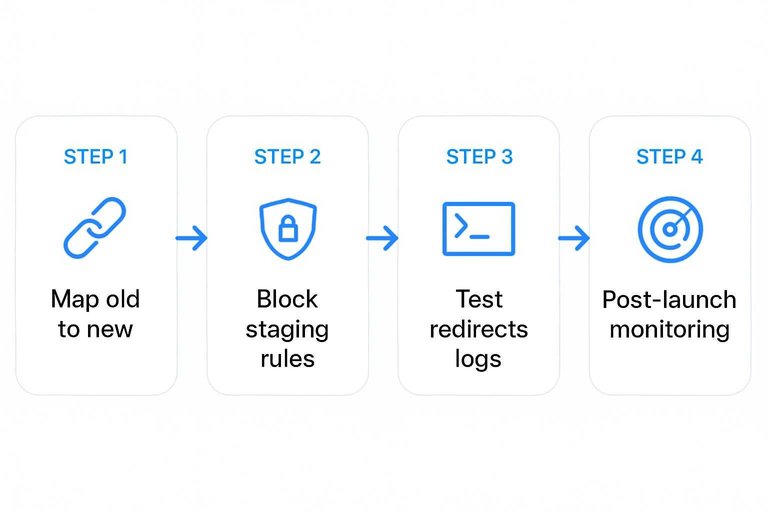
Run a checklist that treats launch like a reversible experiment. Your goal is to prove equivalence before Google does.
- Map every old URL to a new URL, including parameters.
- Confirm staging is blocked, and production is indexable.
- Test redirects with logs, not spot checks.
- Capture Core Web Vitals baselines and compare on staging.
- Set post-launch monitoring for 404s, dips, and crawl spikes.
Ship only when you can predict the first week of crawl behavior.
Ongoing maintenance
Traditional CMS setups centralize risk in one codebase, so patches and SEO changes tend to be packaged together. Headless splits responsibility across CMS, frontend, middleware, CDN, and build tooling, so “nothing changed” becomes harder to trust.
Dependency drift is the quiet killer. A framework upgrade can alter rendering, headers, or caching, and your SEO monitoring becomes your early warning system.
Cost and Team Fit
Your CMS choice sets your total cost of ownership and your hiring plan. The fastest SEO wins usually come from the team you already have.
Traditional CMS can look cheaper until you price plugins, maintenance, and template debt. Headless can look expensive until you account for fewer rebuilds and cleaner deployment.
TABLE: Compare the real costs and the skills each option demands.
| Factor | Traditional CMS | Headless CMS | SEO impact |
|---|---|---|---|
| Upfront build | Low to medium | Medium to high | Speed to launch |
| Ongoing maintenance | Plugin updates | Dev ops + CI | Fewer surprises |
| Required skills | Admin + theme dev | Frontend + API | Control over markup |
| Change workflow | Editor in CMS | CMS + code repo | Faster safe changes |
| Time-to-value | Days to weeks | Weeks to months | Earlier iterations |
Pick the model your team can operate weekly, not the one that demos best. If you need a clear definition of what you’re buying, here’s a helpful explainer on what a headless API is.
Recommendations by Scenario
Pick based on your delivery model, not your org chart. SEO breaks when publishing slows, templates sprawl, or rendering gets flaky.
- Choose a traditional CMS if you need fast publishing with minimal engineering.
- Choose a headless CMS if you ship to web, app, and kiosks from one content source.
- Choose a traditional CMS if your SEO team owns templates, internals, and redirects.
- Choose a headless CMS if you can guarantee SSR, clean routing, and stable canonicals.
- Choose a traditional CMS if you rely on plug-ins like “one-click schema” today.
When you’re unsure, pick a traditional CMS and revisit headless after your workflows are boring.
CMS SEO Pitfalls (and How to Avoid Them)
Most cms seo problems don’t look like “SEO problems” at first. They look like normal publishing: a new template, a new filter, a new integration, a new environment. The issues show up later as crawling waste, duplicate URLs, missing signals, or pages that are indexable but never compete.
Below are the pitfalls that most often decide whether headless or traditional stays healthy over time.
Canonicals and URL normalization
Canonicals are rarely “set once.” They’re a system: routing rules, parameter handling, trailing slash consistency, and pagination decisions.
Traditional CMS: canonicals are often handled by core or an SEO plugin, which is safer for basic sites. The risk is having multiple plugins or theme logic output conflicting canonicals, or letting archives, tags, and author pages generate duplicates you didn’t intend to compete.
Headless CMS: you typically generate canonicals in code. That’s powerful, but you must explicitly decide what happens for query parameters, faceted filters, and alternate route aliases. One small routing change can multiply URL variants.
Practical guardrail: define “one canonical URL per content item” as a contract. If the same content can be reached by more than one path, make the canonical deterministic and test it in CI.
Indexation controls (robots, meta robots, headers)
Indexation fails when environments bleed into each other or when “temporary” directives persist.
Traditional CMS: staging sites are often blocked via a setting, a plugin, or robots.txt. The failure mode is forgetting to remove a noindex directive after a redesign, or having inconsistent directives between pages created by different plugins.
Headless CMS: the frontend, CDN, and serverless functions can all influence indexation via HTML meta robots, X-Robots-Tag headers, and robots.txt generation. The failure mode is shipping the right meta tag but the wrong header (or vice versa), then debugging it too late.
Practical guardrail: treat indexation as a release checklist item per environment. Verify robots.txt, a sample of meta robots outputs, and headers on representative templates (not just the homepage).
XML sitemaps that match reality
A sitemap that’s “technically valid” can still be operationally useless if it includes the wrong URLs or misses important ones.
Traditional CMS: auto-generated sitemaps are convenient, but they can include thin archives, internal search pages, or parameterized URLs depending on plugin configuration. They can also omit custom post types if a plugin isn’t aware of them.
Headless CMS: you’ll often build sitemaps yourself. The risk is only including content from the CMS but forgetting route-generated pages (like category hubs), or emitting URLs before they’re actually live and internally linked.
Practical guardrail: generate sitemaps from the same source of truth that generates routes. If a URL can be visited and is meant to rank, it should be in the sitemap. If it shouldn’t rank, it shouldn’t be emitted.
Faceted navigation and crawl bloat
Filters and facets are where “more pages” quietly becomes “too many pages.”
Traditional CMS: ecommerce and directory plugins can create crawlable combinations of parameters or paths. The failure mode is letting every filter become indexable without a clear strategy.
Headless CMS: faceting is usually custom-built, which means you must choose whether filters are query parameters, path segments, or client-side state. The failure mode is accidentally creating thousands of unique URLs with near-identical content.
Practical guardrail: decide which facets deserve indexable landing pages and which should be crawlable but non-indexed (or blocked). Build rules that prevent new combinations from becoming indexable by default.
Structured data consistency
Schema helps when it’s consistent per template and aligned with what users see. It hurts when it’s duplicated, contradictory, or emitted on the wrong page types.
Traditional CMS: plugins make schema easy to add, but it’s easy to stack outputs (theme emits one version, plugin emits another). You can also end up with “generic” schema everywhere that doesn’t map to the content.
Headless CMS: you can generate schema from structured fields, which is ideal. The risk is neglecting template coverage, so some routes have schema and others don’t, or components emit schema without understanding the full page context.
Practical guardrail: own schema at the template level, not the block level. Make “one schema strategy per page type” a documented rule, and add tests for duplicate JSON-LD blocks.
Preview mismatch (the silent SEO killer)
When preview doesn’t match production, editors ship pages that look right in one environment and render differently for bots or users.
Traditional CMS: previews often reflect the real HTML output, which is a strength. The risk shows up when caching, minification, or personalization changes the production output in ways preview doesn’t represent.
Headless CMS: preview depends on your preview deployment and rendering mode. The risk is previewing draft content in a route that isn’t identical to the published route, or relying on client-side rendering in preview while production is SSR/SSG.
Practical guardrail: make preview a first-class environment with the same templates, routing, and rendering mode as production. If the HTML differs, your team is making SEO decisions on a simulation.
If you want the cleanest decision rule: choose the architecture where you can reliably enforce these guardrails with the team you have today.
Choose the CMS that matches your SEO constraints—not your preferences
- Start with your non-negotiables: indexing model (SSR/SSG vs client rendering), template/URL control, and Core Web Vitals targets.
- Map constraints to reality: your dev capacity, content volume, localization needs, and governance/QA maturity.
- Validate with a proof-of-concept: ship 5–10 representative templates, test crawl/render behavior, structured data, and CWV in real environments.
- If migrating, lock the risk items first: URL mapping, redirects, canonicals, internal links, sitemaps, and monitoring—then scale content and features.
Frequently Asked Questions
- Does a headless CMS hurt SEO compared to a traditional CMS?
- No—headless CMS SEO is usually just as strong or stronger when server-side rendering (SSR) or pre-rendering is set up correctly and your team owns technical SEO details like canonicals, redirects, and sitemaps.
- Do I need SSR for cms SEO on a headless CMS, or is client-side rendering enough?
- For cms SEO, SSR or static generation is usually the safer default because it delivers indexable HTML instantly and reduces rendering risk in Google; client-side rendering can work but often requires more QA and monitoring.
- What’s the best way to generate XML sitemaps and robots.txt in a headless CMS setup?
- Most teams generate sitemaps in the frontend (e.g., Next.js/Nuxt build or server routes) by pulling canonical URLs from the CMS, then serve robots.txt from the same origin so crawlers see a single authoritative source.
- How do I keep canonical URLs and redirects consistent when my CMS and frontend are separate?
- Store canonical path rules and redirect mappings in one system of record (often the CMS or a redirect service like Cloudflare/Netlify) and enforce them at the edge/CDN so every request resolves the same way.
- What should I use to measure cms SEO success after switching CMS platforms?
- Track Google Search Console (Coverage, Sitemaps, CWV, and query/page performance) plus server log/analytics crawl behavior; expect clean indexation signals within 2–6 weeks and more reliable ranking/traffic trends in ~8–16 weeks.
Turn CMS Choices Into Rankings
Whether you go headless or traditional, SEO results come down to consistent, optimized publishing and clean execution your team can sustain.
Skribra generates and publishes SEO-ready articles with keywords, meta descriptions, images, and WordPress integration—plus a backlink exchange network to build authority; start with the 3-Day Free Trial.
Written by
Skribra
This article was crafted with AI-powered content generation. Skribra creates SEO-optimized articles that rank.
Share: