May 7, 2026
·
7 min read
How a Page Optimization Tool Scores On-Page SEO
An explainer on how page optimization tools produce an on-page SEO score—what the score really represents, how tools fetch/render and pick canonicals, which measurable on-page signals they evaluate, and how normalization/weights/penalties translate signals into points and differing recommendations.


That on-page score looks authoritative—until two tools grade the same URL and disagree by 30 points. So what is the score actually measuring: your content quality, Google’s preferences, or just what the crawler can detect?
This explainer walks you through how optimization tools parse a page, extract topics, entities, and internal links, and then convert those signals into weighted points with caps and penalties. You’ll leave knowing what to trust, what to ignore, and why recommendations often diverge.
What the score means
An on-page SEO score is a model output, not the truth about your rankings. It’s a compressed guess based on selected signals, chosen weights, and hard constraints, like “no index” or missing canonicals.
Score as proxy
Tools compress dozens of signals into one number so you can compare pages quickly. It helps you prioritize fixes, benchmark templates, and spot outliers, like “Product pages average 62, blog posts average 78.”
Two scoring layers
Most tools grade two things at once: content relevance and technical compliance. Relevance asks, “Does this page satisfy the query,” while compliance asks, “Can search engines crawl and trust it.”
Inputs vs outputs
Scoring tools ingest page artifacts, then emit diagnostics and score changes you can act on.
- Parse HTML source and meta tags
- Inspect DOM and structured data
- Extract rendered text and headings
- Count internal links and anchors
- Compare issues, recommendations, and score deltas
Treat inputs as evidence and outputs as hypotheses to test, not commandments to follow.
How pages get parsed
A scoring model can’t read a URL. It needs clean, comparable features extracted from whatever the page actually serves to users and bots.
The pipeline is an extraction gauntlet. Each stage reduces ambiguity, like deciding whether “Buy now” is content or chrome.
Fetch and render
Most tools start with an HTTP fetch, then render with a headless browser. They do it because modern pages hide meaning behind JavaScript.
Raw HTML is what the server returns. Rendered DOM text is what users and Google can actually see, including injected headings, reviews, and FAQs.
If your “content” only appears after rendering, a fetch-only tool will score an empty page.

Canonical page choice
Before scoring anything, the tool decides which version of the page is real. Otherwise, you score duplicates and argue with ghosts.
Redirects collapse variants like http→https and non-www→www. Canonical tags hint at the preferred URL, while hreflang groups language and regional alternates.
If canonical and redirects disagree, your scores can drift from what search engines index.
Entity and topic extraction
Entity extraction turns “words on a page” into “things the page is about.” That makes scoring less brittle than pure keyword counts.
Link graph extraction
Link extraction builds a small graph from one page. It captures what you link to, and how you describe it.
Signals tools can measure
A page optimization tool can only score what it can observe in one crawl. So it leans on signals that are visible in HTML, headers, and rendered content.
Title and headings
Titles and H1s get heavy weight because they show topic intent early. They also have hard limits, like SERP truncation, so tools reward front-loaded clarity.
Tools also check heading structure for semantic redundancy across H2s and H3s. Repeating the same phrase in every heading looks like filler, not coverage.
If your headings all say the same thing, your page probably does too. (See Google’s guidance on influencing title links in Search.)
Body relevance signals
A single-page crawl can still infer relevance from the body text. It does this by measuring patterns, not “understanding” your argument.
- Measure term coverage across key phrases
- Check co-occurrence with related modifiers
- Match entities against known knowledge bases
- Estimate topical breadth via subtopics
- Score section-level keyword placement
When the body supports the title with varied evidence, the score stops looking like guesswork.
Media and structured data
Images and markup become relevance hints when they’re machine-checkable. Alt text and captions tie visuals to the topic, and schema types expose intent in a standardized format.
Tools also score completeness, like missing required properties in Product or FAQ schema. A schema block that says little is like a “trust me” citation.
The fastest relevance lift is often filling the fields you already declared. (Google’s Image SEO best practices cover how alt text helps interpret visuals.)
Internal linking clues
Internal links are measurable because they’re just graph math plus anchor text. A tool can infer importance and context from link patterns without leaving the page.
- Count internal inlinks found during the crawl
- Score anchor text relevance to the target topic
- Estimate depth from home using path discovery
- Detect contextual placement versus nav or footer
If most links are boilerplate, you’re signaling structure, not endorsement—this is one of the foundational concepts covered in this SEO guide for internal linking. Google’s post on the importance of link architecture explains why descriptive anchors and crawl paths matter.
Indexability constraints
Indexability signals can override everything because they decide whether the page even competes. A tool can reliably read robots meta, X-Robots-Tag, canonical tags, and HTTP status codes.
Even “great” content gets a low score when it’s noindex, canonicalized away, or returning a soft 404 pattern. That’s the line that gets crossed.
Fix these first, or every other optimization is cosmetic. (Reference: Google’s robots meta tags specifications.)
From signals to points
A page optimization tool turns messy page signals into a single score you can act on. The mechanics are mostly math and guardrails, not magic, and they aim to prevent “keyword stuffing wins” outcomes.
At a high level, tools normalize raw features, weight what matters, cap what can be gamed, subtract for violations, then adjust for confidence. You end up with points you can trust, or at least debug.
Feature normalization
Raw counts are rarely comparable, so tools scale them into stable, score-friendly values. Ten internal links and 100 internal links should not be a 10× difference.
Common normalization moves:
- Log transforms: 1→2 matters more than 51→52.
- Length normalization: keywords per 100 words, not total keywords.
- Diminishing returns curves: early gains, then a plateau.
That curve is the real policy choice, because it decides when “more” stops helping.
Weights and caps
Once features are scaled, the tool decides what’s worth points and what’s allowed to dominate. Without caps, one easy-to-game category will eat the whole score.
- Set max points per category
- Cap repeated term contributions
- Rebalance weights by page type
- Limit wins from templates
- Reserve points for unique content
If your page type changes, your weights should too, or you’ll optimize the wrong thing.
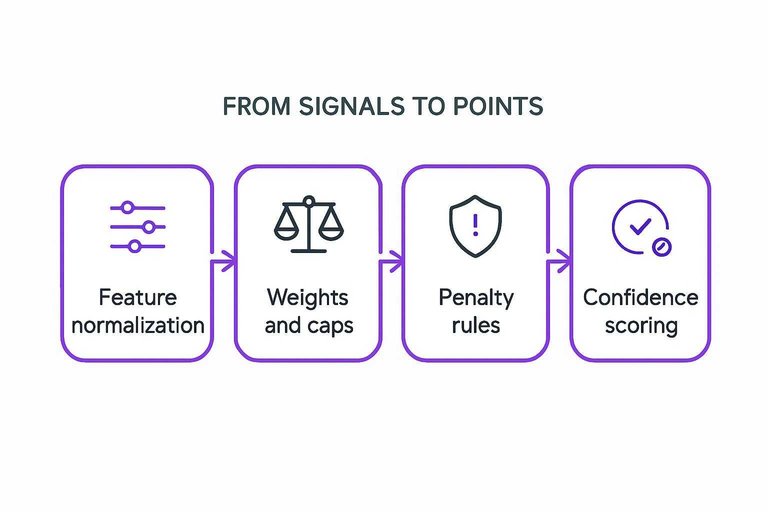
Penalty rules
Penalties handle “looks optimized, behaves bad” situations. They are usually rule-based because you need predictable enforcement.
- Detect spammy repetition across headings and body text.
- Detect hidden text via CSS, off-screen blocks, or zero-opacity.
- Detect thin content using low word count and low entity variety.
- Detect intrusive interstitials that block main content.
- Apply fixed or scaled deductions by severity.
Your score can rise while your penalty grows, and that tension is the point.
Confidence scoring
Tools downweight signals when they are not sure the page was read correctly. A blocked render, a cookie wall, or a client-side app that never hydrates can make “missing content” a measurement artifact.
Confidence adjustments often kick in when templates dominate text, key sections fail to load, or the crawler sees different content than users. If the tool reports low confidence, fix rendering and access first, then trust the recommendations.
Why recommendations differ
Two tools can crawl the same URL and still disagree on “what’s wrong.” They’re scoring against different models of what Google rewards, not a shared rulebook.
A quick way to spot the mismatch is to compare what each tool treats as the baseline—using a essential AI content checklist can also help you validate what’s worth fixing.
| What differs | Tool A assumes | Tool B assumes | So you’ll see |
|---|---|---|---|
| Scoring baseline | Global best practices | Top SERP averages | Different target ranges |
| Keyword dataset | Your tracked keywords | Broad topic clusters | Different “missing terms” |
| SERP sampling | One location/device | Multi-location blend | Different intent signals |
| Content model | Term coverage focus | Entity coverage focus | Different content gaps |
| Link context | Ignores internal links | Weighs internal anchors | Different linking advice |
When scores conflict, pick one baseline and commit, or you’ll chase two incompatible “perfect” pages.
Use the Score Like a Diagnostic, Not a Grade
Treat an on-page score as a fast diagnostic of detectable signals, not a verdict on ranking potential. Before acting on recommendations, confirm the tool rendered the same canonical URL you care about and that its crawl reflects what users and bots actually see. When tools disagree, compare their measured inputs (parsing, topic/entity extraction, link graph, indexability) and prioritize changes that improve real outputs—clearer relevance, stronger internal linking, and fewer crawl/indexing constraints.
Frequently Asked Questions
- Is a page optimization tool score the same thing as Google’s ranking factors?
- No. A page optimization tool score is an internal model that estimates on-page quality, while Google uses far more signals (links, user context, systems like spam detection) that most tools can’t measure from a single-page crawl.
- Do I need a page optimization tool for every page, or just key pages?
- Use a page optimization tool on pages that drive revenue or organic entry—usually your top 20–100 landing pages plus any new pages you publish. For large sites, spot-check templates and page types instead of scoring every URL.
- How can I validate whether a page optimization tool’s recommendations actually improve SEO?
- Track changes in Google Search Console (impressions, clicks, average position) and run controlled updates by optimizing a small set of similar pages while leaving a comparable set unchanged for 2–4 weeks. Confirm wins with rank tracking tools like Ahrefs, Semrush, or STAT.
- How long does it take to see results after following a page optimization tool’s on-page fixes?
- Most sites see indexing and snippet changes in a few days to 2 weeks, and measurable traffic or ranking movement in 4–8 weeks. Competitive queries and low-authority sites often take longer to show sustained gains.
- Can I use a page optimization tool instead of doing keyword research and content planning?
- No. Page optimization tools improve how well a page aligns with a target topic, but they don’t replace selecting the right keywords, mapping search intent, and building content depth and internal link strategy.
Turn Scores Into Rankings
Understanding how page optimization tools score on-page SEO is useful, but turning those signals into consistent, publish-ready improvements across every page takes time and process.
Skribra generates SEO-optimized articles with the right keywords, meta descriptions, structure, and images, then publishes to WordPress—so your pages improve beyond the score; start with the 3-Day Free Trial.
Written by
Skribra
This article was crafted with AI-powered content generation. Skribra creates SEO-optimized articles that rank.
Share: