February 10, 2026
·
Updated July 3, 2026
·
11 min read
How AI Tools for SEO Work for Small Teams
An explainer on how AI tools for SEO actually work for small teams—understand the input→model→constraint→output pipeline, keyword discovery mechanics, retrieval‑grounded content generation, audit and internal linking logic, plus a practical workflow and common tool failure modes.

If your SEO backlog keeps growing while your team stays the same size, “AI will save time” can sound like the only realistic plan. But most small teams hit the same wall: the tool produces lots of output, yet the work doesn’t feel any lighter.
This explainer shows what’s happening under the hood so you can use AI with intent. You’ll learn how SEO tools ingest data, generate keywords, draft content, run audits, and suggest internal links—and where they routinely get things wrong so you can set the right checks.
Problem Small Teams Face
SEO feels hard when you have one calendar, two hands, and ten competing priorities. You still need judgment, but the work screams for automation.
Too Many Tasks
SEO isn’t one job. It’s six jobs that all want to be done first.
- Find keywords with real demand
- Write briefs that guide writers
- Fix titles, headings, and schema
- Build internal links that matter
- Report outcomes to stakeholders
If each task takes “just an hour,” your week disappears.
Why Bottlenecks Happen
Most teams run a dependency chain, not a checklist. It’s research → brief → draft → optimize → publish → measure, and each step waits.
When one person owns three steps, everything queues behind their inbox. That’s the line that gets crossed.
What AI Promises
AI tools market themselves like an extra teammate you don’t have to hire. The pitch usually sounds like “set it and forget it.”
- Faster keyword and topic research
- Better rankings with “NLP”
- Automated audits and fixes
- Content at scale, on demand
- One-click optimization for pages
Treat those as starting hypotheses, not guarantees.
Where It Breaks
AI can invent facts, flatten your voice, and miss intent in subtle ways. You’ll also hit tool seams, where the audit tool flags issues your writer tool can’t address.
The real miss is context: your product, your SERP, your internal links, your conversions. Without that, “optimization” turns into confident noise.
System Overview
AI SEO tools work like a pipeline: they pull in messy signals, run them through a few model types, apply guardrails, then ship drafts and decisions. Think “crawl → interpret → generate → validate → queue work,” not “type prompt, get rankings.” A small team wins when the pipeline is predictable, like a checklist that writes.
Inputs In
AI SEO tools ingest multiple data streams because one source lies by omission.
- SERPs: rankings, features, intent shifts
- Crawls: URLs, status codes, internal links
- GSC/GA: queries, pages, engagement
- Competitors: pages, headings, topics
- CMS: existing drafts and metadata
If your inputs are stale, your outputs will be confidently wrong.
Models Inside
Most stacks combine an LLM with smaller models because generation is not the same as judgment. LLMs draft titles, outlines, and rewrites, while classifiers and embeddings handle routing, clustering, deduping, and similarity search.
A typical flow is retrieval + generation + scoring: embeddings fetch the most relevant pages and SERP notes, the LLM writes, then a scoring model checks “will this likely help?” That split is why the tool can say “write this paragraph” and also “don’t target that keyword.”
Constraints Applied
Guardrails stop the model from being “creative” in the ways you can’t afford.
- Templates: page types and section rules
- Tone rules: voice, claims, banned phrases
- SEO checklists: headings, intent, internal links
- Entity lists: products, people, locations
- Token limits: context windows and truncation
The best constraint is explicit: “Don’t change meaning,” then verify it—use a documented process like this AI SEO workflow guide to keep guardrails consistent across writers and tools.
Outputs Out
Outputs are drafts plus decisions, not just text. You’ll get content suggestions, internal link targets, cannibalization warnings, and prioritized task lists, often with a score or confidence marker.
Treat every recommendation as probabilistic, like a weather report that still helps you plan. Your job is to route uncertainty to review, not to ignore it.
Keyword Discovery Mechanics
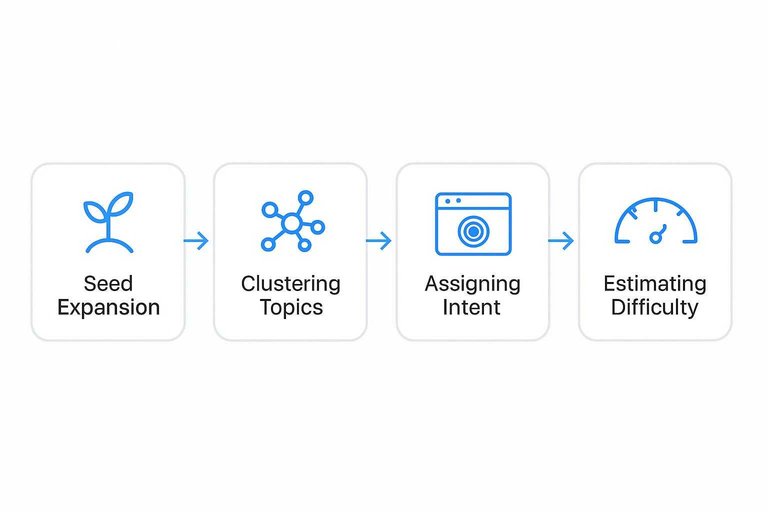
AI keyword tools don’t “find keywords.” They model language and search results, then suggest nearby territory.
Type “email marketing for gyms,” and you’ll see “member retention flows” and “class reminder SMS.” That’s embeddings plus SERP patterns doing their thing.
Seed Expansion
You give a seed because you want coverage fast, not perfect phrasing. The tool expands it by measuring meaning, not matching characters.
Modern tools embed your seed and millions of queries into vectors, then pull neighbors by cosine distance. Many also use a query graph, where edges come from co-clicks, reformulations, and “people also search for” trails. That’s why “running shoes” can surface “pronation stability” and “heel drop,” even with zero shared words.
When suggestions feel “weird but relevant,” you’re seeing semantic proximity, not keyword stuffing.
Clustering Topics
Clustering answers one question: should these live on one page or many. Tools use a mix of language and SERP overlap to decide.
- Shared top SERP URLs
- Embedding cosine similarity
- Common modifiers and facets
- Overlapping entities and attributes
- Same user-journey stage
If two queries rank the same pages, Google already grouped them for you.
Assigning Intent
Intent labels are guesses, built from repeatable SERP patterns. You want them because they tell you what page type will win.
Tools scan the SERP for features and dominant templates, like product grids, local packs, “Top stories,” or video carousels. They also classify ranking pages by type, like category page, blog post, landing page, or comparison list. In one city, “plumber” screams local and flips to “Visit-in-person,” while another market shows guides and becomes informational.
If intent flips by locale, your content strategy should too. For a deeper breakdown of how tools infer intent from SERPs, see this guide on how to identify keyword intent.
Estimating Difficulty
Difficulty scores exist to prevent wasted weeks. They’re composites, not physics.
- Competing pages’ link profiles
- SERP churn and volatility
- Brand bias in top results
- Content depth and format match
- Topical authority proxy signals
Use difficulty to pick fights you can finish, not to predict a guaranteed ranking.
Content Generation Internals
AI SEO writers look smart because they follow a repeatable pipeline, not because they “know” your business. Think of it as a research assistant plus a fast drafter, working under tight formatting rules.
Grounding With Retrieval
RAG is the step where your tool fetches real text before writing, like product pages, docs, and top SERP snippets. Without that feed, the model fills gaps with plausible phrases, and you get “the feature you never shipped.”
Outline Then Draft
Most tools plan before they write, because structure is easier to control than prose.
- Write a brief with keyword, intent, and audience.
- Generate headings that mirror SERP section patterns.
- Add section notes with facts, examples, and required entities.
- Draft the full article from notes and templates.
- Rewrite for tone, links, and on-page checks.
If your headings look identical across posts, your brief template is doing it.
Why It Sounds Same
Models are trained to predict the next token from broad internet averages, so they drift toward “safe” phrasing. Add safety filters and common prompt recipes, and you get the same polite cadence and the same filler transitions.
Optimizing For SERP
Tools aim for SERP-shaped signals, because those are easy to measure and compare.
- Include key entities and related terms.
- Match heading patterns seen on ranking pages.
- Answer common questions and PAA queries.
- Use snippet-friendly formats like lists and tables.
- Cover competitor subtopics without bloating.
Winning often comes from one missing detail, not a longer draft.
On-Page Audits Under Hood
AI audit tools act like a fast, opinionated version of a search bot, then grade what they see. They crawl, parse HTML, and apply rules plus models, which is why you’ll get alerts like “thin content” on a page that’s intentionally short, such as a store locator.
Crawler View
Most tools start by fetching raw HTML, but some also render the page like a browser to see JavaScript content. A non-rendered crawl can miss injected copy or links, while a rendered crawl can “see” UI text that Google may treat differently.
Canonical handling also splits results, because tools choose different defaults for “respect canonicals” versus “audit the URL anyway.” That’s why two tools can disagree on duplicates or indexability when one crawls only canonicals and the other crawls everything.
What Gets Parsed
After fetching, the tool extracts a consistent set of page features for scoring and comparisons.
- Title tags and meta descriptions
- H1–H6 structure and repetition
- Schema types and required fields
- Links, anchors, and broken targets
- Images, alt text, and sizes
If those inputs change, the “same” page becomes a different page to the auditor.
Rule vs Model
Rules are deterministic checks like “missing title tag” or “blocked by robots,” and they rarely vary across vendors. Models produce probability-style scores like “content quality” or “topical relevance,” using training data, embeddings, and heuristics you can’t fully see.
That’s why one tool calls a page “high quality” and another flags it as “thin,” even when both are parsing the same HTML. Treat model scores as a second opinion, not a verdict.
Prioritization Logic
Most tools don’t just detect issues; they rank them using business and crawl signals.
- Estimated traffic impact
- Page type and template usage
- Internal links and authority flow
- Crawl depth and discovery rate
- Conversion value and intent
Tune thresholds to your reality, or you’ll chase loud, low-value fixes.
Internal Linking Engine
Internal linking engines treat your site like a map, then ask, “Where should people go next?” They blend embeddings with a crawl-built graph, but they still guess. That’s why you’ll sometimes see a suggestion that feels like a non sequitur.
Building Site Graph
Your pages become nodes, and every internal link becomes an edge. A crawler builds an adjacency view from HTML, nav, sitemaps, and discovered URLs.
Importance comes from graph signals:
- Inbound link counts and weighted paths
- PageRank-style scores for “central” pages
- Depth from the homepage and section hubs
- Orphan detection and weakly connected clusters
If your crawl misses templates or JS links, the “map” lies, and the engine optimizes the wrong roads.

Finding Candidates
Tools propose targets by combining text signals with structural hints. Most engines mix several cheap matchers before running deeper scoring.
- Mine common anchor phrases across your site
- Match embeddings for topic similarity
- Detect shared entities like products, people, places
- Apply URL pattern heuristics like /guides/ to /tools/
When the graph is sparse, embeddings dominate, and you get “close enough” links that feel off.
Choosing Anchors
Anchor selection is usually span extraction plus intent fit. The model finds candidate phrases near related concepts, then checks whether the phrase matches the target’s query intent.
Overly optimized anchors show up because the system learns from what already ranks, like “best project management software.” If your site overuses that pattern, the tool mirrors it.
Avoiding Overlinking
Linking engines need brakes, or they’ll turn every paragraph into a directory. Safeguards keep suggestions useful and crawl-friendly.
- Cap new links per page
- Exclude noindex and robots-blocked URLs
- Suppress duplicate anchors on the same page
- Enforce hub rules for category pages
If your tool can’t explain which rule fired, you can’t trust its restraint.
Small-Team Workflow
You want AI to remove busywork, not remove ownership. Map each tool output to one role and one checkpoint, like “draft → editor → publish.”
- Define roles and “done” criteria for keywords, briefs, drafts, and updates.
- Route AI outputs to owners: strategist validates intent, writer shapes narrative, editor enforces standards.
- Add two checkpoints: pre-publish QA and 14-day performance review.
- Automate only the repeatable steps: clustering, outlines, internal links, and schema drafts—use an ultimate SEO content streamlining checklist to standardize what gets automated versus reviewed.
- Log decisions in one place, like a ticket comment or brief footer.
Automation without checkpoints creates content noise, not compounding traffic. Google’s guidance on creating helpful, reliable, people-first content is a useful north star for deciding where human judgment must stay in the loop.
Picking a Tool Stack Without Creating Tool Seams
Most small teams don’t fail because the AI is “bad.” They fail because they buy overlapping tools that don’t share context, then spend their week reconciling contradictions.
Use a simple integration test before you commit: can the tool ingest your real inputs, write in your constraints, and ship outputs into the place your team already works?
- Data access: Can it connect to GSC/GA, your crawl source, and your CMS—or will you paste CSVs forever?
- Source of truth: Does it pull from your existing pages and docs (RAG), or does it draft from generic web priors?
- Workflow fit: Does it create tickets, comments, or page drafts where reviews happen, or does it live in a separate tab no one checks?
- Explainability: For audits, links, and “scores,” can it show the inputs and rules that drove the suggestion?
- Permissions and governance: Can you restrict who can publish, what can be edited, and which pages are off-limits?
If two tools both “optimize content,” pick one owner for that step and demote the other to a supporting role. Duplication feels safe until you’re merging two different briefs for the same keyword and calling it a workflow.
What Tools Get Wrong
AI SEO tools often recommend the “right” tactic for the wrong page, query, or CMS constraint.
They also miss hidden signals like internal politics, release cycles, and legal review.
| Common recommendation | Why it fails on real sites | Detection signal | Human check |
|---|---|---|---|
| “Add more keywords” | Intent mismatch, not coverage | High bounce, low scroll | Read SERP, compare intent |
| “Write 10x longer content” | Bloat hurts clarity, UX | Lower time-on-page | Ask: what’s missing? |
| “Fix title tags everywhere” | Duplicate templates override edits | Changes revert, no uplift | Check CMS rules, staging |
| “Build more backlinks” | Wrong pages get links | Links rise, ranks flat | Map links to landing pages |
| “Add schema to all pages” | Markup invalid, no eligibility | Rich results absent | Validate, review guidelines |
Treat tool output as a hypothesis, then prove it against your site’s constraints.
Use AI Like a System, Not a Magic Button
When you treat AI SEO tools as a pipeline—inputs, models, constraints, outputs—you can predict what they’ll be good at and where you must add human judgment. Start with one repeatable workflow (discovery → brief → draft → on-page checks → internal links), then add lightweight validation steps where tools most often fail: intent alignment, SERP reality, and prioritization. The result isn’t “hands-free SEO,” but a small team that ships more consistently with fewer bottlenecks and less rework.
Frequently Asked Questions
- Are AI tools for SEO worth it for a one-person marketing team?
- Usually yes if they replace repetitive work like keyword clustering, briefs, and basic audits. Most solo teams see the best ROI when AI is paired with a simple review checklist for brand voice, accuracy, and conversion intent.
- Do I need paid AI tools for SEO, or can I get results with free tools?
- You can get results with free tiers and general AI chat tools, but paid AI SEO platforms usually save time with integrated crawling, SERP analysis, content briefs, and change tracking. Most small teams upgrade when they’re publishing weekly and need repeatable processes.
- How do I measure whether AI tools for SEO are actually improving rankings?
- Track a baseline and then monitor 3 buckets: visibility (rank tracking for a keyword set), organic demand (Search Console clicks/impressions), and outcomes (leads/sales from organic in GA4). Review weekly for coverage/indexation issues and monthly for ranking and conversion movement.
- How long does it take to see results from AI tools for SEO?
- Expect early signals in 2 to 6 weeks (faster content production, improved coverage, more indexed pages) and measurable traffic growth in 2 to 4 months for low-to-mid competition terms. Competitive queries often take 4 to 9 months even with strong execution.
- Can AI tools for SEO replace an SEO specialist or agency for a small business?
- They often replace a chunk of execution work, but they don’t replace strategy, prioritization, and quality control. Many small businesses use AI tools to run 70–80% of the workflow in-house and bring in an expert monthly for audits and direction.
Automate Your SEO Content Engine
Small teams can understand how AI tools for SEO work and still lose momentum on keywords, audits, internal linking, and publishing cadence.
Skribra turns those mechanics into a daily workflow—SEO-optimized articles, WordPress publishing, and more—so you can grow without extra headcount, with a 3-Day Free Trial.
Written by
Skribra
This article was crafted with AI-powered content generation. Skribra creates SEO-optimized articles that rank.
Share: