March 1, 2026
·
Updated October 3, 2026
·
9 min read
How Google indexes new pages
An explainer on how new pages become searchable in Google—from first discovery to crawling, rendering, indexing, and ranking—covering crawl budget signals, internal link graphs, canonical/duplicate handling, quality gates, and safe ways to speed inclusion.

You published a new page and…nothing. No impressions, no “site:” results, and Search Console looks quiet—so where did it get stuck?
This explainer breaks the journey into the exact stages Google runs through: how URLs get discovered, when they’re scheduled to crawl, what happens during fetch and render, how indexing decisions (and canonicals) are made, and why a page might be eligible yet still not rank. You’ll also get practical levers to speed things up without creating crawl waste.
From URL to results
A new URL goes through a pipeline, not a switch. Each stage has a job: find it, fetch it, decide what it is, then decide when to show it.
Think of it like shipping: discovery is the address, crawling is pickup, indexing is warehousing, ranking is shelf placement, and serving is the checkout.
Discovery sources
Google can’t crawl what it doesn’t know exists. Your job is to put the URL in places Google already watches.
- Internal links from crawlable pages
- External links from other sites
- XML sitemaps in Search Console
- RSS/Atom feeds for new URLs
- Redirects from known URLs
Links create relationships, not just discovery, and that changes everything.
Crawl scheduling
Discovery doesn’t guarantee a fast fetch. Google schedules crawls to protect your site and its own resources.
If your server looks slow or overloaded, Google backs off. Low-importance URL patterns get deprioritized, and strong patterns get attention.
Speed is a trust signal, and it compounds over time.
Fetch and render
Googlebot downloads HTML first, then may render like a browser. Rendering is where it sees JS-generated content and links.
Heavy JavaScript, blocked resources, or delayed client-side rendering can postpone what Google “understands.” The page might be fetched today but interpreted later.
If content appears only after work, Google may treat it like it arrived late.
Index decision
Fetching doesn’t guarantee indexing. Google decides which version is canonical, then decides if that canonical is worth storing.
- Canonical points elsewhere
- Duplicate or near-duplicate content
- Thin or low-value main content
- noindex meta or X-Robots-Tag
- robots.txt blocks needed resources
Your fastest win is making one clear, indexable “source of truth.”
Ranking and serving
“Indexed” doesn’t mean “shows up.” Ranking is query-dependent, and serving adds extra gates.
A page can rank for long-tail queries but miss head terms. It can also get held back by freshness expectations, strong competitors, or serving constraints like Safe Browsing.
Visibility is earned per query, not granted per URL.
Crawling mechanics
Google doesn’t crawl the whole web evenly. It allocates finite fetches across hosts and URLs, and your new pages fight for a slot.
Think of it like a newsroom inbox. Loud, reliable sources get read first.
Crawl budget parts
Crawl budget is shaped by two forces. One protects servers, the other chases value.
| Part | What it controls | How Google infers it | How it adjusts |
|---|---|---|---|
| Crawl rate limit | Requests per second | Latency, errors, timeouts | Slows or ramps gradually |
| Crawl demand | Which URLs get attention | Links, popularity, staleness | Prioritizes, then deprioritizes |
You don’t “get” crawl budget once. You earn it every day. If you’re troubleshooting why it’s being wasted at scale, see enterprise crawl budget mistakes to avoid.
Host signals
Your server teaches Google how cautious to be. When delivery looks shaky, crawling backs off.
- Increase latency under load
- Return 5xx or 429 responses
- Trigger timeouts on big pages
- Fail TLS handshakes or renegotiations
- Serve inconsistent redirects
Fix stability first. Google crawls fastest where it can trust the fetch.
Internal link graphs
Google needs a map and a reason. Internal links provide both, and the strongest hubs set the pace.
Pages one click from nav hubs or high-authority categories get sampled earlier. Deep orphaned URLs can wait, even if they are “new.”
If a new page isn’t near a strong hub, it’s basically whispering.
URL traps
Some URL patterns explode into near-infinite space. Once Google hits them, it gets conservative.
- Identify infinite patterns like calendars and faceted parameters.
- Detect duplicate templates with tiny content changes.
- Throttle crawling on the whole pattern or directory.
- Prefer canonical targets and known hubs.
- Skip new URLs that look trap-adjacent.
One bad pattern can steal attention from your best new pages.
Recrawl loops
Google revisits pages it expects to change. It learns that expectation from your signals and its own history.
Sitemaps with accurate lastmod can prompt quicker refreshes. Link changes, content fingerprints, and observed update cadence also drive recrawl.
If you want faster discovery, make change obvious and consistent.
Indexing internals
Indexing is Google turning your page into something it can store, compare, and retrieve fast. It’s less “saved a page” and more “built a searchable representation,” like an entry with text, entities, links, and rules.
If you’re diagnosing why auto-published pages get crawled but don’t stick in the index, see advanced autoblogging quality and indexing signals.
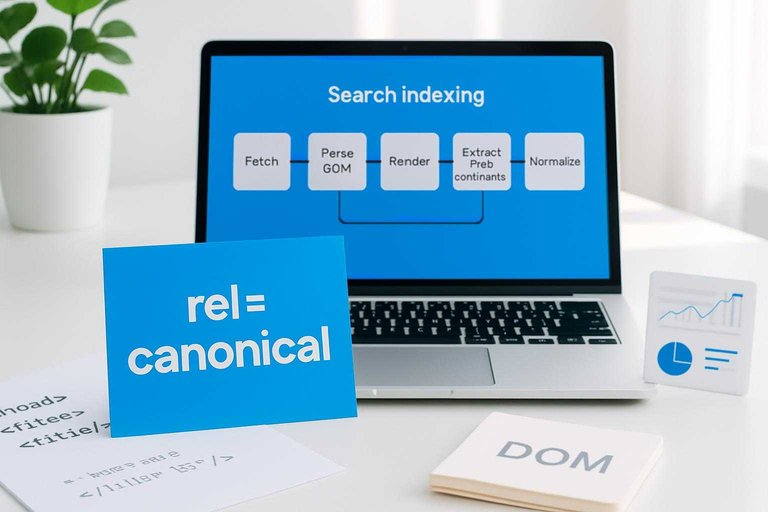
Parsing pipeline
Google has to convert raw HTML into signals it can score and retrieve. Your rendering output matters, because the parser can only extract what it can see.
- Fetch the URL and record headers, status, and directives.
- Parse HTML into a DOM and extract visible text.
- Render when needed to capture JS-generated content.
- Extract links, metadata, and structured data blocks.
- Normalize content into indexable fields and features.
If your main content appears only after complex rendering, indexing becomes slower and less reliable.
For more detail, see Google’s guide to JavaScript SEO basics.
Canonical selection
Google tries to pick one URL as the “representative” for a piece of content. You can hint with rel=canonical, but Google will cross-check other signals.
Strong inputs include redirects, internal links, sitemaps, and content similarity. Conflicts happen when your signals disagree, like “canonical says A” but links and redirects point to B. If you want a broader framework for how these signals work together, see our complete SEO guide.
If your canonicals fight your architecture, Google will side with the version your site behaves like.
Duplicate handling
Google groups near-duplicates into clusters to avoid bloating the index. Many URLs can be crawled, but only one becomes the main indexed version.
Alternates are often parameter variants, printer pages, session URLs, and light rewrites with the same body. You may see “Duplicate, Google chose different canonical” or impression gaps because the alternate does not surface.
If a page becomes an alternate, your fixes need to change clustering signals, not just the copy.
Quality gates
Some signals block indexing or reduce how much Google trusts the representation. You feel it as “crawled, not indexed,” unstable rankings, or missing rich results.
- Thin pages with heavy boilerplate
- Doorway patterns across many locations
- Soft 404s with “not found” content
- Malware, injected spam, hacked templates
- Policy or SafeSearch classification issues
When a gate trips, more crawling won’t save you; you need to remove the underlying pattern.
Structured data effects
Schema helps Google interpret what your page is about and what features it qualifies for. It won’t “force” rankings, even if the markup is perfect.
It can improve understanding of entities, relationships, and eligibility for rich results. Common pitfalls include marking up hidden content, mismatching visible text, using the wrong type, or repeating the same ID across pages.
Treat structured data like a contract: align it with what users can actually see, or it gets ignored.
Why pages aren’t found
You can publish a page and still get “can’t find it” reports for four different reasons. Diagnose by stage first, or you’ll fix the wrong thing.
| Stage | What fails | Common causes | Fast check |
|---|---|---|---|
| Discovery | Google never learns URL | No internal links, no sitemap | site: query misses |
| Crawling | Google can’t fetch | robots.txt block, 5xx, slow | Crawl stats, logs |
| Indexing | Fetched, not stored | noindex, duplicates, thin | URL Inspection status |
| Ranking | Indexed, not visible | low authority, weak intent match | Search Console queries |
Treat “not searchable” as a pipeline bug report. Fix the earliest broken stage, then re-test.
Troubleshoot by Google Search Console status
If a URL’s google searchability is failing, the fastest way to locate the broken stage is to translate what you see in Google Search Console into the pipeline above.
| What you see in Search Console | Where it maps in the pipeline | What it usually means | What to check next |
|---|---|---|---|
| URL Inspection: URL is not on Google + Coverage/Pages shows Discovered – currently not indexed | Discovery → Crawling | Google knows the URL, but hasn’t fetched it yet | Ensure the page is internally linked (crawlable path), appears in your XML sitemap, and isn’t blocked by robots.txt; confirm it returns a 200 status and loads without requiring a login |
| Coverage/Pages: Crawled – currently not indexed | Indexing | Google fetched it but decided not to store it in the index (yet) | Check for noindex, canonical pointing elsewhere, near-duplicate content, or a very weak/unfinished page; review the rendered HTML in URL Inspection to confirm Google sees the main content |
| Coverage/Pages: Indexed, not submitted in sitemap | Discovery (signal quality) | Google found it via links, but your sitemap isn’t reinforcing it | Add it to the correct sitemap and make sure the sitemap is clean (only canonical, indexable URLs) |
| Coverage/Pages: Submitted URL marked ‘noindex’ | Indexing | You’re explicitly telling Google not to index it | Remove the meta robots noindex (or header directive), then request reindexing |
| Coverage/Pages: Duplicate, Google chose different canonical / Alternate page with proper canonical | Indexing | Google is consolidating signals to another URL | Verify canonical tags, internal links, and redirects all point to the preferred URL; avoid publishing multiple pages that answer the same intent |
| Coverage/Pages: Blocked by robots.txt / Blocked due to access forbidden (403) / Server error (5xx) | Crawling | Google can’t fetch the content reliably | Confirm robots rules, authentication, WAF/firewall blocks, and server uptime; validate the live URL returns 200 to Googlebot |
| URL Inspection: URL is on Google but you can’t find it for your terms | Ranking | It’s indexed, but not winning queries | Use Performance → Queries to see what it does appear for, then reassess intent match, title/snippet alignment, internal links, and competing pages on your own site (cannibalization) |
Tip: always start with URL Inspection for that exact URL, then cross-check the Pages report status. Once you’ve fixed the earliest broken stage, re-test with URL Inspection before changing anything else.
Speeding up safely
You want Google to find and process new pages faster, without burning crawl budget or tripping indexing wires.
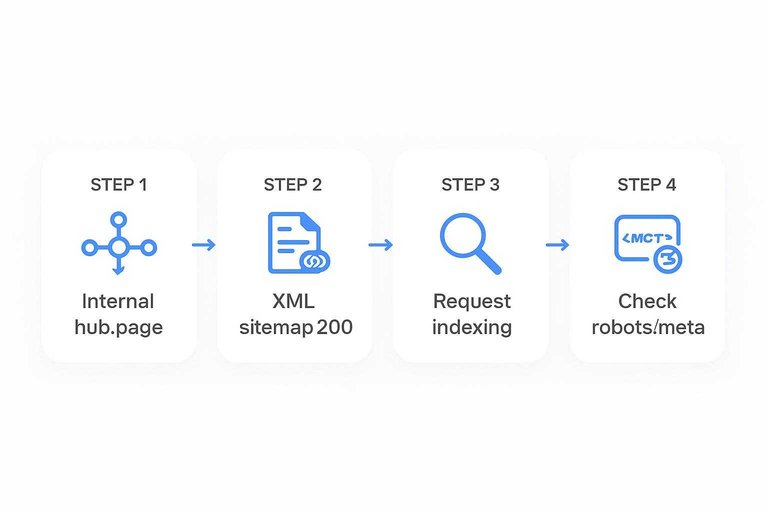
- Publish the page, then add it to a strong internal hub page.
- Add the URL to your XML sitemap, then confirm it returns 200.
- Request indexing in Search Console only for truly important URLs.
- Watch server logs for repeated 404s, redirects, or slow responses.
- Re-check robots and meta tags so you don’t ship “noindex” by accident.
Speed comes from clean paths and clear signals, not from spamming Google with requests. If you’re looking for scalable ways to accelerate discovery and content production, see best AI tools for organic traffic. For more, see Google’s crawl budget management.
A practical mental model
Google searchability behaves like a queueing system, not a light switch. Signals raise a URL’s priority, constraints limit throughput, and visibility happens query-by-query, not site-wide. If you’ve ever thought “it’s published, why isn’t it showing,” you’re thinking in the wrong model. If you need a broader primer on crawl vs render vs index vs serve, see how technical SEO actually works.
Subsections: [
{
“subheading”: “Three queues”,
“content”: “Google moves URLs through three queues: crawl, index, and rank/serve. Each queue has its own inputs, and fixes don’t transfer automatically.\n\nCrawl queue inputs that move you forward:\n- Internal links from frequently crawled pages\n- XML sitemap discovery and freshness\n- Fast, stable server responses\n- Clean redirects and canonicals\n\nIndex queue inputs that move you forward:\n- 200 status and indexable meta directives\n- Canonical pointing to itself, or a clear primary\n- Unique main content with low duplication\n- Renderable content without blocked assets\n\nRank/serve queue inputs that move you forward:\n- Query-relevant content and intent match\n- Strong internal anchor text and context\n- External references and brand signals\n- Good on-page UX, fast and accessible\n\nIf you can’t name which queue you’re stuck in, you’ll keep “fixing” the wrong thing.”,
“description”: “Model as three queues: crawl, index, rank/serve; show what inputs move a URL forward in each.”
},
{
“subheading”: “Leverage points”,
“content”: “A few levers disproportionately improve queue position and throughput. Tie each lever to the queue it changes.\n\n- Add internal links from crawled hubs → Crawl, Rank/serve\n- Fix canonicals and redirect chains → Crawl, Index\n- Improve server speed and reliability → Crawl throughput\n- Publish unique, intent-matched content → Index, Rank/serve\n- Maintain accurate XML sitemaps → Crawl discovery\n\nPick one lever per queue, or you’ll create a faster crawl that still can’t index.”,
“description”: “High-impact levers: internal links, clean canonicals, fast servers, unique content, and sitemaps; map each to a queue.”
},
{
“subheading”: “What to measure”,
“content”: “Use observables that tell you where the URL is waiting, and why.\n\n| Observable | Where you see it | What it indicates | Queue |\n| — | — | — | — |\n| Server logs | Web server | Googlebot hits, latency | Crawl |\n| Crawl stats | Search Console | Crawl rate, errors | Crawl |\n| Coverage state | Search Console | Indexed, excluded reason | Index |\n| URL Inspection | Search Console | Canonical, last crawl | Crawl/Index |\n| Query impressions | Search Console | Shown for queries | Rank/serve |\n\nWhen metrics disagree, trust the queue boundary: impressions require indexing, and indexing requires crawling.”,
“description”: “Key observables: server logs, Search Console crawl stats, coverage states, URL inspection results, and query impressions.”
}
]
Treat Searchability Like a Pipeline You Can Debug
When a new page isn’t “searchable,” assume it’s stuck in one of three queues: discovery (Google hasn’t found the URL), crawling/rendering (it’s found but not fetched efficiently), or indexing/serving (it’s processed but not selected, canonicalized away, or not deemed worth showing). Your fastest wins usually come from improving discovery paths (internal links, sitemaps), reducing crawl friction (clean URLs, fewer traps, fast responses), and clarifying indexing signals (canonicals, duplicates, quality). Measure each stage separately—discovered URLs, crawl stats, index coverage, and impressions—so you know which lever to pull next.
Frequently Asked Questions
- Does Google searchability still matter in 2026 with AI Overviews and other AI results?
- Yes—AI results still rely on Google’s ability to discover, crawl, and index your page first. Strong google searchability increases the odds your content is eligible to be cited, surfaced, or used as a source across search features.
- How can I check Google searchability for a brand-new page without waiting weeks?
- Use Google Search Console: URL Inspection to see crawl/index status, plus the live test for fetch results, and check Coverage/Pages and Sitemaps reports for discovery signals. For external confirmation, use a “site:yourdomain.com page title” query to test whether Google can retrieve it.
- How long does it usually take for a new page to become searchable on Google?
- Most pages that are linked internally and not blocked show up in Google within 1 to 7 days, while low-authority sites or orphan pages can take 2 to 6 weeks. Ranking for competitive queries usually takes longer than being indexed.
- Can I use the Indexing API to improve google searchability for regular web pages?
- No—the Indexing API is intended for job posting and live stream pages, and using it for general content is not supported. For regular pages, the fastest reliable path is strong internal linking, an accurate XML sitemap, and clean crawlability (200 status, not blocked by robots.txt/noindex).
- Should every new page be linked from the homepage to improve Google searchability?
- Not usually—put the page where it logically belongs in your site architecture so it’s reachable within 2–4 clicks from the homepage. Over-linking from the homepage can dilute navigation and doesn’t replace clear category and contextual internal links.
Publish Faster, Get Indexed
Understanding crawling and indexing is one thing; consistently shipping clean, keyword-aligned pages that Google can find is where most teams get stuck.
Skribra generates SEO-ready articles with structured metadata and WordPress publishing built in, so new pages move from URL to results faster—start with the 3-Day Free Trial.
Written by
Skribra
This article was crafted with AI-powered content generation. Skribra creates SEO-optimized articles that rank.
Share: