March 2, 2026
·
Updated October 4, 2026
·
7 min read
Improve Google indexing in 30 minutes
A 30-minute, page-by-page guide to improving Google searchability — set a single target query, run fast indexability checks, rewrite titles and meta descriptions, tune heading structure, and add internal links that reinforce relevance.

If a page isn’t showing up for the query you care about, it’s usually not because you need “more content.” It’s because Google can’t clearly understand, crawl, or prioritize that page.
In the next 30 minutes, you’ll pick one page and one query, confirm the page can be discovered and indexed, then tighten the signals that influence what Google shows: your title tag, meta description, headings, and internal links. You’ll walk away with a sharper page and a simple success metric to track.
Set the target
You don’t improve “SEO.” You improve one page for one query.
For example, pick your “/pricing” page and aim for “pricing for X” by end of sprint.
Pick one page
Choose one URL you can change today, and make sure Google can actually show it.
- Paste the full URL and open it in an incognito window.
- Confirm it returns 200 and isn’t gated by login.
- Check it’s indexable: noindex is absent, canonical points to itself.
- Write down current title tag, H1, and last updated date.
If the page can’t be indexed, nothing else in this sprint matters.
Choose one query
Pick the phrase you want this page to win, then choose close variants that mean the same thing.
- Primary: the exact query you’ll optimize for
- Variant 1: same intent, different wording
- Variant 2: same intent, different qualifier
If any variant changes the intent, you’re targeting a different page.
Define success
Decide what you will ship in 30 minutes, not what you hope will rank.
A good goal is observable work like “new title + meta written,” “H2s rewritten to match intent,” “3 internal links added,” and “two paragraphs refreshed and published.”
Rankings lag, but shipped changes compound.
Quick index checks
Run these checks before you touch copy or layout. You’re looking for a simple green light: Google can fetch it, index it, and interpret it.
Example: the page “looks fine,” but Search Console shows a different canonical. That’s why nothing ranks.
Inspect URL
Use Search Console’s URL Inspection to see what Google thinks right now. You’re confirming eligibility, not guessing from your browser.
- Open Search Console → URL Inspection.
- Paste the exact page URL and run the test.
- Confirm “Indexing allowed” and “Crawled as” looks correct.
- Check “Google-selected canonical” versus your declared canonical.
- Note the last crawl time and any crawl issues.
If Google picked a different canonical, your optimizations may land on the wrong page.
Verify discoverability
You’re checking whether you accidentally told Google “don’t look here.” One hidden directive can erase all SEO work.
- Check robots.txt for disallow on the path.
- Check meta robots for “noindex” or “nofollow.”
- Check X-Robots-Tag headers for “noindex.”
- Confirm the URL appears in your XML sitemap.
- Confirm key resources aren’t blocked for Googlebot.
Find a single “noindex,” and you’ve found the real reason the page won’t show. If you need a broader checklist, see this step-by-step SEO guide.
Fix obvious blockers
Only fix what’s clearly wrong and clearly reversible. The goal is “eligible to rank,” not a full technical overhaul.
- Remove accidental “noindex” from meta, headers, or CMS settings.
- Set the canonical to self, unless you have a real duplicate.
- Ensure the URL returns 200, not 3xx, 4xx, or soft 404.
- Confirm the rendered page matches what users see.
- Request indexing after changes, then re-inspect.
Once the page is indexable, every other improvement starts compounding. For canonical specifics, follow Google’s guidance on specify a canonical.
Rewrite title tag
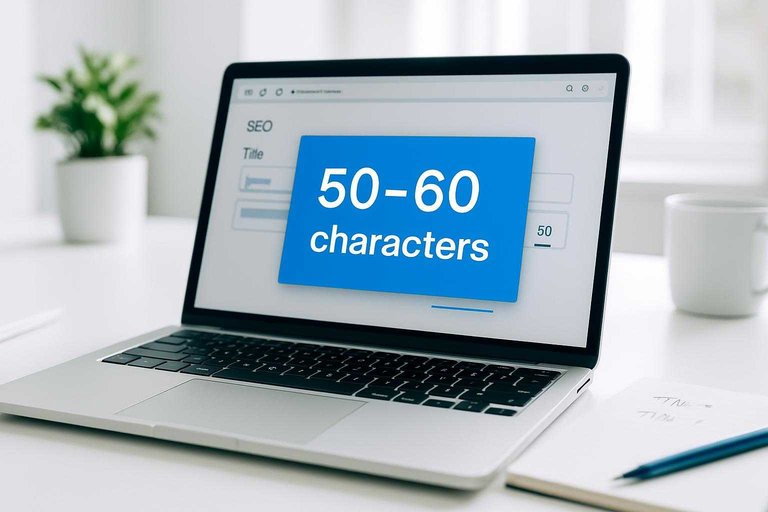
Rewrite your title tag to match what searchers want, then earn the click. You’re aiming for clear intent, a primary keyword, and a readable length.
- Pick one primary query from Search Console, like “invoice template PDF”.
- Draft 3 title options that start with that query, then add a differentiator.
- Keep it ~50–60 characters, avoiding truncation and vague filler.
- Add a trust hook if true, like “Free”, “2026”, or “No signup”.
- Ship the best version, then recheck CTR in 7–14 days.
If your CTR doesn’t move, your promise is wrong, not your keyword.
Improve meta description
Write your meta description like a tiny ad for a specific searcher. You’re matching intent, not showing off keywords.
- State the outcome in plain language, like “rank faster” or “fix indexing.”
- Add one concrete detail, like a timeframe, tool, or scope: “in 30 minutes.”
- Mirror the query’s wording once, then stop repeating it.
- Add a proof point or constraint: “checklist,” “templates,” or “no dev needed.”
- End with a light nudge, like “See examples” or “Get the steps.”
If your description doesn’t promise a specific win, you’re donating clicks to someone who does.
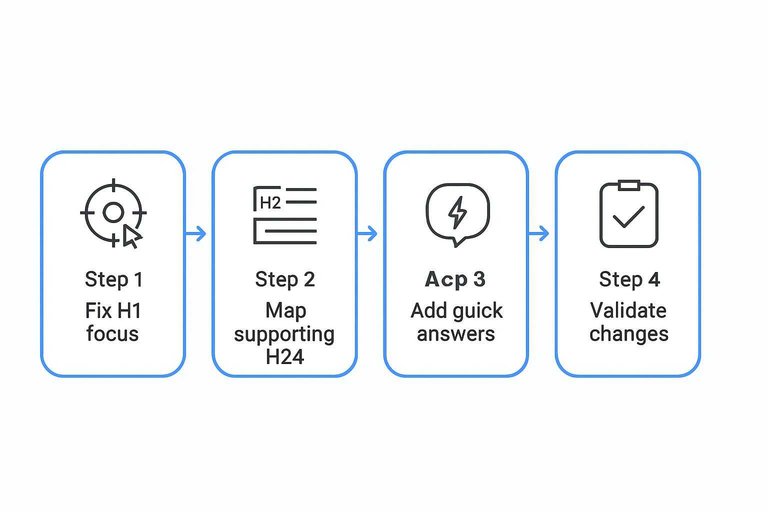
Tune headings structure
Your headings are your page’s promise to Google and to readers. A clean H1 plus purposeful H2s can lift rankings without adding a single “more words” paragraph.
Fix H1 focus
You want one H1 that matches the searcher’s intent, not your internal jargon. If your page has two H1s or a fuzzy one like “Overview,” you’re diluting the signal.
- Find the primary query you want, like “improve Google searchability.”
- Rewrite the H1 to mirror that intent, without extra adjectives.
- Remove duplicate H1s created by themes, builders, or widgets.
- Kill vague H1s like “Resources” or “Welcome.”
- Confirm every other heading starts at H2.
When your H1 is blunt and singular, Google stops guessing what you meant.
Map supporting H2s
Your H2s should match the next questions people ask after the query. Think “what would I click next?” not “what can I say more about?”
- Define “searchability” in plain terms
- List the fastest on-page fixes
- Cover headings, links, and snippets
- Include common mistakes and fixes
- Add tool-free ways to validate changes
If your H2s look like a mini-FAQ for the query, you’re building relevance, not fluff.
Add quick answers
Under key H2s, add a direct answer people can scan in five seconds. A tight paragraph or a few bullets works, like: “Use one H1, then H2s for sections, then H3s for details.”
Place these quick answers near the top of the section, before long examples. You’re optimizing for the impatient reader and the snippet extractor at once—aligned with Google’s guidance on how Google generates snippets.
Add internal links
Internal links give Google and readers a clear route to your page. Think “budget spreadsheet template,” not “click here,” placed where people already look.
Find source pages
You need a few strong source pages so the new link actually gets crawled and clicked. Aim for pages already getting traffic or sitting near your topic.
- Link from high-traffic posts in Search Console
- Link from category or pillar hubs
- Link from adjacent “how-to” articles
- Link from comparison or FAQ pages
- Link from your homepage or top nav hub
If you can’t name three sources fast, your site structure is the real issue.
For a process you can reuse across posts, use this checklist for streamlining SEO content.
Place links properly
Put links where they help the reader continue the thought. One good link in-context beats five buried in a footer.
- Add a link in the first 150 words of the source page.
- Add a link inside the most relevant subsection.
- Add a link near a “next step” sentence or recommendation.
- Add a link in a short “Related” block above the comments.
- Skip footer-only links unless it’s a true site-wide hub.
When links match intent and placement, you get crawling plus clicks.
Write anchors
Anchor text should say what the reader will get after the click. Use natural variety like “internal linking checklist” or “add internal links fast,” not the same exact phrase everywhere.
That’s the line between helpful navigation and obvious SEO stuffing.
Inspect the URL in Google Search Console (and request indexing)
If you need the fastest, most direct improvement to google searchability in a 30-minute window, move from “on-page tweaks” to “tell Google exactly what to crawl.” Google Search Console (GSC) is where you verify whether Google can index the page right now and, if everything checks out, you can request indexing immediately.
Use this workflow for a specific URL (a freshly published page, a page you just updated, or a page that isn’t showing up in search):
- Open Google Search Console for the verified property that matches your site (Domain property is ideal, but URL-prefix works too).
- In the top bar, paste the exact canonical URL you want indexed (be consistent: https vs http, www vs non-www, trailing slash vs none).
- Read the results:
- If the URL is recognized, you’ll see whether it’s on Google or not on Google.
- Click View crawled page (when available) to compare what Google fetched vs what you expect.
- If the page looks indexable, click Request indexing. This queues the URL for re-crawl/re-indexing; it’s not a guarantee, but it’s the quickest “nudge” you can give.
Do this after you’ve made any on-page edits (titles, headings, internal links), so the version Google reprocesses is the improved one.
Common blockers to fix before you request indexing
GSC will often hint at what’s stopping indexing, but you can save time by checking these three blockers first:
-
noindex directive
-
Check the page’s HTML for a meta robots tag like:
content="noindex". -
Also check for an HTTP
X-Robots-Tag: noindexheader (common on PDFs and some CMS templates). -
Remove
noindexonly if the page is meant to be searchable. -
Canonical points somewhere else
-
If the page’s
<link rel="canonical">points to a different URL, Google may index the canonical target instead (or ignore the page entirely). -
Make sure the canonical is self-referential for the page you want indexed, unless you intentionally consolidated duplicates.
-
robots.txt or page-level blocking
-
A
Disallowinrobots.txtcan prevent crawling, which prevents indexing. -
Also watch for page-level
robotsdirectives likenofollow/noindexapplied globally via theme, plugin, or template.
If any of the above applies, fix it first—then return to GSC and request indexing again.
When GSC says “Discovered” or “Crawled” but not indexed
Sometimes GSC will show a status like “Discovered – currently not indexed” or “Crawled – currently not indexed.” In a 30-minute session, your goal is to remove obvious reasons Google might deprioritize the URL:
- Confirm the page is internally linked from at least one relevant, indexable page (your navigation or a related article is fine).
- Ensure the URL returns 200 OK (not a redirect chain, not a soft 404, not blocked for logged-in users only).
- Check that the page has enough unique substance to be a standalone result (thin placeholders, “coming soon,” or near-duplicates are frequent culprits).
After you make the fix, use URL Inspection → Request indexing again so Google re-evaluates the updated version.
Fast validation checklist in under five minutes
Before you leave GSC, confirm these quick signals line up:
- Preferred version: The inspected URL matches the version you want indexed (protocol, host, path).
- Indexing allowed: No
noindex, no blocked resources that prevent rendering critical content. - Canonical alignment: Canonical points to the inspected URL (unless you have a deliberate consolidation strategy).
- Accessible to Googlebot: The page loads without requiring a login, geo-gate, or script that hides core content.
If those are true, requesting indexing is a productive next step—even if Google ultimately decides timing and inclusion.
Make one targeted change, then measure it
Resist the urge to fix everything at once—ship these updates on one page, then give Google time to recrawl and re-evaluate it. Track success against the metric you defined (rank for the chosen query, impressions, clicks, or CTR) and note what changed week over week. If you see movement, repeat the same 30-minute sprint on the next highest-impact page; if you don’t, revisit indexability first, then refine the title/H1 alignment and internal link anchors.
Frequently Asked Questions
- Does “google searchability” mean the same thing as SEO?
- Not exactly. Google searchability focuses on whether a specific page can be crawled, indexed, understood, and surfaced for relevant queries, while SEO also includes broader strategy like content planning, authority building, and technical site health.
- How do I measure whether my Google searchability improved after a 30-minute sprint?
- Check Google Search Console for changes in impressions, average position, and CTR for the target query over the next 7–14 days, and confirm the page is indexed with the URL Inspection tool. If you changed titles/descriptions, CTR often moves before rankings do.
- How long does it take for Google to reflect changes that improve google searchability?
- Most updates are picked up in a few days to a couple of weeks, depending on crawl frequency and site authority. You can usually speed up discovery by requesting indexing in Google Search Console after publishing changes.
- Can I improve google searchability without using Google Search Console?
- Yes, but it’s harder to verify results. You can use site: queries and manual SERP checks, but Search Console is the most reliable way to confirm indexing, see query data, and spot coverage or enhancement issues.
- What should I do if my page is indexed but still has poor google searchability for its main keyword?
- Usually the page doesn’t match intent strongly enough or lacks supporting signals like topical depth, helpful media, or external links. Improve on-page content quality and usefulness, add relevant schema (e.g., FAQ or Product where appropriate), and earn a few quality backlinks to strengthen relevance and authority.
Turn Quick Fixes Into Growth
These 30-minute Google searchability tweaks work fast, but keeping titles, meta descriptions, headings, and internal links optimized takes consistent execution.
Skribra produces SEO-optimized articles with strong on-page structure and WordPress publishing built in—so you can maintain momentum after the quick wins, with a 3-Day Free Trial.
Written by
Skribra
This article was crafted with AI-powered content generation. Skribra creates SEO-optimized articles that rank.
Share: