May 14, 2026
·
Updated July 30, 2026
·
10 min read
Page Optimization Tool vs Manual On-Page Audit
A side-by-side comparison of page optimization tools versus manual on-page audits—how they differ in data inputs, outputs, and workflow; where accuracy and nuance matter; what you gain in speed and scale; and how to judge cost, ROI, and implementation quality.

If you’ve ever “fixed” everything your on-page tool flagged and still watched rankings stay flat, you’re not alone. Automated recommendations can be fast, but they can also miss intent, context, and the messy realities of your site.
This comparison helps you decide when a page optimization tool is the right call and when a manual audit will outperform it. You’ll get a clear snapshot, a criterion scoreboard, and practical guidance on accuracy, scale, ROI, and turning insights into changes your team can actually ship.
Decision Snapshot
A page optimization tool is software that scans your pages and flags on-page issues at scale. A manual on-page audit is a human-led review that judges intent, SERP fit, and prioritization. Choose tools for speed and coverage, and manual audits for nuance and strategy.
What Each Is
A page optimization tool crawls or analyzes URLs and produces standardized recommendations like “shorten title,” “add H2s,” or “fix missing alt text.” Typical outputs include issue lists, content scores, keyword suggestions, and bulk reports for many pages.
A manual on-page audit is a structured review by an SEO or content lead who checks the page against the query, the SERP, and your business goals. Typical outputs include a prioritized action plan, rewrite guidance, internal linking opportunities, and notes like “this needs a different angle.”
If your problem is volume, use software; if your problem is judgment, use a human.
When It Wins
Pick the obvious approach based on your constraints and goals.
- Use a tool when you have hundreds of URLs.
- Use a tool when you need consistent checks for basics.
- Use a manual audit when rankings stalled despite “perfect” scores.
- Use a manual audit when intent and messaging decide conversion.
- Use a manual audit when you need ruthless prioritization.
Tools find patterns fast; humans decide what matters.
Fast Recommendation
Use this quick framework to decide in minutes.
- If you need coverage this week, choose a page optimization tool.
- If one page drives revenue, choose a manual audit.
- If you have writers but no SEO process, choose a tool first.
- If you have SEO basics covered, choose a manual audit next.
- If you can afford both, run the tool then audit the top 10 pages.
Run software for breadth, then spend human time where leverage is highest.
Core Differences
A page optimization tool treats SEO like a measurement problem. A manual on-page audit treats SEO like a decision problem.
Both can look at the same URL and still disagree on what matters. The tool rewards what it can count. The human optimizes for what users and stakeholders will accept.
Data Inputs
Tools ingest what they can reliably fetch at scale, like crawls, SERP features, and log signals. Humans add intent, nuance, and brand constraints, like “we can’t promise that” or “that phrasing sounds off.”
A tool will measure title length, entities, and link depth.
A human will infer search intent, tone fit, and conversion friction.
A tool will trust the HTML; a human will question why it exists.
If your inputs miss intent, your “optimization” becomes a formatting contest.
Outputs Produced
The difference shows up in what you can hand to a writer, developer, or stakeholder.
| Dimension | Optimization tool | Manual on-page audit | Who uses it |
|---|---|---|---|
| Primary artifact | Issue list | Prioritized brief | Lead, editor |
| Success metric | Score, warnings | Business impact | Stakeholder |
| Content guidance | Templates | Targeted rewrites | Writer |
| Linking guidance | Basic suggestions | Linking map | SEO, dev |
If the output can’t drive action, it becomes a report that nobody ships.
Typical Workflow
The workflow shapes what gets noticed, and what gets ignored.
- Tool: crawl pages, pull SERP data, generate issues and a score.
- Tool: apply recommended fixes, re-run, chase higher scores.
- Tool: deploy changes, monitor rank shifts, repeat on the next URL.
- Manual: review SERP intent, competitors, and query-to-page fit.
- Manual: rewrite and restructure, map internal links, QA in staging.
Tools iterate faster, but humans iterate smarter when the page needs a real position change. If you need a broader foundation, this SEO guide for getting started covers the core concepts that tools often reduce to scores. See Google’s guidance on people-first content to understand why nuance and intent fit can’t be reduced to a checklist.
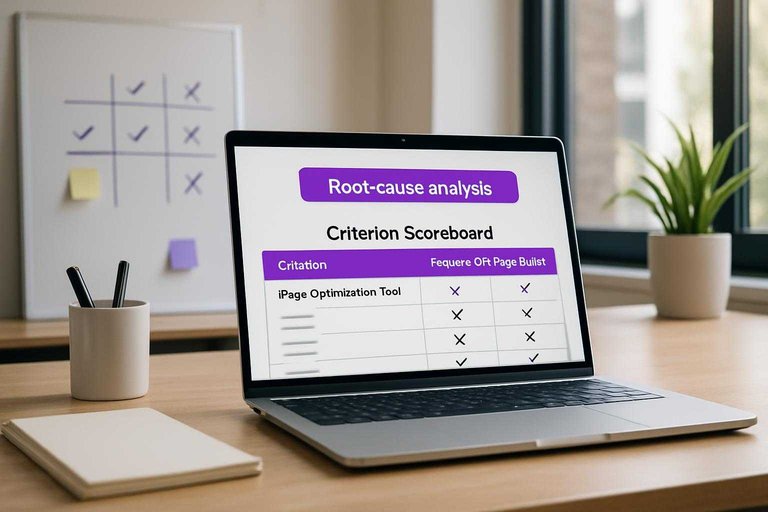
Criterion Scoreboard
You’re choosing between speed and nuance. This table shows where each approach clearly wins.
| Criterion | Page Optimization Tool | Manual On-Page Audit | Winner |
|---|---|---|---|
| Speed to insights | Minutes | Hours to days | Tool |
| Depth of diagnosis | Surface signals | Root-cause analysis | Manual |
| Scalability | Hundreds of pages | Dozens per sprint | Tool |
| Context and intent | Limited | Strong | Manual |
| Repeatability | Consistent checks | Analyst-dependent | Tool |
Use the tool for breadth, then audit the pages that can move revenue.
Accuracy and Nuance
Tools are consistent, fast, and literal. Humans are contextual, creative, and occasionally wrong in new ways.
Accuracy on-page is less about “finding issues.” It’s about picking the right fights for your SERP.
Search Intent Fit
Intent alignment is where optimization wins or loses, because Google rewards usefulness, not keyword density.
A tool can map terms and headings, but it rarely explains why the SERP is shaped a certain way.
If the SERP is full of templates, “People also ask,” and local packs, a human can pivot the page angle fast.
A tool might still push “add 200 words” and “use the exact keyword in H2.”
Winner: manual on-page audit for intent fit, SERP features, and competitor angles.
Edge Case Handling
Edge cases break rules, and tools mostly run on rules.
Here’s where each approach tends to win in real audits.
- Mixed intent pages (guide + product): Manual wins
- UGC-heavy pages (forums, reviews): Manual wins
- Internationalization (hreflang, locale intent): Tool wins
- Regulated niches (medical, finance, legal): Manual wins
If your pages aren’t “standard blog posts,” default to humans, then use tools for coverage.
False Positives
Tools throw flags that are technically true, but strategically irrelevant.
Examples: “missing keyword in title,” “low word count,” or “only one internal link.”
Humans make different mistakes, like over-optimizing copy, ignoring cannibalization, or chasing a competitor’s outdated angle.
They also miss silent issues at scale, like 500 pages with the same thin intro.
More reliable: tools for detection, humans for judgment; the best accuracy comes from using both in sequence.
Speed and Scale
When your site has 10 pages, manual work feels fine. At 10,000 pages, speed becomes strategy, not convenience. The real question is how fast you can learn, ship, and repeat.
Time to Insights
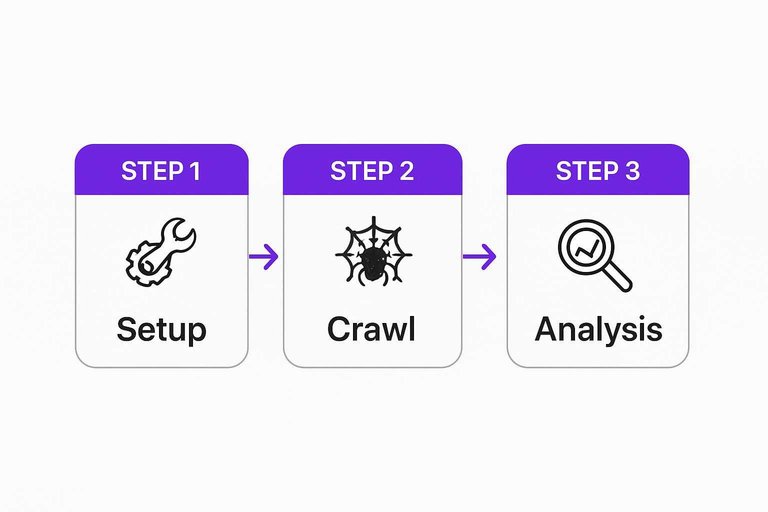
Fast iteration depends on three clocks: setup, crawl, and analysis. Tools compress the middle, while manual audits stretch the last mile.
| Approach | Setup time | Crawl time | Audit time | Winner |
|---|---|---|---|---|
| Tool (10 pages) | 15–30 min | 1–5 min | 30–60 min | Tool |
| Manual (10 pages) | 0–15 min | 0 min | 2–4 hrs | Tool |
| Tool (100 pages) | 15–60 min | 5–20 min | 1–3 hrs | Tool |
| Manual (100 pages) | 0–30 min | 0 min | 1–3 days | Tool |
| Tool (10,000 pages) | 1–3 hrs | 1–6 hrs | 1–3 days | Tool |
If you want weekly experiments, the winner is the one that returns answers before priorities change.
Sitewide Coverage
Scale problems hide in patterns, not pages. Tools see the pattern fast, while manual audits spot it only after enough sampling.
A page optimization tool can flag template-wide title issues, thin category pages, and pagination traps in one pass. It also surfaces faceted navigation, parameterized URLs, and duplicate clusters like “?color=black&size=10” before they flood your index.
Manual audits can catch nuanced intent mismatches and weird edge cases, like a filter that changes copy but not canonical. But you’ll spend time hunting the pattern, then proving it exists.
Winner: the tool for coverage, because templates don’t care about your calendar.
Team Bandwidth
Speed is often a coordination problem, not an SEO problem. The more people you need, the slower “simple fixes” become.
- SEO specialist to set rules and priorities
- Writer to adjust copy at scale
- Developer to fix templates and canonicals
- Analyst to validate impact and anomalies
Manual audits usually need more meetings, more handoffs, and more re-checks. Tools reduce coordination by standardizing what “fixed” looks like. For large sites, this coordination pressure often shows up in crawl constraints too—Google’s crawl budget guidance for large sites is a useful reference for why speed and scale become operational problems. If you’re trying to move faster with fewer handoffs, these resources to simplify SEO workflows can help.
Cost and ROI
Cost is not the subscription line item. It’s total cost of ownership over months, plus the lift you can reliably ship.
A tool wins when you need repeatable coverage. A manual audit wins when you need judgment, prioritization, and fewer wrong turns.
Cost Components
You’re paying for inputs and friction. Count the dollars, then count the time you’ll spend turning advice into shipped changes.
- Pay tool subscription and add-on modules
- Pay per-seat access for editors and SEO
- Pay training time to set baselines
- Pay auditor hours for analysis and write-up
- Pay revisions and implementation support
Your cheapest option is the one that gets implemented with minimal back-and-forth.
ROI by Size
ROI changes fast with page count. Use site size to pick the default, then adjust for complexity.
| Site size | Expected impact | Effort | Best option |
|---|---|---|---|
| Small site | Targeted quick wins | Low | Manual audit |
| Mid site | Consistent lift | Medium | Tool + spot audit |
| Enterprise | Large aggregate gains | High | Tool program |
If you touch thousands of URLs, automation stops being optional.
Hidden Costs
Tools can create noise, and noise burns developer cycles. You’ll ship “green checks” instead of fixes that move revenue.
Manual audits can miss entire templates or long-tail pages. You’ll win on a few URLs and lose on coverage.
Winner by budget tier: low budget goes manual, mid budget goes hybrid, high budget goes tool-first with auditing on top.
Implementation Quality
Execution is where SEO plans either compound or die in Slack. Writers need rewrite-ready direction, and developers need scoped tickets with clear risk. The best approach turns “fix titles” into a page brief you can ship.
Actionability
Generic checklists tell you what to do, but not what to write. Page optimization tools can generate page-specific briefs, include examples, and hand you rewrite-ready copy like “Replace H1 with: Pricing for Teams.”
Manual audits shine when nuance matters, like intent shifts or brand constraints, but they often land as notes and screenshots. The writer still has to translate advice into sentences, and the developer still has to infer requirements.
Winner for execution success: a page optimization tool, because it reduces interpretation work.
Change Management
Roll out updates the same way you deploy code: isolate, verify, observe, and revert fast.
- Page optimization tool: publish to staging with tool-generated drafts and tracked deltas.
- Page optimization tool: QA for templates, structured data, and internal links before merge.
- Page optimization tool: monitor rankings, CTR, and crawl behavior against the baseline.
- Page optimization tool: rollback by restoring the prior version from the CMS history.
Manual audit: create a staging checklist with the audit notes attached per URL.
2. Manual audit: QA with a second reviewer for intent, UX regressions, and compliance.
3. Manual audit: monitor with annotated releases in Search Console and analytics.
4. Manual audit: rollback via deployment revert or CMS version restore.
Tools win when you need speed and consistency; manuals win when the QA is the real work.
Cross-Team Alignment
Alignment breaks when guidance is hard to review or easy to misread. Your approach should give each stakeholder something they can approve.
- Product: clear scope, measurable KPI impact
- Legal: reviewable claims, citations, disclaimers
- Brand: voice examples, do-not-say list
- UX: layout constraints, accessibility checks
- Developers: ticket-ready changes, acceptance criteria
A page optimization tool usually reduces friction most, because everyone comments on the same page-level brief.
Choose Your Default—Then Add the Missing Layer
Use a page optimization tool as your baseline when you need fast, repeatable coverage across many URLs; choose a manual on-page audit when intent fit, edge cases, and stakeholder constraints will make or break the outcome. In practice, the best ROI usually comes from combining them: let the tool surface patterns and quick wins, then apply a manual pass to validate intent, remove false positives, and prioritize changes that your team can implement cleanly. Pick one workflow as your default, document it, and measure results page-by-page so you refine the system instead of debating every recommendation.
Frequently Asked Questions
- Does a page optimization tool replace an SEO specialist for on-page SEO in 2026?
- Usually not. A page optimization tool can automate checks and suggestions, but an SEO specialist is still needed for strategy, intent matching, and prioritizing fixes that actually move rankings and conversions.
- What should I look for in a page optimization tool beyond a content score?
- Look for SERP-based recommendations, internal linking suggestions, schema and technical checks, integrations (GSC/GA4), and change tracking so you can tie edits to performance instead of chasing scores.
- How do I measure whether a page optimization tool is working?
- Track changes in Google Search Console (impressions, clicks, average position, queries) and GA4 (organic landing-page engagement and conversions) over 4–8 weeks after updates, using annotations to compare before/after.
- Can I use a page optimization tool for programmatic SEO or ecommerce category pages?
- Yes—most teams use tools to generate consistent templates and bulk recommendations, then manually QA a sample (often 5–10% of pages) to prevent duplicate intent, thin content, and internal cannibalization.
- How often should I re-run a page optimization tool on the same page?
- Most sites re-run it quarterly and after major SERP shifts, content updates, or product changes; high-velocity topics often benefit from monthly refreshes to keep up with competitors and query drift.
Turn Audits Into Published Wins
Whether you lean on a page optimization tool or manual audits, the real payoff comes from implementing changes consistently across every new page you publish.
Skribra helps you ship SEO-optimized articles with the right keywords, meta descriptions, formatting, and WordPress publishing—so optimization happens at scale. Keep momentum with a 3-Day Free Trial.
Written by
Skribra
This article was crafted with AI-powered content generation. Skribra creates SEO-optimized articles that rank.
Share: