April 30, 2026
·
Updated September 4, 2026
·
10 min read
SEO for one-page websites: 9 trade-offs to expect
A practical collection on SEO for one-page websites—set the right optimization goal, understand the limits of keyword coverage and content depth, anticipate internal linking and crawling/indexing constraints, and plan for SERP features, performance budgets, and clearer analytics.


Trying to rank a one-page website can feel like forcing an entire content strategy into a single URL. You end up stacking intents, stretching sections, and wondering why Google won’t treat your anchors like “real” pages.
This collection walks you through the trade-offs you’re signing up for—and how to reduce the damage. You’ll learn when one-page SEO works, what baseline requirements you can’t skip, and where the approach reliably breaks down across keywords, depth, linking, indexing, SERP visibility, performance, and measurement.
What You’re Optimizing For
One-page SEO is a bet: you trade topical breadth for speed, clarity, and fewer moving parts. Success looks less like “rank for everything” and more like “own one intent,” like “Acme Plumbing Austin” or “emergency drain cleaning near me.”
When it works
It works when the searcher already wants you, or wants exactly one thing.
- Rank for branded and misspelled brand queries
- Win narrow local service intent queries
- Convert fast with one clear page
If your best keyword could fit on a business card, one page can do the job.
When it fails
It fails when Google needs multiple pages to satisfy different intents.
- Target many intents with one URL
- Compete in content-heavy SERPs
- Match deep comparison queries
If the SERP shows guides, categories, and tools, your single page is outgunned.
Baseline requirements
You still need the basics, because Google can’t rank what it can’t parse. Treat your one page like a real site, not a poster.
Your minimum bar:
- Indexable HTML content, not just canvas or images
- Unique title tag and meta description
- One H1, clean H2s for sections
- Fast mobile performance and stable layout
- Crawlable internal links to sections, plus a real footer
Meet the baseline first, then worry about clever tactics.
Trade-off 1: Keyword Coverage
One-page SEO forces many ideas into one URL, and Google still wants clean intent matching. If you try to rank one page for “pricing,” “tutorial,” and “reviews,” you create a relevance tug-of-war.
Cannibalization still happens, but it’s internal. Your own sections compete for the same queries, and the page can’t commit.
Intent stacking limits
Intent stacking sounds efficient, but it blurs what your page is actually for. When one URL tries to satisfy multiple intent clusters, each cluster gets weaker signals.
A “features + pricing + integration docs” page often ranks “almost” for everything. It wins nothing.
You don’t get one strong match. You get three mediocre ones.
Workable keyword model
Pick a keyword set your single page can actually honor. Decide it upfront, or your page becomes a dumping ground.
- Choose one primary query with one dominant intent.
- Select 2–4 supporting variants with the same intent.
- Write a strict “no” list for adjacent intents.
- Map each supporting variant to one section heading.
- Track rankings only for the approved list.
Your “no” list is your strategy. Protect it.
Where it breaks down
Overstuffing shows up in behavior before it shows up in traffic. Your analytics will look noisy, even if the copy “sounds” fine.
Jumpy rankings. Low CTR. High pogo-sticking. Weak engagement on key sections.
When those stack up, split the URL, or accept a ceiling.
If you need a baseline refresher, Google’s SEO Starter Guide lays out how to help search engines understand what a page is about.
Trade-off 2: Content Depth
Long sections can make your one-page site feel more relevant to Google. They can also make real people quit, especially on mobile.
You’re trading topical authority for attention span. The wrong side of that trade shows up as scroll rage and weak conversions.
Depth vs scroll fatigue
Long-form blocks let you cover more variations of the same intent, like “pricing,” “cost,” and “plans.” On mobile, that same block can feel endless, and users bounce before they hit your CTA.
Watch for the moment your page turns into “I’ll come back later.” They won’t.
Section design fixes
You can keep depth without forcing a 2,000-word scroll.
- Lead with a one-sentence answer
- Add jump links that match real queries
- Use collapsible FAQs for edge cases
- Replace paragraphs with visual summaries
- Repeat CTAs after major sections
If your anchors don’t match searches, they’re decoration, not navigation.
Content you can’t fake
One-page sites can explain. They struggle to prove.
- Real examples with screenshots
- Side-by-side comparisons
- Detailed case studies with numbers
- Interactive tools and calculators
- Original data and benchmarks
When competitors ship proof, your “trust us” copy stops working.

Trade-off 3: Internal Linking
A one-page site removes your URL network. That cuts off the usual pathways for PageRank flow, topical clustering, and sitelink eligibility.
On a multi-page site, a “Pricing” page can earn links, then push authority into “Features” and “Integrations.” On one page, everything fights for the same slot.
Anchor links reality
In-page anchors feel like internal links, but Google doesn’t treat them the same way. They’re jumps within one URL, not votes between documents.
Anchors can help usability and sometimes highlight page structure. They rarely create the clean indexing and ranking signals you get from separate, linkable URLs.
If you rely on anchors for SEO, you’re optimizing navigation, not building authority flow.
Navigation alternatives
You can keep the “one-page” feel and still give Google multiple URLs to understand. Add a small support layer that earns links and targets intent.
- Keep the homepage as the pitch and primary conversion page.
- Add a /blog or /resources hub for long-tail discovery.
- Publish core policy pages to build trust and reduce friction.
- Create location or service pages when intent differs meaningfully.
- Link between them with descriptive anchors, not “click here.”
You’re not betraying the one-page design. You’re giving search a map.
Where it breaks down
The failure mode shows up in your query coverage, not your Core Web Vitals. You’ll rank for the head term, then stall.
You’ll see weak long-tail traffic, fewer sitelinks, and limited SERP features. You also can’t target adjacent queries without bloating one URL into a keyword mashup.
At that point, the constraint isn’t content quality. It’s the lack of linkable destinations.
Trade-off 4: Crawling & Indexing
A one-page site puts everything behind one URL. If that URL breaks, your entire presence can vanish overnight.
I’ve seen a single “noindex” deploy turn a homepage into a ghost. One line. No rankings.
Single-point failures
One URL concentrates risk, so small technical mistakes hit like a full-site outage. These are the usual visibility killers.
- Serve content only after JS
- Lazy-load the main text
- Block CSS or JS assets
- Ship an accidental noindex
- Point canonical to another URL
Treat your homepage like production infrastructure, not a brochure. If you need a refresher on the basics, see this SEO guide for crawling and indexing.
Testing checklist
Use a repeatable check before every release and after every template change.
- Run URL Inspection and confirm “Crawled” plus “Indexed.”
- Compare rendered HTML to source and check for missing copy.
- Run Lighthouse and review Core Web Vitals and blocked resources.
- Check server logs or analytics for Googlebot hits and response codes.
Automate this, or you’ll debug it under pressure.
Where it breaks down
“Indexed” is not the same as “eligible to rank.” Google can index a URL, then suppress it when rendering fails or the content looks thin.
You’ll see it as “Discovered” or “Crawled” with no impressions, even for brand terms. That’s the line that gets crossed.
Trade-off 5: SERP Real Estate
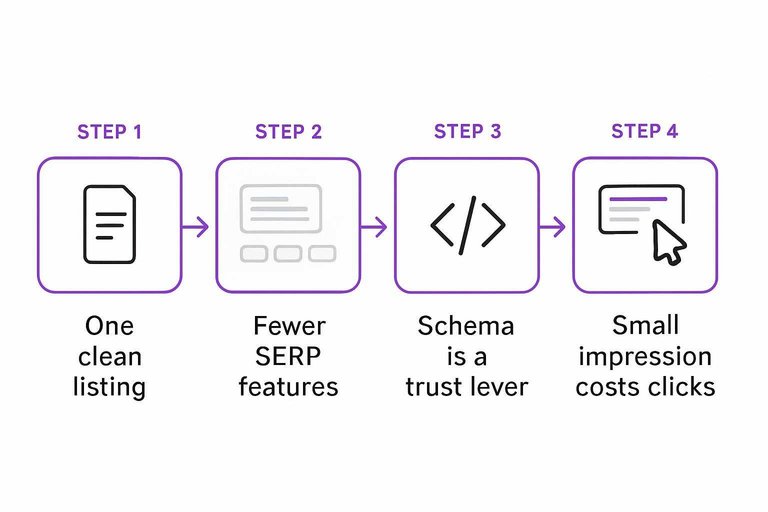
A one-page site often wins simplicity but loses space on the results page. You usually get one clean listing instead of a cluster of sitelinks, breadcrumbs, and supporting pages. That can lower perceived legitimacy when competitors show a fuller footprint.
Feature eligibility
Some SERP features are simply easier to earn with multiple URLs and clearer page-level intent. With one URL, Google has fewer “places” to attach enhancements or match varied searches.
Sitelinks are harder because there are no strong URL-level choices. Breadcrumbs can appear, but the trail often looks thin. Multiple rich results can conflict when everything lives on one page. Diverse query matching gets messy when one page tries to mean ten things.
If your page targets too many intents, Google treats it as a generalist and shows fewer extras.
Schema that helps
Structured data won’t create pages, but it can upgrade your single listing. Use schema that matches what you actually are.
- Organization or LocalBusiness for brand identity
- FAQPage when policy and content allow
- Product or Service for offer clarity
- Review only when fully compliant
If you can’t expand URLs, expand certainty. Schema is a trust lever.
Note that Google has reduced the visibility of FAQ rich results, so it’s worth reading the update on Changes to HowTo and FAQ rich results.
Where it breaks down
SERPs are crowded, and competitors can occupy multiple “tiles” at once. They can rank a homepage, a service page, an FAQ, and a video for the same query.
Your one-page site then fights for a single blue link while others stack features around it. Even with a solid position, your listing can look smaller and riskier. That “small” impression costs clicks.
When others own three slots, you’re competing with a layout, not just a ranking.
Trade-off 6: Performance Budget
Design-heavy one-pagers love big visuals and rich motion. Your performance budget gets spent fast, and rankings notice.
A looping hero video can look “premium” while quietly pushing LCP past three seconds. That’s the line that gets crossed.
Typical bottlenecks
One-page layouts pile everything into one request chain. The usual offenders are predictable, and they stack.
- Autoplay hero video and poster payload
- Slider libraries and animation runtimes
- Third-party trackers and tag chains
- Font bloat from multiple families
- Oversized images without srcset
If you see three or more, you’re not optimizing a page. You’re managing a system. To keep audits and fixes efficient, lean on resources to simplify SEO workflows.
Pragmatic fixes
Treat performance like a budget with a hard cap. Spend it on what users see first.
- Ship only LCP-critical assets on initial load.
- Defer non-critical JS until after interaction or idle.
- Preconnect to essentials like fonts and your CDN.
- Serve responsive images with srcset and modern formats.
- Cut third parties until metrics turn green.
Make the first viewport boring and fast. Put the fireworks later.
Where it breaks down
Sometimes the page must be heavy to sell. Think configurators, live pricing widgets, or embedded product demos.
You can tune hard and still see red Core Web Vitals. Then you choose: simplify the widget, or split the flow onto a second page.
Trade-off 7: Analytics Clarity
A one-page site turns your whole funnel into a single URL. That convenience blurs performance, so SEO choices become slower and riskier.
Measurement gaps
You lose the clean “landing page” lens that makes SEO obvious. In GA4, everything looks like “/” even when users enter at “#pricing.”
You’ll miss:
- Page-level landing performance by intent
- Clean attribution across sections
- Query-to-section visibility in Search Console
Your dashboards stay busy, but your answers get vague.
Instrumentation workaround
You can rebuild clarity with events and lightweight URL parameters.
- Track scroll depth at 25/50/75/90 percent.
- Fire events on anchor clicks like “nav_pricing” and “nav_faq.”
- Send “section_view” when a section hits the viewport.
- Track micro-conversions per section, like “faq_expand” or “demo_click.”
- Append parameters on internal jumps, like ?sec=pricing.
You’re creating virtual pages, so your one-page site can act like many.
Where it breaks down
Even with events, you still lack a true page boundary. A user can read three sections, convert later, and you won’t know which section sealed it.
That uncertainty turns SEO into arguing over “vibes,” not evidence. Trust drops fast when you can’t prove what moved the needle.
Technical SEO Setup for a One-Page Site (So Search Can Actually Understand It)
One-page sites fail in search less because of “lack of content” and more because the page is hard for crawlers to interpret and hard for you to optimize cleanly. You can’t create separate URLs for separate intents, so your technical setup has to do more of the organizational work: clear headings, crawlable in-page anchors, unambiguous canonicalization, and safeguards that prevent accidental deindexing or duplicate versions.
Use the checklist below as a technical baseline before you judge whether seo for one page website is “working.”
Headings and anchor links that act like your site architecture
On a one-page site, headings and jump links are the closest thing you have to navigation and “page-level” context.
- Use one H1, then build a logical H2/H3 outline. Treat each major section as if it were its own page topic: one H2 per core intent, then H3s for supporting points.
- Add unique, stable IDs to each major section (e.g.,
id="services",id="pricing"). Avoid auto-generated IDs that might change when you edit copy. - Link to sections with standard
<a href="#section-id">anchors. This keeps in-page navigation crawlable and shareable. - Don’t rely on JavaScript-only scrolling for navigation. If your menu uses click handlers, ensure it still renders real anchor links in the HTML so crawlers and users can access sections without scripts.
- Write section titles like mini page titles. Since you can’t have multiple title tags, your H2s do extra relevance work for queries that map to that section.
Practical rule: if someone lands halfway down the page from an anchor link, they should immediately know where they are and what that section is about—without needing the hero section for context.
Structured data: choose one primary type, then add only what you can support
Structured data helps you clarify what the page is when the content covers multiple themes. Keep it conservative: use schema you can fully and honestly populate.
- Pick a primary schema type that matches the page’s purpose (commonly
Organization,LocalBusiness, orPerson; sometimesProductif the page is essentially one product). - Add supporting schema only when it’s truly present on the page. Examples:
FAQPagefor an actual FAQ section;BreadcrumbListonly if you genuinely have breadcrumb navigation (many one-page sites don’t). - Avoid marking up things you don’t have as discrete entities. If your “reviews” are just a couple of testimonials, don’t force
AggregateRatingor review markup unless you can represent it accurately and consistently. - Keep JSON-LD aligned with visible content. If the schema says you offer a service, make sure that service is actually described on the page.
Implementation note: validate with a schema testing tool and treat warnings as prompts to simplify, not to add more fields at any cost.
Canonicals and URL hygiene: prevent multiple “versions” of the one page
With a single URL doing all the work, canonical mistakes are disproportionately costly. Your goal is one preferred version that consolidates signals.
- Set a self-referencing canonical on the preferred URL (e.g.,
https://example.com/). - Enforce one hostname and protocol (HTTPS, and either
wwwor non-www) via redirects. - Normalize trailing slashes and index files (choose
/vs/index.htmland redirect the non-preferred version). - Don’t canonicalize to a different URL “because it’s cleaner.” If you canonical somewhere else, you’re telling search engines the current page shouldn’t be indexed.
- Treat parameterized URLs carefully. If your one-page site appends parameters for campaigns (
?utm=), make sure the canonical still points to the clean preferred URL.
If you use anchor links for navigation, remember: #anchors are not separate pages in standard crawling—they’re still the same canonical URL. That’s good for consolidation, but it also means you can’t depend on anchors to behave like separate landing pages for indexing.
Indexing safeguards: avoid accidental noindex, rendering traps, and duplicate states
One-page sites often ship with “temporary” settings that block indexing—then never get removed. Because you only have one URL, a single directive can wipe out organic visibility.
- Confirm the page is indexable: no
noindexmeta tag, noX-Robots-Tag: noindex, and it isn’t blocked inrobots.txt. - Ensure the main content is present in the initial HTML or reliably rendered. If your page is a JavaScript app, verify that key headings and copy appear when crawled (not only after user interaction).
- Avoid duplicate URL states. Common culprits: alternate language versions without clear signals, staging subdomains accessible to crawlers, and printer-friendly or app-generated variants.
- Create a clean XML sitemap even if it’s one URL. It sounds trivial, but it’s an explicit signal of the preferred canonical page.
- Make sure status codes are boring. Your homepage should return a consistent
200response—not intermittent redirects, soft 404 behavior, or blocked states.
A simple operational habit: any time you change themes, rebuild the site, or switch platforms, re-check indexability immediately. On a one-page site, “one mistake” often means “no traffic.”
Decide if One Page Is a Strategy—or a Constraint
- Pick your primary win condition: one core intent, one conversion path, and a short list of supporting queries you can credibly satisfy on the same URL.
- Pressure-test the breakpoints: if you need distinct intents, deep topical coverage, internal link scaffolding, or clean reporting by topic, you’re already past what one page does well.
- If you stay one-page, optimize like it: tighten sections around user tasks, keep a strict performance budget, add schema where it earns SERP visibility, and instrument events so you can measure section-level behavior.
- If you outgrow it, split intentionally: create separate URLs for the intents that want to rank on their own, then rebuild internal links and tracking so each page has a clear job.
Expand Beyond One Page
One-page SEO is a game of smart compromises—limited keyword coverage, thin depth, and fewer internal links can cap your growth over time.
Skribra helps you scale past those limits by generating SEO-optimized articles you can publish consistently—start with the 3-Day Free Trial.
Written by
Skribra
This article was crafted with AI-powered content generation. Skribra creates SEO-optimized articles that rank.
Share: