March 20, 2026
·
Updated July 28, 2026
·
8 min read
SEO paid tools vs free tools for agencies
A comparison for SEO agencies choosing paid tools vs free tools—evaluate data quality, time-to-deliver and automation, collaboration and client access, integrations/APIs, and cost-to-ROI to build a stack that fits your goals.

If your agency relies on “good enough” free SEO tools, you’ve likely felt the pain: inconsistent SERPs, limited crawl depth, and reporting that turns into manual busywork. On the other hand, expensive subscriptions can quietly erode margins when they’re underused.
This comparison helps you decide when paid tools actually earn their seat in your stack—and when free tools are the smarter default. You’ll get a decision frame, a data-quality reality check, and practical guidance on workflows, collaboration, integrations, and ROI.
Agency decision frame
You’re not choosing “paid vs free.” You’re choosing a workflow your team can repeat under deadlines.
A free tool that forces manual stitching can kill margin, even if results look fine.
Typical agency stack
Most agency SEO work is a conveyor belt of repeatable tasks. Your tools should reduce handoffs, not add them.
- Run site audits and issue triage
- Do keyword research and clustering
- Track rankings and SERP features
- Build reports and dashboards
- Analyze links and competitors
If a task happens weekly, automation beats “one more spreadsheet.”
Decision criteria
You’re buying outcomes and speed, not features. Judge tools by what they remove from your team’s calendar.
- Trust data accuracy and freshness
- Save analyst hours per account
- Scale across many clients
- Collaborate with comments and roles
- Ship client-ready reporting
If it reduces rework, it’s cheaper than it looks.
Winner per goal
Free wins when you have one to two clients, loose SLAs, and you can tolerate manual reporting.
Paid wins when you manage three or more clients, promise recurring deliverables, or need defensible numbers fast.
Your breakpoint is usually reporting plus QA time, not “better keywords.”
Data quality battle
Agencies live and die by defensible numbers. When a client asks “show me the data,” free tools rarely hold up under scrutiny.
Paid tools win this section because they combine larger datasets, clearer methodology, and faster refresh cycles. That’s what makes your recommendations stick in a room full of skeptics.
Keywords and SERPs
You can’t forecast traffic or prioritize content without stable keyword volume and SERP context. Free tools give you hints, but they wobble when you need precision.
Paid suites usually win on three fronts: (1) volume models calibrated across clickstream and panel data, (2) difficulty tied to real ranking domains, and (3) SERP feature tracking at scale. Free tools often cap keywords, blur ranges, or skip features like “People also ask.”
If your roadmap needs to survive budget scrutiny, paid keyword data is the safer bet.
Backlinks and authority
Link audits and competitive gap work depend on what your index can actually see. Free backlink reports often look fine until you compare two competitors and half the links vanish.
Paid tools win on index size, historical snapshots, and spam signals that go beyond simple “toxic” labels. They also tend to keep link history longer, which helps you prove patterns like “they lost 30% of links after a site migration.”
When rankings drop and everyone wants a culprit, paid link data gives you receipts—especially when you can point to how often links databases update.
Site crawl depth
Technical audits fail when your crawler can’t reach what users and bots see. Free crawlers are great for quick checks, but agencies hit ceilings fast.
- Crawl millions of URLs without hard caps
- Render JavaScript for SPA content
- Integrate log files for bot reality
- Schedule recurring crawls with diffs
- Export clean data for tickets
If you sell enterprise-like audits, paid crawling wins because “we couldn’t crawl it” isn’t a defensible finding.
Time-to-deliver
Speed is your real margin. Clients don’t pay for “research”; they pay for a client-ready deck by Friday.
Paid SEO tools win throughput for most agencies. Fewer tabs. Fewer exports. Fewer analyst hours—especially when you’re using resources to simplify SEO workflows.
Workflow automation
Monthly SEO work is repetitive on purpose. Automation decides whether your “retainer” is profitable.
- Scheduled crawls and change tracking
- Automatic alerts for spikes and drops
- Reusable templates for audits
- Bulk actions across pages and keywords
- One-click exports to client formats
Paid tools win for repeatable deliverables, because they turn checks into subscriptions.

Reporting velocity
Reporting speed is mostly about assembly time. The fastest report is the one that builds itself while you sleep.
- Built-in dashboards with live data
- White-label links and branded PDFs
- Scheduled emails to stakeholders
- Client portals with role access
- Cross-channel widgets in one view
Paid tools win for fast client reporting, because consistency beats “custom” when deadlines hit.
Learning curve
Free tools are easy to start and hard to systemize. Paid suites feel heavier on day one, then simpler at scale.
Paid tools usually win for ramping new hires. The UI becomes your SOP, not a 27-step doc.
Collaboration and access
Agencies don’t buy SEO tools for features. You buy them for clean handoffs, controlled access, and fewer “who changed this?” moments.
Free tools can work for a solo operator. Teams need seats, roles, and repeatable client sharing.
User seats and roles
Paid tools usually treat access like a system. Free tools treat it like a link.
Seat limits, role-based permissions, and audit trails are where agency operations either scale or stall.
In practice:
- Paid suites offer multiple seats, granular roles, and workspace separation per client.
- Many free tools are single-login, shared credentials, or “anyone with the URL.”
- Audit trails are common in paid platforms, rare in free ones.
- Offboarding is a button in paid tools. It’s a scramble in free setups.
Winner: paid tools for multi-client, multi-team environments.
If you can’t revoke access cleanly, you don’t have collaboration. You have risk.
Client transparency
Clients want proof of progress without a backstage pass. The best setup shares outcomes, not every raw export.
- Scheduled, branded reports
- Client portals or viewer seats
- Commenting and annotations
- Snapshot links with expiration
- Permissions per section
Winner: paid tools for presenting progress without exposing raw accounts.
When clients see the same dashboard every month, trust compounds.
Knowledge retention
Your real enemy is churn. Not client churn. Staff churn.
Paid tools usually store projects, history, notes, and repeatable templates in one place. Free tools often scatter this across spreadsheets, docs, and browser bookmarks.
Look for:
- Saved projects per client and site
- Change history and timeline views
- Notes tied to keywords, pages, and issues
- SOP links embedded in tasks
Winner: paid tools for continuity across staff changes.
If your process lives in one person’s head, your margins are already gone.
Integrations and APIs
Integrations decide whether your reporting runs on pipelines or panic. Agencies feel it when a “quick export” turns into weekly spreadsheet glue.
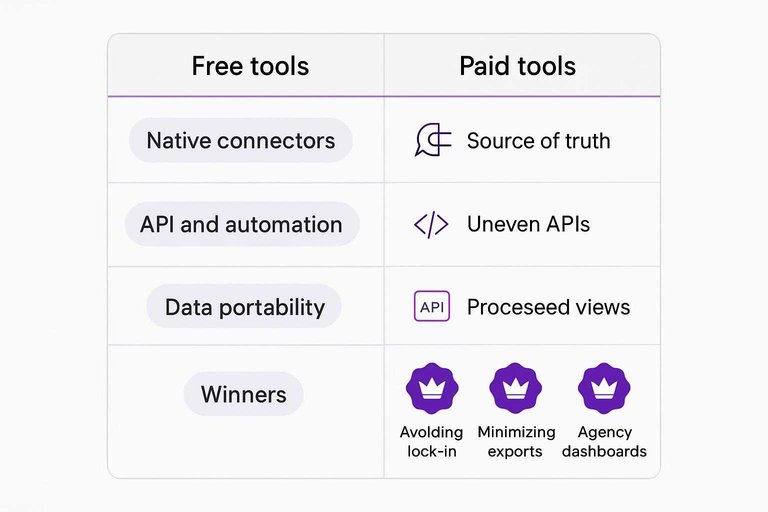
Paid SEO suites usually win on breadth, while free tools win on being the source of truth. Your best setup often mixes both, but one side scales cleaner.
Native connectors
Native connectors reduce human toil because the joins happen before the spreadsheet. The tradeoff is control, because “native” often means “their way.”
- GSC/GA4: free is native; paid often intermediates
- CMS (WordPress, Shopify): paid has plugins; free needs manual tagging
- Looker Studio: free connects directly; paid needs add-ons
- Data warehouses: paid offers connectors; free relies on partners
Winner for minimizing exports: paid tools, because they bundle more endpoints into one pull. That’s the difference between automation and babysitting.
API and automation
APIs decide if you can build repeatable dashboards, not one-off reports. Agencies need quotas, stable schemas, and fewer “call support” moments.
Paid tools usually offer documented APIs, higher quotas, and scheduled pulls, plus webhook-like events through apps. Free tools are uneven: GSC has an API, GA4 has an API, but many free SEO helpers have none.
Winner for agency dashboards: paid tools, because automation beats cleverness when clients multiply—and because mature platforms publish documented SEO suite APIs.
Data portability
Portability is your exit plan, even if you never exit. You want exports that survive tool churn and staff turnover.
Free tools typically export rawer data (GSC queries, GA4 events) with clear lineage, but limited history in the UI. Paid tools export more processed views (rank tables, audits, keyword sets) and may cap bulk exports or hide methodology.
Winner for avoiding lock-in: free tools, because source data migrates cleanly and stays defensible.
Cost and ROI
Tool cost is visible. Labor cost is the invoice-killer.
Use true cost per client: (tooling + seats + API) + (hours × loaded rate).
| Agency scale | Free-tools stack (true cost/client) | Paid-tools stack (true cost/client) | Profitability winner |
|---|---|---|---|
| 1–3 clients | Low cash, high hours | Medium cash, lower hours | Free, if time is cheap |
| 4–10 clients | High hours, more rework | Medium cash, faster cycles | Paid, usually |
| 11–30 clients | Capacity ceiling hits | Lower hours per client | Paid, clearly |
| 30+ clients | Ops sprawl, brittle docs | Standardized, automatable | Paid, no contest |
If you’re selling retainers, you’re really selling turnaround time and consistency, so pay to buy hours back.
Best tool combos
Mixing free and paid tools keeps your stack lean while covering audits, keywords, content, links, and reporting.
Pick combos that remove bottlenecks fast, like “export clean data” or “ship client-ready reports.” If content production is a bottleneck, consider evaluating top AI content platforms compared alongside your SEO tools.
| Agency size | Core paid tools | Best free add-ons | Winner combo |
|---|---|---|---|
| Small (1–5) | Ahrefs Starter, Looker Studio | GSC, GA4, Screaming Frog free | Ahrefs + GSC + Looker |
| Mid (6–25) | Semrush Guru, Screaming Frog | GSC, GA4, PageSpeed Insights | Semrush + Screaming Frog |
| Large (26+) | Ahrefs Advanced, STAT, ContentKing | GSC, GA4, BigQuery | Ahrefs + STAT + ContentKing |
Your “winner” is the stack that shortens time-to-answer, not the one with the most features.
Choose a Stack That Protects Margin and Outcomes
Use free tools to validate demand and diagnose obvious issues, then add paid platforms where accuracy, automation, and collaboration directly shorten delivery time or reduce rework. Tie every subscription to a specific service motion—audits, content ops, technical SEO, or digital PR—and define the metric it improves (hours saved, wins per month, retention). Before you commit annually, run a two-week pilot on a live client: compare outputs, measure reporting speed, and confirm the team will actually use it. The “best” stack isn’t the priciest or the leanest—it’s the one that reliably ships results without shrinking your margins.
Frequently Asked Questions
- Do SEO paid tools still matter in 2026 if I already have Google Search Console and GA4?
- Yes—most agencies use SEO paid tools to add competitive research, backlink indexes, and faster audits that GSC/GA4 don’t provide. GSC/GA4 are essential for first-party performance data, but they don’t replace market-wide visibility and prospecting features.
- Which SEO paid tools are best for agencies managing multiple clients in different niches?
- Most agencies standardize on one suite (Semrush or Ahrefs) for research plus a technical crawler (Screaming Frog or Sitebulb) and a rank tracker (AccuRanker or SE Ranking) to handle varied industries. This setup covers discovery, technical QA, and reporting without switching tools for every niche.
- How do I measure ROI from SEO paid tools in an agency (beyond “rankings went up”)?
- Track tool-driven hours saved per month, output volume (audits, content briefs, link prospects), and revenue outcomes like retained clients and upsells tied to those deliverables. In practice, ROI is strongest when you can attribute the tool to fewer analyst hours and faster client-ready recommendations.
- Can I use SEO paid tools for white-label reporting to clients without giving them logins?
- Yes—most SEO paid tools support scheduled PDF reports, shareable dashboards, or Looker Studio exports so clients see results without direct access. Agencies often keep logins internal to protect workflows, limits, and proprietary templates.
- How long does it take to onboard an agency team to new SEO paid tools and see productivity gains?
- Most teams ramp in 1 to 2 weeks for basic workflows (keyword research, audits, reporting) and reach full efficiency in 4 to 6 weeks with SOPs and templates. The fastest wins usually come from standardized reporting and repeatable audit checklists.
Speed Up SEO Delivery
Choosing between paid and free SEO tools is really about data confidence, turnaround time, and how smoothly your team can collaborate across clients.
Skribra turns those insights into consistent output with daily SEO-optimized articles, WordPress publishing, and integrations that fit your stack—plus a 3-Day Free Trial.
Written by
Skribra
This article was crafted with AI-powered content generation. Skribra creates SEO-optimized articles that rank.
Share: