March 21, 2026
·
Updated August 1, 2026
·
7 min read
SEO tools review basics for beginners
An explainer for how to review SEO tools as a beginner—understand what tools actually do, pick one clear goal, use a practical review checklist, avoid common review traps, and start with a free-tool baseline before you pay.

Ever tried to pick an SEO tool and ended up with 12 tabs, five conflicting “best tool” lists, and no idea what you actually need? Most beginner reviews focus on shiny features and charts, not whether the tool will help your site rank with your time and budget.
This explainer gives you a simple way to evaluate SEO tools: what each category is for, how to choose one goal, how to sanity-check the data and pricing, and how to spot affiliate-driven hype. You’ll finish with a free-tool starting point you can trust.
What SEO Tools Do
SEO tools are helpers for research, diagnostics, and tracking. Think “speedometer” and “check engine light,” not autopilot.
They surface patterns in keywords, pages, links, and rankings. The tool suggests. You decide.
A simple model
SEO tools turn messy signals into a workable loop. You use the loop to choose actions you can measure.
Inputs (your site, SERPs, keywords) → Analysis → Recommendations → Actions → Measurement. Repeat weekly, not hourly.
If you can’t name the next action, your tool setup is noise.
Tool categories
Most SEO tools fall into a few buckets. Learn the buckets before you compare brands.
- Find keywords people search
- Audit technical crawl issues
- Track rankings over time
- Optimize on-page content
- Analyze backlinks and competitors
- Measure traffic and conversions
Pick the category that matches your bottleneck, not your curiosity.
Beginner safety rules
Tools make it easy to collect numbers and feel busy. Your job is to stay focused.
Start with one goal, like “more signups” or “more qualified leads.” Avoid vanity metrics, like total keywords tracked. Change one thing at a time, then wait for data.
If you can’t explain the change, you can’t trust the result.
Pick One Goal
Most SEO tool reviews fail because they mix five jobs into one score. You don’t need “the best tool.” You need the best tool for your next constraint, like “find topics faster” or “fix crawl errors today.”
Common beginner goals
Start by naming the one output you need this month, not the feature list you like. Tools feel “bad” when you ask them to do a different job.
- Find topics your audience searches
- Fix crawl and index issues
- Track rankings for key pages
- Improve on-page content quality
- Monitor backlinks and mentions
Pick one, then judge tools by that metric only.
Scope boundaries
SEO tools don’t guarantee rankings, even if the dashboard looks confident. They also won’t replace strategy, like choosing a niche or positioning a product.
They can’t fix a weak offer or thin content, either. If your page answers nothing, no crawl report saves it.
Use tools to reduce uncertainty, not to outsource judgment. If you need a refresher on the basics before choosing software, see this practical SEO guide. (See Google’s technical requirements for indexing for what “eligible” means—and what it doesn’t guarantee.)
Minimum viable stack
Start small so you learn what you actually need. Add tools only when your process hits a wall.
- Install free analytics and search performance tracking.
- Pick one paid tool that matches your single goal.
- Use it weekly for one repeatable workflow.
- Add a second tool only when you can name the missing step.
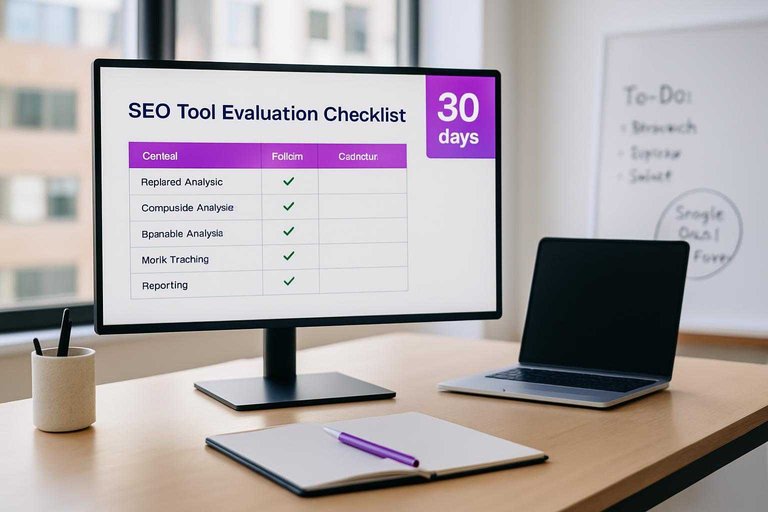
- Drop anything you haven’t used in 30 days.
When your workflow breaks, that’s your real feature request.
Review Checklist
A good SEO tool review is a filter, not a feature tour. You’re trying to answer, “Will this tool stay accurate, usable, and affordable for my work?” Use this checklist to avoid shiny-dashboard bias and catch the deal-breakers early.
Data quality checks
Most SEO tools look similar until the data fails you. Check these signals before you trust any metric in a screenshot.
- Confirm update frequency for your key reports
- Check sampling and “estimated” data flags
- Verify location and device support
- Ask for source transparency on metrics
- Test exportability to CSV or API
If you can’t trace the data, you’re buying vibes, not insight.
Workflow fit
The best tool is the one you’ll actually use on a busy Tuesday. Look for friction points like slow loads, confusing filters, or reports you can’t reuse.
A quick test: can you save a project, rerun it next week, and share a clean report link. Check collaboration, client reporting, and whether it plugs into what you already use, like Looker Studio or Slack—and consider using an ultimate checklist for streamlining SEO content to keep your process consistent end to end.
If it doesn’t fit your workflow, “powerful” turns into shelfware fast.
Cost realism
Pricing looks simple until you hit limits. Do a fast estimate using your real scope, not your best intentions.
- Estimate seats, tracked keywords/pages, and crawl limits you’ll actually need.
- Compare monthly pricing to annual, including upgrade tiers.
- Add add-ons you’ll likely buy, like extra users or API access.
- Include learning time, like “two onboarding afternoons” per person.
If the price only works in a perfect world, it won’t work in yours.
Support and trust
SEO tools break in subtle ways, like a ranking drop caused by a data pipeline change. You want a vendor that documents changes and owns mistakes.
Scan their docs, tutorials, changelog quality, and uptime history. Look for an active community and clear error handling, like “we backfilled data and posted the incident report.”
When things go wrong, support quality becomes a ranking factor for your team’s sanity.
A 30-minute test drive (so your review isn’t theory)
Before you believe any review—or write your own—run the tool through a tiny, repeatable test with your own site. The goal is not to “use every feature.” It’s to see whether the tool can produce one useful decision you’d actually act on.
Use the same sample every time so comparisons are fair:
- Pick 3 real pages (one that ranks okay, one that underperforms, one new page).
- Pick 5 real queries from Search Console (mix one branded, a couple mid-intent, a couple long-tail).
- Run one core workflow that matches your goal:
- Keyword tool → find 10 related queries you’d publish next
- Audit tool → find 5 issues you’d fix this week
- Rank tracker → confirm baseline positions and how it handles location/device
- On-page tool → produce 3 concrete edits you could apply today
- Check the output quality, not the UI:
- Are recommendations specific enough to become tasks?
- Can you trace where the numbers come from?
- Do exports/report links work without cleanup?
- Write a one-paragraph verdict: “Because of X, I would do Y next.”
If you can’t get to a single next action in 30 minutes, the tool may be fine—but it’s not a fit for your workflow right now.
Avoid Review Traps
Reviews can save you money, or push you into the wrong tool fast. Beginner traps usually look like “objective” numbers, confident rankings, and endless feature lists.
Treat every review like a sales page until it proves otherwise.
Vanity metrics
“Domain authority,” giant keyword databases, and backlink totals look scientific. They mislead when they aren’t tied to your site, your market, and your workflow.
A tool bragging “50T keywords” helps less than “covers your country and language well.” A backlink index saying “300B links” matters only if it finds links your competitors actually have. Even “DA 70” is just a third-party score, not a Google metric—Moz says so in its Authority Scoring Guide.
Ask what changes your decisions, not what inflates a chart.
Affiliate bias signals
Most SEO tool reviews are monetized, so you need quick tells. Look for signals that the writer never used the product.
- Repeats the same “top 10” lineup everywhere
- Lists zero real cons or tradeoffs
- Shows no screenshots or workflows
- Hides the testing method and sample queries
- Skips your use-case and team context
If the review can’t show work, don’t trust the verdict.
Feature overload
Tool pages make you feel underpowered on purpose. You’ll pick better if you lock your scope for one quarter.
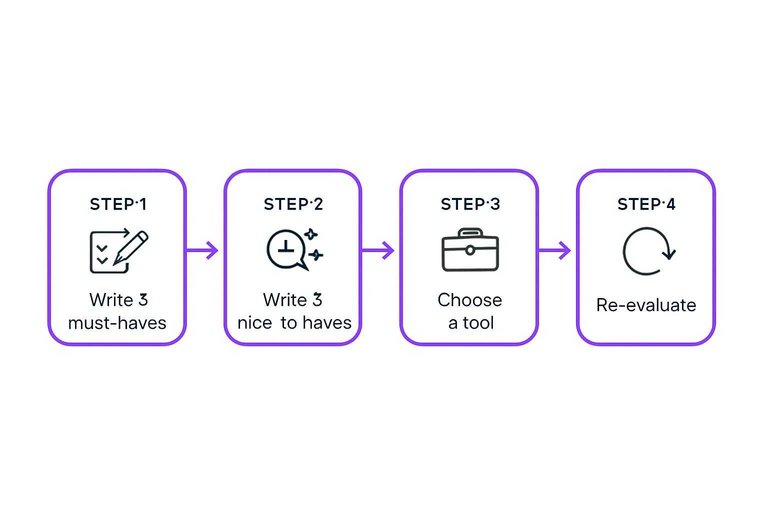
- Write 3 must-haves tied to weekly tasks.
- Write 3 nice-to-haves that would save time.
- Choose a tool that nails must-haves, not most features.
- Ignore every other feature for 90 days.
- Re-evaluate with real usage notes and gaps.
Constraints beat comparison fatigue every time.
Start With Free Tools
Setup — Free tools give you real data before you pay for guesses. Start here so your first fixes actually move rankings.
Substance — Use this quick-start table and open one report immediately.
| Tool | Best for | First report to open | First action |
|---|---|---|---|
| Google Search Console | Search queries | Performance | Fix one low-CTR page |
| Google Analytics | On-site behavior | Landing pages | Improve top exit page |
| PageSpeed Insights | Speed issues | Core Web Vitals | Compress one heavy image |
| Bing Webmaster Tools | Bing visibility | Search performance | Submit your sitemap |
Punchline — Do one action per tool today, then recheck in seven days for a signal.
How to Test and Compare SEO Tools (7–14 Day Plan)
A good seo tools review isn’t just a list of features—it’s a repeatable way to test whether a tool helps you reach one goal faster, with fewer headaches, at a quality you can trust. Below is a beginner-friendly evaluation plan you can run in a week (or stretch to two) without needing advanced SEO skills.
Before you start, keep the test fair:
- Use the same websites and keywords in every tool (your site plus 1–2 competitors).
- Do the same tasks in each tool (don’t explore one tool deeply and only skim another).
- Capture proof as you go (screenshots, export files, notes on where you got stuck).
- Decide a pass/fail bar for your one goal (for example: “I can reliably produce a weekly report in under 30 minutes”).
Day 0: Set up a fair test (30–60 minutes)
Create a simple test sheet (a doc or spreadsheet) with:
- Your one goal (from your earlier decision)
- 5–10 target keywords (mix of easy + competitive)
- 2–3 competitor domains
- Your current baseline (what you can do today with free tools)
- Your “must-have” constraints (budget range, number of users, location data needed, integrations)
Then set up each tool the same way:
- Connect Google Search Console / Google Analytics if available
- Set your target country and language
- Add your domain(s) and competitors
- Turn on any default tracking you’ll actually use (rank tracking, site audits, alerts)
Days 1–3: Run the core tasks (hands-on comparison)
Pick 3–5 tasks that directly support your goal and do them in each tool.
Examples of beginner-friendly tasks:
- Keyword research: Find 20 keyword ideas related to one page or product. Save/export them.
- On-page check: Audit one existing page and list the top fixes the tool recommends.
- Technical scan: Run a site audit and identify the top issues you can understand and act on.
- Competitor snapshot: Compare your domain to one competitor and note the biggest gaps.
- Backlink overview (if relevant): Find your top linked pages and a few new link opportunities.
What to record while you work:
- Time to complete each task
- Where you got confused (labels, metrics, navigation)
- Whether the tool explains what to do next (not just what’s wrong)
- How easy it is to export/share results
Days 4–7: Verify accuracy and repeatability
Beginners often get stuck because different tools disagree. You don’t need perfect agreement—you need consistent, explainable results.
Do a quick reliability check:
- Cross-check 3–5 data points in each tool (e.g., a few keyword ranks, a few pages flagged as issues, a few top competitors). Look for results that feel plausible and stable.
- Re-run one task 48 hours later. Ask: did the tool produce similar output, and did you understand why anything changed?
- Compare the tool’s suggestions against what you can see in Search Console (queries/pages) to confirm it’s aligned with reality.
Also test workflow fit:
- Can you save projects, create a recurring report, or set an alert without hunting through menus?
- If you’re collaborating, can you share access or export a clean report?
Days 8–14 (optional): Test support, learning curve, and long-term fit
If you have time, extend the trial to see what it’s like when you’re busy.
Try:
- One real weekly cycle: research → implement one change → check results in the tool.
- Support test: ask one specific question you genuinely have (chat/email/docs). Evaluate clarity, not speed alone.
- Training resources: watch one beginner tutorial and see if it matches the UI you’re using.
- Limits and scaling: check how the tool behaves when you add more keywords/pages/sites (even if you won’t today).
Sample scoring rubric (copy/paste)
Score each category from 1 (poor) to 5 (excellent). Add short notes so your score is defensible.
| Category | Weight | What “5” looks like for beginners | Score (1–5) | Notes |
|---|---|---|---|---|
| Goal fit | 25% | Directly supports your one goal with clear next steps | ||
| Ease of use | 15% | You can finish key tasks without tutorials or confusion | ||
| Actionability | 15% | Recommendations are specific, prioritized, and doable | ||
| Data trust | 15% | Outputs feel consistent; changes are explainable | ||
| Reporting & exports | 10% | Clean exports; simple reports; shareable outputs | ||
| Integrations | 5% | Connects to GSC/GA and tools you already use | ||
| Support & education | 5% | Helpful docs/tutorials that match the interface | ||
| Value & limits | 10% | Pricing/limits make sense for your usage and growth |
How to decide:
- Multiply each score by the weight and total them.
- If two tools tie, pick the one that scored higher on Goal fit and Actionability—those are what turn a tool into real progress.
Tip: Keep your rubric focused. A tool can be “powerful” and still be wrong for beginners if it slows you down or produces reports you can’t act on.
Choose one goal and run a 30-minute reality check
- Pick one goal for the next 30 days (e.g., fix technical issues, find topics, improve a page) and ignore tools that don’t directly support it.
- Test data quality fast: compare a few keywords/pages against Google Search Console results and manually spot-check the SERP.
- Confirm workflow fit: can you go from “insight” to “next action” in under 10 minutes, and export/share what you need?
- Start free first, then pay only when the tool removes a real bottleneck you’ve already hit.
Frequently Asked Questions
- Are SEO tools reviews trustworthy, or are most SEO tool reviews sponsored?
- Many SEO tools reviews are influenced by affiliate links or sponsorships, so treat them as marketing unless the reviewer shows methodology, datasets, and repeatable tests. Look for screenshots from real accounts, disclosed relationships, and side-by-side comparisons using the same keywords/site.
- What should I test during an SEO tools review free trial to decide quickly?
- In 30–60 minutes, test 3 things: data accuracy (compare to Google Search Console), workflow speed (how fast you can go from issue to action), and reporting/export options (PDF, CSV, Looker Studio). If those fail, extra features won’t matter.
- How do I measure ROI from an SEO tools review and pick the best value tool?
- Track hours saved per week plus lift in organic clicks/leads (via GA4 and Search Console) after implementing tool-driven fixes for 4–8 weeks. A tool is good value when the time saved and revenue lift exceed the monthly cost by at least 2–3x for most small teams.
- Can I do an SEO tools review without paying for Ahrefs or Semrush?
- Yes—use Google Search Console, GA4, PageSpeed Insights, Bing Webmaster Tools, and free crawlers like Screaming Frog (500 URLs) to cover core audits and tracking. Paid suites mainly add scale, deeper competitive data, and faster workflows.
- How often should I re-evaluate my SEO tool stack after reading an SEO tools review?
- Re-check tools every 6–12 months, or immediately after big changes like a site migration, new market, or team growth. Tool needs shift fastest when your content volume, technical debt, or reporting requirements increase.
Turn Reviews Into Rankings
After you’ve compared features, picked one goal, and used a review checklist, the real win is shipping SEO-optimized content consistently without getting trapped in tool hype.
Skribra turns your SEO tool research into daily, keyword-targeted articles with meta descriptions, images, and WordPress publishing—plus a backlink exchange network. Start with the 3-Day Free Trial.
Written by
Skribra
This article was crafted with AI-powered content generation. Skribra creates SEO-optimized articles that rank.
Share: