February 8, 2026
·
Updated June 5, 2026
·
11 min read
Set Up an AI Content Generator in Under 30 Minutes
A step-by-step guide to setting up an AI content generator in under 30 minutes — pick the right stack, build a reusable prompt template, connect reliable source inputs, and run a two-pass workflow with fast troubleshooting and reuse.

If your AI drafts keep coming out bland, off-brand, or just plain wrong, the issue usually isn’t the model—it’s your setup. Most “content generators” fail because there’s no consistent inputs, structure, or finish line.
In the next 30 minutes, you’ll assemble a simple stack, create a prompt template you can reuse, and plug in source material so your drafts stay accurate and on-voice. You’ll also add a lightweight editing workflow, grab copy-paste prompts, and learn quick fixes when output goes sideways.
Pick Your Stack
You’re choosing a toolchain, not a philosophy. The goal is usable drafts today, like a “good enough blog outline” you can edit in 10 minutes.
Define one use
Pick one output and one channel, or your prompts sprawl fast. “A 900-word blog draft for LinkedIn reposts” beats “content marketing” every time.
Lock these in:
- Content type: blog, emails, ads, product pages
- Channel: site, LinkedIn, newsletter, Amazon
- Cadence: one-off, weekly, launch-only
- Success metric: time saved, conversions, approvals
Your stack gets simple the moment the target stops moving.
Choose a model
The model is your engine. Pick the one that hits your quality bar without breaking the 30-minute setup.
- OpenAI: strong general writing, fast, easy APIs
- Anthropic: clean tone, solid longform, great safety defaults
- Local models: cheaper per token, slower setup, more tinkering
- Hosted: fastest start, fewer knobs, predictable reliability
- Self-hosted: more control, more time, more failure modes
If you’re timing yourself, hosted wins almost every time.
Select an interface
Your interface decides whether you ship or fiddle. Optimize for copy, paste, and repeatable prompts.
- ChatGPT/Claude: fastest start, prompt history, quick iterations
- No-code app: forms, templates, easy team handoff
- Simple script: repeatable runs, versioned prompts, batch generation
- Docs workflow: generate, paste, edit, publish
- Saved prompts: fewer “what did I type?” moments
Choose the interface you’ll still use on a rushed Tuesday.
Gather inputs
Inputs beat clever prompting. A short packet of real constraints steers output like guardrails.
Collect:
- Brand voice notes, like “plainspoken, no hype”
- Audience and job-to-be-done, in one paragraph
- Offers, pricing, and hard claims you can defend
- Links: homepage, docs, top competitors
- Three samples you like, even screenshots
Do this once, and every future draft gets easier to trust.
Create a Prompt Template
You want one prompt you can reuse without babysitting. The goal is predictable structure, a consistent voice, and fewer “fix-it” passes.
Set role and voice
Tell the model who it is, who it serves, and what it must never do. Without that, you’ll get generic advice and risky claims like “guaranteed results.”
Add a tight style snippet you can paste every time:
“Role: Senior content strategist for [AUDIENCE]. Voice: direct, practical, no hype. Reading level: smart generalist. Tone: calm confidence. Avoid: medical, legal, financial guarantees; invented stats; competitor bashing. Style: short paragraphs, scannable lists, concrete examples, US English.”
Once role and voice are locked, your edits shift from rewriting to trimming.
Force structure
Structure beats inspiration because it prevents rambling.
- Output H2 sections with clear, action titles.
- Include at least one bullet list and one short CTA.
- Hit [WORD_COUNT] ±10% and keep paragraphs under three lines.
- Add “Sources or assumptions” with links or explicit assumptions.
- End with a one-sentence takeaway and next step.
If it can’t cite it, it should label it as an assumption.
Add variables
Variables make the prompt reusable across topics and funnels.
- Topic: [TOPIC] and target reader: [AUDIENCE].
- SEO: [PRIMARY_KEYWORD] and [SECONDARY_KEYWORDS].
- Offer: [PRODUCT] and desired action: [CTA].
- Friction: [OBJECTIONS] and how to address each.
- Proof: [EXAMPLES] and point of view: [ANGLE].
If you can’t fill a variable, you don’t have a brief yet.
Add quality checks
Ask for a self-review so the first draft behaves like a second draft. You’re aiming for fewer vague lines like “leverage AI to optimize content.”
Add a revision block the model must run before final output:
“Quality check: clarity (no vague verbs), specificity (names, numbers, steps), originality (no clichés), compliance (no forbidden claims), and alignment with [VOICE]. Then revise once and return only the revised version.”
Make the model judge its own work, then force it to fix what it finds.
Connect Your Content Source
Your generator is only as good as the context you feed it. Give it a trustworthy source once, and stop re-explaining basics like pricing or positioning every prompt. Think “single source of truth,” like a Google Doc your team already treats as law.
Use a source doc
Create one doc that the model can reference every time, so it stops guessing. You want consistent facts, not “close enough” marketing copy.
- Start a “Facts + Claims” doc in Google Docs or Notion.
- Add positioning, features, pricing, FAQs, and approved claims.
- Add “Things we never say” and banned comparisons.
- Paste it into your tool, or link it as the primary source.
If your outputs keep drifting, your doc is either missing details or not being used.
For more on handling big context well, see these long context prompting tips.

Add example outputs
Examples teach tone faster than guidelines do. Give the model something to copy, plus one thing to avoid.
- Add 2–3 “great” samples from your best posts
- Add 1 “bad” sample that fails your standards
- Label what to imitate: structure, voice, formatting
- Label what to avoid: hype, vagueness, risky claims
One ugly example prevents ten subtle mistakes.
Set guardrails
Guardrails keep the generator from inventing facts or stepping into brand risk. Write them like rules, not suggestions.
Use lines like: “Cite sources for stats,” “Do not mention competitors,” and “Include a medical disclaimer when discussing outcomes.” Add one more rule: “Ask clarifying questions if key facts are missing.”
When the model asks questions, your workflow speeds up, not down.
Version your inputs
Outputs drift when your inputs change quietly. Versioning lets you roll back fast when something breaks.
- Name the facts doc with a version number
- Add a date and owner at the top
- Keep a short changelog section
- Version your style notes separately
Treat prompts like code. Revert when needed.
Build the Workflow
You need a pipeline you can run half-asleep. One screen, one direction: generate → review → publish.
A simple setup looks like: prompt → outline → draft → edit → paste into CMS. Tight loops beat “perfect” prompts every time—especially once you understand how AI transforms SEO content.
Choose a run mode
Pick the smallest workflow that reliably ships your content. Complexity feels powerful, but it hides failures.
Single prompt works for short posts and FAQs. A multi-step chain fits when you need sources, outline, and draft. A template form wins when you repeat the same format, like “X tools for Y.”
Start simple. Add steps only when you can name the exact problem they solve.
Draft in two passes
Two passes cut revision time because structure stops drifting.
- Generate a tight outline with headings and bullets.
- Lock the outline order and section intent.
- Expand each section into full paragraphs.
- Fill examples, numbers, and quotes last.
If your outline is weak, your draft will be expensive.
Add an editor step
Editing needs its own prompt, not vibes.
- Rewrite for brevity and remove filler.
- Enforce style rules like “max 20 words.”
- Add clarity: examples, definitions, and labels.
- Polish tone to match your brand voice.
Save both prompts. Consistency comes from reuse, not talent.
Define done criteria
Done is a checklist, not a feeling. Without rules, you will keep “tweaking” forever.
Minimum checks: factual accuracy, working links, one clear CTA, clean formatting, and on-brand voice. After pass two, you publish unless a check fails.
That’s how you turn editing from an identity into a step.
30-Minute Setup Plan
You need a working generator, not a perfect system. This plan gets you to one publishable draft in 30 minutes.
- Pick one output and one channel, like “LinkedIn post” or “blog intro”.
- Create a simple prompt template: audience, goal, tone, constraints, and one example.
- Add a source pack: 5 bullets of facts, links, or quotes to ground it.
- Run three generations, then stitch the best parts into one draft.
- Do a 10-minute edit pass: cut fluff, add proof, and finalize a headline.
If you can’t ship after step five, your bottleneck is inputs, not the model.
Copy-Paste Prompts Pack
Use these prompts when you need output fast and consistent across channels.
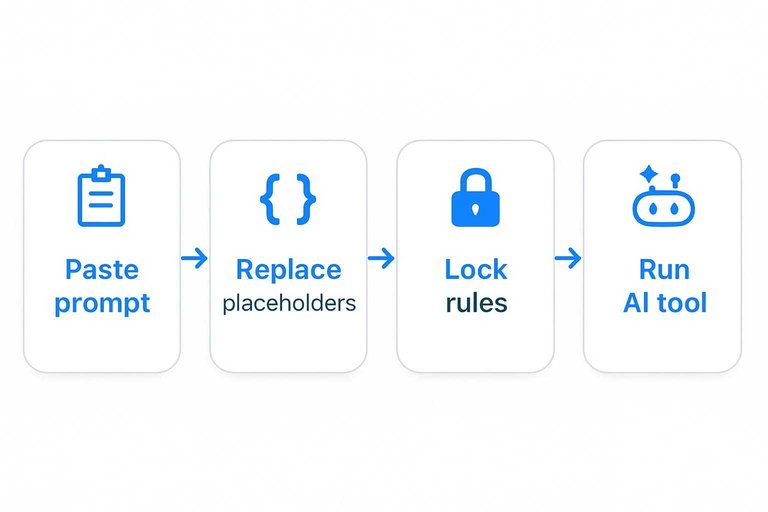
Paste one into your AI tool, then replace the placeholders before you run it.
| Use case | Copy-paste prompt | Placeholders | Output rules |
|---|---|---|---|
| Blog draft | “You are a senior content writer. Write a {WORD_COUNT}-word blog post about {TOPIC} for {AUDIENCE}. Use {TONE}. Include: 1 strong hook, 5 scannable H2s, and a short conclusion with a clear next step. Add one concrete example per H2. Avoid fluff and banned phrases: {BANNED_PHRASES}.” | {TOPIC}, {AUDIENCE}, {WORD_COUNT}, {TONE}, {BANNED_PHRASES} | Markdown; H2 only; 5 bullets max per list |
| Product description | “You are a conversion copywriter. Write a product description for {PRODUCT} aimed at {AUDIENCE}. Emphasize {PRIMARY_BENEFIT} and address {TOP_3_OBJECTIONS}. Include: 1-sentence positioning, 5 benefit bullets, 1 short spec block, and 1 CTA line. Use {TONE}.” | {PRODUCT}, {AUDIENCE}, {PRIMARY_BENEFIT}, {TOP_3_OBJECTIONS}, {TONE} | 120–180 words; bullets under 10 words; 1 CTA |
| “You are an email strategist. Draft an email for {CAMPAIGN_GOAL} to {AUDIENCE}. Context: {CONTEXT}. Offer: {OFFER}. Include: 3 subject lines, preview text, and the email body. Use {TONE}. Add one clear CTA link text: {CTA_TEXT}.” | {CAMPAIGN_GOAL}, {AUDIENCE}, {CONTEXT}, {OFFER}, {TONE}, {CTA_TEXT} | 3 subjects; body under 180 words; 1 CTA | |
| Social thread | “You are a social copywriter. Write a {PLATFORM} thread about {TOPIC} for {AUDIENCE}. Goal: {GOAL}. Format: 1 hook post, then 6–8 short posts, then 1 CTA post. Include 1 concrete example and 1 mini-framework with 3 steps. Use {TONE}.” | {PLATFORM}, {TOPIC}, {AUDIENCE}, {GOAL}, {TONE} | Numbered posts; < 240 chars each; no hashtags |
If your outputs feel random, lock the placeholders and rules first. That’s the lever that makes quality repeatable.
Troubleshoot Fast
You’ll hit five problems fast: bland output, wrong tone, shaky facts, repetition, and drafts that sprawl. Fix them with tight constraints and targeted reruns, not a full rewrite.
Bland to specific
Generic output happens when your prompt has no stakes. Give the model real constraints, then rerun only the part that reads like “add value” fluff.
- Add one real example from your product, customer, or workflow.
- Require 2-3 numbers: time, cost, conversion, or frequency.
- Name the reader pain point in one sharp sentence.
- Add: “Avoid generic advice and vague claims.”
- Regenerate only the weakest section, not the whole draft.
Specificity is mostly a routing problem, not a talent problem.
Tone mismatch fixes
Tone drifts when you don’t pin it to a reference. Treat voice like settings, then give it a target to copy.
- Set formality: “casual, no slang” or “formal, no fluff.”
- Set humor: “none,” “dry,” or “light, one line max.”
- Set brevity: “tight,” “medium,” or “verbose with examples.”
- Paste 2-3 samples and say: “Rewrite in this style.”
- Add a guardrail: “No hype, no exclamation points.”
If you can’t describe the voice, you can’t debug it.
Accuracy recovery
Hallucinations usually come from missing inputs, not bad intent. Force the model to surface assumptions, ask questions, and cite what it used.
Add three lines to your prompt:
- “List assumptions before writing.”
- “Ask 3 questions if any facts are missing.”
- “Cite sources or label as ‘unsourced’.”
Then paste the missing facts, like pricing, dates, or feature limits. Regenerate only the factual paragraphs, not the whole piece.
Your job is to feed truth; the model’s job is to shape it.
Repetition control
Repetition is a pattern problem. Break the pattern, then run a cleanup pass that hunts duplicates.
- Add: “No repeated phrases or sentence templates.”
- Add: “Vary sentence openings across paragraphs.”
- Request: “Run a deduplication pass after drafting.”
- Add: “Auto-shorten intros to one sentence.”
Once repetition drops, your content starts sounding human again.
For more practical prompt iteration ideas, review these prompt engineering techniques.
Governance: Keep Your AI Content Generator Safe and Publishable
Speed is great until you publish something you can’t defend. Add a few rules now and you won’t have to “clean up” later across dozens of drafts.
Disclosure rules (when to say AI helped)
Decide your stance before you scale, especially if you publish under a personal byline or in regulated categories.
Pick one:
- No disclosure for internal drafts only (AI never publishes unreviewed).
- Light disclosure when AI materially contributed (edited and verified by a human).
- Always disclose on pages where trust matters most (education, reviews, sensitive topics).
Write the rule into your workflow: where the disclosure lives (footer, author bio, editorial policy) and who approves exceptions.
Copyright + plagiarism checks
An ai content generator should produce original phrasing, but you still need guardrails for accidental copying and risky “sounds like” outputs.
Add a simple policy:
- No copying competitor text, even “for inspiration.”
- No generating in the style of a living author or a named brand voice.
- Run a plagiarism/duplication check on anything high-stakes (landing pages, pillar posts).
- Treat quotes and statistics as “needs a source” by default.
If you can’t source it, rephrase it as an opinion, an example, or an assumption—or remove it.
Privacy and data handling
The fastest way to create risk is pasting sensitive data into a chat window.
Define what never goes into prompts:
- Customer PII (emails, phone numbers, addresses)
- Private financials or non-public performance metrics
- Internal roadmaps, credentials, or security details
- Unpublished contracts and legal language
If you need personalization, use redacted placeholders (e.g., [INDUSTRY], [ROLE], [PAIN_POINT]) or a sanitized customer summary you’d be comfortable publishing.
Approval gates for “risky” content
Not all content needs the same review. Add one extra step for the categories that can cause real harm.
Create a “requires review” list, such as:
- Medical, legal, financial, or compliance claims
- Safety instructions and how-to guidance with real-world risk
- Comparative claims (“best,” “#1,” “guaranteed,” “works for everyone”)
- Testimonials, case studies, and any quantified outcomes
Route those drafts through a human reviewer and require sources for every hard claim. Everything else can follow your normal edit checklist.
Publish and Reuse
Turn your first output into a reusable system, not a one-off draft. Treat it like a template you can run again with new inputs.
- Save your prompt as a named template, like “Product FAQ v1”.
- Store inputs in one place: audience, offer, tone, examples.
- Track outcomes: impressions, clicks, signups, replies.
- Create a weekly iteration note: “keep, cut, test next”.
- Reuse the winner across channels: blog, email, LinkedIn, landing page—and run it through an essential AI content checklist before republishing.
Your first post is proof the machine works; the template is the asset.
Lock It In and Run Your Next Draft in Minutes
- Save your prompt template as a “master,” then clone it per content type (blog, landing page, email) with only the variables editable.
- Create one source-of-truth folder (briefs, notes, examples, constraints) and version it so every run is traceable.
- Run the workflow in two passes: draft for structure first, then rewrite for voice and specificity—don’t mix them.
- Add a final checklist before publishing (facts verified, tone matched, repetition removed, CTA present), then store the finished piece as a new example to improve the next run.
Frequently Asked Questions
- Do I need a paid tool to set up an AI content generator in 30 minutes?
- No—most people can start with a free tier (ChatGPT, Claude, Gemini) plus Google Docs/Notion and get a working AI content generator the same day. Paid plans mainly unlock higher usage limits, better models, and team features.
- How do I measure whether my AI content generator is actually improving results?
- Track time-to-publish, edits per draft, and output quality (readability, accuracy rate) plus performance metrics like Search Console clicks/CTR or email open/click rates. Compare against a 2–4 week baseline to see if speed and outcomes improve.
- Is using an AI content generator safe for SEO in 2026?
- Usually yes if you publish helpful, original content and add human review for accuracy and expertise. Avoid mass-publishing thin or duplicate pages, and use Search Console plus rank/traffic trends to catch quality issues early.
- Can an AI content generator write in my brand voice without lots of training data?
- Yes—most tools can match your tone with a short style guide and 2–3 examples of “on-brand” writing pasted into the prompt. Save that voice block as a reusable snippet so every draft starts consistent.
- How long does it take before an AI content generator pays off in real output?
- Most teams see a speed payoff immediately (first day) and a consistent reduction in drafting time within 1–2 weeks once templates and review rules are standardized. Content performance gains typically show up over 4–8 weeks for SEO or 1–3 campaigns for email/social.
Automate Your Publishing Workflow
If your 30-minute AI content generator setup works in theory but breaks under real publishing pressure, the right system keeps it consistent and reusable.
Skribra generates SEO-optimized articles, images, and meta in a repeatable workflow and publishes to WordPress—start with the 3-Day Free Trial.
Written by
Skribra
This article was crafted with AI-powered content generation. Skribra creates SEO-optimized articles that rank.
Share: