February 2, 2026
·
10 min read
Set Up an SEO Writing Assistant for Daily Content
A hands-on guide to setting up an SEO writing assistant you can run every day—define a repeatable workflow, choose an LLM + SEO signal toolstack, build a reusable prompt kit, connect brand/links/backlog inputs, and ship through a quality gate with tracking and troubleshooting.

Daily content sounds simple until you’re juggling briefs, internal links, SEO checks, and “one more tweak” edits that eat the whole morning. If your publishing pace depends on heroic effort, it’s not a workflow—it’s luck.
This guide shows you how to build an SEO writing assistant that behaves like a reliable teammate: it starts from a clear acceptance checklist, pulls the right inputs (voice, link map, backlog), runs a repeatable prompt kit, and outputs publish-ready drafts you can verify and ship fast.
Define the workflow
You need a workflow your assistant can repeat without guessing. Set one daily goal, lock your SEO constraints, and define “done” in plain language. Think “publish one cluster page a day” instead of “write more content.”
Pick a daily target
Choose one output you can ship every day, even on busy days.
- Pick a content type you can repeat, like “comparison page” or “FAQ post.”
- Set a cadence you can sustain, like one draft daily by 2pm.
- Choose one primary success metric, like clicks or qualified leads.
- Set a minimum quality bar, like “top 10 ranking target” or “editor-approved.”
- Write the target as a single sentence, then reuse it in every prompt.
When the target fits one sentence, your assistant stops negotiating and starts producing.
Decide SEO constraints
Constraints stop your assistant from “getting creative” in the wrong direction.
- Write in one language and one locale
- Match one intent per page
- Use one primary keyword, plus 3-5 variants
- Add 3-5 internal links, mapped to slugs
- Include required on-page elements, like FAQs and schema
The moment you standardize constraints, you get outputs you can actually compare.
Create an acceptance checklist
Your assistant needs a definition of done that reads like a QA ticket. Write it like: “1,200–1,600 words, H2 every 200 words, two cited sources, no copied sentences, and a 155-character meta description.” Add internal link rules, like “include one link to the product page above the first fold.”
If you can’t fail the checklist, you can’t trust the system.
Choose your toolstack
Your assistant is only as steady as the stack beneath it. Pick boring, dependable parts that your team will actually use daily, like “one model, one source of truth, one place to edit.” If you’re still deciding what belongs in that stack, start with tools to supercharge content workflows.
Select an LLM
You’re choosing a default brain for drafting and rewriting. Match it to your risk tolerance, budget, and document sizes.
| Model option | Quality | Cost | Privacy |
|---|---|---|---|
| OpenAI GPT-4.1 | High | Medium | Vendor-hosted |
| OpenAI GPT-4.1 mini | Medium | Low | Vendor-hosted |
| Anthropic Claude 3.5/3.7 | High | Medium | Vendor-hosted |
| Self-hosted Llama 3.x | Medium | Low | You control |
If you can’t describe your privacy needs in one sentence, start vendor-hosted and add guardrails.
Add SEO signals
The assistant needs a scoreboard, not vibes. Choose one SERP or query data source, then constrain what it can read.
- Start with Google Search Console for real queries and pages.
- Add Ahrefs or Semrush when you need competitor SERPs and difficulty.
- Define readable fields: query, page, impressions, clicks, position.
- Add SERP features and intent labels if you track them.
- Set refresh rules: daily for GSC, weekly for tools.
When the input is consistent, your outputs stop arguing with each other.
Pick a workspace
Your drafts need one home where comments and approvals already happen. Use Google Docs for fast editing, Notion for linked research, or your CMS when publishing rules are strict.
Decide who can edit, who can comment, and who can approve. One owner per draft, or it turns into a “who touched this?” mystery.
The best workspace is the one that produces a publishable version without copy-paste detours.
Build the prompt kit
PROSE:
Your prompt kit turns scattered ideas into repeatable outputs. Same inputs in. Same quality out. Think “brief → outline → draft → SEO pass,” every day.
Create a brief template
LIST:
Use one brief format for every article, so your assistant stops guessing. You fill the blanks once, then reuse them across every prompt.
- Topic: what you’re writing about
- Audience: who it’s for
- Intent: learn, compare, buy, or troubleshoot
- Primary keyword: exact target phrase
- Secondary terms: 3–8 related queries
- Angle: your unique point of view
- Examples: real tools, numbers, or stories
- Internal links: 3–5 URLs to include
If you can’t fill a field, that’s a research task, not a writing task.

Write core system rules
PROSE:
System rules keep the model honest when you’re moving fast. Write them once, then paste them into every prompt as “non-negotiables.”
Example rule: “Don’t invent sources; if a claim needs proof, ask for a link or mark it as an opinion.” Another: “If the brief lacks audience or intent, stop and ask two questions.”
To avoid over-automating low-value output, align your guardrails with Google’s guidance on scaled content abuse.
Draft output prompts
STEPS:
Create one prompt per output, all fed by the same brief. Keep names consistent, so you can run them like a checklist.
- Write a SERP summary prompt that extracts intent, subtopics, and content gaps.
- Write an outline prompt that maps headings to keywords and examples.
- Write a full draft prompt that enforces voice, structure, and link placement.
- Write an on-page SEO pass prompt for title, meta, headers, and internal links.
Once these four prompts work, you’ve built a content assembly line, not a one-off generator.
Connect content inputs
Your assistant gets good when it sees your real context, not just prompts. Give it your voice, your site map, and a queue of next posts, and it stops guessing.
Think of the difference between “Write a blog post” and “Write like our help center, link to /pricing, avoid hype.” That’s the gap you’re closing.
Import brand voice
You want consistent tone, readability, and structure across daily posts. A small voice pack beats a long brand deck every time.
- Paste 3–5 “gold standard” samples from your site.
- Add 5 phrases you never want, like “game-changer” or “unlock.”
- Set reading level and sentence length targets.
- Specify formatting rules, like H2 frequency and bullets.
- Add style constraints, like “direct voice” and “no fluff.”
Once this is saved, you’re editing for facts, not fixing tone.
Add internal link map
You want the assistant linking on purpose, not spraying random URLs. A lightweight map is enough to guide anchors and clusters.
| Page | Primary topic | Target anchor | Cluster |
|---|---|---|---|
| /pricing | Plans | pricing | Commercial |
| /blog/seo-audit | SEO audit | seo audit checklist | SEO |
| /features/writer | Writing tool | seo writing assistant | Product |
| /docs/integrations | Integrations | content workflow | Ops |
If a page isn’t in the map, it won’t get links by accident.
Create a content backlog
You need a “next up” list so daily writing never starts from zero. Add priority, keyword, and intent so the assistant picks the right angle.
Use a backlog row like: “Topic: programmatic SEO templates; Keyword: programmatic SEO; Intent: commercial; CTA: demo.”
When your backlog is explicit, your assistant becomes a production line, not a brainstorm buddy.
Automate a daily run
Set your assistant to produce one draft every day, without you remembering. You want a consistent input stream, like “drafts at 7:30am.”
- Pick a trigger time in your calendar, then create one scheduled job.
- Pull fresh inputs: Search Console queries, RSS feeds, or a keyword list.
- Run the pipeline: outline, draft, title variants, and meta description.
- Save outputs to one place: Google Docs, Notion, or a Git repo.
- Send a daily notification with links and a one-line brief.
Once this runs unattended, your job shifts to editing, not starting.
Quality gate and publish
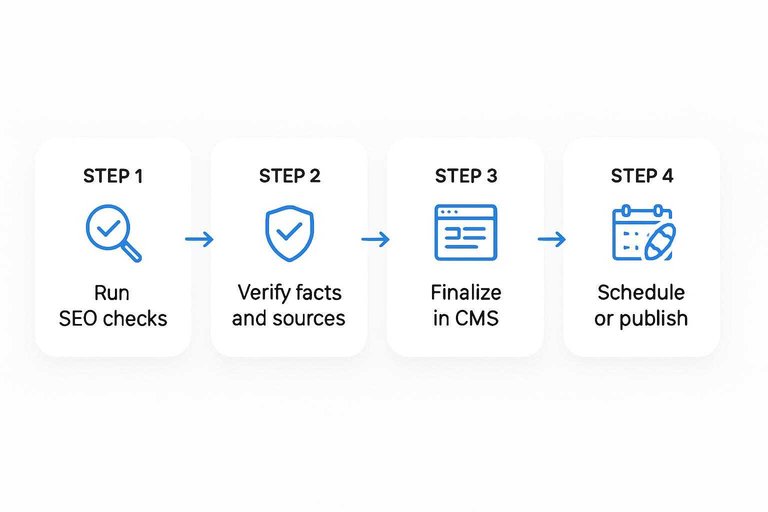
You need a fast quality gate before anything hits your CMS. A 10-minute review catches the stuff that tanks rankings and trust, like missing internal links or a shaky claim.
Run SEO checks
Do a quick pass for search intent and on-page signals before you touch the CMS—use this SEO content streamlining checklist as a quick reference.
- Place primary keyword in H1 and early intro
- Cover intent with H2s, not filler sections
- Add 2–5 internal links with relevant anchors
- Tighten title and meta for CTR and match
- Check snippet format and cannibalization risk
If you can’t explain the page’s unique query in one line, you’ll fight your own site.
Verify facts and sources
Treat factual review like a production checklist, not a debate.
- Highlight every claim that sounds like a number, rule, or “best.”
- Add a citation link for each claim, or rewrite as opinion.
- Recheck dates, pricing, and limits against the source page today.
- Reproduce any steps or examples exactly as written, then fix mismatches.
If you can’t verify it in two minutes, it doesn’t ship.
Finalize in CMS
Move to the CMS only after the doc passes SEO and fact checks. Then do one UX pass, like a reader on a phone, and fix the obvious snags.
Format headings cleanly, add images with specific alt text, set a short slug, and add schema when it will earn a rich result. Schedule or publish, then log the URL and target query for tracking.
Track and improve
You need tight feedback loops, or your assistant stays “clever” instead of useful. Track ranking, edits, and prompt changes in one place so you can spot what actually moves.
Track these signals daily, then adjust prompts based on outcomes, not vibes.
| Metric to track | Where to pull it | What “good” looks like | Prompt tweak to try |
|---|---|---|---|
| Avg position | Search Console | Upward trend | Tighten intent phrasing |
| CTR | Search Console | Rising with same rank | Rewrite titles, add payoff |
| Time-to-publish | Your timer | Under 30 minutes | Add stricter outline rules |
| Edit rate | Git diff or doc history | Fewer human rewrites | Add banned phrases list |
| Conversions | Analytics | Growing per page | Add stronger next-step CTA |
If you can’t link a prompt change to a metric shift, you’re guessing.
Troubleshoot common failures
Your assistant will fail in predictable ways. Fix them fast, or you’ll publish “fine” content that never ranks.
- Generic drafts: add unique data, a POV, and one real example
- Missed intent: rewrite the outline to match the SERP’s top task
- Weak E-E-A-T: cite sources, add author creds, and include firsthand steps
- Over-optimization: cut repeated keywords, keep headings natural, vary phrasing
- Duplicate content: enforce canonical topics, rewrite templates, run similarity checks
Treat each failure like a system bug, not a writer problem.
Turn it into a daily habit—and tighten the loop
Start with a small daily target you can sustain, then run the same prompt kit and quality gate every time so results are comparable. Publish only what passes your SEO, accuracy, and CMS checks, and log the failures you see (missing links, thin sections, unsupported claims) so you can update rules instead of re-editing forever. Review performance on a weekly cadence, promote what works into templates, and retire prompts that create recurring issues. With that loop in place, your assistant stops being a one-off generator and becomes a predictable production system.
Frequently Asked Questions
- Is an SEO writing assistant the same as an AI writing tool like ChatGPT?
- No. An SEO writing assistant combines AI drafting with SEO data (keywords, SERP intent, competitors) and on-page checks, while a general AI writing tool usually generates text without built-in ranking guidance.
- Do I still need an SEO writer or editor if I use an SEO writing assistant daily?
- Yes. Most teams keep a human editor for brand voice, accuracy, and final on-page decisions; the assistant mainly reduces research and drafting time so one editor can ship more content.
- How do I measure whether my SEO writing assistant is actually improving results?
- Track 3 metrics: time-to-publish (hours saved), content quality (edit distance or revision cycles), and SEO impact (impressions, clicks, and average position in Google Search Console over 4–12 weeks).
- How long does it take to see rankings from content produced by an SEO writing assistant?
- You usually see early movement in impressions within 2–6 weeks and more reliable ranking/traffic gains in 8–16 weeks, depending on your site authority, crawl rate, and competition.
- Can I use an SEO writing assistant without paid SEO tools like Ahrefs or Semrush?
- Yes. You can use Google Search Console, Google Trends, and manual SERP reviews for keyword and intent inputs, but paid tools often speed up competitor research and topic validation.
Automate Daily SEO Publishing
Building an SEO writing assistant is straightforward on paper, but daily execution breaks down without reliable automation, quality gates, and publishing integrations.
Skribra turns your workflow into a daily run—keyworded drafts, meta, formatting, images, and WordPress publishing included—plus a backlink network to build authority; start with the 3-Day Free Trial.
Written by
Skribra
This article was crafted with AI-powered content generation. Skribra creates SEO-optimized articles that rank.
Share: