April 12, 2026
·
Updated July 28, 2026
·
7 min read
Set up keyword search in SEO using free tools
A step-by-step guide to setting up keyword search in SEO with free tools — define your use case and success metrics, build a lightweight tool stack, generate and expand seed keywords via SERP mining, and validate plus prioritize opportunities with Search Console, Keyword Planner, Trends, and a simple scoring model.


Keyword research gets messy fast: too many tools, conflicting numbers, and a spreadsheet that grows but never turns into pages that rank. If you’re relying on guesses or expensive platforms, you’re probably missing the easiest wins already hiding in your own data.
This guide shows you how to set up a repeatable keyword search workflow using free tools. You’ll pick a clear use case, build a lean stack, generate and expand seed terms from the SERP, validate demand with real signals, and score keywords so your next content decisions are obvious.
Define your setup
Keyword research fails when you skip the “what for” part. Decide your goal, your market, and what “done” looks like before you touch any tool.
Pick a use case
Different goals produce different keywords, so pick one job to do first. Choose one primary site section, like “/blog/” or “/products/,” so your list stays coherent.
- Build a new content plan for one topic cluster
- Refresh an underperforming page and reclaim rankings
- Target local SEO for one service area
- Optimize product pages for purchase intent
If you can’t point to one section, you’re collecting keywords, not building traffic.
Set constraints
Constraints turn keyword search into a repeatable workflow. Set your market reality first, then decide the one filter you won’t compromise on.
- Lock location and language for SERP relevance
- Pick device focus: mobile, desktop, or both
- Set time budget per keyword batch
- Choose primary filter: volume, difficulty, or intent
The primary filter is your decision engine when everything looks “pretty good.”
Name success metrics
Define the outputs you need, not the tool features you like. For example: “50 keywords for /pricing/ with intent labels and one brief by Friday.”
Your minimum set could be a prioritized keyword list, intent labels, and a draft content brief. Pick a minimum viable list size and a review cadence, like biweekly, so the system keeps improving.
Tool stack overview
You can run solid keyword search with zero subscriptions, if your stack covers four jobs. Discovery finds phrases, validation filters noise, clustering groups intent, and documentation keeps decisions repeatable.
Think of it as a “free-tool assembly line.” Each tool hands cleaner inputs to the next.
Core discovery tools
Start with what Google already suggests, because it reflects real searches and real language. You want seed ideas fast, plus angles you can turn into pages.
Google Autocomplete: type a stem, harvest the suggested tails.
People Also Ask: capture question formats and hidden subtopics.
Related Searches: grab adjacent intents and synonyms.
Google Trends: spot seasonality and rising variants.
Your best seeds usually sound “too obvious.” That’s why they work.
Validation tools
Discovery is cheap. Validation saves you from writing pages nobody sees.
- Google Search Console: pull queries with impressions and position drift.
- Keyword Planner (free): check volume ranges and geo filters.
- SERP extensions: scan titles, schema, and page types.
- Incognito SERP checks: confirm intent and page format.
If tools disagree, trust the SERP behavior over any number.
Workflow hub
A workflow hub keeps keyword work from turning into scattered tabs and forgotten screenshots. You need one place to store the keyword, the intent, and the decision.
Google Sheets is the default: shareable, filterable, and easy to version. Add Notion or Trello only if you need editorial status like “Draft” or “Update.” If you want a broader framework to keep those choices consistent, use this SEO guide for documentation alongside your hub.
The hub is where your strategy becomes visible, and visibility creates consistency.
Seed keyword generation
Build a rough seed list fast so you can expand it later with data. You’re hunting for phrasing users already type, like “best budget running shoes.”
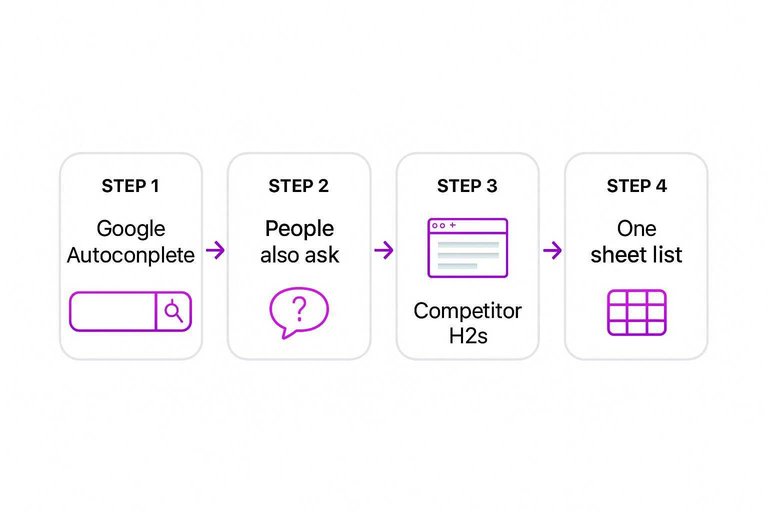
Start with free search surfaces and obvious on-page cues from competitors. Collect raw terms first, then worry about quality.
- Type your core topic into Google and capture Autocomplete suggestions.
- Scroll the results and copy “People also ask” questions verbatim.
- Open 2–3 top competitor pages and note repeated H2s and section labels.
- Grab exact words from title tags, meta descriptions, and breadcrumb categories.
- Paste everything into one sheet, one keyword per row, no deduping yet.
Speed beats perfection here, because you can’t filter what you never captured.
Expand with SERP mining
SERP mining turns a vague seed like “email marketing” into dozens of specific, winnable queries. You pull language from live results, so you match what people actually type, like “email marketing for dentists” or “best email marketing tool for Shopify.”
Mine PAA questions
Pull People Also Ask questions, then rewrite them into keyword variants you can target.
- Search your seed in Google and open the PAA box.
- Expand 10–20 questions by clicking different questions.
- Copy questions into a sheet with the exact wording.
- Rewrite each as variants: “how,” “what,” “why,” “for [audience],” “in [tool].”
- Tag intent per question: learn, compare, buy, troubleshoot.
If the question keeps reappearing across seeds, it’s a content pillar.
Capture modifiers
Modifiers expose funnel stage and content expectations fast. Use the same modifier set across every seed for consistency.
- Best → commercial investigation
- Near me → local, high-intent
- Price → purchase intent
- Vs → comparison intent
- How to → informational intent
Treat modifiers as templates, then swap in your seed and audience.
Record SERP patterns
SERP features and ranking page types tell you what Google thinks should win. Search “crm for small business” and you might see listicles, review sites, and a video carousel.
Match what’s dominating the page: maps suggest local pages, shopping suggests product feeds, videos suggest YouTube-style intent. If you fight the format, you usually lose rankings.
Validate with free data
You can’t trust keyword ideas until you see demand in real search behavior. Use first‑party signals like Search Console, then sanity‑check with free Google sources like Keyword Planner and Trends (and bookmark these resources to simplify SEO workflows).
A good test is simple: if the query shows impressions and stable interest, it’s worth your time.
Use Search Console
Pull queries from pages already close to ranking, so you’re upgrading winners, not guessing.
- Open Search Console → Performance → Search results.
- Set the date range to the last 3 months.
- Filter Page to a relevant URL or directory.
- Export Queries, then filter impressions > 0 and position 4–20.
- Mark queries with high impressions and weak CTR for content updates.
Those position 4–20 queries are your fastest lifts, because Google already trusts the page.

Use Keyword Planner
Keyword Planner won’t give perfect SEO volumes, but it will reveal demand and variant wording.
- Open Google Ads → Tools → Keyword Planner → Discover new keywords.
- Enter your seed terms and your landing page URL.
- Set location, language, and search network settings.
- Review volume ranges and “close variants,” then group by theme.
- Export the grouped list, and note match-type implications.
If you skip location and match-type context, you’ll optimize for a market you don’t serve.
Use Google Trends
Trends tells you whether interest is steady, spiky, or slowly dying. It also shows where demand lives, which can change your content angle.
Check seasonality, review “Rising” queries, and compare regional interest for your top terms. Flag volatile queries, then pick an evergreen alternative like a “how to” variant.
If interest drops to zero half the year, your content needs a seasonal plan, not a ranking plan.
Score and prioritize
You need a scoring model you can explain, not one you can’t repeat. A simple sheet beats “gut feel,” especially when two keywords look equally tempting.
Set up one row per keyword, then score each factor from 1–5 and calculate a total. Use free data sources like Google Keyword Planner ranges, Google Trends direction, and your own SERP scan notes.
| Factor | What you check | Score (1–5) | Weight |
|---|---|---|---|
| Demand | Planner range, Trends | 1–5 | 3 |
| Intent fit | Matches your page type | 1–5 | 4 |
| Competition | SERP difficulty by eyeballing | 1–5 | 4 |
| Business value | Leads, revenue, pipeline | 1–5 | 5 |
| Content readiness | Do you have proof, assets | 1–5 | 2 |
When someone challenges your priorities, you can change a weight, not start a debate.
Turn the Setup Into a Weekly Keyword Habit
- Lock your use case and metrics, then save your stack and templates (seed list, SERP notes, scoring table) in one hub.
- Run the workflow weekly: add 10–20 seeds, mine SERPs for PAA/modifiers/patterns, then validate with Search Console, Keyword Planner, and Trends.
- Score, pick your top 5 opportunities, and assign each to a specific page action (create, refresh, consolidate, or support with internal links).
- Review results monthly against your success metrics and tighten constraints so your keyword list stays small, current, and publishable.
Frequently Asked Questions
- Is keyword search in SEO the same as keyword research?
- They’re related but not identical. Keyword search in SEO usually focuses on finding and validating specific queries to target, while keyword research often includes broader tasks like mapping keywords to pages and planning content strategy.
- Do I need paid tools to do keyword search in SEO competitively in 2026?
- Most sites don’t. Free tools plus Google SERPs can get you to a strong keyword list, and paid tools mainly save time and add bigger databases, historical trends, and easier competitive gap analysis.
- How do I track whether my keyword search in SEO is working after publishing content?
- Track impressions, clicks, and average position in Google Search Console and compare 28-day vs. previous 28-day ranges. Also monitor how many target keywords enter the top 10 and whether the page is earning clicks for relevant long-tail queries.
- How long does it take for keyword search in SEO results to show up in Google?
- New pages often show early visibility within 2 to 6 weeks, with more reliable ranking movement in 8 to 12 weeks. Faster results usually come from updating already-indexed pages rather than publishing brand-new URLs.
- Can I use keyword search in SEO for local businesses without location-based tools?
- Yes. Use location modifiers (city, neighborhood, “near me”) and check SERPs from the target area using browser location settings or a neutral/incognito setup, then validate performance in Search Console by filtering queries that include your locations.
Turn Keyword Research Into Content
Free tools can get you from seed keywords to prioritization, but turning that list into consistently published, optimized posts is where most teams stall.
Skribra converts your keyword search in SEO into daily, SEO-ready articles with metadata, images, and WordPress publishing—plus a backlink exchange network to build authority. Start with the 3-Day Free Trial.
Written by
Skribra
This article was crafted with AI-powered content generation. Skribra creates SEO-optimized articles that rank.
Share: