April 20, 2026
·
9 min read
Set up SEO paid tools for weekly reporting
A step-by-step guide to setting up paid SEO tools for reliable weekly reporting — define reporting scope, choose a tool stack, provision access, configure rank tracking, schedule site audits, and monitor backlinks with alerts and workflows.

Weekly SEO reporting falls apart when the numbers change, the tools disagree, or no one knows what “good” looks like. If your dashboards feel like busywork, the problem is usually setup—not effort.
This guide walks you through a clean, repeatable paid-tool configuration so your weekly report answers the questions your stakeholders actually ask. You’ll define the right KPIs and thresholds, pick a stack that matches your needs, lock down access and naming rules, and automate rank tracking, audits, and backlink monitoring.
Define Reporting Scope
Weekly SEO reporting only works when the scope is explicit and repeatable. Treat it like a contract: who it’s for, what “good” looks like, and which systems are allowed to speak.
Pick report audience
Your report should match the reader’s decisions, not your tool access. A CFO needs trend and risk, while a content lead needs page-level wins and losses.
Write down:
- Who reads it and who forwards it
- The decisions they make on Mondays
- The cadence they expect, like “5-minute skim”
If the audience can’t act on it, you’re producing noise with charts.
Choose weekly KPIs
Pick a tight KPI set you can measure the same way every week. Use metrics that map to outcomes, not tool features.
- Organic sessions (GA4)
- Organic conversions (GA4)
- Rankings and visibility (SEO tool)
- Share of voice (SEO tool)
- Backlinks and referring domains (SEO tool)
Add the rest only if someone will act on it next week.
Set success thresholds
Weekly deltas are meaningless without ranges that trigger action. Define green, yellow, and red per KPI, using both change and absolute level.
Example: rankings might be green at “top 3 up,” yellow at “flat,” red at “top 10 down.” If conversions are red at “-15% WoW,” your next step is investigation, not debate.
Thresholds turn opinions into a queue of fixes.
Inventory data sources
Your reporting setup will break at the first missing permission. Inventory every source and assign an owner with admin-level access.
- GA4 property and key events access
- Google Search Console property access
- CMS access for published URLs
- Ad platforms, if brand search needs context
- Paid SEO tools with project admin rights
Missing access isn’t a blocker. It’s a risk you can track and resolve.
Select Your Tool Stack
You’re buying reporting coverage, not “more SEO.” Pick the smallest stack that reliably answers three weekly questions: rankings, site health, and links.
Here’s a quick comparison of paid tools based on common reporting needs.
| Tool | Best for weekly reporting | Strength | Watch-outs |
|---|---|---|---|
| Ahrefs | Backlinks, competitors | Link index depth | Audits not primary |
| Semrush | All-in-one dashboards | Reporting breadth | Data variance by niche |
| Moz Pro | Simpler SEO reports | Clear metrics | Smaller link index |
| Screaming Frog | Technical audits | Crawl control | Not a SaaS dashboard |
| AccuRanker | Rank tracking | Fast, granular SERPs | Needs other tools |
Build around your “must-not-miss” metric first, then fill the gaps with one specialist tool. That’s how you avoid paying twice for the same chart—especially if you’re aligning tool choices to a broader SEO guide for reporting.
Provision Accounts Access
Buy the right plans, then set them up so reporting runs unattended every week. One missed permission can break a “scheduled export” at 2 a.m. and nobody notices until Monday.
Create tool workspaces
Each tool needs a workspace per site so data stays clean and filters behave predictably.
- Create one project per site, not per campaign.
- Set the canonical domain, including www or non-www.
- Lock the protocol to HTTPS.
- Choose the primary country and language for tracking.
- Add key competitors only if the report needs benchmarks.
If workspaces mirror reality, your weekly numbers stop “mysteriously” changing.
Connect Google properties
Link GA4 and GSC early, because many SEO tools won’t backfill missed history.
- Connect GA4, then pick the correct account and property.
- Select the right data stream, usually the main web stream.
- Connect GSC, then choose the exact verified property.
- Confirm ownership and permissions using a non-personal account.
- Run a test pull and verify dates, filters, and totals.
Choose the wrong property once, and every “trend” becomes fiction.

Set user permissions
Give people the minimum access they need, because “admin for convenience” becomes a security incident later. Use clear roles like admin, editor, and viewer, then tie them to job needs, not seniority. Keep all access requests and approvals in one place, like a shared ticket or a dedicated access log, so you can answer “who changed this?” fast. If you’re building a more repeatable process, see resources to simplify SEO workflows. For a refresher on Google’s model, review Search Console users and permissions.
Standardize naming rules
Names are the glue between dashboards, exports, and automation.
- Use Site | Tool | Purpose for projects
- Prefix tags with team, like SEO_ or CRO_
- Encode country and language, like US-en
- Date campaigns as YYYY-MM for sorting
- Keep segments noun-based, like Returning users
Clean names make your reporting pipeline boring, and boring is reliable.
Configure Rank Tracking
Weekly rank tracking only works if your inputs stay stable. Your goal is a repeatable trend report, not a weekly mystery.
Treat the keyword set, settings, competitors, and segments as a locked baseline. Change it rarely, and only with a logged reason.
Build keyword set
A good set reflects how people buy, not how you brainstorm. Build it once, then resist the urge to “just add a few.”
- Pull keywords from Search Console, paid search, and top landing pages.
- Group by intent: informational, commercial, transactional, navigational.
- Map each keyword to one target URL, even if it feels imperfect.
- Tag funnel stage: awareness, consideration, decision, retention.
- Split branded vs non-branded, and flag priority money terms.
If two keywords map to the same page, they belong in the same fight.
Set tracking settings
Settings decide what “rank” even means. Match them to real customer behavior, not your office Wi‑Fi.
- Set location to your primary market, then add key secondary markets.
- Track mobile and desktop if both drive meaningful conversions.
- Choose the search engine that matches demand, usually Google.
- Set frequency to weekly, on the same weekday and time.
- Enable SERP features you care about, like Local Pack and Featured Snippet.
When settings drift, trends turn into noise.
Add competitors
Pick competitors you actually lose deals to, not brands you admire. Three to ten is the sweet spot for stable comparisons.
Validate them with overlap keywords. If they don’t rank for your tracked terms, visibility and share-of-voice will lie to you.
The right competitor set turns rankings into market context, not vanity charts.
Create keyword segments
Segments let you answer specific questions fast, like “Are non-brand money terms improving?” Define tags once, then reuse them everywhere.
- Brand vs non-brand
- Product line or solution
- Region or city
- Content cluster or hub
- Priority tier: P1–P3
If you can’t filter it, you can’t manage it.
Configure Site Audits
Your weekly SEO report is only as good as your crawl configuration. Run one clean baseline crawl, fix the setup noise, then recrawl weekly for a stable technical health snapshot.
Set crawl scope
Your goal is repeatable coverage, not “crawl everything” chaos. Set firm boundaries so week-over-week changes are real, not artifacts.
Define scope like this:
- Choose domains and subdomains explicitly
- Set crawl limits and speed caps
- Include only indexable sections
- Exclude faceted, search, and parameter traps
- Enable JS rendering when needed
If the scope changes midstream, your trendline becomes fiction. If you’re using Semrush, follow their Site Audit configuration guidance to lock scope and limits.
Run baseline crawl
Do one full crawl before you automate anything. You want a trustworthy “day zero” export for comparisons.
- Run the crawl with final scope settings.
- Export indexability issues and blocked pages.
- Export status code errors and redirect chains.
- Export canonical and duplicate signals.
- Export internal link issues and orphan risks.
That baseline becomes your reference point when the report shows a spike.
Map issue priorities
Weekly reporting needs a short list your team will actually act on. Tie every issue to impact and effort, then rank.
Build your weekly “top 10” using:
- Revenue page affected, not total URLs
- Indexing risk, not cosmetic warnings
- Crawl waste risk, not “nice to have”
- Effort estimate, in hours not points
- Owner and deadline, always
Fix the system first; the wins follow.
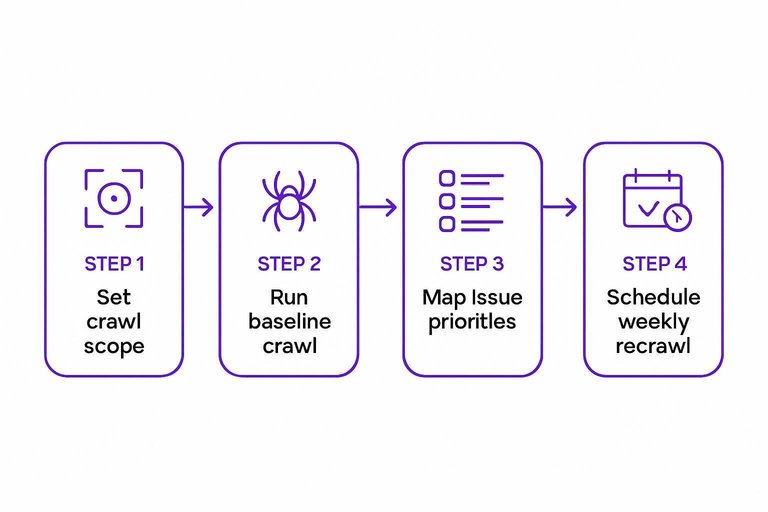
Schedule weekly recrawl
Automate recrawls once the baseline exports look sane. Keep cadence consistent so anomalies stand out.
- Schedule a weekly crawl at low-traffic hours.
- Turn on email alerts for new critical issues.
- Alert on sudden page count changes.
- Alert on indexable page count shifts.
- Store each crawl export in a dated folder.
When alerts fire, you’re catching releases and migrations early, not explaining them later.
Configure Backlink Monitoring
Backlink monitoring keeps your weekly report honest. You want to see acquisition gains and risk spikes before rankings wobble.
Example: a “new links” jump can be real PR, or just scraped RSS syndication.
Verify domain profile
Backlink tools split data when your domain variants are misconfigured. Lock the canonical version so every new or lost link lands in one place.
Check these settings:
- Canonical domain: example.com vs www.example.com
- Protocol preference: https vs http
- Country or language subfolders: /us/, /uk/, /en/
- Blog or content hubs: /blog/, /resources/
If you see duplicates across variants, fix this before you trust any trendline.
Set link alerts
Alerts turn backlink monitoring into a weekly habit. You need signals for growth and signals for risk.
- Enable weekly alerts for new links and lost links.
- Enable toxic or spam-score alerts, if your tool supports it.
- Set thresholds by volume, like “10+ lost links” in a week.
- Set thresholds by quality, like “3+ toxic links” in a week.
- Route alerts to one owner inbox and one shared channel.
Thresholds create a trigger. Triggers create action.
Create link categories
Categories make the report readable. They also stop arguments like “those links don’t count.”
Tag links using:
- Source type: news, blog, directory, forum
- Campaign: Q2 PR, partner rollout, affiliate push
- Content asset: pricing page, study, template, tool
- Authority band: high, medium, low
- Relationship: earned, paid, UGC
If you can’t label a link, you can’t defend its impact.
Define cleanup workflow
Risky links are a process problem, not a one-off task. You need a consistent workflow so “toxic” doesn’t become panic.
- Review flagged links weekly and confirm they are real and indexable.
- Classify intent: scraper, spam network, negative SEO, irrelevant placement.
- Attempt outreach when removal is realistic, and log dates and replies.
- Disavow only when patterns persist, and removal fails.
- Document criteria, like “sitewide spam” or “obvious link network.”
Disavow is a scalpel. Treat it like one.
Launch Your Weekly Reporting System
- Lock the scope: confirm audience, weekly KPIs, and success thresholds so the report has one definition of “winning.”
- Validate the stack: ensure each tool maps to a job (rank tracking, audits, backlinks) and every KPI has a single source of truth.
- Make it repeatable: standardize naming, permissions, and segments so updates don’t break comparisons week to week.
- Automate the cadence: schedule weekly crawls, rank refreshes, and link alerts—then review exceptions, not raw data.
Frequently Asked Questions
- Do I need multiple SEO paid tools for weekly reporting, or can one platform cover everything?
- Most teams can run weekly reporting with 1–2 SEO paid tools, but a single “all-in-one” platform often has weaker depth in one area (commonly backlinks or technical crawling). A common setup is one suite (Ahrefs/Semrush) plus Google Search Console for verification and coverage.
- What’s a realistic monthly budget for SEO paid tools used for weekly reporting?
- Most small to mid-size sites spend about $150–$500/month for SEO paid tools that cover rank tracking, audits, and backlinks. Agencies or multi-location brands often land in the $500–$2,000/month range due to higher keyword, project, and user limits.
- How do I validate weekly SEO reports from paid tools against Google Search Console and Google Analytics?
- Use Google Search Console for clicks/impressions/queries and GA4 for conversions, then treat tool metrics like “visibility,” “share of voice,” and “estimated traffic” as directional. If trends disagree for 2+ weeks, check keyword targeting, location/device settings, and whether pages are indexed and receiving impressions.
- Can I automate weekly reporting from SEO paid tools into Looker Studio or Google Sheets?
- Yes—many SEO paid tools offer native integrations or connectors, and you can also use their APIs with scheduled exports into Sheets or Looker Studio. For reliability, automate only the core KPIs and keep a manual notes field for anomalies (algorithm updates, tracking changes, site releases).
- How long should I keep historical data in SEO paid tools for weekly reporting?
- Keep at least 6–12 months of history to spot seasonality and confirm that improvements persist beyond short-term volatility. For competitive benchmarks and algorithm-impact analysis, 18–24 months of rank and audit history is often more useful if your plan allows it.
Turn Reports Into Rankings
Once your paid SEO tools are configured for weekly reporting, the real leverage comes from acting on those insights fast and consistently.
Skribra turns your tracking, audits, and backlink monitoring into a steady stream of SEO-optimized articles and publish-ready updates—start with the 3-Day Free Trial.
Written by
Skribra
This article was crafted with AI-powered content generation. Skribra creates SEO-optimized articles that rank.
Share: