April 7, 2026
·
9 min read
Traffic Stalling? 9 Content SEO Strategy Fixes
A no-fluff checklist to restart stalled organic traffic—verify the drop in Google Search Console, isolate the root cause, and apply five high-impact fixes: indexing gaps, keyword cannibalization, intent mismatch, content decay, and internal link rot.

Traffic doesn’t usually “just stall”—it slips because something in your indexing, relevance, or site structure quietly changed. The frustrating part is that the page still looks fine, yet clicks flatten and rankings drift.
This checklist helps you diagnose the stall in minutes using GSC, then move through five proven content SEO fixes. You’ll learn exactly what to check, what to change, and how to validate that the fix worked—without rewriting everything or chasing random tactics.
Diagnose the Stall
Organic traffic rarely “just stalls.” It usually shifts in one place first, then spreads. Your job is to prove the drop is real, isolate where it lives, and name the most likely cause.
Confirm in GSC
Start in Google Search Console, because analytics can lie and GSC usually doesn’t.
- Set the correct date range for the suspected decline.
- Compare to the previous period, not last year.
- Confirm Search type is Web, not Image or Video.
- Clear or verify country, device, and query filters.
- Check clicks and impressions, not just average position.
If impressions are flat, it’s a visibility issue, not a CTR problem.
Segment the drop
One big number hides the answer.
Break it into slices you can blame.
- Separate templates: blog, category, product, landing.
- Split queries: informational, commercial, navigational.
- Compare brand vs nonbrand performance.
- Split new pages vs existing pages.
- Group by topic clusters or sections.
The fastest wins come from the segment that moved first, not the one that’s biggest.
Map to a cause
Once you have a clear losing segment, tie it to a short list of repeat offenders.
Use simple labels like “indexing” or “intent shift,” then verify with evidence.
Common mappings that hold up:
- Indexing: pages missing from GSC, sudden “Crawled - currently not indexed.”
- Relevance: impressions drop first, rankings follow, competitors cover the topic deeper.
- Cannibalization: two URLs trade positions for the same query.
- Links: losing segment is link-light, competitors gained authority.
- Intent shift: SERP fills with tools, lists, or ecommerce pages.
- SERP changes: AI Overviews, new features, more ads above the fold.
Name the cause before you touch the content, or you’ll “fix” the wrong thing.
Check timing clues
Timing narrows your suspects fast.
Match the start date to changes you control, and events you don’t.
- Compare the drop date to deploys, releases, and CMS changes.
- Check for migrations: domain, URL structure, redirects, canonicals.
- Review content pushes: rewrites, pruning, internal linking changes.
- Verify tracking: GA tags, consent banners, GSC property changes.
- Cross-check known volatility days and update chatter.
If the cliff lines up with a deploy, assume a technical cause until proven otherwise.
Fix 1: Indexing Gaps
Pages can be “good enough” to rank and still never enter the index. Google sees conflicting technical signals and chooses the safest option: exclusion.
A common example is a blog post that returns 200, but is canonicalized elsewhere and buried in internal links.
Spot exclusion patterns
Indexing issues rarely show up as one broken URL. They show up as clusters in GSC that point to one underlying cause.
- Crawled — currently not indexed
- Discovered — currently not indexed
- Soft 404
- Duplicate without user-selected canonical
- Alternate page with proper canonical
If one bucket spikes, you have a system problem, not a content problem.
Correct the signals
Pick one version of each page to be indexable, then make every signal agree.
- Set a self-referencing canonical on the preferred URL.
- Remove noindex from pages you expect to rank.
- Unblock important paths in robots.txt and meta robots.
- Fix status codes: 200 for real pages, 301 for moves, 404/410 for gone.
- Add internal links to the preferred URL, not variants.
When signals disagree, Google “votes” against you. For a broader framework that ties these fixes together, reference this technical SEO guide.
Revalidate quickly
After changes, you need fast feedback on whether Google accepted your version. Use URL Inspection to confirm “Indexing allowed” and the selected canonical matches your intent.
Request indexing for a few key URLs, then watch Crawl stats, Indexed pages counts, and the exclusion buckets for a drop. The first win is usually fewer “Discovered” URLs, not rankings.
For programmatic checks, see Google’s announcement on the Search Console URL Inspection API.
Fix 2: Keyword Cannibalization
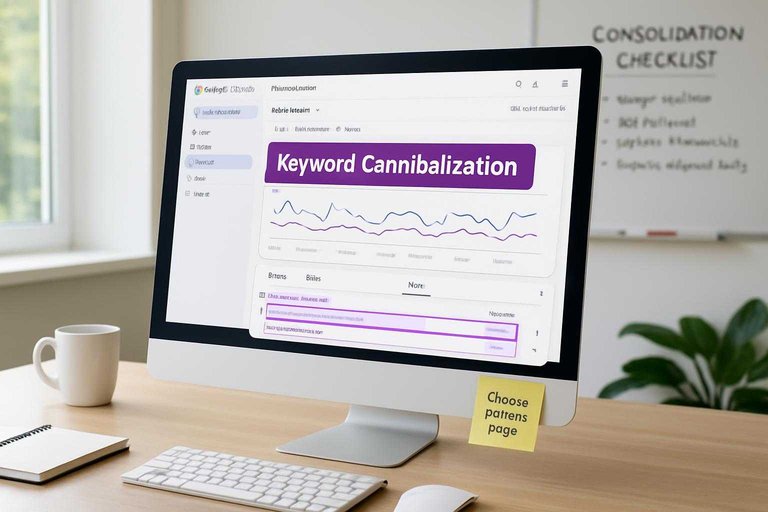
Keyword cannibalization happens when two or more pages target the same intent and fight each other. You get position swings, diluted links, and lower click-through because Google can’t pick a clear winner.
Find competing URLs
You need proof of overlap before you merge anything. Google Search Console makes it obvious when one query triggers multiple pages.
- Open GSC → Performance → Search results.
- Set a date range with enough data, like 3 months.
- Add a Query filter for the target term.
- Open the Pages tab and export all ranking URLs.
- Flag URLs with shared intent and swapping positions.
If rankings oscillate between two URLs, you’re watching cannibalization in real time.
Choose a primary page
Pick one URL to own the intent. The rest must support it, not compete with it.
Use a simple tie-breaker stack:
- Backlinks: stronger and more relevant wins.
- Depth: best coverage of the topic wins.
- Conversions: the page that drives leads wins.
- SERP fit: matches what ranks now.
Write down the “winner,” then list the supporting pages and what they should cover instead. Clarity beats cleverness here.
Consolidate cleanly
Consolidation works when you keep value and remove confusion. You’re building one stronger page, not deleting history.
- Merge unique sections from weaker pages into the primary URL.
- 301 redirect weaker URLs to the most relevant section or the page.
- Update canonicals so only the primary self-canonicals.
- Replace internal links to point at the primary URL.
- Rewrite anchor text to match the primary intent.
Do it right and your signals stop splitting, so the primary page can finally climb.
Fix 3: Intent Mismatch
Your rankings slide when the SERP changes, and your page stays the same. Google starts rewarding a different “job to be done,” like comparisons instead of tutorials. Match what the current winners deliver, not what used to work.
Read the SERP mix
Pull the top 10 results for your core query and scan for patterns. You’re looking for the dominant format and the repeated angles.
- Classify each result: guide, category, tool, video, forum
- Note repeated H2 themes and questions
- Spot commercial signals: “best,” “pricing,” “alternatives”
- Check intent modifiers: “how to,” “near me,” “for beginners”
- Watch SERP features: snippets, PAA, shopping, videos
If 7 of 10 are the same type, that’s the SERP’s vote.
Update the page shape
Reshape the page so it answers the same intent as the winners. Keep the change structural, not cosmetic.
- Rewrite the intro to confirm intent in the first 80 words.
- Reorder sections to match the SERP’s common H2 sequence.
- Add missing entities, specs, and “vs” comparisons users expect.
- Align CTAs to intent: demo for commercial, checklist for informational.
- Remove sections that serve a different intent, even if they rank.
Structure is relevance made visible.
Avoid over-optimizing
Intent work fails when you chase every keyword variation. One page can’t be a guide, a glossary, and a product pitch.
Keep one primary intent, then support it with tight subtopics and clean language like “compare,” “choose,” or “buy.” That’s the line between a focused answer and a noisy document.
Fix 4: Content Decay
Aging URLs quietly lose clicks, even when rankings look “fine.” Rivals update, SERP features change, and your page starts reading like last year’s playbook.
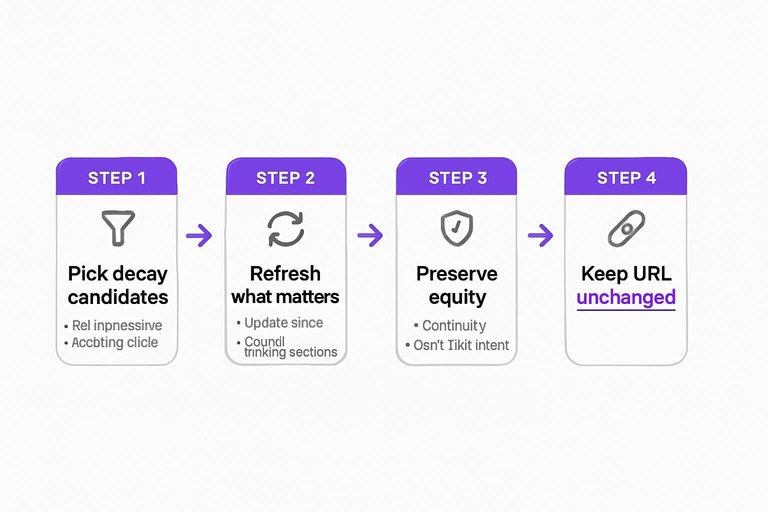
Pick decay candidates
You want pages that still get seen, but get chosen less. Think “steady impressions, falling CTR,” or “position drift” without a traffic spike elsewhere.
- Filter for URLs with flat impressions and declining clicks.
- Check average position and flag consistent downward drift.
- Scan the snippet for old years, dates, or stale promises.
- Look for long-tail query count shrinking over 3–6 months.
- Compare against the top three rivals’ update recency.
If impressions stay steady while CTR drops, your content is losing the click war.
Refresh what matters
Refreshes work when you update the parts users verify fast. Facts, visuals, and missing sections beat word-count padding.
- Update stats, laws, and product details.
- Replace dated examples with current ones.
- Redo screenshots that no longer match UI.
- Add missing subsections that rivals cover.
- Add checklists or tables for scan speed.
Make it easy to validate in ten seconds, and users stop bouncing back to the SERP.
Preserve equity
Most decay fixes fail because the refresh becomes a rewrite. You want Google to see continuity, not a new topic wearing an old URL.
Keep the URL unchanged.
Retain the strongest sections and improve around them.
Don’t shift the primary intent, even if you add helpful edges.
Only update title and meta when the query intent stays constant.
Fix the page, not the promise, and you keep the rankings you already paid for.
Fix 5: Internal Link Rot
Internal links quietly break when you change navigation, add new templates, or publish fast. Your best pages slip deeper, lose internal PageRank, and stop looking “important” to crawlers.
Example: a former top-nav category becomes a footer link, and rankings wobble within a month.
Audit link depth
Pages buried past 3–4 clicks often stop getting crawled like they used to. You’re hunting for the quiet losers after site structure drift.
- Export crawl depth for all indexable URLs
- Flag URLs deeper than four clicks
- Identify orphan pages with zero internal links
- Check missing links from hubs and categories
- Review template links in header, footer, and modules
If depth keeps growing, your site is expanding without a map—and it may be time to lean on resources to simplify SEO workflows.
Rebuild topic hubs
Hubs restore obvious pathways for users and bots. They also force you to define what each cluster is actually about.
- Choose one hub per topic, aimed at the core intent.
- Add 8–20 contextual links to key supporting pages.
- Add reciprocal links back to the hub from each support page.
- Standardize anchor text around intent and entities, not cute phrasing.
- Add hub links to category pages and relevant templates.
If the hub reads like a table of contents, Google treats it like one.
Validate impact
Internal linking fixes should show up fast because they change crawl paths, not content quality. You’re looking for movement that confirms authority is flowing again.
Watch crawl frequency in server logs or GSC Crawl Stats, plus indexation and query positions for the target URLs. If nothing shifts in 2–6 weeks, your links are still too deep, too sparse, or too generic.
Run the Checklist, Then Lock in a 30-Day Validation Loop
- Start with Diagnosis: confirm the drop in GSC, segment by page/query/device/country, and map each segment to a likely cause.
- Apply the highest-confidence fix first: indexing gaps, cannibalization, intent mismatch, content decay, or internal link rot.
- Validate in GSC: watch impressions, clicks, average position, and the indexing report for the affected URLs—document the “before” date of your change.
- Re-check weekly for 30 days: if metrics don’t budge, revisit the cause map and move to the next fix (don’t stack multiple changes before you can attribute impact).
Frequently Asked Questions
- Does a content SEO strategy still work in 2026 with AI Overviews and zero-click results?
- Yes—most sites still grow by targeting queries with clear intent and creating pages that earn clicks (comparisons, templates, tools, original data). Optimize for both visibility and CTR by adding strong titles/meta, unique angles, and “next-step” assets that can’t be answered in one snippet.
- How do I measure whether my content SEO strategy is actually working after a traffic stall?
- Track a weekly dashboard of Google Search Console clicks, impressions, average position, and CTR by page group, plus conversions from organic in GA4. Expect stabilization signals in 2–4 weeks and measurable growth in 8–12 weeks after major updates.
- How long should a content SEO strategy take to recover stalled organic traffic?
- Most sites see early movement within 4–8 weeks (re-indexation, ranking volatility, CTR changes) and clearer recovery in 3–6 months. Competitive niches and large sites often need a full 6–9 months to compound improvements.
- Can I use programmatic SEO or AI content instead of a traditional content SEO strategy?
- Yes, usually as a supplement: programmatic SEO works best for large sets of long-tail pages with consistent templates, and AI helps with drafts and outlines. You still need human-led positioning, fact-checking, and differentiation to rank and convert.
- How often should I update my content SEO strategy and refresh content to prevent future stalls?
- Review your content SEO strategy quarterly and run a content refresh cycle every 6–12 months for top pages. Update sooner (every 3–6 months) for fast-changing topics, product pages, and high-revenue keywords.
Fix Stalls With Consistent SEO
Spotting indexing gaps, cannibalization, intent mismatch, decay, and internal link rot is straightforward—keeping everything corrected as you publish is the hard part.
Skribra helps you execute a content SEO strategy at scale with AI-written, SEO-optimized articles, WordPress publishing, and built-in backlink opportunities—plus a 3-Day Free Trial.
Written by
Skribra
This article was crafted with AI-powered content generation. Skribra creates SEO-optimized articles that rank.
Share: