March 10, 2026
·
Updated July 28, 2026
·
7 min read
Website Keywords in URLs vs Titles: Pros and Cons
A clear comparison of putting keywords in URLs vs page titles — weigh ranking and CTR signals, SERP display behavior, rewrite risk, and maintenance tradeoffs to choose a consistent on-page strategy.

Should your main keyword live in the URL, the title tag, or both? It’s easy to over-optimize one and end up with ugly URLs, rewrites in the SERP, or titles that don’t earn clicks.
This comparison shows how Google and users actually interpret each element, when the choice matters most, and what to do for new vs existing pages. You’ll get a side-by-side framework, common pitfalls to avoid, and simple playbooks for rollout, testing, and monitoring.
Decision Snapshot
You’re deciding where keywords should live: in the URL, the title tag, or both. The outcomes you care about are rankings, clicks, and how painful future maintenance becomes.
What’s being compared
URL keywords live in the slug, not the whole URL with protocol and parameters. Think “/best-running-shoes/” versus “?ref=nav”.
Title-tag keywords live in the HTML title shown in Google, and they’re not always your on-page H1. Your H1 can say “Running Shoes,” while the title tag says “Best Running Shoes (2026 Guide)”.
When it matters most
These situations force a tradeoff between SEO gains and long-term stability.
- Launching a new site with clean slugs
- Refreshing top pages that already rank
- Rebranding terms, products, or categories
- Migrating domains, CMS, or URL structure
- Fighting for clicks in crowded SERPs
If a change could trigger redirects, treat it like surgery, not copyediting.
Key evaluation criteria
Use a short list of criteria, or you’ll optimize one metric and break three others. The right answer depends on how you balance rankings, CTR, shareability, readability, scalability, rewrite risk, and analytics continuity.
If your tracking or redirects are fragile, “perfect keywords everywhere” becomes an expensive hobby.
SEO Basics Refresher
Search engines read your title and URL as separate hints, not a single headline. In the SERP, they also remix what users see, like swapping in your brand name or a cleaner path. If you need a quick framework to align both elements, see this SEO guide for beginners.
Titles as signals
Your title is a primary relevance cue, and it often decides whether you earn the click. It also helps query matching, but Google may rewrite it or truncate it, especially when you stuff in “Best, Cheap, 2026.”
That’s the line: write for intent and clarity, not for a perfect on-page mirror.
URLs as signals
URL keywords add lightweight context, and they can act like a breadcrumb when users scan results. They also help when pages get shared or linked, but messy parameters, duplicate paths, and weak canonicalization can split signals fast.
If your URL can exist in three versions, you have three ranking problems.
SERP display quirks
SERPs rarely show your page exactly as you wrote it.
- Title gets rewritten from H1
- URL shows breadcrumb path
- Query terms appear bolded
- Snippets change by device
Design for what gets displayed, not what you typed.
Keywords in URLs
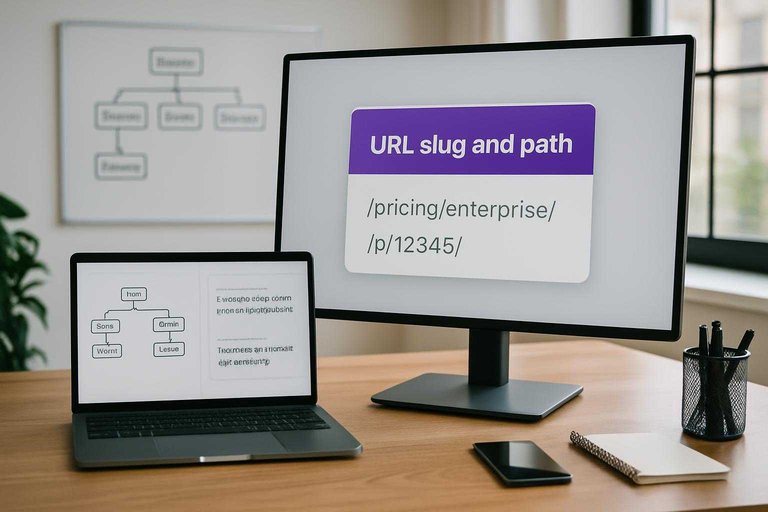
Keywords in your URL slug and path can help humans and systems orient fast. Think “/pricing/enterprise/” versus “/p/12345/” when someone copies a link into Slack.
Primary advantages
Keyworded URLs work because they communicate before the page loads. They also make your site easier to navigate over time.
- Improve scanability in tabs and SERPs
- Signal topic intent at a glance
- Make links easier to trust and share
- Support cleaner internal grouping by path
- Create clearer breadcrumbs and hierarchy
If your structure matches your content model, URLs become a map, not decoration.
Primary disadvantages
Keyworded slugs can age badly when your content strategy shifts. They also tempt teams into “SEO” that reads like spam.
- Inflate slugs into unreadable strings
- Trigger keyword-stuffing vibes
- Force redirects after renames or pivots
- Drift into inconsistent taxonomy over time
The real cost is maintenance: every change becomes a URL decision with consequences.
Best-fit use cases
URL keywords help most when the page intent stays stable for years. They also shine when paths mirror how users browse, like “/docs/” or “/locations/.”
Evergreen guides benefit because the slug becomes a durable reference, like “/guides/keyword-research/.” Category hubs, location pages, and documentation also win because hierarchy matters more than clever naming.
Use keywords where permanence is likely, and keep everything else boring and flexible.
Keywords in Titles
Front-loading keywords in your title tag is a click and control play, not just an SEO checkbox. It helps users scan fast, and it tells Google what you think the page is about, like “Running Shoes for Flat Feet — 2026 Buyer’s Guide.” Your real win is messaging leverage when the SERP is crowded and nobody reads past the first few words.
Primary advantages
Front-loading keywords gives you a stronger first impression in the SERP and more control over intent framing. You’re optimizing for the human decision, not only the algorithm.
- Signals relevance early
- Lifts CTR for head terms
- Enables rapid title testing
- Tailors message to intent
You’re buying attention in the first three words, where most clicks are decided.
Primary disadvantages
Title keywords can backfire when Google title rewrites what actually shows, or when you push too hard. The SERP is a harsh editor.
- Triggers Google title rewrites
- Gets truncated on mobile
- Risks over-optimization signals
- Creates promise-page mismatch
If your title overpromises, your bounce rate becomes the ranking factor you can’t hand-wave away.
Best-fit use cases
Title keywords matter most when clicks are scarce and intent is sharp. That’s common on newsy posts, competitive head terms, product pages, and campaign landing pages where the headline is the pitch.
A “Black Friday CRM Discount” page needs the keyword up front to stop the scroll. A thought-leadership essay often doesn’t.
Use front-loading when the SERP is a marketplace, not a library.
Side-by-Side Comparison
Pick the placement based on what you’re optimizing for: click behavior or crawl clarity.
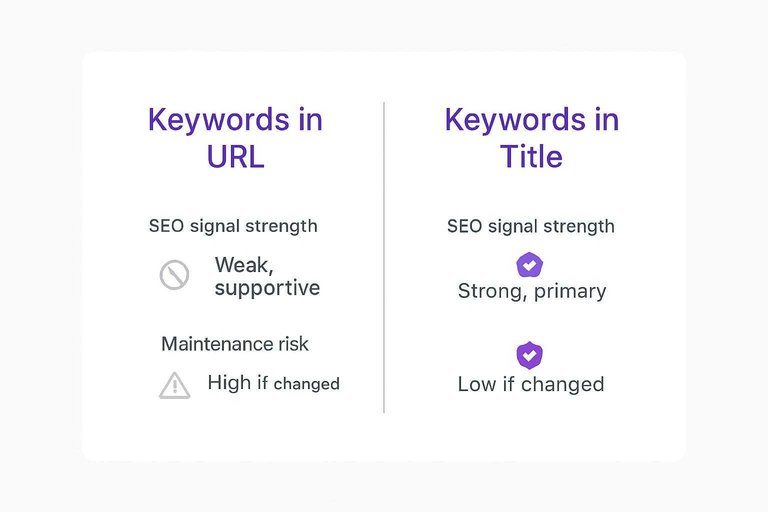
| Criteria | Keywords in URL | Keywords in Title | Quick take |
|---|---|---|---|
| SEO signal strength | Weak, supportive | Strong, primary | Title usually wins. |
| SERP click impact | Low, subtle | High, obvious | Title drives CTR. |
| Social share preview | Often hidden | Always visible | Titles travel better. |
| Maintenance risk | High if changed | Low if changed | Don’t rename URLs lightly. |
| User clarity | Medium, skimmed | High, read | Titles explain intent. |
Treat URLs as stable identifiers, and use titles for the heavy lifting.
Common Mistakes
You can add keywords to URLs and titles and still lose traffic. The failure mode is usually over-optimization, like cramming in “best-cheap-affordable-top” everywhere.
- Stuffing titles with repeat keywords
- Writing URLs like a sentence
- Changing URLs without redirects
- Targeting multiple intents per page
- Leaving boilerplate titles sitewide
Write for the query once, then make everything else consistent.
Implementation Playbooks
You need a repeatable way to choose URL-only, title-only, or both without breaking what already works. Treat URLs as infrastructure and titles as messaging, and you’ll move faster with fewer regrets.
New pages workflow
Pick the keyword path before you publish, because post-launch changes create churn. Your goal is a readable URL, a click-worthy title, and consistent on-page cues.
- Pick one primary term based on intent, not volume.
- Draft a user-first title that earns the click, then include the term.
- Create a short slug with 2–5 words, no filler.
- Align the H1 with the same intent, not the exact phrasing.
- Set internal anchor text that varies, but stays semantically on-topic.
If you need to “force” the keyword into five places, the page angle is wrong.
Existing pages workflow
Existing URLs have history, links, and trust, so you change them only with a clear payoff. Titles are cheaper to iterate, so start there unless the slug is actively harmful.
- Audit current rankings and top queries in GSC for that URL.
- Decide if the slug change is worth it, based on links and traffic risk.
- If you change the slug, implement a 301 from old to new.
- Update internal links to the new URL, starting with highest-authority pages.
- Run recrawl checks: status codes, canonicals, and index coverage.
If the page already wins, your job is to avoid “SEO refactors” that reset momentum.
Testing and monitoring
Track outcomes where Google shows you behavior, not guesses. Use GSC to compare queries, CTR, and average position for the page before and after changes, and watch for “same rank, different CTR” when you edit titles.
Pair that with rank tracking for head terms, and use server logs or crawl stats to confirm Googlebot is hitting the new URL after redirects. If you can, split-test titles on similar pages or templates, like swapping “Free template” vs “Downloadable template,” then keep the winner.
As AI transforms SEO content creation, the goal stays the same: you’re not testing keywords in isolation; you’re testing whether your snippet and structure deserve the click.
Pick a Primary Signal, Then Standardize It
Treat titles as your primary keyword-and-click lever, and use URLs for stable structure and clarity—not as your only place to “stuff” relevance. For new pages, create a short, readable slug that reflects the topic, then write a title that leads with intent and earns the click; for existing pages, change URLs only when you’re fixing taxonomy or consolidation and can 301 cleanly. Finally, monitor CTR and query/page alignment in Search Console to confirm your titles (and not fragile URL edits) are driving measurable gains.
Frequently Asked Questions
- Do keywords in website URLs still help SEO in 2026, or is it mostly about the title tag?
- They still help, but mostly as a small relevance and usability signal rather than a primary ranking factor. Titles and on-page content typically drive bigger gains, while clean, keyword-relevant URLs support clarity and link sharing.
- Should I change old URLs to add keywords in website slugs if the page already ranks?
- Usually no—changing ranking URLs often costs traffic unless you have a strong reason (major rebrand, consolidation, severe mismatch). If you must change them, use a 301 redirect, update internal links, and monitor Google Search Console for 2–6 weeks.
- How do I measure whether adding keywords in website titles or URLs actually improved performance?
- Track the page’s average position, impressions, and CTR in Google Search Console before and after the change, using a 28-day vs 28-day comparison. Also watch organic sessions and conversions in GA4 to confirm the click lift translates into business results.
- Can I use synonyms instead of exact-match keywords in website titles and URLs?
- Yes—Google matches meaning, so synonyms often work as well as exact phrases and can improve readability. Keep one clear primary term in the title when possible, and avoid forcing awkward exact-match wording into the URL.
- How long does it take for title or URL keyword changes to show up in Google results?
- Title tag updates often reflect in SERPs within a few days to 2 weeks after recrawl. URL changes take longer because redirects and reindexing are involved, so expect 2–8 weeks for stable results and full signal transfer.
Operationalize Keyword Placement Fast
Getting keywords right in URLs and titles is straightforward on paper, but executing it consistently across every post is where most teams stall.
Skribra generates SEO-optimized articles with keyword-aligned titles, metadata, and publish-ready formatting, so your implementation playbooks become repeatable—start with the 3-Day Free Trial.
Written by
Skribra
This article was crafted with AI-powered content generation. Skribra creates SEO-optimized articles that rank.
Share: