March 11, 2026
·
10 min read
Website Keyword Updates Case Study: 30 Pages Over 60 Days
A practical case study of updating keywords across 30 existing pages in 60 days—baseline snapshots, page selection logic, execution workflow, measurement setup, and before/after + cost tables so you can replicate the process with clear success criteria.


Ever “optimized” a page, hit publish, and then couldn’t tell whether rankings moved because of your edits, an algorithm shift, or simple seasonality? That’s the trap most keyword updates fall into: lots of change, fuzzy measurement.
This case study shows how to run website keyword updates like a controlled project across 30 pages in 60 days. You’ll see how pages were chosen, what was changed (and what wasn’t), the week-by-week workflow, and the measurement guardrails that make before/after comparisons credible—plus the tables that tie outcomes to effort and cost.
What Changed, Why
This case looks at 30 existing pages updated over about 60 days. “Keyword updates” here means targeted edits that change what a page signals, not a full rewrite or redesign.
The question is simple: do these small, scoped changes beat the time and coordination they cost, compared to other SEO work.
Baseline Snapshot
The starting set mixed money pages and support pages, like product, category, and evergreen guides. Rankings were uneven: a few terms hovered near page one, while most pages sat in the “seen but not clicked” range.
Constraints shaped everything. The CMS limited layout changes, approvals added delay, and developer time was rationed.
Update Types
These updates were small on purpose. Each one targets a specific ranking blocker, not “make it better” vibes.
- Rewrite titles for primary intent
- Adjust H1s to match queries
- Expand copy around missing subtopics
- Add internal links from relevant hubs
- Add FAQs and schema where fit
Treat them like switches, not paint. You’re changing signals, not just wording.
Success Criteria
“Worth it” means the edits move business outcomes, not just a rank tracker. Think qualified leads, demo requests, purchases, or whatever your site exists to drive.
SEO signals still matter as early indicators. Higher impressions on the target theme, better CTR from improved snippets, and more entrances from non-brand queries are the usual tells.
Set expectations up front. If you can’t wait for crawl and re-evaluation cycles, don’t choose this lever.
Costs Counted
Keyword updates look cheap until you count coordination. Track real inputs, not just “writing time.”
- SEO hours for research and mapping
- Writer or editor time for revisions
- Dev or CMS support for implementation
- QA time for links and schema
- Opportunity cost versus new pages
If you don’t price the overhead, you’ll over-credit the tactic. That’s where most SEO plans lie to themselves.
Page Selection Logic
Picking the 30 pages is where you protect the business and protect the experiment. You want enough variety to learn patterns, but not so much volatility that you can’t tell what worked.
The goal was a set any typical team could execute on: limited dependencies, clear owners, and changes that ship without heroics.
Candidate Pooling
Start wide so you don’t miss obvious wins, then narrow using signals you already have. You’re building a pool that balances opportunity, relevance, and diagnosable problems.
- Export all indexable URLs from your CMS and analytics stack.
- Filter to pages with meaningful impressions in Search Console.
- Add pages with conversions or assisted conversion value, even if impressions are modest.
- Flag decay pages where clicks or rankings are trending down.
- Flag cannibalization clusters where multiple URLs compete for one query.
If a page can’t be measured or explained, it can’t teach you anything. For a broader framework on prioritization and diagnostics, reference this SEO guide.
Effort Tiers
Tiering keeps the plan realistic when calendars fill up and approvals slow down. It also makes your results comparable, because “light” and “heavy” behave differently.
| Effort tier | Typical changes | Dependencies | Cost signal |
|---|---|---|---|
| Light | Title, H1, meta | Low | Fast, repeatable |
| Moderate | Section rewrites | Medium | Writer + SME time |
| Heavy | Structure, consolidation | High | Multi-team coordination |
If you can’t staff heavy work, don’t “accidentally” select heavy pages.
Risk Filters
Some pages are too risky or too noisy for a 60-day learning sprint. Excluding them isn’t playing it safe; it’s keeping your test interpretable.
Skip legal or compliance-controlled pages where small wording changes have outsized consequences. Avoid high-revenue pages unless you have rollbacks, monitoring, and stakeholder sign-off. Deprioritize seasonal topics that will swing on the calendar, not your edits. Be cautious with queries showing unstable SERPs, where intent and ranking shift week to week.
Protect revenue and clarity first, then run faster everywhere else.
Mapping to Intent
Intent mapping stops you from “keyword updating” a page into a confused mess. You want one page to satisfy one primary job, with supporting sub-jobs.
- Assign one primary query per page, based on the dominant SERP pattern.
- Group secondary queries by the same intent, not by similar wording.
- Label intent and funnel stage: learn, compare, buy, or troubleshoot.
- Split topics when secondary intent requires different content formats or promises.
- Merge pages when two URLs serve the same intent and compete.
When intent is clean, your edits get simpler and your results get louder.
Execution Workflow
You can’t evaluate keyword updates if your process is noisy. A tight 60-day cadence keeps ownership clear, reduces rework, and makes changes attributable.
Think in batches, not one-off hero edits. Your goal is repeatable inputs and clean measurement.
Week-by-Week Plan
A weekly cadence prevents drift and makes “done” unambiguous. Batch similar pages together so research and QA don’t reset every day.
- Week 1: Triage pages, cluster by intent, and pick the first batch.
- Week 2: Do keyword research, entity gaps, and SERP notes per cluster.
- Week 3: Write briefs, assign editors, and lock the on-page checklist.
- Week 4: Edit pages in batches, then run a single review pass.
- Week 5: Publish, annotate releases, and run post-publish checks.
If each week has one dominant output, handoffs get boring—and boring stays measurable.
On-Page Checklist
Standard checks keep editors from improvising and breaking comparability. Use the same checklist for every page, even “easy” ones.
If you need a repeatable template, use this checklist for streamlining SEO content to keep every batch consistent.
- Match headings to primary intent.
- Expand topical coverage, not fluff.
- Add key entities and definitions.
- Strengthen internal links to related hubs.
- Improve snippet readiness with clear answers.
A consistent checklist turns SEO from art into an audit trail.

Change Control
You need documentation that survives memory and Slack. Track every touched URL, capture before and after snapshots, and add release annotations in analytics and Search Console.
Limit simultaneous changes per page. Avoid changing templates, navigation, and copy in the same window.
Isolation is the whole game. If you can’t isolate, you can’t learn.
For a closer look at the feature, Google’s update on custom annotations in Search Console shows how to document changes directly in performance charts.
QA and Rollback
QA prevents “successful edits” from shipping broken pages. Decide rollback triggers before you publish, not after rankings wobble.
- Run a crawl to catch titles, canonicals, and broken internal links.
- Confirm indexability: robots, meta robots, and canonical targets.
- Check templates: headers, breadcrumbs, and schema output.
- Validate analytics events and conversions still fire.
- Roll back if critical pages lose indexability or key journeys break.
Rollback isn’t failure. It’s your safety valve for moving fast without gambling.
Measurement Setup
You can measure keyword updates without pretending you proved causation. The goal is simple: detect direction and confidence, then rule out obvious noise—especially when you’re publishing at a steady cadence and need to know whether that consistency is translating into durable search gains.
Tools that standardize SEO inputs (keywords, meta descriptions, formatting) can make measurement cleaner because you’re comparing pages that were produced under similar constraints. If you’re using a platform like Skribra to keep output consistent and ship updates regularly, that consistency becomes an advantage: you can set clearer baselines, track cohorts by publish date, and spot real lifts versus normal volatility.
Primary Metrics
Pick metrics that show demand, visibility, and outcomes at the page-group level. You want leading indicators (Search Console) and lagging indicators (analytics) in the same view.
In practice, track impressions, clicks, CTR, and average position by URL and query group in Google Search Console. Pair that with conversions, engagement signals, and assisted conversions from your analytics tool, grouped by the same page sets. If you can’t tie outcomes to the same grouping, you’ll chase ghosts.
If your content workflow programmatically sets basics like target keywords and meta descriptions, keep those fields in your measurement notes so you can separate “ranking moved” from “snippet changed.” Treat ranking as a symptom, not the diagnosis.
Segmenting Pages
Segments keep you honest when results look “too good” or “too bad.” Use slices that match how your site actually earns traffic.
- Split brand vs nonbrand queries
- Group by intent: informational, commercial, navigational
- Tier updates: light, medium, heavy
- Separate template types: blog, product, category
- Tag historical stability: stable, volatile, seasonal
If you publish at volume, add an operational slice too: manually written vs AI-assisted, and “standardized SEO brief” vs ad-hoc. For example, if Skribra is producing daily SEO-focused articles, cohort those pages by publish week so you can see whether performance improves as the site accumulates consistent topical coverage.
If a win only exists in one slice, you found a clue, not a conclusion.
Attribution Guardrails
Keyword updates rarely happen in a vacuum, so your measurement has to assume interference. You’re watching a moving system, not a lab experiment.
Algorithm updates can shift positions across the whole site, even with no changes. Seasonality and news cycles can inflate impressions, while PR spikes can spike branded clicks and mask nonbrand performance. Site changes like internal linking, navigation, or indexation fixes can move pages for reasons unrelated to copy.
Use annotations for every meaningful change and external event, then keep a control group of similar pages you did not update. If updated and control pages move together, it’s probably noise.
Also annotate process changes: switching prompts, changing publish frequency, or enabling automation (like direct WordPress publishing) can alter crawl patterns and indexing speed, which can look like “content quality” when it’s really distribution mechanics.
Reporting Rhythm
Weekly reporting prevents you from reacting to daily wobble.
- Pull GSC and analytics exports for each page group.
- Compare against two baselines: recent and pre-update.
- Annotate anomalies: updates, PR, outages, tracking changes.
- Flag winners, losers, and “no signal yet” pages.
- Decide one action per group: expand, revert, or wait.
If you’re publishing on a schedule (especially daily), treat cadence as part of the report: include “new pages published” and “pages refreshed” counts per group so you can interpret lifts in context.
Your job is consistency, not clairvoyance.
Before vs After Table
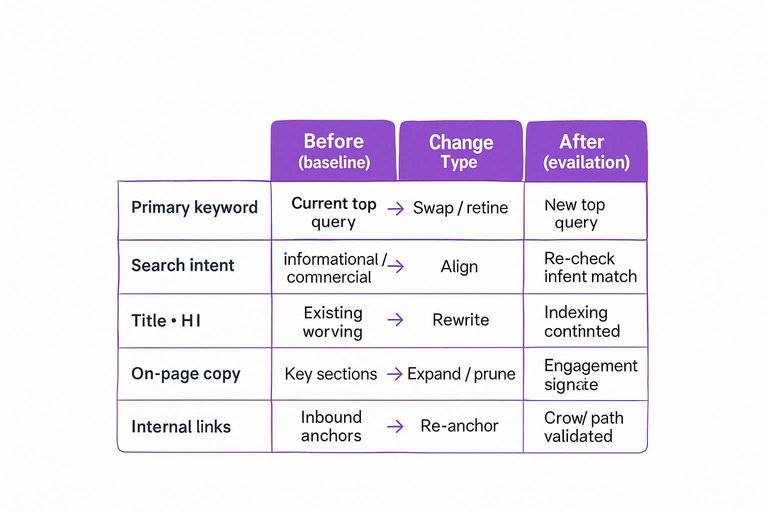
You need a consistent snapshot for every page, or you’ll argue with your own results.
| Per-page capture | Before (baseline) | Change type | After (evaluation) |
|---|---|---|---|
| Primary keyword | Current top query | Swap / refine | New top query |
| Search intent | Informational / commercial | Align | Re-check intent match |
| Title + H1 | Existing wording | Rewrite | Indexing confirmed |
| On-page copy | Key sections | Expand / prune | Engagement signals reviewed |
| Internal links | Inbound anchors | Re-anchor | Crawl path validated |
If the windows and fields match, your “before vs after” stops being a vibe check.
If you need a reference point for how these baselines are defined, see Search Console’s explanation of impressions, position, and clicks.
What It Cost
You can treat this project like a set of time buckets, because time is the real budget. The fastest plans fail when review cycles, rewrites, and approvals sprawl.
| Effort category | Typical work | Time balloons when | How to control it |
|---|---|---|---|
| Keyword research | Map intent, pick targets | Scope keeps expanding | Cap per page |
| Content updates | Rewrite sections, add FAQs | Stakeholders debate wording | Use a single editor |
| On-page SEO | Titles, headings, internal links | Templates are inconsistent | Create a checklist |
| QA + publishing | Proof, links, formatting | CMS quirks appear late | Use staging pass |
| Tracking + notes | GSC checks, change log | No baseline exists | Log before edits |
If you control approvals and QA, the rest stays boring and predictable.
Use This Case Study as a Repeatable Update Playbook
- Start with a baseline you trust: snapshot rankings, clicks, conversions, and the current target intent for each page before you touch anything.
- Pick pages with a clear upside-to-effort ratio: pool candidates, assign effort tiers, filter for risk (cannibalization, fragile links, compliance), and map each to a single primary intent.
- Execute with change control: follow a consistent on-page checklist, log every edit, QA templates/internal links, and define rollback rules for unexpected drops.
- Measure on a rhythm: segment pages by update type, use attribution guardrails, and review the before/after and cost tables together so you know what to scale next sprint.
Systematize Keyword Updates Faster
This case study shows how much impact focused keyword updates can have, but repeating the page selection, execution, and measurement cadence takes real bandwidth.
Skribra streamlines SEO content creation with keyword-targeted drafts, meta descriptions, and WordPress publishing so you can scale the same process—start with the 3-Day Free Trial.
Written by
Skribra
This article was crafted with AI-powered content generation. Skribra creates SEO-optimized articles that rank.
Share: