April 9, 2026
·
7 min read
Website ranking explained for beginners in plain English
A beginner-friendly explainer to understand how website ranking works—how crawling and indexing lead to results, what the ranking “scorecard” measures (relevance, trust, usability), and how to improve visibility safely without keyword traps or shady link tactics.

Why does one page show up first on Google while another never appears at all? For beginners, “ranking” can feel like a mysterious algorithm that either blesses your site or ignores it.
This explainer breaks ranking into plain English: how search engines discover and store pages, what they’re trying to measure when they order results, and what you can do that helps without risking penalties. You’ll leave with a simple mental model and a few safe, practical moves to make your pages easier to choose.
Ranking in one sentence
Website ranking is how a search engine orders pages by usefulness for your exact query. Think of it as a live shortlist, not a trophy. If you search “best running shoes,” the order is the engine’s best guess.
The librarian model
Picture Google as a librarian behind a desk. Your query is the question, pages are books, and ranking is the reading order they hand you first.
The librarian skims clues fast:
- Title and headings for topic match
- Content depth for your intent
- Links and mentions for credibility
- Speed and usability for access
If the first “book” disappoints, the librarian reshuffles next time.
What ranking is not
Ranking attracts myths because it looks mysterious. Cut the noise before you optimize.
- Not “paid by default” for organic results
- Not random, even when it feels that way
- Not a one-time score you earn forever
- Not identical for every query
- Not stable across time and location
If it moves, your job is to find what signal changed.
Two levels of ranking
Ranking happens at two levels: your site’s reputation and your page’s relevance. One can help the other, but neither guarantees a win.
A trusted site gets the benefit of the doubt faster. A weak page still loses if it doesn’t answer the query.
Build authority on the domain, then earn the click with the page.
How search engines work
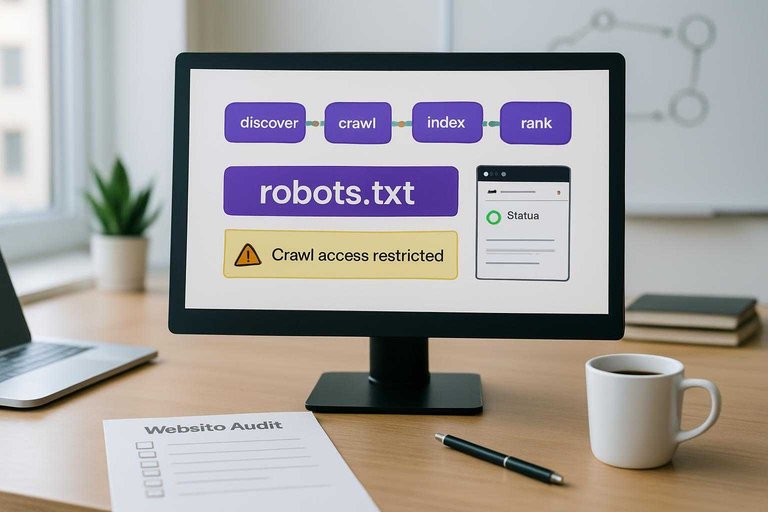
Search engines follow a simple loop: find pages, understand pages, then pick the best page for a search. Think “discover → crawl → index → rank,” like a librarian who first finds books, then catalogs them, then recommends one.
Discovery and crawling
Search engines use bots to follow links across the web, then download pages to see what’s there. They also come back to check changes, because pages and links rot fast.
If your pages return errors, load forever, or are blocked by robots.txt, bots either can’t fetch them or won’t try often. A broken internal link is like a “door to nowhere,” and it quietly cuts off the pages behind it.
Visibility drops when bots can’t reach you, even if your content is great.
For a deeper walkthrough, see this SEO guide for beginners.
For the official lifecycle breakdown, see how Google Search works.
Indexing basics
After a bot fetches a page, the engine tries to store it in an index, which is basically a giant catalog. If crawling is “reading the page,” indexing is “filing it under the right labels.”
Titles, headings, and main text tell the engine what the page is about, like a clear book cover and chapter names. Structured data is extra labeling, like “this is a recipe” or “this is a product,” which reduces guesswork.
Make your page easy to label, and you stop competing with confusion.
Serving results
When someone searches, the engine tries to match what they mean, not just the words they typed.
- Interpret the query intent
- Pull relevant indexed candidates
- Score each page for usefulness
- Order results by best fit
- Adjust slightly for location
Personalization exists, but relevance usually does the heavy lifting.
The ranking scorecard
For beginners, think of ranking as a simple scorecard with three buckets: relevance, trust, and usability. When your page drops, one bucket usually leaked. Picture a “best running shoes” page that’s detailed, cited, and fast on mobile.
Relevance signals
Relevance is about matching what the searcher meant, not just what they typed.
- Match the topic, not the keyword
- Use clear headings that map the answer
- Cover entities like brands, models, specs
- Reflect intent and related questions
- Stay fresh where freshness matters
Answer the question cleanly, and relevance gets easier to prove.
Trust signals
Trust is why Google believes you, even when competitors say similar things.
- Earn backlinks from real sites
- Collect brand mentions across the web
- Show author and About information
- Keep NAP and facts consistent
- Avoid spam tactics and link schemes
Build a reputation you’d want offline, because the web remembers.
Usability signals
Usability is how it feels to use your page, especially on a phone. If people hit your page, struggle, and bounce, the algorithms notice through behavior and secondary signals.
Mobile-friendly design, fast load times, no intrusive popups, and a readable layout do the quiet work—and using best AI tools to boost organic traffic can help you spot and fix UX friction faster. Fix friction first, then worry about clever SEO tricks.
Relevance done safely
Your page should feel like it was made for one question. When a beginner searches “how to fix a slow website,” they want guidance, not a pricing page.
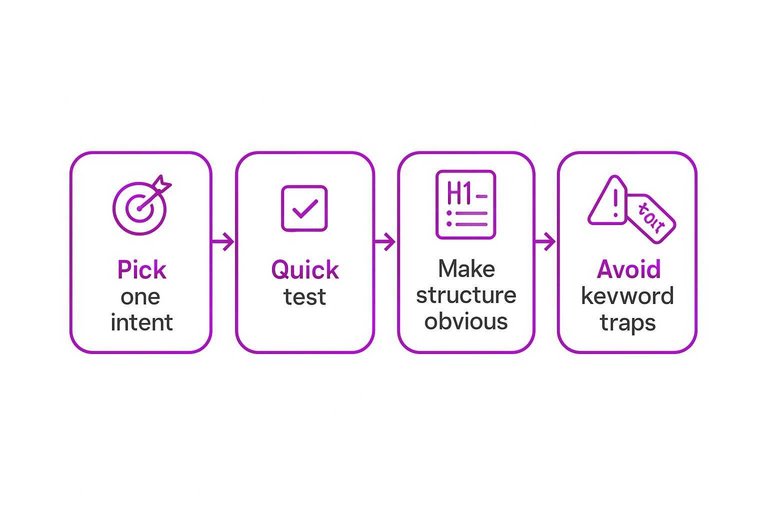
Pick one intent
Every page needs one primary job for the reader. Decide if you’re teaching (“what is SSL?”) or selling (“buy SSL certificate”), then commit.
A quick test: finish the sentence “After reading this, you can ____.” If the answer is “understand,” it’s informational. If it’s “choose” or “buy,” it’s transactional.
That choice controls everything, including your headline, examples, and call to action.
Make structure obvious
Your layout should let someone skim and still get the point. Use this checklist before you publish:
- Write a specific title, not a clever one
- Use one clear H1 matching the topic
- Break sections into logical H2s
- Keep paragraphs under three lines
- Link with descriptive anchor text
- Add helpful images with accurate alt text
If a skim reader can’t tell what you cover, Google can’t either.
Avoid keyword traps
Keyword stuffing is when you repeat the exact phrase until it sounds robotic. Duplicate pages are when you publish near-identical versions to “catch more keywords.” Thin content is when you answer a big query with vague filler.
Replace all three with normal language: use the main phrase once in a key spot, then write like you’d explain it to a friend. Use natural variations like “improve speed,” “load faster,” and “performance,” only where they fit.
If it reads like a human wrote it for one person, you’re already ahead.
Google’s guidance on helpful, reliable, people-first content reinforces this approach.
Trust without tricks
Authority online works like reputation in real life. You earn it through consistent, verifiable signals, not clever hacks. A beginner can look credible today by making it easy to trust who you are and what you publish.
Links as citations
Search engines treat links like citations in a research paper: they’re a vote, plus a clue about context. A link from a relevant site in your niche beats ten links from random directories or low-quality blogs. Think “a local newspaper mentions your plumber site,” not “500 links from a coupon farm.”
Beginner trust actions
Do these basics before you worry about “authority.”
- Publish real contact info, including address or service area.
- Write a clear About page with names, credentials, and photos.
- Cite primary sources and link to them where you make claims.
- Add “last updated” dates and actually refresh old pages.
- Use HTTPS and publish privacy, cookie, and refund policies.
Do this, and even a small site feels legitimate enough to recommend.
What to avoid
These tactics spike fast, then break trust even faster.
- Buying links or “guest post packages”
- Joining private blog networks (PBNs)
- Publishing spun or AI-scraped content
- Faking reviews or testimonials
- Creating doorway pages for every keyword
If rankings depend on tricks, you’re renting visibility from an algorithm that changes weekly.
Use the Scorecard to Make Your Next Page Easy to Choose
When you want to rank, stop thinking in hacks and start thinking in signals: can a search engine tell what your page is about (relevance), why it should be believed (trust), and whether it works well for people (usability)? Pick one clear intent per page, make your structure obvious, and earn “citations” the honest way through useful content and real mentions. Do that consistently and ranking stops being magic—it becomes the predictable outcome of being the best match for the search.
Frequently Asked Questions
- How long does it take to improve website ranking on Google?
- Most sites see early movement in 4–8 weeks once pages are indexed and updated consistently, with more reliable gains in 3–6 months. Competitive keywords and brand-new domains usually take longer.
- Do I need backlinks to improve my website ranking in 2026?
- Usually yes for competitive searches, because quality links still help search engines gauge trust and authority. For low-competition or local queries, strong content plus solid on-page SEO can rank with few backlinks.
- What’s the difference between website ranking and SEO?
- Website ranking is your position in search results for a specific query, while SEO is the set of actions you take to influence those positions. SEO covers content, technical fixes, and off-site signals that affect ranking.
- How can I check my website ranking without getting misleading results?
- Use Google Search Console for average position and queries, and a rank tracker like Ahrefs, Semrush, or SERP Robot for specific keyword positions. Avoid manual Google searches unless you use an incognito window plus location settings, since personalization skews results.
- Why did my website ranking drop suddenly even if I didn’t change anything?
- Common causes include a Google algorithm update, a stronger competitor improving their pages, or technical issues like noindex tags, blocked crawling, or slow/unstable pages. Start by checking Google Search Console (Coverage, Manual actions, Security issues) and comparing traffic dates to known update timelines.
Turn Ranking Basics Into Traffic
Understanding how relevance and trust work is the easy part—applying it consistently with fresh, optimized content is where most sites fall behind.
Skribra creates and publishes SEO-optimized articles with keywords, meta descriptions, formatting, and images—plus tools to build authority—so you can improve rankings steadily; start with a 3-Day Free Trial.
Written by
Skribra
This article was crafted with AI-powered content generation. Skribra creates SEO-optimized articles that rank.
Share: