April 28, 2026
·
11 min read
Why free SEO AI tools give misleading audits
A practical troubleshooter for diagnosing scary “free SEO AI audit” reports without wasting time—decode scare-score patterns, understand common crawler and data limitations, validate issues with Search Console/logs/real crawls, and prioritize fixes that move rankings and revenue.


Did a free SEO AI tool just tell you your site is “critical” and needs 200 urgent fixes—yet traffic hasn’t moved at all? Those audits often sound authoritative while being built on shallow crawls, missing data, and outdated SEO myths.
This troubleshooter shows you how to spot inflated warnings, separate real problems from noise, and verify claims with evidence you already have. You’ll learn what to ignore first, how tools misclassify issues, and which fixes actually improve indexing, performance, and results.
Audit Symptoms Map
Free SEO AI tools love scary labels because fear drives clicks. Your job is to translate the “audit symptoms” into real failure modes, then ignore the noise.
Think of it like a check-engine light. It can mean “loose gas cap” or “engine damage,” and the tool rarely knows which.
Scare-score patterns
Most warnings are just a vague symptom with a dramatic name. Here’s what they usually represent, and when they’re often fake.
- “Critical issues” → broad heuristics, not business risk
- “Toxic links” → low-quality links, rarely a penalty
- “Thin content” → weak intent match, not word count
- “Missing schema” → lost CTR chance, not ranking loss
- “Slow site” → lab scores, not real-user pain
If the tool can’t tie it to traffic, it’s a guess wearing a siren.
Quick triage questions
You need five yes/no checks to separate “audit theater” from real work. Answer these before you open a ticket.
- Did organic traffic drop on the same dates in Search Console?
- Is there a manual action or security issue reported?
- Can Googlebot access key pages without login or blocks?
- Are important URLs missing from index coverage reports?
- Did conversions fall on organic landing pages?
If you can’t say “yes” to at least one, don’t touch the code yet.
What to ignore first
Severity labels are arbitrary because the tool doesn’t know your goals, your baseline, or your competitors. “High priority” often means “easy to detect,” not “worth fixing.”
Many recommended fixes move nothing without context, like adding schema to pages nobody sees. Ranking changes usually follow relevance, links, and crawlable architecture, not checklist compliance.
Treat free audits as prompts for investigation, not a to-do list.
How Tools Get It Wrong
Free SEO audit tools look decisive because they print red warnings and crisp scores. But their inputs are thin, so the output becomes confident guesswork.
Shallow crawling limits
Most free crawlers can’t behave like Googlebot, so they sample your site. That sampling turns into “sitewide” conclusions, like calling a template broken from five URLs.
Bot restrictions block them first. Robots rules, WAFs, geo blocks, and rate limits cut the crawl short.
JavaScript rendering gaps come next. If navigation, canonicals, or product data load client-side, the tool never sees them.
Then parameter traps eat the budget. Calendar pages, faceted filters, and session IDs create endless URL variants.
Partial crawls create phantom errors and missed templates. You get “missing H1” alerts from empty shells, while real pages never load.
Treat any audit without crawl coverage details as a sketch, not a map.
No access to truth
An audit tool can’t verify what it can’t connect to. Without your real signals, it guesses at indexation, penalties, and intent fit.
Search Console is the obvious missing piece. Coverage, queries, and canonical choices live there.
Server logs are the other half. They show crawl frequency, status codes, and bot behavior over time.
Rank history matters because movement tells you which pages actually compete. A snapshot can’t show a slide.
Conversions close the loop. Without them, the tool can’t separate “traffic” pages from “money” pages.
When the tool lacks truth sources, treat its certainty as a UI choice, not evidence.
Heuristics over context
Rule-based checks feel objective because they’re easy to measure. But they ignore your niche, SERP intent, and page purpose.
- Flag thin content below a word-count threshold
- Penalize “low density” or “high density” keywords
- Mark templates as duplicate without intent review
- Auto-score E-E-A-T from on-page signals only
The tool is grading a checklist. Google is grading usefulness.
Outdated ranking myths
Some audits still push advice that worked in 2012. You can spot it fast if you know the usual tells.
- Find any mention of “meta keywords” as a ranking factor.
- Watch for exact-match repetition advice, like “use the keyword 12 times.”
- Check for PageRank sculpting tips, like nofollow-ing internal links.
- Look for “every page needs schema” claims, regardless of eligibility.
If the tool teaches superstition, it will also misdiagnose real problems. For what Google actually supports, refer to structured data Google Search supports.
Misleading Issue Categories
Free SEO AI audits often label the same buckets as “critical,” because those are easy to detect. They also produce lots of false positives, because they can’t see your real search context.
You want categories that map to outcomes, not checklists. Evidence beats alarms every time.
Technical false positives
Free audits love technical flags because they look objective. But they often infer problems from incomplete crawls or synthetic tests.
Canonicals get misflagged when tools see cross-domain URLs, parameter variants, or clustered duplicates. Hreflang gets “broken” when the crawler can’t reach alternates, or ignores x-default rules. Redirects look “bad” when chains are intentional, or when the tool can’t follow JS. Sitemaps get marked “invalid” from temporary fetch errors or blocked user-agents. Robots rules get labeled “blocking SEO” when you’re only blocking junk paths.
Core Web Vitals are the biggest trap. Many tools use lab data and call it “CWV,” even when your CrUX field data is fine.
Trust Search Console coverage, CrUX, server logs, and live fetches. If those are clean, the audit is noise, not a fire.
Content misclassification
Content classifiers usually judge pages by similarity and word count. Your site’s templates confuse that model fast.
Pagination pages get “thin” because they’re mostly lists. UGC pages get “low quality” because text is messy and repetitive. Product variants look “duplicate” because 80% of the layout matches. Category pages look “no content” because the intent is navigation, not essays.
The evidence is search performance, not a label. If the page ranks, gets clicks, and has stable canonicalization, it’s doing its job.
Fix content when users bounce and queries don’t match. Don’t rewrite pages that already win.

Link toxicity claims
“Toxic link” scores are easy to sell and hard to prove. Most are based on proxy metrics and guesswork.
- Check for Manual Actions in Search Console.
- Look for unnatural anchor patterns at scale.
- Compare link relevance to your topic and geography.
- Watch for sudden spikes from one source.
- Prioritize links driving qualified referrals.
If there’s no manual action and no pattern, disavow lists are often self-inflicted damage.
Schema overreach
Schema is useful when it unlocks rich results. Missing schema is irrelevant when Google can already understand the page.
- Confirm the page type and the rich result you want.
- Check Google’s documentation for eligibility requirements.
- Validate with Rich Results Test and Schema Markup Validator.
- Monitor enhancements and errors in Search Console.
- Measure impact in CTR, not “schema score.”
Add schema for outcomes, not for audits. Rich results are the only scoreboard that counts.
Validate Before You Fix
Free SEO AI audits love confident diagnoses. Your job is to demand proof, like “show me the URL, the request, and the query.” Evidence beats vibes. If you need a baseline to sanity-check recommendations, keep a practical SEO guide handy.
Confirm with Search Console
Search Console is your fastest reality check because it shows what Google actually saw and did.
- Check Manual Actions for penalties and applied sitewide flags.
- Check Security issues for hacks, malware, and injected spam.
- Check Indexing/Coverage for excluded patterns and sudden drops.
- Check Enhancements for template errors that repeat across pages.
- Use URL Inspection on examples to confirm canonical and render.
- Review Performance queries and pages for the real impact window.
If Search Console is clean, the “critical” audit issue is usually just noise.
Use real crawl evidence
A tool that never crawled your site is guessing. Run a full crawl with rendering so JavaScript, canonicals, and internal links are real.
Compare templates, not one-off URLs. Sample a set of URLs per template and reproduce the issue twice.
If you can’t reproduce it in a rendered crawl, you can’t fix it with confidence.
Check server logs
Logs tell you what bots did, not what tools assume. They also reveal waste that no page-level audit can see.
- Filter requests by Googlebot user-agents and reverse-DNS verify.
- Look for crawl budget waste on parameters, faceted URLs, and search pages.
- Chart 404 and 5xx spikes by day and directory.
- Find blocked resources causing partial renders and broken layouts.
- Detect redirect chains and loops at scale, not by spot checks.
When logs disagree with the audit, trust the logs and fix the system.
Tie to business metrics
Fixes that don’t move traffic or revenue are chores. Prioritize issues that change indexation, rankings, and conversions.
Map each issue to a metric: “indexed pages,” “top query clicks,” or “checkout completion.” Treat “best practices scores” like a vanity metric.
The only audit that matters is the one that changes your numbers.
Fixes That Actually Work
Free SEO audit tools love dramatic red flags. Your job is to fix the small set of issues that actually block crawling, ranking, or conversion. Use success criteria you can verify in Search Console, logs, and real user data.
Indexing and crawl fixes
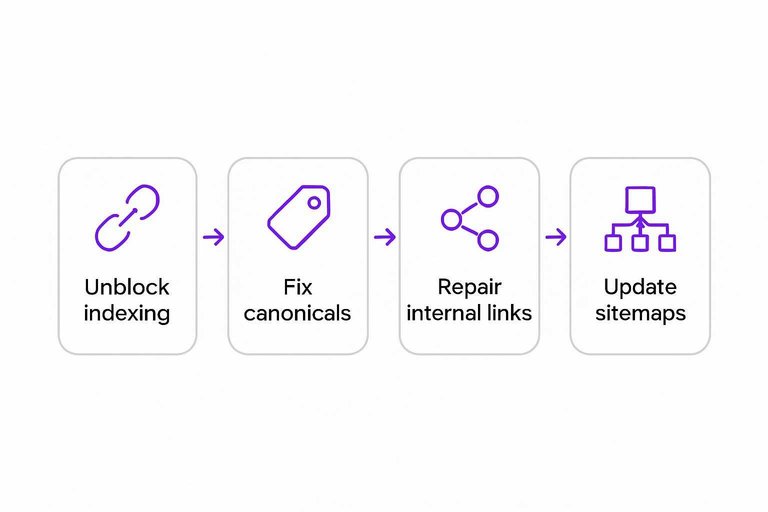
Most “SEO errors” are just symptoms of blocked discovery or confused canonicalization. Fix the pathway first, then judge content.
- Unblock robots.txt and meta robots on pages you want indexed.
- Fix canonical tags to match your preferred, indexable URLs.
- Repair internal links to point at canonical, 200-status destinations.
- Clean parameter traps with rules, canonicals, and URL handling choices.
- Update sitemaps, request indexing, and monitor Coverage changes.
Success is seeing stable indexed counts and fewer “Duplicate/Excluded” surprises in Search Console.
Performance and UX fixes
Lab scores are easy to game, but field pain is what kills rankings and revenue. Fix what real users feel, then validate.
- Reduce JS and CSS by removing dead code and deferring non-critical scripts.
- Optimize images with modern formats, correct sizing, and lazy-loading below the fold.
- Improve TTFB with caching, database tuning, and CDN where it helps.
- Stabilize layout by reserving space for media, ads, and injected UI.
- Validate in Lighthouse and CrUX, then recheck CWV field data.
Success is CrUX moving, not just a prettier Lighthouse report.
Content improvements that rank
Rankings move when your page matches intent better than alternatives. “Add 300 words” is noise unless it changes the answer.
Start with intent matching. A query like “best budget espresso machine” wants comparisons, not brand history.
Add unique value that competitors cannot copy quickly. Original photos, tested results, or a clear framework.
Cover entities and relationships, not keyword variants. Mention the models, features, tradeoffs, and buyer constraints.
Build internal linking hubs. One strong guide should route to supporting pages and back. If you need ideas to scale this work efficiently, see best AI tools to boost organic traffic.
Prune or merge only with evidence. Use low impressions, thin differentiation, or cannibalization you can prove.
Your success criteria is simple: higher impressions on the same query set, not “more content.”
Link cleanup reality
Most sites do not need a disavow file. Panic-disavowing “toxic links” can erase signals you did nothing wrong to earn.
Do nothing when links look natural, mixed, and uncoordinated. Ignore scary scores from third-party tools.
Disavow when you have a real risk pattern. Obvious paid networks, hacked sitewide spam, or manual action history.
If you paid for links, document removals. Keep outreach logs, URLs removed, dates, and responses.
Use reconsideration requests only when Search Console shows a manual action. Be specific, brief, and evidence-heavy.
The goal is trust with Google’s reviewers, not a “clean” backlink dashboard.
Audit Claims vs Reality
Free SEO AI audits often sound precise because they name a “problem” and assign a score.
But most are pattern matches with missing context, so the real cause lives elsewhere.
| Free-tool claim | Likely root cause | How to verify | Fix that matters |
|---|---|---|---|
| “Missing meta description” | Template omission | Check SERP snippet | Improve title intent |
| “High spam score” | Link graph bias | Review top links | Earn relevant mentions |
| “Too many keywords” | TF-IDF guesswork | Read competitor pages | Rewrite for clarity |
| “Slow page” | Lab-only metrics | Check CrUX field data | Fix LCP element |
| “Thin content” | Word-count heuristic | Test query coverage | Add missing sections |
Treat the claim like a symptom, then validate with real SERP and field signals before you touch anything.
Turn the Audit Into an Evidence-Driven Plan
- Triage the report: flag anything framed as “critical” without a clear affected URL list, reproduction steps, or measurable impact.
- Verify with reality checks: confirm indexing and query impact in Search Console, reproduce with a real crawl, and sanity-check with server logs where possible.
- Prioritize by outcomes: fix blockers (crawl/indexing), then performance/UX, then content improvements tied to ranking pages—not cosmetic “best practices.”
- Document the before/after: track impressions, clicks, and conversions per affected page so you can prove what worked and ignore the rest next time.
Frequently Asked Questions
- Are free SEO AI tools accurate enough for a technical SEO audit in 2026?
- Usually not for a full technical audit. They can surface quick clues, but you should confirm issues with Google Search Console, server logs, and a real crawler like Screaming Frog or Sitebulb before fixing anything.
- Why do free SEO AI tools flag “critical” issues on pages that rank fine?
- Most of the time the tool is scoring generic best practices instead of measuring your actual search performance. Cross-check the flagged URLs against GSC clicks/impressions and index status to see if there’s a real problem.
- How can I tell if a free SEO AI tool’s crawl data is incomplete?
- Compare its crawled URL count to your XML sitemap, GSC “Pages” report, and a paid crawler run. If the tool finds far fewer URLs or misses key templates (products, categories, faceted pages), the audit is incomplete.
- What should I use instead of free SEO AI tools for trustworthy audit data?
- Use Google Search Console and Google Analytics for performance signals, plus a crawler like Screaming Frog/Sitebulb and PageSpeed Insights/Lighthouse for speed. For deeper validation, add server logs (or Cloudflare logs) to confirm what bots actually crawl.
- How often should I run audits if I’m relying on free SEO AI tools?
- Run free-tool scans monthly for lightweight monitoring, but do a validated audit quarterly or after major releases (migrations, redesigns, CMS changes). Treat any “critical” alert as a hypothesis until confirmed in GSC and crawl data.
Turn Audits Into Rankings
When free SEO AI tools flag dozens of “critical” issues, it’s easy to waste weeks fixing noise instead of the few changes that move traffic.
Skribra helps you execute what actually works with consistent, SEO-optimized publishing, WordPress integration, and built-in backlinks—try the 3-Day Free Trial to start compounding results.
Written by
Skribra
This article was crafted with AI-powered content generation. Skribra creates SEO-optimized articles that rank.
Share: