March 26, 2026
·
8 min read
Why Website Domain Authority Drops After a Redesign
A redesign troubleshooting guide to diagnose why your site’s domain authority appears to drop—verify the decline with clean baselines, map root causes (redirects, canonicals, internal links), and fix crawl/indexing blockers so equity and visibility recover.


Your redesign launches, the site looks better, and then the metrics tank—“domain authority” drops, rankings wobble, and traffic doesn’t follow your new UX.
Most of the time, nothing mystical happened to your authority; you lost signals. This troubleshooter helps you confirm the drop is real, pinpoint where equity is leaking (redirects, canonicals, internal links), and rule out crawl/indexing blocks. You’ll leave with a short list of fixes to stabilize visibility and speed up recovery.
Redesign Drop Symptoms
A redesign is when “nothing changed” and everything changes. Your first job is proving the domain authority drop is real, redesign-linked, and not just a metric wobble.
Confirm the drop
Check consistency before you chase causes, because DA can swing with tool updates. You’re looking for a drop that lines up with launch timing and shows up in crawl and index signals too.
- Pull DA/DR from two tools on the same day.
- Compare readings from pre-launch, launch week, and today.
- Check GSC for index coverage and crawl stats shifts.
- Split signals: DA change vs ranking change vs traffic change.
- Note any tool update dates overlapping your window.
If the drop aligns across tools and search signals, it’s not “just a score.”
Scope the impact
You need to know where equity fell, not just that it fell. Redesigns often change templates, internal links, and canonicals in specific sections.
- Segment by subdomain: www, blog, shop, help.
- Segment by folder: /products/, /resources/, /pricing/.
- Compare top linked pages pre vs post.
- Check new templates for the biggest drops.
- Flag pages that lost internal links.
Find the cluster that moved first, and you’ll usually find the bug that caused it.
Set a baseline
Capture a before-and-after snapshot while the evidence is still clean. You’ll use it to prove causality and measure fixes.
Pull these metrics side by side:
- Referring domains and total backlinks
- Top linked pages and their status codes
- Link velocity by week
- Index coverage and excluded reasons
- Organic landing pages and sessions
Without a baseline, every fix becomes an argument instead of an experiment.
Root Cause Map
Redesigns drop authority when they interrupt signals Google already trusts. Use this map to trace each visual change to a measurable SEO failure. For a broader framework on diagnosing these issues end-to-end, see this technical SEO troubleshooting guide.
A redesign change usually breaks one of these signal paths.
| Redesign change | Signal lost | What breaks | Where to verify |
|---|---|---|---|
| URL/path changes | Links | 404s, weak 301s | GSC, server logs |
| Nav + internal links | Crawl | orphaned pages | crawl tool, logs |
| Template canonical tags | Canonicals | wrong canonicals | page source, crawl |
| Robots/noindex defaults | Indexation | deindexed sections | GSC Coverage |
| Content + E-E-A-T edits | Trust | intent mismatch | SERP, analytics |
Fix the broken signal first, then judge “authority” again.
Redirects Gone Wrong
Redesigns change URLs. Redirects are the bridge, and weak bridges drop link equity into the river.
You’ll see it as “mystery” 404s, weird loops, and strong pages suddenly going quiet.
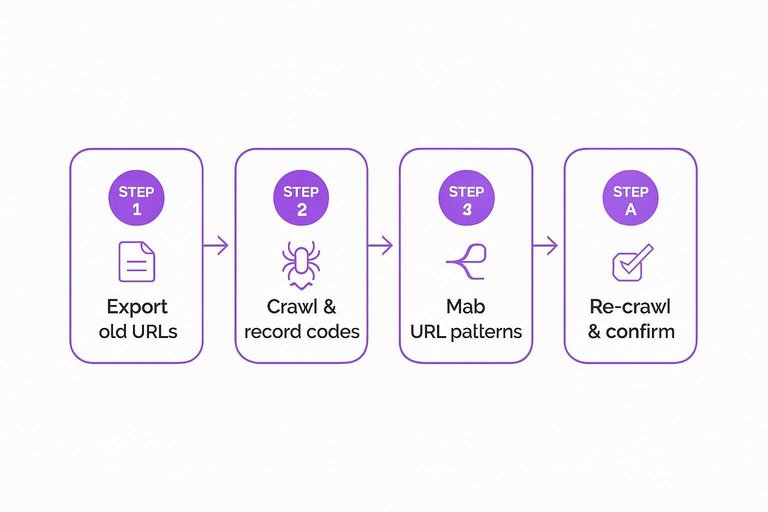
Match URL patterns
You need full coverage from old URLs to new ones, not a handful of manual redirects. One missed pattern can orphan thousands of links.
- Export old URLs from sitemaps, analytics, and backlink tools.
- Crawl the old URL list and record 3xx, 4xx, and 200s.
- Map each old pattern to a single new pattern, not one-offs.
- Verify query parameters, trailing slashes, and case rules match.
- Re-crawl and confirm every important old URL resolves cleanly.
If you can’t describe your redirects as rules, you’re already leaking authority.
Kill redirect chains
Chains and loops waste crawl budget and dilute signals. They also break more often during later “quick fixes.”
- Crawl your site and export all 301/302 hops per URL.
- Flag any redirect with two-plus hops, or any URL that loops.
- Update rules so every old URL redirects once to the final canonical.
- Collapse protocol and host hops into one: http→https and non-www→www.
- Retest with a crawl and spot-check with
curl -I.
One hop or you pay interest forever.
Preserve link targets
Your strongest pages often have deep links pointing to specific content, not your homepage. When you redirect everything to “/”, you’re telling search engines, “That page is gone,” even if you kept the topic.
Keep high-link URLs alive with the closest equivalent page, even if the new structure looks different. Also redirect PDFs, images, and old downloadable assets people still link to. If a PDF moved, redirect it to the new PDF, not a category page.
Respect the intent of the original link, and you keep the authority that came with it. For migration specifics, follow Google’s guidance on site moves with URL changes.
Canonicalization Conflicts
Redesigns often swap templates, routing rules, and URL helpers. That’s when canonicals quietly start pointing somewhere else, like “https://staging.example.com/page” or an HTTP variant.
Search engines treat that as mixed signals. Equity splits, duplicates grow, and your strongest URL stops being the one that ranks.
Spot canonical drift
Canonical tags usually break from template defaults, not one-off pages. You’re hunting for patterns that repeat across page types.
- Confirm self-referencing canonical on every indexable page
- Flag canonicals pointing to staging domains
- Catch HTTP canonicals on HTTPS sites
- Find canonicals to noindex or blocked URLs
- Check parameterized URLs canonicalizing inconsistently
If canonicals disagree with reality, Google will pick its own “preferred” URL.
Fix duplicates fast
Pick a single winner per page cluster, then make every signal support it. Partial fixes keep the duplicate set alive.
- Choose one preferred URL for each page or variant set.
- Set the canonical tag to that preferred URL.
- Update internal links to only use the preferred URL.
- 301 redirect non-preferred URLs to the preferred URL.
- Remove conflicts like noindex + canonical, or mixed hreflang targets.
One clean path beats five “almost right” hints every time.
Validate consolidation
Don’t trust the code change until you’ve re-crawled the site like a bot. You want to see one indexable version per page, and the rest folding in.
Re-crawl and confirm each canonical resolves to a 200, indexable URL. Then watch Search Console as indexed duplicates drop and your chosen URLs become the reported preferred versions.
If duplicates don’t shrink within weeks, a second signal is still contradicting your canonicals.
Internal Linking Breakage
Redesigns often change navigation, templates, and modules that quietly carried most of your internal link flow. One swapped menu or removed “Related articles” block can turn a strong page into a dead end overnight.
Identify orphaned pages
Orphaned pages still exist, but your redesign stops linking to them anywhere. That kills crawling and strips away internal authority signals.
- Export your XML sitemap and a full crawl.
- Compare both lists and flag URLs missing from the crawl graph.
- In your crawl, filter pages with zero internal inlinks.
- Add links back from nav, hubs, and “related” modules.
- Re-crawl and confirm each page has at least one pathway.
If a URL is in the sitemap but not in the link graph, it’s effectively invisible.
Repair link depth
Deep pages leak value because fewer internal links reach them. Redesigns often add depth by splitting categories or hiding links behind UI.
- Measure clicks-from-home for key pages
- Build category hubs for major topics
- Add breadcrumbs on all templates
- Place contextual links within body copy
- Promote key pages from hub modules (use resources to simplify SEO workflows to streamline audits and link mapping)
If a revenue page takes five clicks, you built a maze, not a site.

Rebalance equity
Template changes can shift link equity toward low-value pages without you noticing. One common culprit is moving important links into the footer because it “looks cleaner.”
Map your top SEO and revenue URLs, then give them prominent, repeated links in navigation, hubs, and relevant content modules. Keep anchor text consistent and specific across templates, like “pricing for teams,” not “learn more.” Google also recommends following link best practices so important internal links remain crawlable.
Design should simplify choices, not starve your best pages.
Indexing and Crawl Blocks
Redesigns often ship with “temporary” crawl controls that never get removed. When Google can’t crawl or index your key URLs, it can’t credit the links pointing at them.
Robots and noindex
Blocks hide in more places than robots.txt, and staging settings love to leak into production. You’re checking for anything that says “don’t crawl” or “don’t index.”
- Open /robots.txt and confirm critical paths aren’t disallowed.
- Spot-check templates for meta robots like noindex, nofollow.
- Check headers for X-Robots-Tag on HTML, PDFs, and images.
- Review CDN, WAF, and server rules for bot blocks or auth gates.
- Verify production config differs from staging, not inherits it.
If crawling stops at the door, authority can’t enter either.
Sitemap accuracy
Sitemaps are your crawl shortcuts, but only if they’re clean. A redesign often leaves old URLs, redirects, and parameters mixed in.
- Export sitemap URLs and keep only canonical 200 pages.
- Remove redirected, 404, parameter, and non-canonical URLs.
- Update lastmod values to reflect real content changes.
- Host the sitemap at a stable URL and link it in robots.txt.
- Submit and monitor sitemap status in Search Console.
A dirty sitemap wastes crawls on junk, and your important pages wait longer.
Crawl budget signals
Google slows down when it sees duplication, traps, and unstable URLs. Redesigns can accidentally create infinite spaces, like faceted filters that generate endless combinations.
Reduce duplicate faceted URLs with rules, canonicals, or parameter handling. Fix infinite URL generation from internal search, calendars, or filter loops. Stabilize pagination so page lists don’t reshuffle on each render. Improve server response times and error rates to avoid crawl throttling.
When crawling gets expensive, Google spends less—and your equity compounds slower.
Lock In the Fixes Before Google Relearns the Wrong Site
- Re-confirm the scope: compare pre/post baselines for top URLs, top queries, and linking pages so you’re fixing the highest-impact losses.
- Eliminate signal leaks in order: fix redirect mismatches and chains first, then resolve canonical drift/duplicates, then restore internal linking depth to key pages.
- Remove crawl/indexing brakes: correct robots/noindex rules, ship an accurate sitemap, and validate in Search Console that the right URLs are being crawled and indexed.
- Recheck weekly until stable: watch indexed URL counts, crawl stats, and page-level ranking URLs to ensure equity consolidates where you intended.
Frequently Asked Questions
- Does a website domain authority drop after a redesign always mean my rankings will drop too?
- Not always. Domain authority is a third‑party score, so rankings may stay stable, but a redesign-related DA drop often correlates with lost crawlable links or diluted internal signals that can affect organic performance.
- How long does it usually take for website domain authority to recover after a redesign?
- Most sites see stabilization in 4 to 8 weeks and clearer recovery in 2 to 4 months once redirects, canonicals, and crawlability are fixed and recrawled. Full recovery can take longer if many backlinks now point to changed or removed URLs.
- Which domain authority tool should I trust after a redesign: Moz, Ahrefs, or Semrush?
- Use at least two tools and focus on direction, not the exact number, because each uses different link indexes and scoring models. Moz DA, Ahrefs Domain Rating (DR), and Semrush Authority Score often move at different speeds after major site changes.
- Can changing my domain name or moving from HTTP to HTTPS cause website domain authority to drop?
- Yes—domain changes and protocol migrations often trigger a temporary authority drop if 301 redirects aren’t perfectly mapped and backlinks aren’t updated. Expect volatility until search engines and link indexes reprocess the new destination URLs.
- Should I stop a redesign launch if I see my website domain authority dropping in the first week?
- Usually no—first-week drops are common while crawlers and link indexes catch up. Instead, prioritize a launch audit (redirect map, canonical targets, robots/noindex, sitemap, analytics) and re-crawl with Screaming Frog or Sitebulb to confirm nothing critical is blocking discovery.
Rebuild Authority After Redesign
Once redirects, canonicals, internal links, and crawl rules are stabilized, the next lever for recovering website domain authority is consistent, optimized publishing and link acquisition.
Skribra generates and publishes SEO-ready articles to keep your content velocity high, and supports quality backlink exchanges to strengthen authority—start with the 3-Day Free Trial.
Written by
Skribra
This article was crafted with AI-powered content generation. Skribra creates SEO-optimized articles that rank.
Share: