April 18, 2026
·
11 min read
Why your Google indexing dropped after a redesign
A step-by-step troubleshooter for diagnosing why rankings and organic traffic fell after a site redesign—pinpoint the drop timeline, isolate redesign-driven root causes (URLs/redirects/content/blocks), verify indexing and crawl signals, and fix template + internal linking regressions at scale.


Your redesign shipped on time, the site looks better, and then Google traffic falls off a cliff. Was it the new URLs, a redirect mistake, or something quietly telling Google not to index your pages?
This troubleshooter helps you move from “something’s wrong” to a short list of provable causes. You’ll confirm when the drop actually started, rule out reporting noise and penalties, then audit the usual redesign culprits—indexing, redirects, templates, and internal links—so you can recover visibility fast.
Spot the Drop
Your rankings rarely “just fell.” A redesign changes templates, URLs, internal links, and rendering, then Google reacts on its own schedule.
Treat this like incident response. Pin the moment, isolate the blast radius, then decide what to inspect next.
Confirm the timeline
You need one clean timeline that merges launches with visibility. Otherwise you’ll chase the wrong cause.
- Mark redesign launch date, plus every release after.
- In GSC, compare 28 days before vs after for clicks and impressions.
- Overlay GA4 organic sessions, with annotations for releases.
- Check the Indexing > Pages report for spikes in “Excluded” or “Crawled - currently not indexed.”
- Note lag: crawls and reindexing often trail releases by days.
If the drop matches a specific release window, you’ve already narrowed the culprit class.
Map losses fast
You’re looking for the biggest deltas first. One broken template can sink hundreds of queries.
- Export top lost queries by clicks and impressions.
- Export top lost landing pages by clicks.
- Segment by device: desktop vs mobile.
- Segment by country: top markets only.
- Flag pages with position drops, not just volume drops.
When losses cluster on one template or segment, you’ve found your fastest path to a fix.
Rule out reporting
A redesign can break measurement and make a stable site look worse. Don’t diagnose SEO with missing tags.
Check GA4 tag firing on key templates, especially after consent banners. Verify Consent Mode signals didn’t flip from “granted” to “denied.” Confirm GA4 data streams, filters, and cross-domain settings match pre-launch.
In GSC, confirm you’re looking at the same property type and scope as before, like Domain vs URL-prefix.
Check penalty signals
Most redesign drops aren’t penalties, but you should prove it quickly. Penalty-like patterns change what you do next.
- Check GSC Manual actions for any active issues.
- Check GSC Security issues for hacks or injected spam.
- Scan indexing warnings for sitewide “noindex” or blocked resources.
- Look for abrupt, sitewide query loss across many categories.
- Compare branded vs non-branded queries for disproportionate collapse.
If it’s sitewide and sudden, treat it like an access or trust problem, not a content problem.
Redesign Root Causes
Redesigns fail in predictable ways. You change what Google already understood, then wonder why rankings wobble.
Your job is to spot which “small” changes broke crawling, indexing, relevance, or link equity. Fix the system first.
URL changes
URL continuity is your rankings’ memory. Change it carelessly, and Google treats pages like strangers.
Watch for:
- Slug edits like “/services” to “/what-we-do”
- Removed pages that used to rank
- Parameter behavior changing, like ?ref= being indexable
- Trailing slash or case shifts, like /Page vs /page
If the URL changed, you just started a new page’s history from zero.
Bad redirects
Redirects should preserve intent and authority. Redesigns often ship with shortcuts that quietly bleed equity.
- Using 302s instead of 301s
- Creating redirect chains across multiple hops
- Shipping redirect loops that never resolve
- Sending many old URLs to the homepage
- Redirecting to “kind of related” pages
When redirects lie, Google stops trusting the path.
Internal link reshuffle
Your internal links tell Google what matters. Simplify navigation too hard, and your best pages go dark.
Look for fewer menu links to key categories, more clicks to reach money pages, and new orphans. Also watch lost in-copy links, like “See pricing” removed from a product page.
If important pages got deeper, you just lowered their priority.
Content replaced
New templates often look cleaner and say less. That trade can erase relevance signals you didn’t realize you had.
- Removing paragraphs that answered “why choose you”
- Dropping H2s that mapped to queries
- Deleting FAQ blocks that matched long-tail searches
- Replacing specific copy with vague brand language
- Cutting examples, specs, or locations
Design polish doesn’t rank. Useful words do.
Technical blockers
Redesigns change defaults. One checkbox can turn an entire site into “do not crawl.”
Check robots.txt for new disallows, meta noindex on templates, and canonicals pointing to the wrong version. Also verify Google can render critical content, and that CSS or JS isn’t blocked.
The fastest SEO loss is a site that Google can’t fully see. See Google’s reference on robots meta tags and X-Robots-Tag to confirm the exact directives that may be blocking indexing.
Indexing & Crawl Checks
After a redesign, Google often “sees” a different site than your users do. You’re validating one thing: Google can crawl, render, and index the new URLs without hidden blockers or mixed signals. If you need a broader reference point while you audit, this technical SEO guide can help you sanity-check the basics.
Robots and tags
Redesigns frequently ship with leftover staging controls. One bad directive can drop thousands of pages overnight.
- Open /robots.txt and look for broad disallows like
Disallow: /. - Spot-check templates for
<meta name="robots" content="noindex">ornofollow. - Check response headers for
X-Robots-Tag: noindexon HTML and PDFs. - Verify staging protections are off in production, including basic auth and IP blocks.
- Confirm bot access isn’t blocked by WAF rules or rate limits.
Treat every “temporary” block like live ammo, because Google does.
Canonicals sanity
Canonicals tell Google which URL wins when duplicates exist. After a redesign, they’re often wrong by one small detail.
- Use self-referential canonicals on indexable pages.
- Point canonicals to the preferred hostname and protocol.
- Avoid canonicals that jump to unrelated categories or homepages.
- Prevent faceted pages from canonicalizing to filtered variants.
- Never canonicalize to a different domain unless intentional.
If canonicals disagree with your internal links, Google will trust neither.

Sitemaps accuracy
Sitemaps are your crawl budget map. Post-redesign, they often still list the old world.
- Include only canonical URLs that return 200.
- Remove any URL that 301s, 302s, or chains.
- Exclude URLs that are
noindexor blocked by robots.txt. - Update
lastmodwhen meaningful content changes, not on every deploy. - Submit the new sitemap location in Search Console and monitor errors.
A clean sitemap won’t force rankings, but it stops Google wasting time.
Render like Google
Modern redesigns lean on client-side rendering and delayed content injection. Google can index what it can render, not what you meant to show.
Use Search Console’s URL Inspection and check the rendered HTML, not just the live page. Confirm primary content, internal links, titles, and structured data appear without requiring user interaction or blocked scripts.
If your key content isn’t in the rendered output, you don’t have an SEO problem. You have a delivery problem.
Redirects & Migrations
Redesigns usually don’t “hurt SEO” by themselves. Broken migration mechanics do, especially redirects and missing URL equivalents.
If your old pages don’t resolve cleanly, Google sees a different site than your users do. That’s when rankings slide.
Old-to-new mapping
You need a one-to-one plan for every valuable old URL. Without it, you create accidental “dead ends” where authority and intent disappear.
- Export old URLs from analytics, GSC, and your XML sitemap.
- Group them by intent, not by folder structure.
- Assign each old URL the closest topical replacement page.
- Write 301 rules that match exactly, then document exceptions.
- Keep a mapping sheet with old URL, new URL, and notes.
When every valuable URL has a home, your redesign stops leaking equity.
Fix chain waste
Chains and duplicate hops waste crawl budget and soften link equity. They also slow users, which increases bounce on slower devices.
- Replace chains with one-hop 301 to final URL
- Force one protocol and one hostname
- Remove HTTP→HTTPS→WWW double hops
- Eliminate redirect-to-redirect from internal links
- Fix mixed-case and trailing-slash loops
If you see two or more hops, you’re paying interest on every click.
Handle removals
You removed pages during the redesign. That’s fine, but you must do it deliberately.
If a page still gets links or branded searches, a blanket 404 is you telling Google, “We dropped the thing people wanted.”
Use 410 when content is truly gone and should be deindexed fast. Use 301 when you have a close equivalent. Restore or rebuild when demand and links still exist.
That’s the line between pruning and self-sabotage.
Validate at scale
You can’t QA migrations by spot-checking 20 URLs. You need a repeatable crawl that proves old URLs resolve cleanly.
- Compile a master list of old URLs, including parameter variants.
- Crawl the list and record status, redirect hops, and final URL.
- Confirm each old URL 301s to a final 200 indexable page.
- Verify the final page declares itself canonical.
- Segment failures by template, rule, or directory for bulk fixes.
Patterns beat heroics, because most migration bugs ship in batches. If you want a practical framework, see this guide on an SEO migration redirect plan.
Template SEO Regressions
Redesigns often change templates, and templates carry your strongest on-page signals. One swapped component can turn “Best hiking shoes | Brand” into “Home” across thousands of URLs. Fix the template once, and the recovery scales.
Titles and H1s
New templating rules can quietly strip keywords, duplicate titles, or truncate H1s. You’re hunting for patterns that repeat across page types.
- Compare title tags across top templates for duplicates
- Check H1 presence, uniqueness, and keyword loss
- Spot truncated titles from new separators or prefixes
- Look for swapped title/H1 mapping in components
- Verify canonicals don’t point to “pretty” titles
If the same title shows up three times, that’s not SEO drift. That’s a template bug.
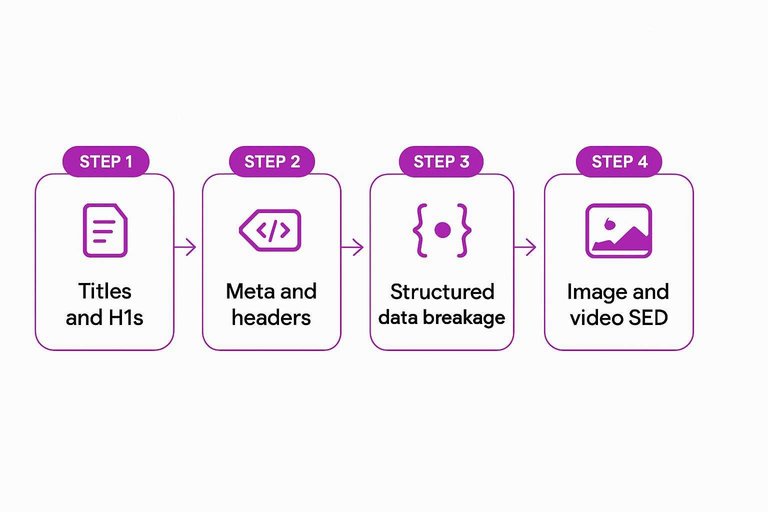
Meta and headers
Meta often “looks fine” on one page, then fails across a template. The tell is when Google snippets and international targeting suddenly get weird.
Check meta descriptions for empty fields, token placeholders, or blanket defaults. Verify hreflang clusters, pagination tags, and HTTP headers like robots and canonical didn’t change during routing or CDN tweaks.
When these regress, you don’t lose rankings evenly. You lose trust in whole page groups.
Structured data breakage
Component refactors can break schema without breaking the page. You need to test what Google actually sees.
- Run Rich Results Test on key templates and variants.
- Check for parse errors and missing required properties.
- Confirm schema types still match the content shown.
- Verify eligibility flags didn’t disappear after removals.
- Re-test after deploy and monitor Search Console Enhancements.
If rich results vanished after the redesign, assume schema drift until proven otherwise.
Image and video SEO
Media SEO breaks when assets move, loading changes, or markup gets stripped. You’re checking discovery, not aesthetics.
- Confirm alt text still renders in the HTML
- Validate lazy-loading doesn’t hide assets from bots
- Check robots rules for blocked image or video paths
- Verify image URLs didn’t change without redirects
- Ensure video pages keep VideoObject markup
If Google can’t fetch or understand your media, your traffic won’t “come back later.” It just goes elsewhere. For a broader process that keeps these checks consistent across page types, use an ultimate checklist for streamlining SEO content.
Internal Links & IA
Redesigns often break internal authority flow without breaking anything “visible.” Your pages still load, but Google’s paths to them get thinner or disappear.
Find orphan pages
You need proof of what lost internal links and what got buried. Crawl data will show pages Google can reach, and pages your IA quietly abandoned.
- Crawl the site and export pages with zero inlinks.
- Flag URLs deeper than your old click depth baseline.
- Validate breadcrumb trails for missing or looping parents.
- Check for navigation-only pages blocked by JS rendering.
- Prioritize money pages first, then supporting content.
Orphans aren’t “low quality.” They’re just unreachable.
Repair navigation
Your menu and footer are authority routers. If key pages lost placement, rankings can slide even with unchanged content.
- List category pages removed from top nav.
- List product or service pages dropped from submenus.
- List hub pages no longer linked from templates.
- List footer links reduced to a single “Sitemap.”
- List new pages added without a nav home.
If a page matters, it needs a dependable template link.
Rebuild context links
Navigation links help discovery, but contextual links drive meaning. You’re rebuilding topical clusters, not sprinkling random links.
Add 3–5 in-content links from high-traffic pages to key targets using descriptive anchors like “pricing calculator” or “HIPAA compliance checklist.” Create simple hub pages that summarize a topic and link out to the best supporting pages. Add “related” modules where they fit the user’s next question.
Do it where readers actually scroll, or Google won’t treat it as a real path.
Anchor text issues
Redesigns love “clean” UI labels that kill semantics. Google still reads anchors as labels for what a page is about.
- Replace “Learn more” with specific topic phrases.
- Remove hidden links used for tracking or styling.
- Convert JS-only links to real href links.
- Avoid repeating the same anchor sitewide.
- Stop linking with empty icons only.
Anchors are your internal keywords, whether you meant them or not.
Stabilize Visibility with a 48-Hour Recovery Sprint
- Lock the timeline: compare pre/post-launch in GSC (Performance + Pages) and confirm the affected sections, queries, and URLs.
- Remove blockers first: audit robots.txt, noindex, canonicals, and render-critical resources to ensure Google can crawl and index the right pages.
- Make redirects deterministic: build an old→new mapping, eliminate chains, and validate status codes + destinations at scale.
- Restore on-page and internal linking: fix title/H1 and structured data regressions, then repair navigation, orphan pages, and contextual links to re-distribute authority.
Frequently Asked Questions
- How long does it take for google searchability to recover after a website redesign?
- Most sites see early stabilization in 2–4 weeks and clearer recovery in 8–12 weeks once crawlability, redirects, and internal linking are fixed. Competitive keywords and large sites can take 3–6 months to fully regain visibility.
- Does changing the site design (colors, fonts, layout) hurt google searchability by itself?
- Usually no—visual styling changes don’t affect rankings unless they alter HTML content, headings, internal links, indexation rules, or rendering performance. Searchability drops typically come from technical or content changes shipped with the redesign.
- What are the fastest ways to diagnose a google searchability drop after a redesign?
- Check Google Search Console for Coverage/Indexing issues and compare pre/post clicks and impressions by page and query, then crawl the site with Screaming Frog or Sitebulb to spot noindex, canonicals, broken links, and redirect problems. Also verify rendering with Google’s URL Inspection test.
- Can slower Core Web Vitals after a redesign reduce google searchability?
- Yes—performance regressions can reduce crawl efficiency and weaken rankings for some queries, especially on mobile. Use PageSpeed Insights and CrUX to confirm LCP/INP/CLS changes and prioritize fixes that improve real-user metrics.
- Should I block the new site from Google during a redesign to protect google searchability?
- No—blocking the live site (robots.txt, noindex, or password gates) often causes deindexing and a steep visibility drop. Use a separate staging environment that’s blocked, but keep the production site fully crawlable throughout launch.
Rebuild Rankings After Redesign
After you’ve checked crawlability, redirects, templates, and internal linking, the next challenge is rebuilding consistent, search-focused momentum without losing time.
Skribra helps you publish SEO-optimized articles with the right keywords, metadata, formatting, and WordPress-ready output—plus a backlink network to support authority growth. Start with the 3-Day Free Trial.
Written by
Skribra
This article was crafted with AI-powered content generation. Skribra creates SEO-optimized articles that rank.
Share: