June 20, 2026
·
9 min read
Google Search Console vs Log Files: Which Finds SEO Issues?
A practical comparison of Google Search Console and server log files for diagnosing SEO problems — how each data source “sees” crawling and indexing, which issues each finds best, and how accuracy, freshness, and setup effort shape the right workflow.

When an SEO issue hits, the first question is usually: “Is Google seeing what I think it’s seeing?” Search Console can feel like the obvious answer—until a page you expected to be crawled never shows up, or a sudden drop has no clear explanation.
This comparison helps you pick the right lens fast. You’ll learn where GSC is strongest, what logs reveal that GSC can’t, how timeliness and sampling change your conclusions, and how to avoid the common misreads that turn good data into bad decisions.
How Each Sees SEO
Google Search Console is Google telling you what it decided to report about your site. Log files are your server telling you what actually requested URLs, and how your server responded.
That split sets expectations fast. GSC is closer to Google’s interpretation. Logs are closer to raw behavior.
Data source reality
GSC data comes from Google’s own systems, then gets processed into reports. Log files come from your web server, then get filtered into something readable.
Because GSC is curated, it can be delayed, bucketed, or thresholded. Because logs are raw, they can be messy, incomplete, or missing context like final rendered output.
Trust both. Just trust them for different questions.
Coverage blind spots
Each source has holes, and some holes look like “issues” when they are not.
Coverage blind spots
- GSC misses non-Google bots and user traffic details
- GSC hides low-volume URLs and some edge cases
- Logs miss what Google rendered after fetching
- Logs miss issues after CDN or WAF normalization
- Both mislead during migrations and temporary outages
Treat gaps as a prompt to verify, not a verdict.
Typical SEO questions
Use the source that directly observes the thing you are asking about.
Typical SEO questions
| SEO question | Best source | What you look for | Common gotcha |
|---|---|---|---|
| Indexed or not | GSC | Indexing status | Report lag |
| Crawled what URLs | Logs | Googlebot requests | Bot spoofing |
| Rendered correctly | GSC | Render findings | Not in logs |
| Slow responses | Logs | TTFB, status codes | CDN hides origin |
| Canonical chosen | GSC | Selected canonical | Only for seen URLs |
When they disagree
Conflicts happen when the two systems are looking at different slices of reality. GSC may sample, group, or apply reporting thresholds. Logs may include many “Googlebots” that are not Google.
Time windows also bite. A redirect chain fixed today can still show as a problem in GSC later, while logs show clean behavior immediately.
When you see disagreement, isolate the timeframe and the user agent first. Then trace the exact URL path end-to-end.
Issues GSC Finds Best
GSC is your front-row view of how Google saw, indexed, and ranked your site. Use it to spot patterns and prioritize fixes without chasing every alert—especially if you’re publishing at a steady cadence (for example, with an automated workflow like Skribra feeding SEO-formatted posts into WordPress), where small technical issues can compound across many new URLs.
- Indexing and canonicalization conflicts (inspect affected URL patterns)
- Coverage and crawling anomalies (watch spikes, then sample URLs)
- Mobile usability and page experience failures (treat persistent ones as blockers)
- Rich result and structured data issues (fix errors before warnings)
- Search performance drops by query/page (confirm with segmentation, not screenshots)
Treat severity like triage: sustained errors and widespread impact first, then recurring warnings, then one-off noise. And if your process includes templated SEO elements like consistent meta descriptions and formatting, use GSC findings to validate that those patterns are helping rather than accidentally creating sitewide repeats.
Issues Logs Find Best
Server logs show what crawlers actually did, not what your tools think they did. Use them when you suspect silent crawl problems.
- Crawl waste on low-value URLs
- Bot traps and infinite spaces
- Response anomalies and timeouts
- Hidden crawl paths and orphan hits
If Search Console looks calm but rankings drift, logs usually show the real bottleneck.
Accuracy And Freshness
You’re trying to spot problems fast, not argue about whose data is “right.” Google Search Console (GSC) is a curated view of Google’s processing, while log files are a raw record of hits.
Trust GSC for what Google decided. Trust logs for what actually happened on your server.
Timeliness windows
Logs update as requests hit your server, so they’re close to real time. GSC lands later because it reports after crawling, processing, and indexing signals settle.
Imagine a bad deploy at noon that starts 500s. Logs show the spike immediately, while GSC may surface it after the damage pattern already repeated overnight.
Daily patterns are the tell. If issues track specific hours, you need logs first.
Sampling and aggregation
GSC is designed for reporting, not forensics, so it compresses reality. Logs are messy, but complete for every request you receive.
- Groups URLs by canonicalization and properties
- Buckets queries, pages, and devices into summaries
- Filters “known” noise and low-signal events
- Omits many long-tail URLs from reports
- Captures every request, including rare pages
If your problem lives in low-traffic URLs, aggregation will hide it. Logs won’t.
Bot identification
In logs, “Googlebot” in the user-agent string proves nothing by itself. You need verification, because anyone can spoof a user-agent.
Real Googlebot verification uses reverse DNS and forward confirmation, so you only analyze genuine Google crawls. Other bots matter too, because scrapers and uptime tools can inflate crawl volume, distort error rates, and fake “crawl spikes.”
If you don’t verify bots, you’ll diagnose a ghost and ship the wrong fix.
Data retention limits
Retention decides which stories you can tell with evidence. You can’t prove a seasonal trend if your data expires first.
- GSC performance data keeps limited history
- GSC crawl stats are windowed summaries
- Servers often rotate logs on size or age
- CDNs may sample or cap log exports
- Compliance rules can shorten storage
When retention is short, prioritize fast alerts and snapshots. Otherwise you’ll only have opinions.
Setup Effort And Cost
You’re choosing between what’s already available in your Google stack and what requires infrastructure access. The real cost is ongoing ownership, not the first hour of setup.
Google Search Console is usually low-friction for SEO teams, while log analysis often needs engineering or ops help—so it helps to have resources to simplify SEO workflows before committing.
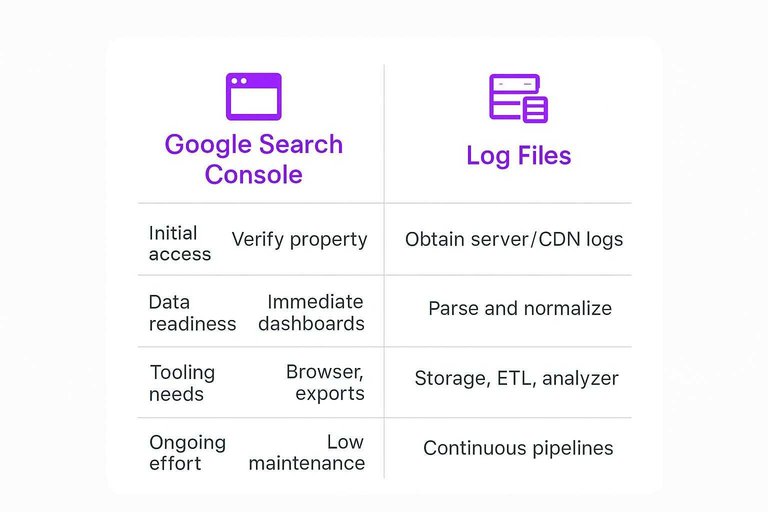
| Factor | Google Search Console | Log Files | Who owns it |
|---|---|---|---|
| Initial access | Verify property | Obtain server/CDN logs | SEO vs DevOps |
| Data readiness | Immediate dashboards | Parse and normalize | Analyst + engineer |
| Tooling needs | Browser, exports | Storage, ETL, analyzer | Data/engineering |
| Ongoing effort | Low maintenance | Continuous pipelines | Shared ownership |
| Typical blockers | Verification, permissions | Privacy, retention, volume | Legal + IT |
If you can’t sustain the pipeline, log files become a one-off audit, not a system.
Use-Case Matchups
Pick the tool that matches the failure mode you’re chasing. GSC tells you what Google decided. Log files tell you what Googlebot actually did.
When stakes are high, run both. Disagreement is usually where the issue lives.
Technical audits
Technical audits fail when you trust one viewpoint. GSC is outcome-focused, while logs are behavior-focused.
For redirects and status codes, start with logs to see real Googlebot hits and response patterns. Use GSC after to confirm which URLs Google still surfaces and flags.
For canonicals and hreflang, start with GSC to see Google’s selected canonical and hreflang processing signals. Validate with logs to confirm Googlebot is crawling the right variants and not getting trapped.
For crawl budget questions, logs win because they show crawl frequency, spikes, and wasted fetches by path and parameter. Use GSC to spot the symptoms, like “crawled — currently not indexed.”
When the question is “what did Google do,” GSC leads. When it’s “what happened on my server,” logs lead.
Indexing investigations
Indexing is a pipeline. GSC shows the pipeline status, while logs prove the handoffs actually occurred.
- Discovery: Use GSC sitemaps and URL Inspection for known URL discovery signals.
- Crawl: Use log files to confirm Googlebot requests and response codes.
- Render: Use GSC URL Inspection for render and page resources clues.
- Index: Use GSC Indexing reports to see Google’s chosen outcome.
- Re-crawl: Use logs to confirm repeat visits after fixes and internal linking changes.
If logs show crawling but GSC shows non-indexing, your problem is usually content, canonicals, or duplication.
Migration monitoring
Migrations break in two places: what users see and what bots get. GSC catches the search-side impact, while logs catch the routing mistakes.
- Pre-launch: Export GSC queries, pages, and index coverage as a baseline.
- Pre-launch: Pull log samples for top URLs to baseline crawl patterns.
- Launch day: Watch logs for 404s, redirect chains, and bot access blocks.
- Launch day: Watch GSC for indexing spikes, canonical flips, and sitemap errors.
- Post-launch: Compare logs crawl focus versus GSC indexed pages and performance trends.
Your fastest save is usually in logs. Your biggest risk shows up later in GSC.
Content pruning decisions
Pruning is easy to get wrong because “low clicks” is not the same as “low value.” GSC measures demand and visibility, while logs measure Googlebot attention.
Use GSC to identify pages with sustained low impressions, weak query coverage, or irrelevant intent. Then check logs to see if Googlebot still crawls those URLs frequently, especially after internal links or sitemap inclusion.
If a page gets crawled often, Google still thinks it might matter. Redirect, consolidate, or improve it before you delete it. For a broader framework on deciding what to keep, fix, or remove, see this complete SEO guide.
Common Misreads To Avoid
Most bad SEO fixes start with a correct report and a wrong interpretation. Read the signals like a diagnostic panel, not a verdict.
GSC report pitfalls
GSC is an index and reporting view, not a replay of every crawl. Treat it like a product dashboard with sharp edges.
- Panicking over “Excluded” without reading the exact reason
- Calling “Duplicate” an error when canonicals are doing their job
- Trusting impressions as demand, not just visibility and sampling
- Treating Coverage as a crawl log or request-level truth
Use GSC to choose hypotheses, then verify with request-level evidence.
Log analysis pitfalls
Logs feel like ground truth because they look raw. They still lie by omission, aggregation, and infrastructure.
- Counting all bots instead of verified Googlebot user-agents
- Ignoring CDN and cache layers that never reach origin logs
- Missing subdomains and hosts stored in different log streams
- Assuming crawl automatically means indexability or ranking impact
If you can’t map a request to a URL state, you’re measuring motion, not progress.
Reconcile with testing
When GSC and logs disagree, force a tie-break with direct tests. You want one URL, one response, one rendering outcome.
URL Inspection shows what Google says it indexed and why. Pair that with a live HTTP header check, a render test, and a controlled recrawl after a single change.
If your tests don’t change the observed state, stop shipping fixes and change the hypothesis.
Choose Your Primary Lens, Then Cross-Check the Rest
Use Google Search Console when your question is about Google’s reported outcomes—indexing status, search performance, and surfaced coverage signals—and use log files when your question is about raw crawler behavior—what hit the server, how often, and with what response. If the tools disagree, treat it as a lead, not a verdict: validate with live tests (HTTP status checks, rendering, and URL inspection) and confirm whether the discrepancy is timing, aggregation, or bot identification. The fastest path to the real issue is picking the right starting point and then reconciling the story with a second source.
Frequently Asked Questions
- Is Google Webmaster Console the same thing as Google Search Console in 2026?
- Yes—“Google Webmaster Console” is the old name for Google Search Console (GSC). Most guides and tools still use the terms interchangeably, but the product is now officially Google Search Console.
- Can Google Search Console replace server log file analysis for technical SEO?
- No—GSC shows what Google reports (indexing, coverage, performance), while log files show what actually hit your server (all bots, status codes, crawl paths). For crawl behavior, bot traps, and response anomalies, logs fill gaps GSC can’t see.
- Why do my log files show Googlebot crawling URLs that don’t appear in Google Search Console?
- GSC usually reports a curated subset of URLs tied to Google’s indexing systems, while logs record every request your server receives. Those extra URLs often come from internal links, parameter combinations, redirects, sitemaps, or legacy URLs that Googlebot is testing or rechecking.
- How do I connect Google Search Console data with log file insights without overcomplicating it?
- Start by matching on URL and timestamp windows, then compare patterns: GSC for indexing outcomes and query/page performance, logs for crawl frequency, status codes, and bot behavior. Keep a shared “URL inventory” (canonical, redirect targets, parameter rules) so both data sources map to the same set of pages.
- Should I prioritize fixing Google Search Console warnings or issues found in log files first?
- Fix issues that block access or indexing first (persistent 5xx/4xx on important URLs, redirect loops, canonical mistakes), then tackle crawl-efficiency problems revealed in logs (bot traps, infinite parameters). Use GSC to confirm whether the fixes changed indexing and visibility for the affected pages.
Turn Insights Into Rankings
GSC and log files can show you what’s broken, but fixing patterns consistently still takes steady, optimized publishing and technical follow-through.
Skribra turns those findings into daily SEO-ready articles with keyword targeting, meta descriptions, and one-click WordPress publishing—plus a backlink exchange network. Start with the 3-Day Free Trial.
Written by
Skribra
This article was crafted with AI-powered content generation. Skribra creates SEO-optimized articles that rank.
Share: