June 3, 2026
·
10 min read
Set up an AI SEO platform for WordPress
A step-by-step guide to setting up an AI SEO platform for WordPress—from blueprint to publishing—covering core components and data flow, WordPress and SEO plugin configuration, keyword/SERP tooling and briefing, AI writing and editing safeguards, and practical WordPress AI integrations for a reliable workflow.

If your WordPress SEO process feels like a pile of disconnected tools, the hardest part isn’t “using AI”—it’s building a system you can trust. Without clear inputs, guardrails, and a repeatable workflow, you’ll get inconsistent briefs, messy drafts, and pages that don’t match your site structure.
This guide walks you through a complete AI SEO setup: a platform blueprint, a solid WordPress foundation, plugin defaults that prevent metadata chaos, keyword and SERP tooling that feeds better briefs, and AI integration paths that take you from research to publish without losing control.
Platform blueprint
Your AI SEO platform is a workflow, not a tool pile. It starts with research, ends with measurable updates, and runs through WordPress every day.
“Done” looks boring and repeatable: a brief, a draft, clean on-page work, intentional internal links, and a report you trust.
Core components
You want one stack that covers creation, optimization, and feedback. If any piece is missing, you’ll ship guesses.
- WordPress as publishing and workflow hub
- SEO plugin for schema, titles, and indexing controls
- AI writer for drafts, rewrites, and FAQ blocks
- Keyword research tool for topics and intents
- Crawler for technical and internal link audits
- Analytics plus events for page performance
- Rank tracker for query-level monitoring
When these tools agree on URLs and page titles, your system becomes maintainable.
Data flow
Decide what moves where, and in what format. Otherwise your “platform” becomes copy-paste and lost context.
Keywords and SERP notes become a content brief with intent, angle, and page type. That brief feeds the AI draft, then you push the draft into WordPress with headings, images, and a source-of-truth URL.
From WordPress, you generate metadata in the SEO plugin, add internal links based on your crawl map, and publish with indexation rules set. After launch, analytics and rank tracking feed back into an update queue tied to the same URL and primary query.
If the URL is stable, the learning loop stays intact.
Tool selection criteria
Pick tools that reduce handoffs. Your goal is fewer tabs, fewer exports, and fewer “who owns this?” moments.
- API access for automation and syncing
- Clean exports for briefs and reports
- Pricing that matches publishing volume
- Permissions that fit team roles
- Deep WordPress integration, not just a plugin
The best tool is the one your process can rely on every week.
Minimum viable setup
Start with the smallest setup that can publish and learn. Fancy features are useless without a feedback loop.
Use WordPress plus one solid SEO plugin to control titles, meta, canonicals, and schema. Add one keyword research source to create briefs, then use an AI writer to produce drafts that you edit into your brand voice.
For measurement, connect analytics and a simple rank tracker to the same URL list. Run a lightweight crawl occasionally to catch broken links, thin pages, and orphaned posts.
Once you can update one URL based on real performance data, you’re ready to scale.
WordPress foundation
Configure WordPress so it stops creating SEO problems before you add any AI layer—especially if you plan to publish at a steady cadence with an AI workflow like Skribra. If you need a deeper checklist, see this SEO guide for WordPress. If you’re new to the concept, start with AI SEO platform basics for beginners.
- Set your site to public: Settings → Reading → uncheck “Discourage search engines.”
- Confirm one canonical URL: enforce HTTPS and pick www or non‑www via redirects.
- Set clean permalinks: Settings → Permalinks → “Post name,” then save.
- Configure basics: set Site Title, Tagline, and a sensible timezone.
- Remove duplicate paths: stop auto‑creating thin tag, archive, and attachment pages you won’t use.
Do this first, or your AI will optimize confusion at scale—then even well-formatted, SEO-minded posts pushed directly into WordPress can end up amplifying the wrong signals.
SEO plugin configuration
Pick one plugin and commit to it. Rank Math and Yoast both cover the basics, but mixed settings create silent conflicts. Your goal is predictable metadata, clean schema, and safe crawl controls.
Metadata defaults
Metadata defaults prevent empty titles and messy snippets. They also stop thin pages from leaking into the index.
- Set title templates for posts, pages, and taxonomies.
- Set description templates with excerpt or custom field fallbacks.
- Choose one separator and use it everywhere.
- Set archive rules, including author and date archive behavior.
- Noindex thin pages like tags, search, and attachments.
Once templates are stable, your editors stop “fixing SEO” in every single post.
Schema setup
Schema should match what your site really is, not what looks impressive. Configure it once, then validate so you can trust it.
Set your site identity as Organization or Person, including logo and social profiles. Pick a default Article type for posts, then override only when you truly publish NewsArticle or BlogPosting variants. Enable breadcrumbs schema and ensure it matches your visible breadcrumb trail. Validate key templates using Google’s Rich Results Test, then fix issues at the template level.
If the test fails on one template, it fails at scale.
Sitemaps and robots
Sitemaps help discovery, while robots rules prevent waste. Handle both carefully because “hide” and “block” are different.
- Enable XML sitemaps for posts and pages.
- Exclude low-value types like tags, media attachments, or test CPTs.
- Set sitemap limits so large sites split automatically.
- Use meta robots for noindex, not robots.txt.
- Keep robots.txt minimal unless you know the crawl impact.
If you block crawling, Google can still index a URL without seeing content.
Integrations
Plugin integrations reduce setup friction, especially for verification and basic reporting. They are helpful, but they are not always the source of truth.
Connect Google Search Console for site verification and performance data inside WordPress. If the plugin offers an analytics module, treat it as a convenience dashboard, not your canonical tracking implementation. Prefer native tags or Google Tag Manager when you need full control, consent mode, or multi-tool routing. Keep one owner for verification and one place where tags are managed.
Convenience is great until you need debugging, and then “simple” becomes opaque.

Keyword and SERP tooling
Your AI briefs are only as good as your inputs. Pick research and SERP tools that export clean data and map to your WordPress workflow.
Research tool options
Choose tools based on how they collect data and how easily you can move it. You want repeatable exports that your clustering and brief steps can consume.
| Tool | Dataset focus | Clustering support | Export friendliness |
|---|---|---|---|
| Ahrefs | Backlinks, keywords | Limited, manual | Strong CSV |
| Semrush | Keywords, SERP features | Built-in tools | Strong CSV/API |
| LowFruits | Low-competition SERPs | Basic grouping | Simple exports |
| Google tools | Real queries, trends | None native | Manual, limited |
If your exports are messy, your briefs will be messy too.
For automation and cleaner exports at scale, it helps to review the Semrush API capabilities before you commit to a tooling stack.
Keyword clustering
Clustering turns a keyword dump into a publishable plan. It also prevents two WordPress pages from fighting each other.
- Export keywords with volume, difficulty, and SERP notes.
- Group by shared meaning, not just shared words.
- Assign one primary term and 3–8 secondary terms per cluster.
- Decide one page per cluster, unless intent clearly splits.
- Name the page using intent, like “how to” or “best”.
If you can’t name the intent, you don’t have a cluster yet.
SERP extraction
SERPs tell you what Google already accepts for an intent. Extract patterns, then feed them into your AI brief template.
- Capture top titles and rewrites.
- List recurring H2 topics and order.
- Note content types: guide, list, tool.
- Record gaps: missing steps, missing examples.
- Collect cited sources and definitions.
When the top pages agree on structure, treat it like a spec.
Brief template
A reusable brief keeps quality stable when you scale content. Build it once, then populate it from your keyword cluster and SERP extraction.
Include: target intent, audience, angle, required sections, key entities to mention, internal links to add, FAQs to answer, and sources to cite. Also add a “do not do” box for common SERP mistakes, like thin intros or vague definitions.
Your template is the contract between research and writing.
AI writing and editing
An AI assistant can speed up drafts, rewrites, and SEO formatting. Your job is keeping voice, standards, and constraints intact.
Subsections: [
{
“subheading”: “Model and workspace”,
“content”: “Pick one primary model and treat it like a staff writer with a style guide. You want predictable output, fewer debates, and repeatable edits.\n\nSet workspace rules: brand voice, forbidden claims, required structure, and source expectations. Add guardrails like "no invented stats" and "flag uncertainty," plus SEO constraints like title length and internal link targets.\n\nThe tool matters less than the operating rules you enforce every time.”,
“description”: “Choose ChatGPT/Claude/Gemini and set up project instructions, voice rules, and content guardrails.”
},
{
“subheading”: “Prompt library”,
“content”: “Build a small set of prompts you can reuse across posts. Consistency beats clever prompts.\n\n- Generate an SEO outline from a keyword and intent\n- Draft section-by-section with voice and constraints\n- Rewrite for clarity without changing meaning\n- Produce title tags and meta descriptions\n- Suggest FAQs and JSON-LD schema candidates\n\nWhen prompts are assets, editing stops feeling like roulette.”,
“description”: “Build prompts for outline, draft, refresh, meta tags, FAQ, and schema suggestions.”
},
{
“subheading”: “Plagiarism and accuracy”,
“content”: “AI errors are usually process errors. Add checks before content touches WordPress.\n\n1. Require sources for any factual claim or number.\n2. Verify claims against primary sources, then log URLs.\n3. Run a plagiarism scan on the final draft.\n4. Check for brand-risk items: medical, legal, financial advice.\n5. Confirm quotes, dates, names, and product specs match sources.\n\nIf you can’t verify it, rewrite it as an opinion or remove it.”,
“description”: “Add fact-check steps, citation requirements, and a verification checklist before publishing.”
},
{
“subheading”: “Content optimization layer”,
“content”: “Optimization tools help you match search intent without stuffing keywords. Use them after the draft, not before.\n\nRun the content through Surfer, Frase, NeuronWriter, or your plugin’s scoring—and consider <a href="https://skribra.com/blog/7-ai-ranking-mistakes-costing-you-organic-clicks">AI ranking mistakes that cost clicks when building your stack. Adjust H2s, missing subtopics, term coverage, and readability while keeping your editorial bar and real-world usefulness.\n\nTreat scores as diagnostics, not a definition of "good."\n\n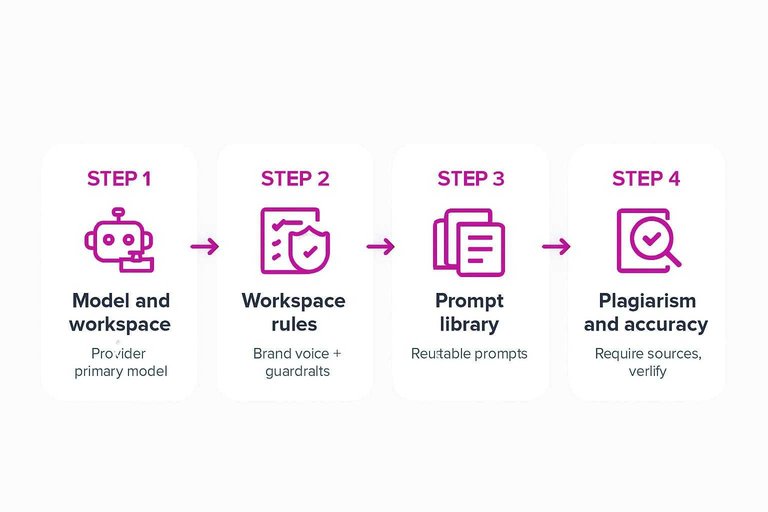 \n\n”,
“description”: “Use Surfer/Frase/NeuronWriter or plugin scoring to align headings, terms, and readability.”
}
]
WordPress AI integration
You need a clean bridge between AI output and WordPress. Otherwise, drafts get stuck in docs, chats, or someone’s desktop.
Treat WordPress as the source of truth. Everything else should feed it in a repeatable way.
Integration paths
Pick the path that matches your volume and tolerance for maintenance. The goal is predictable publishing, not clever plumbing.
| Path | Best for | Strength | Tradeoff |
|---|---|---|---|
| Native block editor | Low volume | Fewer moving parts | More manual work |
| AI WordPress plugins | Fast setup | In-editor generation | Vendor constraints |
| Zapier / Make | Simple automation | No-code routing | Limited edge cases |
| WP-REST API scripts | Full control | Custom workflows | Engineering upkeep |
Choose the simplest path you won’t outgrow in two months.
Custom fields mapping
AI output is only useful when it lands in the right WordPress fields. Mapping upfront prevents endless cleanup later.
- Define your brief fields and allowed values, including defaults.
- Map fields to WP: title, slug, excerpt, categories, and tags.
- Map media: featured image source, alt text, and caption rules.
- Map structured data to your SEO plugin fields, or post meta keys.
- Validate required fields before a post can move to Review.
Once mapping is strict, your editors stop doing data entry and start improving content.
Publishing workflow
Define who touches what, and when. Clear handoffs beat heroic saves.
A simple pattern works well: draft → review → optimize → schedule → publish. Keep “optimize” separate so SEO changes don’t restart editorial debates.
If approvals feel slow, tighten the checklist, not the people.
Media generation
Images break workflows when they’re inconsistent, heavy, or missing rights context. Decide your media rules once, then automate enforcement.
- Choose sourcing: stock library, in-house, or generative, with usage rules.
- Generate or assign alt text from the page’s primary intent.
- Compress and convert on upload, using consistent formats and sizes.
- Push delivery through a CDN, with cache rules that fit updates.
- Fail safely: publish with a placeholder if image generation fails.
Media is where “AI content” looks amateur or professional.
Launch Your First End-to-End Workflow
- Lock the blueprint: choose your core stack, define data flow, and document a minimum viable setup you can run weekly.
- Harden WordPress: fix performance basics, permalink/taxonomy rules, and editorial roles so automation doesn’t create structural debt.
- Configure SEO defaults: metadata templates, schema rules, sitemap/robots logic, and integrations so every new URL starts clean.
- Build the research-to-brief pipeline: keyword clustering, SERP extraction, and a brief template that maps intent to a target URL.
- Add AI with guardrails: prompt library, factuality checks, plagiarism/duplication controls, and an optimization pass tied to on-page requirements.
- Connect to publishing: map custom fields, standardize drafts → review → publish steps, and only then automate media and posting.
Frequently Asked Questions
- Is an AI SEO platform the same as an SEO plugin like Rank Math or Yoast?
- No—an SEO plugin handles on-page controls inside WordPress (titles, schema, sitemaps), while an AI SEO platform usually adds research, content planning, drafting, and workflow automation across multiple tools.
- Do I need Google Search Console and GA4 if I’m using an ai seo platform?
- Yes. Connect Google Search Console for queries, impressions, and index coverage, and GA4 for engagement and conversions so your AI briefs and content decisions are grounded in real performance data.
- How do I measure whether my ai seo platform is actually improving SEO?
- Track GSC clicks/impressions, average position on priority queries, pages indexed, and changes in organic landing-page traffic in GA4, then review outcomes by content cluster rather than single posts.
- How do I prevent AI-generated content from causing duplicate or thin content issues on WordPress?
- Use unique SERP-informed outlines, add original examples/data where possible, and run a final human edit for accuracy and differentiation before publishing; also avoid generating multiple near-identical pages targeting the same intent.
- What’s a good alternative if I don’t want to stitch together multiple tools into an ai seo platform?
- Use a single end-to-end system that can draft, optimize, and publish to WordPress with a consistent workflow; for example, Skribra focuses on SEO-optimized article generation with WordPress publishing to reduce tool sprawl.
Automate Your WordPress SEO Stack
Once your blueprint, plugins, and tooling are in place, the real bottleneck becomes producing optimized content consistently without draining your team’s time.
Skribra generates and publishes SEO-optimized articles directly to WordPress, complete with keywords, meta descriptions, and formatting—plus automatic images and backlinks. Get started with the 3-Day Free Trial.
Written by
Skribra
This article was crafted with AI-powered content generation. Skribra creates SEO-optimized articles that rank.
Share: