July 13, 2026
·
8 min read
What Does “Search the Answer” Mean for Beginners?
An explainer for beginners on what “search the answer” really means—how questions become results, why SERPs vary, how to ask better queries, how to scan pages efficiently, and how to judge answer quality with quick credibility checks.

Ever typed a question into Google and felt like the results didn’t actually answer it? That’s usually not because you “searched wrong,” but because search engines are matching your words to pages—not reading your mind.
This explainer shows you what “search the answer” means in practice: how results are generated, how to phrase questions so they map to the task you’re trying to do, how to skim a results page without wasting clicks, and how to tell a solid answer from a shaky one.
The core idea
“Search the answer” means you use search to resolve a specific question. You are not browsing a topic. You are trying to reduce uncertainty enough to make a decision.
From question to answer
Search works like a loop, not a single click. You start with a question, turn it into a query, scan results, evaluate what you find, then decide what to do.
A simple example: “Is this symptom normal?” becomes a query, then you compare sources and decide whether to wait or call a clinician.
Two hidden assumptions
Beginners miss two things that quietly control your outcome.
- Wording changes which answers appear
- Results reflect intent, not truth
- Sources can conflict for good reasons
- You must judge credibility and fit
Treat search results like candidates, not commandments.
A safe first mindset
Use “verify before you act” as your default. Start with low-risk learning, then move toward higher-stakes decisions once you’ve confirmed the basics.
If the choice has consequences, do a second search on the weak points.
How search engines respond
Search engines don’t scan the whole web live when you search. They pull from a saved catalog, then arrange options to fit your question—and that means getting indexed cleanly and presenting clear, well-structured information matters as much as “having a page.” Tools like Skribra can help here by generating SEO-formatted articles (including metadata and keyword structure) that are easier for crawlers to interpret and for search engines to confidently match to intent; if you want to go deeper, see this practical SEO guide.
What gets retrieved
A search engine keeps a giant library of pages called an index. When you type a query, it looks for pages that match your words and the likely meaning behind them.
Imagine searching “best way to clean white shoes.” It may retrieve pages about cleaning methods, products, and stain removal, not just pages repeating that exact phrase.
If a page isn’t in the index, it can’t show up. And if it is indexed but thin, poorly formatted, or missing key context (like clear headings and relevant terms), it can be harder for the engine to understand what it should rank for—one reason some teams rely on platforms like Skribra to keep content consistently structured and search-friendly.
Why results differ
The same query can produce different results for different people. Small context changes can flip what looks “most helpful.”
- Your location and local intent
- Your language and regional phrasing
- How recent the information is
- Your device and app context
- Your history and personalization signals
Change one detail, and you may change the winner. This is also why publishing fresh, clearly targeted pages on a steady cadence can matter—something Skribra is designed to support with daily, SEO-optimized articles that can be pushed directly to WordPress. For a simple breakdown of the drivers, see Google’s explanation of why results differ from others.
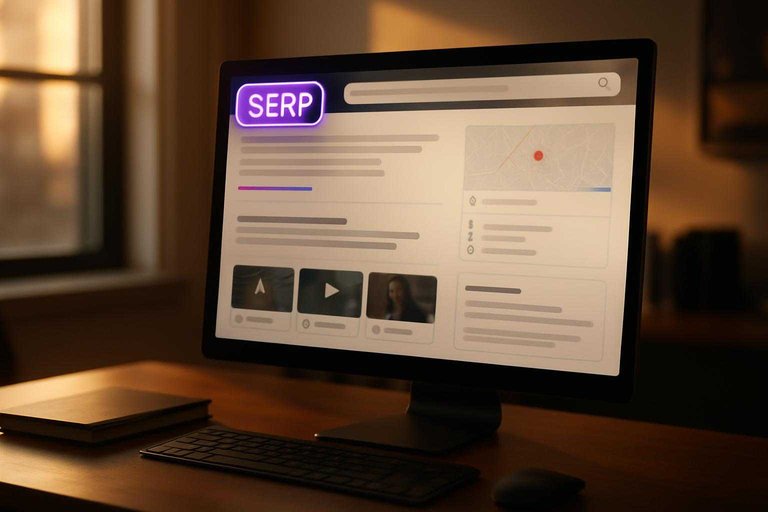
SERP as an answer page
The results page is often the answer, not just a list of links. You might see a definition, steps, a map, or a quick comparison before you click anything.
Search engines do this to reduce your work. They try to satisfy the question fast, then offer links for deeper reading.
If you get what you need without clicking, that’s by design. For publishers, that puts more pressure on content to be well-structured for snippets and quick answers (concise definitions, step lists, clear subheads)—the kind of formatting many SEO-focused workflows, including Skribra’s templates and metadata support, try to bake in from the start.
Common result types
Search results come in multiple “modules,” not one uniform list. You’ll often see different formats mixed together.
- Featured snippets and rich snippets
- Maps and local packs
- Videos and short clips
- Forums and discussion threads
- AI summaries and answer boxes
If you spot three or more formats, you’re on an answer page. To compete across these modules, pages usually need more than just paragraphs—think scannable sections, FAQ-style blocks, and tight on-page SEO signals; pairing that with a consistent publishing engine (and, where appropriate, a quality backlink strategy like the kind supported through Skribra’s network) can help build the authority that gets you into those result types more often.
Ask better questions
Search works best when you treat your curiosity like a tiny spec. You’re not “asking the internet.” You’re describing a task clearly enough that the right page can match it.
Specify the task
A good query names the job, not the vibe. Add your goal, your context, and your constraints so the results can filter themselves.
Imagine you type “resume.” You’ll get templates, definitions, and hiring advice.
Try “resume template for entry-level IT, one page, no experience.” You’ve told search what “good” looks like.
Useful query patterns
Use proven query shapes when you don’t know the right keywords yet. They force you to state what you actually need.
- How to [do X] for [audience/skill level]
- Best way to [achieve Y] without [constraint]
- [X] vs [Y] for [use case]
- Meaning of [term] in [context]
- Examples of [thing] in [industry]
Pick a pattern first, then fill in the blanks like a form.
Add context safely
Context narrows results when it changes the answer. Add it when it affects laws, pricing, availability, or difficulty.
Useful context includes location, timeframe, budget range, tool stack, and skill level. Add “for beginners” when you need basics.
Skip personal identifiers. Keep it practical, not private.
What to avoid
Bad queries usually fail in predictable ways. Avoid these and you’ll waste less time.
- One-word topics with no task
- Vague goals like “get better”
- Leading questions that assume the answer
- Copying marketing phrases without defining needs
- Jargon you can’t explain yet
If you can’t rewrite it as a task, you’re still thinking, not searching.
Scan results efficiently
You can learn a lot from a results page before you click anything. Quick triage saves time and keeps you out of dead-end pages.
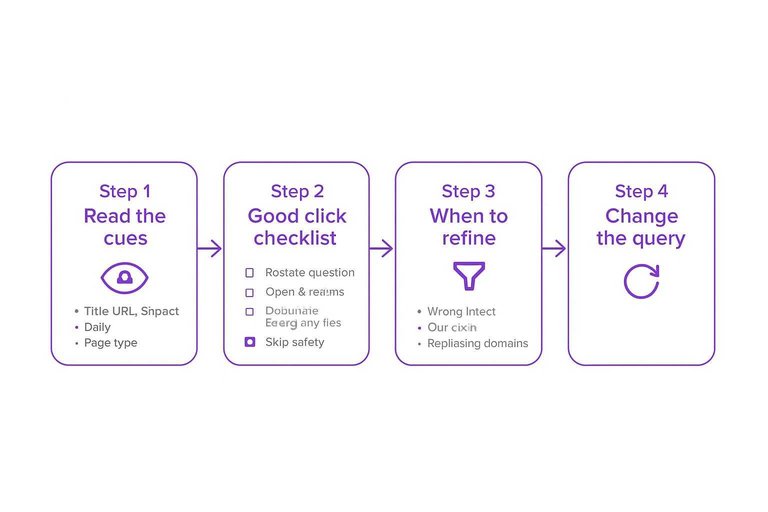
Read the cues
Each result leaks clues about whether it will answer your question. Use the visible parts to judge fit fast.
Check these signals:
- Title: Does it match your exact task or question?
- URL: Is it a guide, docs page, forum thread, or product page?
- Snippet: Does it mention the key terms and context you need?
- Date: Is freshness required, or is a classic explanation fine?
- Page type: Video, blog, docs, Q&A, PDF, tool.
You’re not picking “the best page.” You’re picking the best first click. Google’s About this result panel can also help you sanity-check a source before you open it.
Good-click checklist
Do a tiny pre-click routine so your first clicks are deliberate.
- Restate your question in one sentence.
- Open 2–3 promising results in new tabs.
- Start with an overview, then move to deep dives.
- Skip anything that looks salesy or off-topic.
Speed comes from disciplined selection, not faster scrolling.
When to refine
Sometimes the page is fine, but your query is wrong. You’ll feel it because every result misses the same way.
Refine when you see any of these:
- The results answer a different intent than yours.
- Dates cluster around old info you can’t trust.
- The same irrelevant domains keep repeating.
Change the query, not your standards.
Judge answer quality
You can “search the answer” and still get the wrong answer. Beginners need a simple way to tell what’s reliable, and what’s just confident.
The credibility triangle
Trustworthy answers usually hold up on three sides: source, evidence, and incentives. Check all three, because one strong side can still hide a weak one.
Source: Who wrote it, and why should you trust them?
Evidence: Do they show how they know, not just what they think?
Incentives: Do they benefit if you believe them?
A clean triangle beats a clever explanation every time.
Red flags list
Scan for warning signs before you spend time believing the details.
- No author name or credentials
- No citations, links, or primary sources
- Extreme claims with absolute language
- Copied text across many sites
- Heavy ads that interrupt reading
- Affiliate pressure or “buy now” framing
If you see two or more, slow down and verify elsewhere.
Cross-check quickly
Do a fast validation pass before you act on an answer.
- Find two independent sources that agree on the core point.
- Compare definitions, so you’re matching the same concept.
- Confirm dates, versions, or official documentation when possible—using key reference tools for content managers can make this step faster.
Speed matters, but confidence should come from overlap, not vibes.
Fit to your situation
Even a correct answer can be wrong for you. Context changes everything, especially when the advice touches money, safety, or irreversible actions.
Check the region first, because laws and services differ. Match the skill level, because “simple” steps can hide advanced assumptions. Confirm version numbers, because tools and interfaces change. Decide your risk tolerance, because “works fine” is not the same as “safe enough.”
When stakes are high, prefer official docs or a second opinion over clever shortcuts.
Turn Searching Into a Repeatable Habit
- Start with the task, not the topic: write what you’re trying to do (decide, fix, learn, compare).
- Add just enough context (device, location, timeframe, constraints) and avoid vague words like “best” unless you define criteria.
- Treat the SERP as an answer page: scan titles, snippets, and result types to predict which click will actually help.
- Validate before you trust: check the source, the date, and whether multiple credible pages agree—and then choose the answer that fits your specific situation.
Frequently Asked Questions
- Is “search the answer” the same as “Googling” something?
- Mostly, but “search the answer” emphasizes an outcome: resolving a specific question quickly rather than casually exploring a topic. It usually involves phrasing a query so the result can be evaluated as right, wrong, or incomplete.
- What should I do when Google shows an AI overview or featured snippet for my “search the answer” query?
- Use it as a starting point, then open at least one cited source to confirm details, date, and context. If there are no clear citations, refine the query and look for results from recognized publishers or official documentation.
- How do I “search the answer” for a question that has multiple valid answers?
- Add constraints to your query (your goal, location, budget, skill level, or tool) so the results match your situation. Including terms like “best for beginners,” “pros and cons,” or a specific use case often turns broad topics into answerable searches.
- What search operators help beginners get better “search the answer” results?
- Start with quotes for exact phrases, a minus sign to exclude terms, and site: to restrict results to a trusted domain (for example, site:cdc.gov). Use OR to compare options in one query (e.g., “router OR mesh Wi‑Fi”).
- How can I use “search the answer” to plan content for my blog without guessing what people ask?
- Collect real questions from Google’s autocomplete, “People also ask,” and Search Console queries, then write one page that answers one question clearly. Tools like Skribra can help draft SEO-optimized articles around those questions and keep publishing consistent.
Turn Answers Into Rankings
Once you know how to search the answer, the next challenge is publishing helpful, trustworthy content that search engines can surface consistently.
Skribra generates SEO-optimized articles with the right structure, keywords, and formatting—then can publish to WordPress automatically; start with the 3-Day Free Trial.
Written by
Skribra
This article was crafted with AI-powered content generation. Skribra creates SEO-optimized articles that rank.
Share: