September 3, 2026
·
11 min read
9 Best Organic Traffic Analytics Tools in 2026
A 2026 pick-the-right-tool collection that settles “which organic traffic number should you trust?” — clicks vs sessions, organic vs direct, Google Search Console and Bing Webmaster Tools for queries, GA4/Matomo/Plausible for sessions and attribution, and Ahrefs Site Explorer/Similarweb for competitor estimates so each tool is chosen by the measurement problem it actually solves.

You’re trying to answer a simple question: how much traffic is coming from search—and what it’s doing for your business.
The obvious workflow (open one report, copy one number) breaks fast: “organic” can mean queries, visits, or estimated clicks, and the totals won’t line up across platforms. Get it wrong and you’ll chase the wrong pages, defend the wrong KPI to clients, or misread a competitor’s momentum. This guide ranks the best organic traffic analytics tools by the exact question you’re asking, and shows quick two-tool checks to verify the answer.
Define organic traffic
Before you pick an “organic traffic” tool, decide which system’s definition you’re using. Google Search Console is built around Google Search performance (queries, impressions, clicks), while GA4 is built around on-site behavior grouped into sessions and channels. Most measurement arguments start when you expect those two worldviews to produce the same number.
Clicks vs sessions
Google is explicit that Search Console and Google Analytics use different metrics and systems, so organic-search data won’t match completely. When you do compare them, Google calls Search Console Clicks vs GA4 Sessions the “most comparable” pair—but they still drift for specific reasons like consent and cookies, timezone differences (Search Console dates are Pacific Time by default), canonical URL reporting differences, and bot filtering. Treat the question as “do trends align?” rather than “do totals match?”
See Google’s guidance on using Search Console and Analytics together.
Organic vs direct
In GA4, “Organic Search” and “Direct” are channel definitions, not vibes.
- Organic Search: non-ad links in organic-search results
- Organic Search: includes AI Overviews and AI Mode
- Direct: arriving via a saved link
- Direct: entering your URL
- GA4 default channel group: can’t be edited
Interface gotchas
If you don’t account for these UI limits, you’ll “disprove” your own organic traffic numbers by accident.
- Search Console can omit queries for privacy (anonymized)
- Search Console tables can truncate to “most important” rows
- Bulk data export gives the most complete query list
- GA4 retention doesn’t change standard reports
- GA4 retention changes explorations and funnels
Where teams disagree
Organic traffic tool choices fail when two teams expect one “real” number, one “real” keyword list, or one “real” competitor baseline.
Which number is real
One camp expects Search Console and analytics to reconcile into a single organic traffic total, because reporting needs one scoreboard. The other camp follows Google’s posture: Search performance and on-site analytics are different systems, so you compare them deliberately instead of forcing a match. Do the comparison the way Google’s own Looker Studio template does on the GA side—limit it to sessions where Session source = google and Session medium = organic—then sanity-check trend alignment against Search Console clicks and treat persistent gaps as an instrumentation question, not an SEO “performance” story.
Competitor estimates usable
Some teams reject competitor organic traffic numbers as “too inaccurate,” and they’re right if you treat them like GA-style measurements. Directional teams treat them as methodology-based models: useful for comparisons, not for owned-property truth.
Not provided in 2026
The “not provided” fight is old, but it still changes tool choice: in 2012, Google stopped sending search terms in the Referer header for clicks from Google Search. That’s why analytics products show blanks like Matomo’s “Keyword not defined” when the search engine doesn’t pass the keyword. The modern workaround is integration, not recovery—tools surface queries by pulling Search Console data, and Semrush’s Organic Traffic Insights explicitly positions itself as a “not provided” solution by combining GA, Search Console, and Semrush data to list keywords driving organic traffic to top pages.
For context on why keyword terms disappeared, see Plausible’s notes on the Google Search Console integration.
Tool stack shortcut
Use this as a “two-systems check”: answer the question once, then reproduce it in a second place fast. If you need a refresher on the underlying concepts, see this SEO guide for key metrics.
| Question you’re answering | Fastest tool pairing | Reproduce it in | Why it works |
|---|---|---|---|
| Competitor organic traffic baseline | Ahrefs Site Explorer + Similarweb | Click model vs visits | Rank+volume+CTR curve |
| Competitor Organic Search share | Similarweb API + Ahrefs | Channel visits vs clicks | Desktop visits by channel |
| Bing query CTR by position | Bing Webmaster Tools + API | UI drilldown + export | CTR = clicked impressions |
| Recover “not provided” terms | Plausible + Search Console | Site stats + query terms | Search terms removed 2012 |

Query-level winners
When organic traffic dips, the fastest diagnosis starts at the query and ends at the page. These tools are best when you need to answer three questions: which queries moved, which URL won (or lost), and whether position changed or behavior changed.
Google Search Console
Use this workflow when you need the cleanest query → page → position story Google will give you.
- Open the Search Console Performance report and set the date range you’re comparing.
- Apply the branded/non-branded query filter to keep the comparison consistent across the same 16-month history window (Google introduced this filter in March 2025).
- Add the metrics you’ll diagnose with: clicks, impressions, CTR (clicks ÷ impressions), and average position (where 1 is the topmost position).
- Switch between Queries and Pages, then click into a single query to see which page is getting the clicks.
- Export the report (or use the Search Console bulk data export) so you’re not limited to the UI’s “top rows” view.
Note: export helps with UI truncation; anonymized queries are still withheld for privacy in Search Console reporting, so focus on what’s actually exposed and trend it consistently over time.
(If you can’t reproduce the same query list twice, you’re not diagnosing—you’re browsing.)
Definitions for clicks, impressions, CTR, and position are in Search Console Help.
Bing Webmaster Tools
Use Bing’s Search Performance report when you want query performance outside Google, with position-level detail you can drill into.
- Read impressions, clicks, and average CTR in Search Performance.
- Expect a short delay before data appears after you add a site.
- Click a keyword to see performance by results position.
- Use the position view to spot “ranked-but-not-clicked” queries.
- Re-check after changes that could affect snippet relevance.
Semrush Traffic Insights
This workflow is for turning query lists into page-level work you can assign.
- Connect Google Analytics and Google Search Console inside Semrush Traffic Insights.
- Pull the report that ties queries to the pages they land on.
- Sort by your top-performing pages first, then review the query set attached to each page.
- Export the page → query list so you can track fixes and re-check later.
Two-tool check
Query tools tell you what moved in search results; analytics tools tell you what changed after the click. When you see a slipping query in Search Console, take the landing page that used to win and open the equivalent page view in GA4 to confirm whether session behavior shifted on that same URL (or whether the problem is mostly rank/CTR).
That’s the difference between a ranking problem and a page problem.
Sessions and attribution
Sessions are where organic traffic turns into on-site behavior you can attribute to signups, leads, or sales. In 2026, most “SEO analytics fights” here come from reporting mechanics: channel rules, retention windows, and missing keywords.
Google Analytics 4
Use this workflow when you need Organic Search sessions and conversion attribution in one place.
- Open Reports → Acquisition → Traffic acquisition and set your date range.
- Filter to Session default channel group = Organic Search (this includes AI Overviews/AI Mode), and treat that definition as fixed because the default channel group can’t be edited.
- Add your conversion context by viewing key events alongside sessions in the same report.
- When you switch to Explore (or build funnels), check your property’s data retention setting first.
- Pick 2 months or 14 months retention based on how far back your analysis needs to go; retention affects explorations and funnels, not standard aggregated reports.
Google’s details on GA4 data retention for explorations and funnels clarify what’s impacted.
Matomo
If Matomo shows “Keyword not defined,” it’s not a tracking bug you can “fix” in Matomo. It means the search engine didn’t pass the keyword used by the visitor (keywords are hidden for privacy), so Matomo can only label it as undefined.
Shift the question from “which keyword?” to “which landing page from which search engine referrer?” and do your diagnosis at the page level instead of trying to recover terms that were never sent.
Plausible
Plausible stays honest about keyword visibility: it doesn’t pretend it can recover search terms that aren’t in the referrer.
- Integrate Google Search Console to see Search Console keyword terms.
- Use those terms to explain “not provided” organic sessions.
- Expect gclid/msclkid values to be stripped as unique identifiers.
- Pricing context: 100k monthly pageviews shows $9/month or $6/month.
Two-tool check
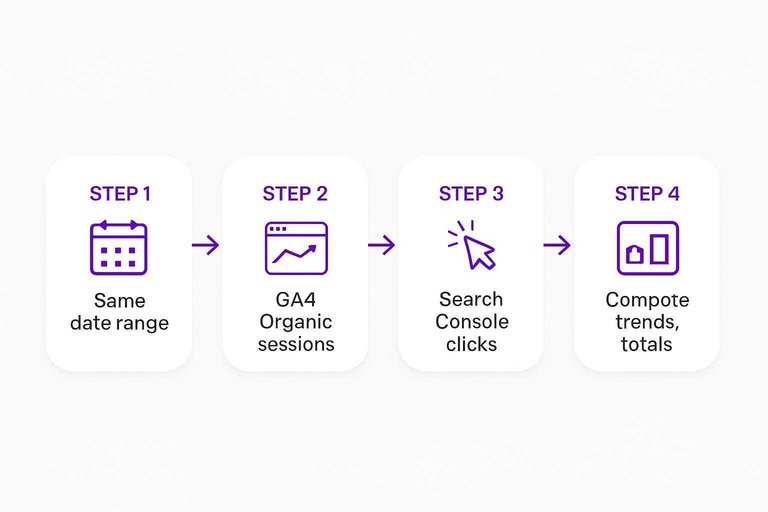
Run this when a sessions report and a search-performance report “disagree,” and you need to know if it’s real.
- Set the same date range in GA4 and Google Search Console.
- In GA4, pull Organic Search sessions for that range.
- In Search Console, pull Clicks for that same range.
- Compare trends first, then totals.
- If totals don’t match, check mechanics: Search Console dates are Pacific Time by default, plus any consent/cookie gaps and canonical URL reporting differences.
Dashboards and estimates
Agencies build dashboards to keep first-party and third-party “organic traffic” views in the same frame. The trick is to label every chart by its underlying system: sessions (analytics), clicks (search performance), or modeled estimates (benchmarking). This section is the reporting layer: a dashboard for truth, and estimators for context.
Looker Studio
Use Looker Studio when you need a client-facing view that keeps GA4 sessions and Search Console clicks side-by-side.
- Deploy Google’s Looker Studio template as your base report.
- In the GA4 portion, filter to Session source = google and Session medium = organic.
- Add a Search Console data source with clicks, impressions, and CTR.
- Put GA4 sessions and Search Console clicks on the same date control.
- Duplicate the report per property so every client starts from the same definitions.
Once this is stable, estimation tools stop “arguing” with your dashboard and start adding context.
Ahrefs Site Explorer
Ahrefs is the cleanest “directional baseline” when you need competitor benchmarking that’s explicit about being a model.
- Open Site Explorer and enter the competitor domain, subfolder, or URL you want to benchmark.
- Read Organic traffic as an estimate of how many clicks from Google the target gets each month.
- Treat the number as a rankings model: traffic per keyword is estimated from ranking position, monthly search volume, and an estimated CTR for that position.
- Remember the CTR isn’t one global curve; Ahrefs models the CTR curve separately for every keyword.
- Use it for competitor comparisons and directional deltas, not as a substitute for GA4/GSC on your own site.
Similarweb
Use Similarweb when you need channel-mix estimates and a visits-based benchmark, not a click model.
- Pull the traffic-sources overview-share API endpoint for estimated desktop visits by channel.
- Use the returned Organic Search visits as your channel benchmark.
- Keep the unit explicit: estimated desktop visits, not sessions or clicks.
- Pair it with click-estimate tools when you want visits vs clicks context.
Reality checks
Third-party “organic traffic” numbers are where teams either get disciplined or get loud: some treat them as unusable, others use them directionally because the tools document their modeling approach.
Use estimates for competitors only, and validate your owned-site trends in Search Console and GA4 before you tell a performance story. In every report, write the metric name in the chart title (for example: GA4 Organic Search sessions vs Search Console clicks vs Ahrefs estimated monthly Google clicks vs Similarweb estimated desktop visits from Organic Search), and keep a link to Google’s Search Console + Analytics guidance (last updated 2026-01-07) in the reporting notes so “why don’t these match?” doesn’t derail the meeting.
Verdict for 2026
An organic traffic analytics stack is viable when you treat search performance and on-site behavior as two ledgers, and you have an escape hatch out of the UIs when reporting needs get serious.
- Make “data portability” a non-negotiable: if your org needs reproducible reporting and joins to other data, plan around exports outside the UI (for example, Search Console’s bulk data export to BigQuery) instead of screenshots and saved views.
- For an SEO operator, the minimum combo is Google Search Console + Bing Webmaster Tools; add the Bing Webmaster API when you need repeatable, position-level pulls outside the UI.
- For a performance owner who’s accountable to outcomes, the minimum combo is GA4 (Organic Search sessions + key events) + one dashboard surface so the scoreboard doesn’t move every meeting.
- For an agency reporting layer, keep first-party charts (sessions and clicks) separate from competitor benchmarks, and label the unit on every chart so estimates don’t masquerade as measurement—especially if you’re also testing AI tools to boost organic traffic.
- For an analyst or data team, draw the line early: once questions turn into joins, cohorts, or recurring QA, move the canonical view to the warehouse and treat the product UIs as exploration tools.
Pick your “organic” question first, then validate it in two places
- Decide what you mean by “organic”: queries and rankings, sessions and attribution, or competitor benchmarks.
- Use the right source for the right layer: query-level questions live in search-engine performance tools; session and conversion questions live in analytics.
- Stop expecting one “real” total: Google explicitly notes Search Console and Analytics use different metrics and systems, so the numbers won’t match completely; the closest comparison is Search Console clicks vs Analytics sessions.
- Make every decision pass a two-tool check: reproduce the same question in two tools (e.g., page → query drivers, or channel → landing-page outcomes) before you ship a strategy or report a win.
Turn insights into rankings
Once you’ve picked your analytics stack, the next challenge is consistently shipping pages that match intent, avoid cannibalization, and keep improving with performance data.
Skribra runs an AI-driven SEO content system that builds a rolling 30-day content calendar, writes and publishes long-form posts, and updates live articles based on Search Console performance—plus a 3-Day Free Trial.
Written by
Skribra
This article was crafted with AI-powered content generation. Skribra creates SEO-optimized articles that rank.
Share: