June 19, 2026
·
9 min read
9 Google Search Console Costs Worth Knowing in 2026
A case-study-style breakdown of the real costs behind “free” Google Search Console—setup time, data limits, engineering bandwidth, content rework, and monitoring cadence so you can budget effort, avoid hidden bottlenecks, and judge ROI clearly.


Google Search Console doesn’t have a line item on your invoice, but it still charges you—through time, attention, and coordination. If GSC feels “free” yet your SEO work keeps stalling, the bill is probably showing up in your team’s calendar instead.
In this case study, you’ll see where those costs actually accumulate: how long setup really takes, what GSC can’t report, when engineering becomes the constraint, why content refreshes eat capacity, and how to right-size monitoring so insights turn into action.
Why GSC Isn’t Free
Google Search Console has no invoice, but it still spends your budget. The spend shows up as hours, tools, and delayed work elsewhere.
In 2026, the real question isn’t “Is GSC free?” It’s “What does it pull into motion?”
What “cost” means
Direct cost is what you pay for supporting tools, contractors, and training. Indirect cost is internal time spent collecting, cleaning, and explaining GSC data.
Opportunity cost is the work you don’t ship because GSC work took the slot. Risk cost is the downside of acting on weak signals, or ignoring strong ones.
Budget for effort and decision-quality, not just software.
Who pays most
GSC work rarely stays inside SEO. It leaks into every team that touches the site.
- SEO: audits, triage, reporting
- Dev: fixes, releases, regressions
- Content: refreshes, pruning, briefs
- Analytics: joins, QA, dashboards
- Legal/compliance: privacy and policy review
The biggest cost is coordination time, not clicks in the UI.
Cost-vs-benefit lens
You’re paying for better decisions, not prettier charts. Judge GSC work by how often it changes your next action.
Look for three signals: decisions improved, frequency of use, and impact on revenue-proximate KPIs like qualified traffic, leads, or sales paths. Keep it grounded in your funnel, even when the data is noisy.
If it doesn’t change a decision, it’s a hobby line item.
Cost 1: Setup Time
Google Search Console is free. Your setup time is not.
In 2026, the real cost is coordination across DNS, security, analytics, and vendors.
Property strategy
Your property choice decides what you can see, share, and migrate later. Pick wrong and you pay twice.
Domain properties are best for whole-brand coverage across subdomains and protocols. URL-prefix properties are useful for narrow scope, like a single path, but they fragment reporting.
For multi-country setups, decide whether you manage by ccTLD, subdomain, or subfolder, then mirror that in properties. If a migration is likely, choose the structure that will survive redirects and hostname changes.
Bad strategy creates invisible rework: every dashboard, permission, and export must be rebuilt. (See Google’s guidance on multi-regional and multilingual sites.)
Access and governance
Permissions work until the day they don’t, then it’s a fire drill.
- Define owners, admins, and day-to-day users
- Grant agency access with least privilege
- Set an offboarding path for leavers
- Keep a simple access audit trail
- Ensure ownership stays with the business
If ownership sits with a vendor, your “free tool” becomes a hostage situation.
Launch checklist
Do this once, cleanly, so you can trust every report later.
- Verify the right property type for your strategy.
- Submit XML sitemaps and confirm they process.
- Align canonical signals across templates and key pages.
- Connect analytics tooling, including GA alternatives or exports.
- Export a baseline of queries, pages, and coverage.
The baseline is your receipts when rankings move and everyone wants answers. If you need a broader framework to validate your approach, use this SEO guide for setup planning.
Cost 2: Data Limits
Google Search Console is free, but its data comes with built-in limits. Sampling, aggregation, retention windows, and row caps can hide detail, shorten history, and force you into extra exports.
The real cost shows up later. You pay with analysis time, missed signals, or new tooling.
Query reporting gaps
Search Console doesn’t show every query you rank for. Some queries get anonymized, thresholded, or rolled up into broader buckets.
That hits long-tail analysis first. You can’t reliably map every page to every intent, so content planning leans on partial evidence.
Treat GSC queries as a directional compass, not a complete keyword ledger.
Export workarounds
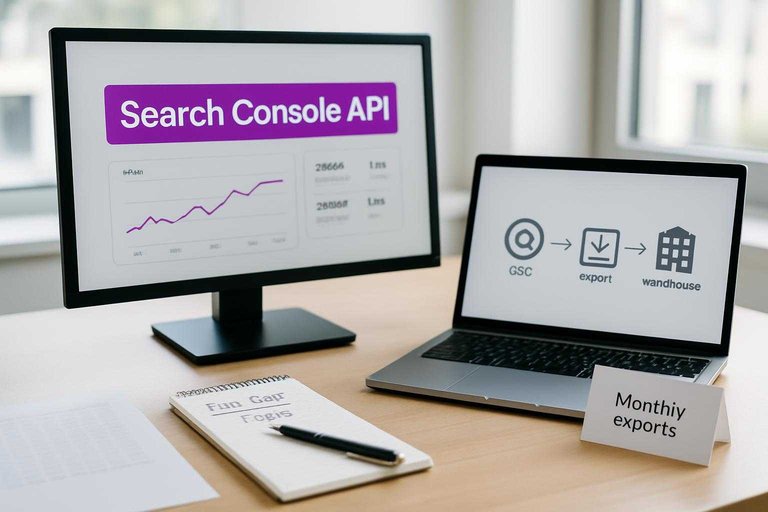
If the UI caps your rows or history, you’ll reach for exports. Each workaround shifts “free” into ongoing ops.
- Pull data via the Search Console API
- Schedule exports into Sheets or BigQuery
- Warehouse snapshots for longer retention
- Use third-party connectors and dashboards
- Build alerts for key segments
If you can’t automate it, you’ll re-pay the same analysis debt every month.
When limits matter
Limits are tolerable on small, steady sites. They hurt when you need depth, history, or segmentation across many pages.
Imagine a large site with thousands of indexable URLs. Row caps and aggregation blur page-level patterns, so technical SEO and content teams argue from different slices.
When SEO decisions need proof, your data limits become your process limits.
Cost 3: Engineering Bandwidth
Google Search Console is free to use. The engineering time it triggers is not.
GSC findings often turn into indexing work, structured data tweaks, hreflang cleanups, canonical decisions, and performance fixes. Each one competes with product work. One practical way to protect engineering bandwidth is to reduce the number of avoidable SEO fires upstream—especially content-level issues like missing metadata, inconsistent formatting, or thin pages that can be handled before they ever become tickets. Platforms like Skribra, which generate SEO-structured drafts with keywords and meta descriptions and can publish into WordPress, can help keep the content layer from adding to the backlog while engineering focuses on the system layer.
Fix backlog triage
You need a repeatable way to turn GSC alerts into scoped tickets. Otherwise, you either ignore problems or thrash.
- Validate the issue in GSC and server logs.
- Estimate effort with an engineer who ships that code.
- Confirm an impact hypothesis tied to a query or template.
- Schedule the work into a real sprint, with acceptance criteria.
- Verify the fix in GSC, then document the pattern.
Treat triage like a product queue, not a panic queue.
A useful addition to this routine is labeling what’s truly an engineering fix vs. what’s a content/ops fix. If the pattern is “missing meta,” “weak internal linking,” or “pages not consistently published,” that can often be addressed by tighter publishing workflows (for example, using an SEO-focused generator like Skribra for standardized metadata and formatting) rather than consuming dev cycles.
Common dev-heavy fixes
Many “SEO issues” are really systems issues. They live in templates, routing, rendering, and infrastructure.
- Fix robots.txt and accidental noindex directives.
- Resolve rendering gaps for critical content and links.
- Generate and segment sitemaps reliably.
- Collapse redirect chains and standardize final URLs.
- Handle parameters with consistent canonicals and rules.
If engineers own the primitives, SEO stops being a whack-a-mole game. Use Google’s redirect best practices to reduce migration and chain-related issues.
Maintenance tax
Every release can reopen old wounds. A CMS migration changes canonicals, a new filter adds parameters, and a template tweak breaks structured data.
The cost is recurring: auditing, regression checks, and guardrails in code review. Build “SEO invariants” into tests and conventions, or you will keep paying the same bill.
It also helps to standardize what the CMS outputs so releases don’t introduce new variation in titles, meta descriptions, headings, and image markup. Consistent, template-aligned publishing—especially when your content process bakes in SEO formatting by default—reduces the number of regressions that show up in GSC as “mystery” drops.
Cost 4: Content Rework
Google Search Console doesn’t charge you money, but it often charges you effort. Once you see queries, pages, and intent mismatches clearly, you can’t unsee them.
The real cost is coordination. Refreshing, consolidating, and aligning intent sounds tidy, until three teams need to touch one URL—especially if you don’t have an SEO content streamlining checklist to keep updates moving.
Refreshing vs rewriting
GSC patterns tell you whether a page is still “right,” just stale. Or fundamentally mis-aimed.
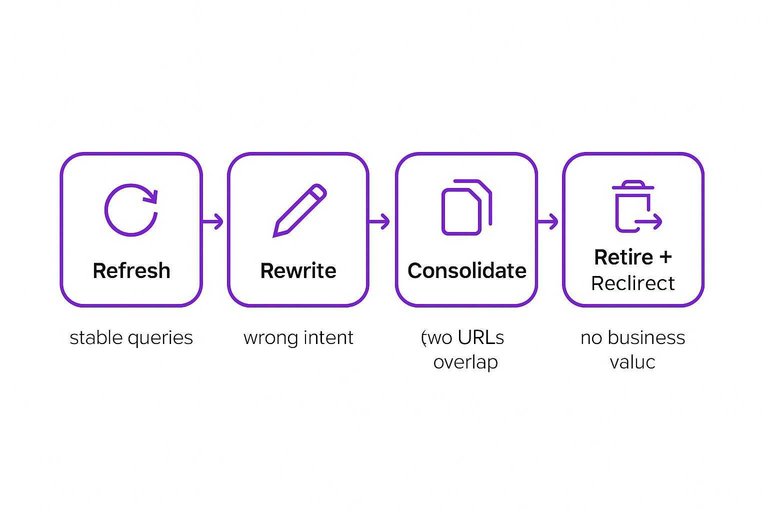
Refresh when the page ranks, but slips on freshness signals. Rewrite when it ranks for the wrong intent.
Use these decision rules:
- Refresh: stable queries, falling clicks, outdated examples and screenshots
- Rewrite: query mix shifts, wrong intent, weak above-the-fold answer
- Consolidate: two URLs trade impressions for the same query set
- Retire: impressions without clicks, no internal links, no business value
- Redirect: retired page has a clear closest match
Treat it like portfolio management. Every kept URL needs a reason to exist.
Editorial workflow load
GSC-driven changes ripple through your content pipeline. The work is rarely “just update the page.”
- Writing or revising the brief
- SME review and revisions
- Legal or compliance checks
- Internal links and nav updates
- Republishing and release coordination
If this pileup surprises you, your process is the cost center, not the content.
Opportunity cost
Every hour spent tuning an existing page is an hour not spent elsewhere. GSC makes “easy wins” visible, but it can also trap you in endless maintenance.
Imagine you spend a week consolidating three overlapping articles. You might gain clarity and rankings, yet delay a new landing page that improves sign-ups.
Choose a lane per quarter. Either you’re compounding authority, or you’re building new surface area.
Cost 5: Monitoring Cadence
Monitoring isn’t “free” just because the tool is. Your real cost is recurring time spent on checks, alerts, and incident response.
Cadence is the multiplier. Go too slow and you pay in recovery work. Go too fast and you pay in constant noise.
What to watch weekly
A weekly pass catches quiet breakage before it becomes a search problem. It also keeps your alerting honest, because you still see the raw data.
- Coverage anomalies by template
- Manual actions and warnings
- Security issues and hacked content
- Sitemap status and indexing gaps
- Spikes or drops by directory
If you can’t explain a change by directory, you can’t fix it quickly.
Alerting playbook
Alerts only save time if they produce consistent actions. Otherwise, they create a second job: ignoring them.
- Define thresholds that map to real risk.
- Route notifications to the right channel.
- Assign a named owner and backup.
- Document the response steps and rollback.
- Postmortem and add one prevention measure.
Your playbook turns “we saw it” into “we handled it.”
Right-size the cadence
Daily monitoring fits large sites, frequent releases, or search-driven revenue. Weekly fits steady sites with controlled change. Monthly fits low-change properties where search is a nice-to-have.
Tie cadence to blast radius. More pages, more deploys, and more revenue dependence mean faster detection is cheaper overall.
Budget the Hidden Work—and Make GSC Worth It
- Define what “cost” means for your org (hours, opportunity cost, dev cycles) and identify who absorbs it most.
- Put a number on setup and governance up front (property choices, access, launch checklist) so you don’t pay in rework later.
- Treat data limits as a design constraint: decide what you must export, how often, and when the gaps change your decisions.
- Protect engineering bandwidth by triaging fixes, batching dev-heavy work, and planning for ongoing maintenance—not one-off wins.
- Right-size content rework and monitoring cadence so refreshes and weekly checks reliably ship improvements instead of generating endless “to-do” lists.
Reduce Hidden GSC Overhead
Those “free” Google Search Console insights still cost you in setup, engineering time, rework, and consistent monitoring to act on what the data shows.
Skribra turns GSC findings into a steady stream of SEO-ready articles with optimized structure, metadata, and WordPress publishing—start with the 3-Day Free Trial.
Written by
Skribra
This article was crafted with AI-powered content generation. Skribra creates SEO-optimized articles that rank.
Share: