September 14, 2026
·
8 min read
9 Keyword Check Examples for Google Worth Knowing in 2026
A 2026 case study on making a Google Keyword check that actually leads to a decision — demand vs intent, visibility and coverage, nine decisive keyword-check examples, why Google tools disagree, and a standardized workflow you can scale responsibly.

You’re staring at a keyword and trying to decide whether it deserves a new page, an update to an existing one, a paid test, or a hard “skip.” Make the call off the obvious signal and you can end up writing the wrong brief, chasing demand that isn’t there, or creating overlap that drags down pages you already rank with.
This case study breaks the keyword check into nine concrete checks (with the exact outputs to look for), shows the common ways Google’s own surfaces disagree, and gives you a repeatable workflow your team can standardize and scale in 2026.
What a keyword check is
A “keyword check google” isn’t one metric in one tool. It’s triangulation: you validate a query’s demand (is anyone searching), intent (what they mean and want), and your current visibility (whether your site already shows up, and for which variants). Google surfaces answer different parts of that triangle, and they don’t share one measurement model—so treating any single number as “truth” is where bad keyword decisions start.
Demand and intent
For demand sizing, Keyword Planner is built for advertisers, so its forecasts are refreshed daily and based on the last 7–10 days, then adjusted for seasonality. It can also discover ideas either from seed phrases or by scanning a website’s content (but not hyperlink text). That’s useful for “how big is this, roughly?”—not for understanding the shape of interest.
For seasonality and direction, Google Trends is normalized—it divides by total searches in your chosen time/place and scales results onto a 0–100 index, so it’s not absolute volume. In “Related searches,” a Breakout label means a rising term grew by more than 5,000% versus the prior period. And for long-tail discovery, Autocomplete is its own signal: it predicts phrases from real searches plus word patterns across the web, and search personalization (a setting that can shape predictions based on your past searches) can change what you see.
Visibility and coverage
Visibility is site- and account-specific. In Search Console, average position is an average of the topmost ranking position your site held across impressions—not a single fixed rank. When queries seem to “go missing,” it can be because of anonymized queries (queries omitted from table-level reporting for privacy) and data truncation (Search Console stores/shows only the most important rows, so the UI list can be incomplete).
Paid-query reality has its own vocabulary: in Google Ads, a search term is what the user typed, while a keyword is what you targeted, and low-activity search terms can be omitted from the Search terms report for privacy.
That’s why a real keyword check is multiple checks: each surface is a partial truth, and the mismatch is often the signal.
Nine checks that decide
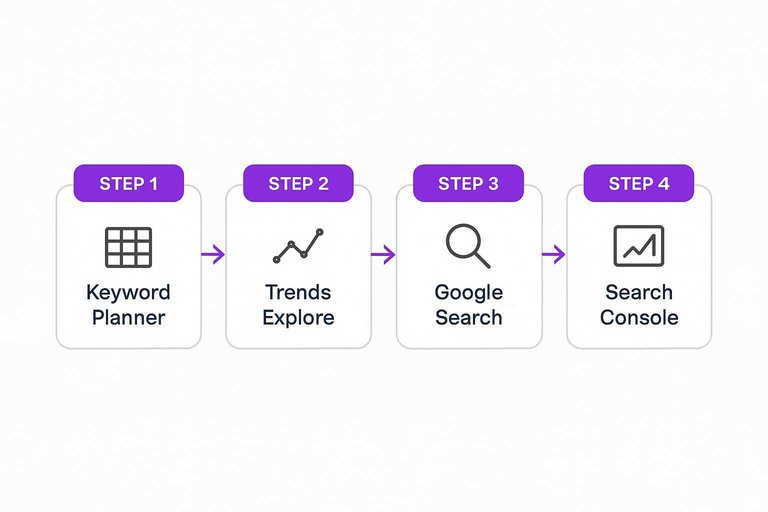
There isn’t one “Google Keyword Tool” in 2026. For a practical keyword check in Google, you move between Google Ads Keyword Planner, Google Trends Explore, Google Search (Autocomplete + operators), Search Console’s Performance report, and Google Ads’ Search terms report—because each surface changes a different go/no-go decision.
| Scenario (what’s happening) | Google surface output to look at | What you’re checking in that output | Decision it changes |
|---|---|---|---|
| You need keyword ideas from a competing site | Keyword Planner → Discover new keywords → Start with a website | Ideas from on-page content; not hyperlink text | Build |
| Your seed term won’t show ideas/forecasts | Keyword Planner message/error for the term | “Very low volume” or “sensitive”; not discoverable/forecastable | Skip |
| Trends shows a flat 0 for a query | Trends Explore → Interest over time shows “0” | Filtered out: low-volume, repeats, special characters, Google-product internal searches (incl. AI Mode/AI Overviews) | Test in ads |
| You’re targeting a place-specific query | Google Search → Autocomplete suggestions | Predictions can be unique by location/time | Build |
| Autocomplete looks biased by your history | Google Search → Autocomplete with Search personalization off | Suggestions without prior-search influence | Test in ads |
| You suspect you already have the page | Google Search using operators (site:) | Whether your URL already exists for it | Update |
| You have impressions but weak results | Search Console → Performance report (defaults to past 3 months) | Query impressions vs clicks in that window | Update |
| Filtered totals don’t reconcile cleanly | Search Console → Performance report with query/URL filters | Filtering can shift totals due to truncation + anonymized queries | Test in ads |
| Ads are triggering terms you didn’t plan | Google Ads → Search terms report + Match type column | What people typed vs what you targeted | Build |
How Google tools disagree
Google’s tools aren’t “arguing” with each other. They’re applying different measurement models—so the mismatch is usually the clue.
-
Keyword Planner shows demand, Trends looks “small” (or flat). Trends is normalized: it divides by total searches in your chosen time/place, then scales to a 0–100 index. So a query can have meaningful absolute activity and still look modest if overall search volume is huge. Trends also filters what it reports—low-volume terms (which can show as 0), repeated searches in a short period, queries with special characters, and even searches made by Google products (including AI Mode and AI Overviews). Signal: you’re seeing “share of attention,” not raw volume—and sometimes you’re seeing what survived filtering.
-
Trends is 0, but Autocomplete happily suggests the phrase. Autocomplete predictions can come from real searches and word patterns across the web, and they can change by location or time (think breaking news). If Search personalization is on, your prior searches can also shape what you see in suggestions. Signal: the phrase is plausible and contextual (or personally primed), but Trends may still suppress it publicly because it’s too small, too noisy, or filtered.
-
Search Console “rank” doesn’t match what you see in Google. The Google-native way to check your keyword rankings is Search Console’s Performance report, but it reports average position (an average across impressions), not a single fixed rank. The report also defaults to the past three months, and Google notes results vary by time, place, device, and recent search history. On top of that, filtering can change totals because some queries are anonymized and some rows are truncated. Signal: treat discrepancies as segmentation problems (date range, device, geography, query set), not as “the ranking is wrong.”
Once you read disagreements as normalization vs averaging vs filtering vs privacy limits, they stop being annoying—and start telling you what to check next.
Standardize the workflow
Use the same capture package on every “keyword check google” so you can compare work across clients—and across quarters.
-
Open a fresh capture record before you look anything up. Write the keyword exactly as tested (keep Keyword Planner inputs within 80 characters and 10 words), plus the market assumptions you’ll reuse (country/region, language, device).
-
Lock down “what you saw” in Google Search. Save the exact query string and any operators used (don’t put spaces after operators like
site:,filetype:,after:,before:). If you’re checking Autocomplete, note whether Search personalization was turned off. -
Snapshot Search Console the same way, every time. The Performance report defaults to the past 3 months—record the date range you used, export the report, and screenshot the top rows with the filters visible. If totals shift after filtering, write down which query/URL filters were applied (filters can change totals due to data truncation and anonymized queries). If you need help streamlining this part, see these resources to simplify SEO workflows.
-
Capture paid-query reality when Ads data exists. Export the Google Ads Search terms report with the Match type column, and note that some low-activity search terms can be omitted for privacy.
-
End with a comparison-ready decision line. One sentence: build / update / skip / test in ads—plus the single screenshot or export you’d use to defend it later.

Scale responsibly in 2026
UI checks are fine for a handful of keywords. Once you’re doing weekly QA across categories, rely on exports (or APIs) so your “keyword check google” is repeatable—and auditable.
Skribra fits after validation: it turns your build/update decisions into a rolling content calendar, publishes, and then updates posts using Search Console signals—see the Skribra SEO guide for the full workflow.
- Automate exports, keep the decision human. Export Search Console and Google Ads Search terms data for slicing; keep the “build / update / skip / test” call human.
- Switch to exports when the UI stops being a complete view. Use exports as the scalable path when the UI stops being a complete, stable view of your query set.
- Design for privacy gaps. Anonymized queries, data truncation, and omitted low-activity Ads search terms create permanent “missing rows”—so your automations must tolerate blanks.
- Don’t bet your process on experimental UI features. Search Console’s prompt-based filter suggestions are limited to 20 requests per user per day and only show for a small percentage of users.
- Treat Gemini-in-Trends as governed data. Google says Gemini interaction data in Trends may be retained for 55 days; aggregate activity is kept in Google Analytics for 14 months; and a reviewed subset can be kept up to 3 years—so decide what you’re willing to paste in, and log it.
Triangulate, then make the call
Stop treating any single Google surface as “the number” you’re allowed to decide from—each one measures a different slice of demand, intent, and visibility, and privacy/filters mean some rows will always be missing. When Planner, Trends, Autocomplete, Search Console, and Ads don’t line up, assume the mismatch is the diagnostic signal and use it to choose the right move: build, update, skip, or test in ads. The first step is simple: open a capture record, run at least two checks, and finish with a one-sentence decision you can defend later with the export or screenshot that produced it.
Frequently Asked Questions
- Is there a tool that can check my keyword rankings on Google?
- Yes—Google Search Console is the Google-native option for checking how your site performs on queries, and you can pair it with Google Ads Search terms (when you run ads) to see the exact searches that triggered your ads versus the keywords you targeted.
- Where is the Google Keyword Tool in 2026—did Google replace it?
- There isn’t one single “Google Keyword Tool”; for keyword research in Google you’ll use Google Ads Keyword Planner, which includes “Discover new keywords” using either seed phrases or “Start with a website” (and it won’t use hyperlink text to generate ideas).
- Why does my keyword show 0 in Google Trends but still appear in Google Autocomplete?
- Google Trends reports normalized interest on a 0–100 scale (relative to total searches in your selected time/place), so a term can be too small to register meaningfully there while still showing up as a plausible Autocomplete prediction.
- How do I do a clean “keyword check google” without Autocomplete being influenced by my search history?
- Turn off Search personalization in Google Search so predictions aren’t based on what you’ve searched for before, then rerun the query to capture suggestions without that prior-history influence.
- What’s the fastest way to turn keyword checks into a repeatable content calendar?
- Use a system that converts validated keywords into a rolling plan and then updates posts based on performance data; Skribra does this by generating a rolling 30-day content calendar and maintaining posts using Search Console numbers.
Turn checks into publishable keywords
Once your capture records are consistent, the bottleneck becomes turning defensible decisions into pages—week after week—without slipping on intent, cannibalization, or follow-through.
Skribra is an AI-driven SEO content system that researches keywords, builds a rolling 30-day content calendar, writes long-form articles, publishes to your site, and updates live posts based on performance data—plus a 3-Day Free Trial.
Written by
Skribra
This article was crafted with AI-powered content generation. Skribra creates SEO-optimized articles that rank.
Share: