August 17, 2026
·
13 min read
What Is Checking Keywords on Google and How Does It Work?
A pillar-style guide to running a Google keyword check the right way — understand query intent and rewrites, compare opportunity vs difficulty, interpret SERP features and cannibalization signals, and turn findings into a mapped, measurable content plan.

You look up a keyword and the results don’t match what you expected—different page types, weird SERP features, or competitors you’ve never heard of. That’s not bad luck; it’s Google interpreting your query in ways your research tool might not show.
This guide breaks down what a Google keyword check actually is, what inputs matter, and how to read the SERP like evidence. You’ll learn the main check types, a repeatable workflow, which tools to use, and how to convert “interesting data” into clear next actions.
Keyword Check Basics
A Google keyword check is a quick, targeted inspection of what Google shows for a specific query right now. You run it to answer practical questions about visibility, intent, and competition before you write, optimize, or bid. It sits between “idea” work and “execution” work in both SEO and paid search.
Core definition
A keyword check means you take one query and verify what Google currently treats it as. You’re checking intent clues, result types, and who already wins the click. It answers questions like: “What does Google think users want here?” and “What would my page need to compete?”
Why it matters
Keyword checks cut uncertainty before you spend time writing or budget bidding.
- Confirm search intent before drafting
- Spot SERP features stealing clicks
- See competitors and their angles
- Detect shifts after updates
- Validate ad-to-landing alignment
Less guessing. More deliberate decisions.
What it is not
A keyword check is not full keyword research, where you build a topic set and prioritize terms. It’s not rank tracking, where you monitor positions over time across many keywords. It’s not a full SEO audit, where you diagnose technical, content, and authority issues sitewide.
Inputs and outputs
You provide a few variables, then record what the SERP reveals.
- Query and close variants
- Location and language
- Device and browser context
- Logged-in or neutral state
- Date and notes
If you can’t reproduce the setup, you can’t trust the conclusion.
When to run one
Run a keyword check whenever the SERP might change your plan or your expectations. Common triggers include a new page brief, a sudden ranking drop, entering a new market, seasonal demand shifts, or expanding an ad group. Do it before you “fix” anything.
How Google Interprets Queries
A Google keyword check is really a “meaning check.” Google tries to infer what the searcher wants, then chooses pages and SERP layouts that best satisfy that intent.
Your job is to separate the words you typed from the job Google thinks you’re hiring it to do—something we cover in more detail in this SEO guide for beginners.
Intent categories
Google buckets most queries by intent because different intents need different answers. That’s why the same topic can produce a guide, a homepage, or a product grid.
Informational queries reward explanations, definitions, and step-by-step content. Navigational queries reward the most obvious destination, usually a brand or specific page.
Commercial and transactional queries lean toward comparisons, pricing, inventory, and checkout paths. If your page type mismatches intent, relevance drops fast.
Query rewriting
Google rarely treats your keyword as an exact string. It rewrites queries to reduce ambiguity and increase satisfaction.
It expands with synonyms and close variants, corrects spelling, and infers entities like people, places, and products. It also uses context signals like recent wording trends and implied modifiers.
So a “keyword check” is often checking a cluster of meanings, not one phrase. That’s where many ranking surprises come from.
Localization effects
Location signals reshape both results and competition because Google assumes local relevance when it can.
Personalization limits
Personalization exists, but it’s narrower than people assume. It can nudge rankings based on language, location, device, and sometimes past behavior.
It usually doesn’t rewrite the entire SERP for common, high-volume queries. For many checks, layout and top results stay broadly consistent across users.
To minimize bias, use incognito, log out, fix location settings, and compare with a neutral rank tracker. Treat your own browser as a noisy instrument.
SERP feature triggers
Google adds SERP features when it detects a faster or safer way to satisfy intent. Those triggers are often visible in the query’s shape.
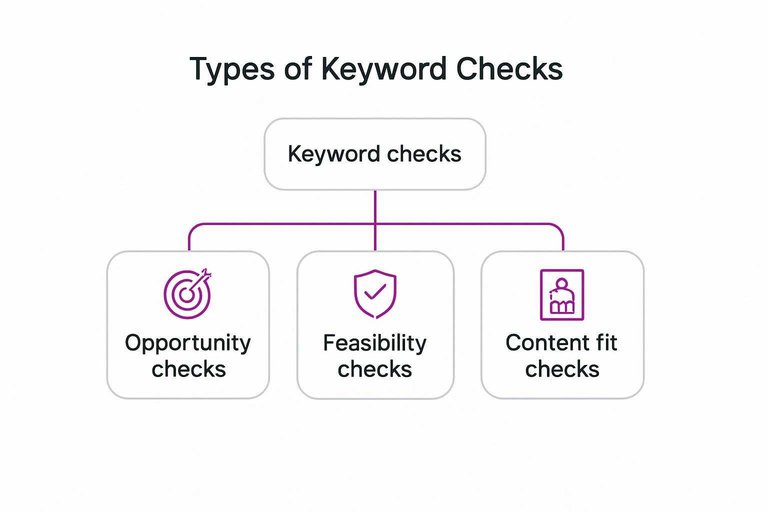
Types of Keyword Checks
Keyword checks aren’t one thing. They’re different tests for different questions.
Choose the check by your goal. Otherwise you’ll “answer” the wrong problem.
Opportunity checks
An opportunity check asks one thing: is this keyword worth your time. You’re judging intent fit, SERP makeup, and how deep the competition runs.
Start by reading the SERP like a product spec. Note the dominant intent, the page types ranking, and any SERP features that steal clicks.
If the SERP demands a different outcome than your page can deliver, walk away early.
Feasibility checks
A feasibility check asks whether your site can realistically compete right now. Look for signals in your content, your authority, and how stable the results are.
- Match top-page depth and coverage
- Prove topical authority with clusters
- Compare link profiles, not totals
- Watch SERP churn week to week
- Validate freshness expectations
If you’re missing two or more signals, plan an upgrade before you plan a target.
Ranking checks
A ranking check confirms where you sit today, not where you “should” sit. Device, location, personalization, and feature layouts can change what “position” even means.
Use a consistent baseline. Pick the same device type, the same location, and the same query formatting each time.
Treat small moves as noise until you see a pattern across multiple checks.
Content fit checks
A content fit check prevents the classic mistake: targeting the right keyword with the wrong page. You’re matching intent to format before you write.
- Identify the dominant intent on the SERP.
- Note the winning page type and format.
- Map it to your funnel stage and CTA.
- Choose an existing page or plan a new one.
- Confirm you can satisfy the “why now” angle.
If your planned page disagrees with the SERP’s format, Google usually sides with the SERP.
Paid search checks
Paid keyword checks answer different questions because the auction is different. Match types, CPC ranges, competitor density, and policy rules can matter more than organic difficulty.
Check the keyword under each match type you might use, then scan the ad landscape for intent cues and aggressiveness.
In paid search, the keyword can be “right” and still be unbuyable at your margins. Use Google Ads Keyword Planner to validate match types, forecasts, and competition signals before committing budget.
Keyword Check Workflow
A Google keyword check is only useful when it ends in a decision you can defend. Use a workflow you can repeat so your notes turn into page plans, not opinions.
Set the context
Pick your context before you look at the SERP, because context changes the SERP.
- Define the searcher persona and job-to-be-done.
- Set location, down to city or country.
- Choose device: mobile, desktop, or both.
- Lock language and query variant.
- Decide scope: organic, paid, or both.
If you change any parameter later, you are running a different check.
Collect SERP evidence
Capture what Google is rewarding right now, not what you hope it rewards.
- Record the top 10 organic results and their titles.
- Note SERP features: snippets, maps, videos, PAA, shopping.
- Tag each result’s format: guide, category, tool, homepage, forum.
- Mark brand mix: well-known brands, niche sites, UGC.
- Save screenshots or a SERP export for later comparison.
Evidence first. Interpretation comes after.
Assess competitors
Ranking pages usually win because they match intent and remove friction.
Check how each top page answers the query, and how fast it gets there.
Look for depth where it matters, tight structure, recent updates, and credibility cues like authorship, citations, and clear policies.
When the winners all share the same “shape,” you’re seeing the real requirement.
Gauge difficulty
Use quick heuristics from what you can see, not just a tool score.
- Count strong domains in the top results.
- Compare content depth across the top three pages.
- Check how many SERP features steal clicks.
- Look for UGC results that indicate weak editorial coverage.
- Note whether results are tightly consistent or wildly mixed.
If features dominate and brands stack the top, you’ll need a sharper angle.
Choose an action
Your move depends on intent fit and your current site footprint.
If you already have a relevant page, upgrade it to match the SERP’s format and coverage gaps.
If the SERP wants something you don’t have, build a new page designed for that intent.
If results suggest a different interpretation, switch to a clearer keyword or add a modifier.
Avoid the term when it is brand-locked, feature-crowded, or misaligned with your offering.
The best keyword is the one you can win without lying to the searcher.
Document and repeat
Consistency turns keyword checks into monitoring, not one-off guesswork.
- Record parameters: location, device, language, mode.
- Save the SERP screenshot set.
- List the top URLs and formats.
- Write your decision and the reason.
- Set a recheck cadence tied to volatility.
If you can’t reproduce the check, you can’t trust the trend.
Tools and Data Sources
A Google keyword check can pull from several sources, and each one answers a different question. Use the right source for the decision you’re making, or you’ll chase noise. Once you’ve triangulated what’s real, the next challenge is executing consistently—this is where an SEO-focused publishing workflow (for example, Skribra’s keyword-aware formatting and meta description generation) can help turn those signals into repeatable content updates. If you want more ideas on streamlining that process, see these resources to simplify SEO workflows.
| Source | What it’s good for | What it misses | Best use |
|---|---|---|---|
| Google Search results | Real SERP reality | Personalization, volatility | Snapshot a query |
| Google Search Console | Your actual queries | Limited to your site | Validate existing demand |
| Google Ads Keyword Planner | Paid demand signals | Broad buckets, grouping | Rough volume ranges |
| Third-party SEO tools | Competitive baselines | Modeling, lag | Compare keyword sets |
| Browser + location tools | Local intent checks | Still not perfect | Spot geo differences |
Triangulate two sources before you change strategy, especially if rankings feel “off.” Then bake the winning topics into a steady cadence—ideally with tooling that can publish directly (e.g., WordPress integration) so the research-to-live loop doesn’t stall.
Interpreting Results Correctly
A keyword check is only as good as your interpretation. Most bad decisions come from tidy-looking numbers and messy real-world SERPs.
Volume vs value
High volume can still be low value, because intent drives outcomes. A keyword check that ignores intent often sends you toward traffic that never converts.
Look for signals that suggest business value:
- Query wording: “buy,” “price,” “near me,” versus “what is” or “examples.”
- SERP makeup: product pages, reviews, and local packs versus blog guides.
- Next-step friction: how many clicks until a purchase or lead form.
- Your own funnel: which intents map to pages that can convert.
Treat volume as a door count, not revenue. Then pick doors that lead somewhere.
Feature crowding
SERP features can erase clicks without changing your ranking. Your keyword check should account for what pushes organic results down.
- Ads above the fold reduce first-click share
- Map packs capture local intent quickly
- Featured snippets satisfy simple questions
- Shopping grids steal product discovery
- “People also ask” keeps users looping
Adjust expectations by click opportunity, not position. Rank #3 under four ads is a different universe.

Cannibalization signals
Cannibalization happens when your own pages compete for the same query. A keyword check may show “you rank,” while your pages quietly trade places.
Watch for patterns like two URLs alternating for one keyword, unstable rankings without clear competitors moving, or multiple similar pages targeting the same intent. It often leads to weaker relevance signals, diluted links, and confused internal linking.
Pick a primary page per intent, then make everything else support it.
Seasonality context
Seasonality can look like a ranking problem when it is just demand changing. A keyword check without trend context makes normal cycles feel like emergencies.
Compare your impressions and clicks against a longer trend line, not last week. Also consider publication timing, because a “new” page can rise into a peak and fall out later, even with steady rankings.
Check the calendar before you change the strategy.
Correlation traps
One-off checks create clean stories from noisy systems. You need repeat observations before you claim cause and effect.
- “We updated the title, rankings rose”
- “Competitor posted, we dropped”
- “More backlinks, immediate lift”
- “Higher DR, better positions”
- “New page indexed, cannibalization fixed”
Run the check again over multiple dates and devices. If it persists, then you’ve got a signal.
Common Mistakes
A keyword check is only useful if your inputs match real search behavior and your outputs drive decisions.
Most bad checks fail quietly, then you build content on the wrong signal.
- Checking single keywords, ignoring intent variants
- Mixing locations, devices, or languages in one report
- Using rankings without noting SERP features present
- Tracking too many terms, then never acting on changes
- Treating one tool as ground truth
Clean up the inputs first, then your keyword check becomes a decision tool, not trivia.
From Check to Plan
A keyword check is only useful if it changes what you build next. Turn the findings into a plan that names the topics, assigns owners, and sets a simple priority rule.
Keyword clustering
A single keyword rarely represents a single need, so planning one page per term breaks fast. Cluster queries that share intent and show similar top results, then treat the cluster as the unit of work.
Start with your checked keywords, then group by what the searcher wants.
- Same intent: learn, compare, buy, fix
- Same SERP types: guides, category pages, tools
- Same must-have angles: pricing, specs, pros/cons
- Same “People also ask” themes
If two queries trigger the same SERP, they probably want one strong page.
Map to pages
Once clusters exist, you need a one-to-one map between cluster and page purpose. That avoids cannibalization and keeps internal linking clean.
- Inventory existing URLs that already match each cluster’s intent.
- Assign one primary URL per cluster, even if several rank today.
- Mark conflicts where two pages target the same cluster.
- Decide the fix: merge, differentiate, redirect, or re-angle.
- Create briefs for clusters with no suitable page.
One cluster, one page, one job. Everything else is noise.
On-page priorities
After mapping, prioritize updates that align your page with what Google already rewards for that intent. Use the SERP as the spec, not your internal guess.
- Rewrite titles to match intent and modifiers
- Rebuild H2s to mirror common subtopics
- Add missing sections that rivals all cover
- Upgrade media: tables, images, short demos
- Add schema that matches page type
Meet the SERP’s expectations first, then differentiate.
Off-page considerations
Sometimes your page is fine, but the SERP is stacked with stronger domains and deeper link profiles. In those cases, content tweaks alone often plateau.
Look for off-page needs when top results are brand-heavy, link-rich, or dominated by “known” sources.
If your page matches intent and depth, shift effort toward mentions, partnerships, digital PR, or linkable assets.
If the SERP is an authority contest, write better and you still lose.
Measurement setup
Changes without measurement are just activity, so set tracking before you publish. Tie every cluster to a small set of signals you can review weekly.
- Rankings for primary and secondary queries
- Impressions by page and query cluster
- Clicks and CTR by page
- Conversions tied to that intent
- SERP feature presence and losses
Track by cluster, not by keyword, or you’ll chase ghosts.
Turn Your Next Keyword Check into a Repeatable Decision
- Pick one keyword and set context first: audience, location, device, and the page you want to win with.
- Capture the live SERP evidence: intent signals, top-ranking page types, and any features that steal clicks.
- Decide the action—not the score: create a new page, refresh an existing one, consolidate cannibalizing pages, or deprioritize.
- Document what you saw and what you chose, then re-check on a cadence so your plan stays aligned with how Google is actually serving the query.
Frequently Asked Questions
- How do I do a keyword check in Google without personalized results skewing what I see?
- Use an Incognito/Private window, set your location and language explicitly, and add URL parameters like “&pws=0” (personalized search off) when possible. For a cleaner baseline, compare results in Google Search Console (site data) versus a neutral SERP check.
- Is a “keyword check Google” the same thing as checking rankings?
- No—rank checking is only one output of a keyword check. A keyword check also evaluates intent, SERP features (maps, videos, shopping), and the types of pages Google rewards for that query.
- How can I track keyword checks over time without violating Google policies or getting blocked?
- Rely on first-party sources like Google Search Console for performance trends and use reputable SEO tools that disclose how they collect SERP data. Avoid aggressive scraping from your browser or scripts, which often triggers captchas and unstable results.
- Can I do a Google keyword check for local SEO keywords in different cities?
- Yes—set the search location (or use a VPN plus location settings), and verify what shows in the local pack and Google Business Profiles for that area. Always cross-check with Google Search Console’s country/device filters to confirm what your site actually earns impressions for.
- After a keyword check, how do I quickly turn findings into a content brief?
- Start with the dominant intent and SERP format (guide, product page, category, local landing page), then outline the subtopics and entities you see recurring in top results. If you want to speed up drafting at scale, a tool like Skribra can help generate SEO-oriented outlines and drafts based on your target query and page type.
Turn Keyword Checks Into Content
Running a Google keyword check is only useful if you can turn the insights into a consistent plan and publish fast enough to compete.
Skribra converts your keyword data into SEO-optimized articles with the right structure, metadata, and formatting—then publishes to WordPress automatically; start with the 3-Day Free Trial.
Written by
Skribra
This article was crafted with AI-powered content generation. Skribra creates SEO-optimized articles that rank.
Share: