October 14, 2026
·
10 min read
9 SEO Content Marketing Metrics Worth Tracking in 2026
This case study settles what “SEO content performance” should mean in 2026 — SEO vs content goals, AI-driven visibility shifts, Search Console limits and GA4 measurement setup, a table of 9 metrics that matter, and diagnostic pairings plus cadence/archiving so you can defend a keep/fix/stop decision with clean data.

You’re trying to prove whether your content program is worth the budget, but the usual dashboard story no longer adds up.
When search results start answering questions directly, visibility can rise while clicks and CTR fall—and if your tracking stack is leaky, you can end up defending the wrong KPI in the wrong meeting. This case study shows how to set up the measurement stack before you pick KPIs, then walks through nine metrics (from indexing to key events), how to read conflicting signals, and how to report on a cadence without losing history.
Performance, redefined
SEO vs content
Content marketing is the work: you publish something genuinely useful for a real audience. Example: an e-commerce brand publishes a “size guide” and a care guide so customers buy with confidence and get fewer returns.
SEO is what makes that content discoverable in search, and measurable once it’s there. In practice, that means you don’t just ask “Did we publish?”—you track how often the page was shown and chosen in Google results using Google Search Console’s Performance report, which surfaces clicks, impressions, average CTR, and average position.
An impression in Search Console is a recorded view of a link to your site in Google results (how it’s counted varies by result type); it’s the denominator for CTR and the basis for average position.
AI shifts meaning
In 2026, “working” can look like rising visibility with falling clicks because the SERP itself is doing more of the answering.
That’s why Search Console’s Generative AI performance report—a Search Console report rolled out globally on August 31, 2026 that reports impressions for your URLs inside AI Overviews and AI Mode, separate from classic web-search performance—belongs next to your normal web-search numbers. A recent arXiv study found AI Overviews appeared on about 18% of Google searches in its dataset, while clicks to cited sources happened in about 1% of AI Overview visits.
If you don’t separate web impressions from AI-feature impressions, you’ll misread “less traffic” as “less demand,” and cut the very content that’s still being surfaced.
Stack before KPIs
A KPI is only as truthful as the measurement stack behind it. For seo content marketing, that stack is usually two systems with different jobs (see this SEO guide for content marketing): Search Console tells you what Google showed and what got clicked; GA4 tells you what people did after they landed. Lock the limits first, or you’ll “explain” performance with data you never actually had.
Search Console limits
Search Console is the source of record for Performance metrics, but it’s not a full-fidelity query database. Google explicitly warns about anonymized queries—queries omitted from Search Console tables for privacy—which can make the chart totals higher than the sum of the visible table rows. If you build query-level KPIs off “top queries” tables, you’re building on a partial dataset.
Then there’s sheer row loss. The Search Console UI export tops out at 1,000 rows. The Search Analytics API (and the Looker Studio connector) gets you further, but still has a daily ceiling of 50,000 rows per day per site per search type. You also have to paginate: rowLimit can go up to 25,000 per request, and you move through results with startRow.
Finally, the Performance report is a 16‑month window. Google’s own debugging guidance points you to “Last 16 months,” and the way past that is to archive your data yourself via the API or bulk exports.
GA4 measurement setup
GA4 is where you decide what “quality traffic” means. Start with an engaged session—a session lasting longer than 10 seconds, or with a key event, or with 2+ page/screen views—because GA4’s engagement rate and bounce rate are calculated from that definition.
Define key events early: a key event is any GA4 event you mark as especially important to the business, and GA4 elevates it in reporting and attribution.
If you want topic- or cluster-level reporting, set up a content group—a GA4 categorization that uses the content_group parameter—so you can compare performance across related sets of pages (implemented via gtag or Google Tag Manager).
Last: pick GA4 data retention intentionally. Google lists 2, 14, 26, 38, or 50 months; 26/38/50 months are available to 360 properties only, and only for event data. If you don’t lock retention and archiving up front, your “year-over-year” KPIs will silently turn into “whatever still exists.”
9 metrics that matter
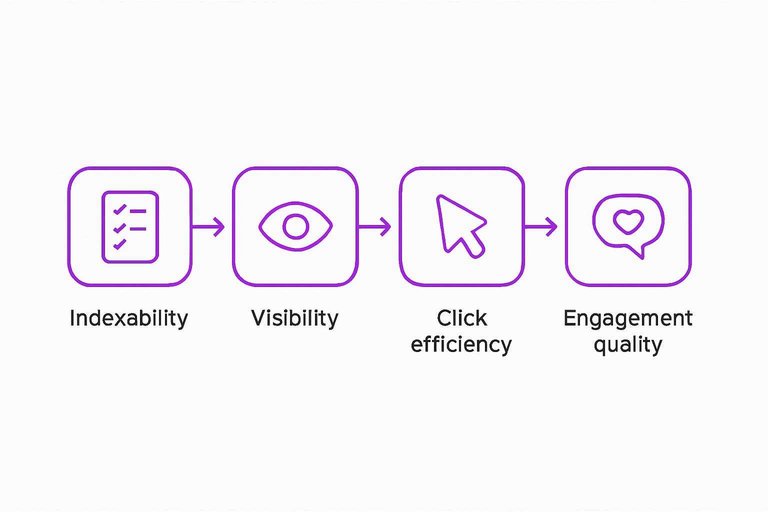
Track these in the order an analyst debugs performance: indexability → visibility → click efficiency → engagement quality → business outcomes. If you skip the earlier stages, you’ll end up “explaining” downstream numbers (CTR, engagement, conversions) with pages Google never indexed.
Search Console’s Page indexing report—the report that groups URLs into indexed vs not indexed with specific reasons like “Discovered - currently not indexed”—is your gate. Until that report looks sane, every other SEO content marketing metric is just noise. If you need help making this repeatable across teams, keep a shortlist of resources to simplify SEO workflows.
| Metric (analyst order) | Where to pull it | What decision it drives | Common failure mode to watch |
|---|---|---|---|
| Indexed pages (count) | Search Console → Page indexing report | Confirm content can compete at all | Indexing isn’t instant; not guaranteed |
| Not-indexed backlog (count by reason) | Search Console → Page indexing report | Decide: prune, improve, or re-submit | “Discovered/Crawled - currently not indexed” piling up |
| Internal links to content (trend) | Search Console → Links report | Fix discoverability via internal linking | Report is a sample; tables limited in UI |
| Web impressions (classic search) | Search Console → Performance (Search results) | Demand/visibility trend by page/topic | Query tables omit anonymized queries; totals won’t match |
| AI feature impressions (AI Overviews/AI Mode) | Search Console → Generative AI performance report | Separate “seen in AI” from web search | Disabled via Search generative AI control; changes take days |
| Average position (web) | Search Console → Performance (Search results) | Diagnose persistent dramatic drops | Averaging hides winners/losers; don’t treat as KPI alone |
| CTR (web clicks ÷ web impressions) | Search Console → Performance (Search results) | Sniff-test snippet + intent match | Mixing AI impressions with web CTR breaks the math |
| Clicks (web) | Search Console → Performance (Search results) | Forecast traffic, prioritize updates | Looks “down” when visibility shifts into AI features |
| Organic key events (count + rate) | GA4 → Reports/Explorations (filter Organic Search; use Content group) | Judge business impact of organic content | Not marking events as key events; mis-scoped channel filters |
The rule: only compare metrics that share the same scope (same URL set, date range, and “web vs AI” surface). Get that wrong, and your dashboard will be internally consistent—and still completely misleading.
Read the signals
Search Console’s Performance report is four metrics—clicks, impressions, CTR (clicks ÷ impressions), and average position. Pair movements across those (and then validate with GA4 outcomes) so you can form a hypothesis you can test.
-
Web impressions flat, web clicks down → treat it as a click-efficiency problem, not “lost demand.” Check CTR and the queries/pages driving the drop; remember Search Console can omit anonymized queries, so charts may not match table totals.
-
AI feature impressions up, web clicks down → assume the SERP is answering more on-page. Use Search Console’s Generative AI performance report (AI Overviews/AI Mode impressions are separate from classic web performance), then validate impact in GA4 with organic engagement and key events; Google has said clicks from AI Overviews are higher quality (users are more likely to spend more time on the site), but panel research found overall clicking was lower on AI-Overview SERPs (8% click rate on SERP visits with AI Overviews vs 15% without) and “end browsing session” behavior was higher (26% vs 16%) (panel research found overall clicking was lower on AI-Overview SERPs).
-
AI feature impressions suddenly near-zero → before you blame “algorithm updates,” check the Search generative AI control in Search Console settings; excluding your site removes traffic and impressions from those features, and changes can take days.
-
Average position “improves,” clicks don’t → don’t report rank as the KPI. Position is an average; it can rise while losing the few queries that actually produced clicks.
-
Indexed count down (or ‘Discovered/Crawled – currently not indexed’ up) → stop tuning titles. Fix indexability first: start with the reason shown in the Page indexing report.
-
Internal links to content down → treat it as a discoverability regression. Also remember Search Console’s Links report is a sample and its tables cap at 1,000 rows.
If you want this triage operationalized, Skribra connects to Search Console and its Hook/Scout agents flag high-impression/low-CTR pages and “striking distance” URLs (positions 5–15) with clicks sliding versus a 28‑day baseline, then runs a refresh.
Cadence and archiving
Weekly vs monthly
Weekly is for catching measurement breakage early, before it ruins a month of reporting. Keep it small: scan for sudden changes in indexed/not-indexed counts, web impressions that cliff-drop on a single day, and AI-feature impressions that flatline. If AI visibility suddenly disappears, check your Search Console setting for Search generative AI: excluding your site removes traffic and impressions from AI Overviews/AI Mode, and changes generally take days to settle.
Monthly is for decisions. Report at the level you can act on: topic clusters (via your GA4 content groups) and key events, not individual URLs. Also separate two artifacts:
- Analyst view: messy, diagnostic, built to explain “what moved” (and why chart totals won’t always match table rows because Search Console can omit anonymized queries).
- Executive narrative: stable, scoped, and comparable month-to-month.
That split prevents you from spending leadership time on normal noise—and keeps your seo content marketing program defensible when the surface area of search keeps shifting.
Keep your history
To stay measurable beyond Search Console’s 16‑month window, treat your data like logs: export it before it ages out.
- Schedule an archive pull using the Search Analytics API or Search Console bulk exports (don’t rely on UI tables).
- Capture enough raw detail to rebuild your monthly views later (pages at minimum; add other cuts you actually report).
- Remember AI reporting has UI limits too: the Generative AI performance report is subject to the same 1,000-row limitation.
- Align GA4 retention to your reporting horizon, and make sure your content-grouping is implemented via the
content_groupparameter so historical comparisons don’t collapse when URLs change. - Do a restore test once: rebuild one prior month from your archive and compare it to what your dashboard reported then.

Keep, fix, or stop
The 80/20 rule in SEO is prioritizing the minority of pages that produce most of what you can actually measure—visibility (web vs AI impressions), traffic (web clicks), and outcomes (GA4 key events). Use the nine metrics to find that minority, then deprioritize everything else until this set is stable.
- KEEP (scale what’s working): Indexed pages steady, not-indexed backlog not piling up, internal links holding, web + AI impressions rising, and organic key events growing.
- FIX (don’t add more pages yet): Use metrics to validate five strategy levers: indexability cleanup, internal linking/architecture, snippet + intent alignment (CTR), refresh/expand content where visibility exists, and on-page conversion paths (key events).
- STOP (net-new publishing): If indexing is regressing (indexed down or “not indexed” up), you’re producing inventory Google won’t carry.
- Weekly triage, monthly decisions: Weeklies catch breakage early; monthlies decide budget by topic clusters and key events.
- Archive like logs: Pull Search Console via API/bulk export and lock GA4 retention so your baseline survives tooling windows; don’t treat IndexNow as “Google indexing speed” evidence—its official endpoints don’t list Google.
Make performance defensible again
In 2026, a content program can be doing its job even when clicks fall—because visibility is increasingly happening inside AI features—so rankings and CTR alone are no longer a defensible verdict. The only way to prove the budget is to measure the whole chain with clean scope: indexability first, then separate web-search visibility from AI-feature visibility, and judge “quality” with GA4 engagement and organic key events. Your first move is not picking a KPI—it’s locking the measurement stack (Search Console + GA4), separating “web vs AI” surfaces, and archiving the data so the story doesn’t evaporate at 16 months. Once that’s in place, weekly checks catch breakage, and monthly reporting can stay stable enough to support a clear keep/fix/stop decision.
Frequently Asked Questions
- Why did my AI Overviews impressions drop to zero in Google Search Console for SEO content marketing pages?
- Check Search Console settings → Search generative AI and confirm your site isn’t excluded; exclusion means you won’t receive traffic or impressions from AI Overviews and AI Mode. After changing the control, updates generally take days (with exclusion taking effect within 1–2 days after the control goes live, and some content taking longer).
- How do I track AI Overviews visibility separately from classic SEO content marketing performance?
- Use Google Search Console’s Generative AI performance report to see impressions for your URLs in AI Overviews and AI Mode, separate from the classic Search results Performance report. The report is subject to the usual Search performance limitations, including a 1,000-row limit.
- What counts as a “key event” in GA4 for measuring SEO content marketing outcomes?
- In GA4, a key event is any collected event you mark as especially important to business success (for example, a lead form submit or purchase). Once marked, it’s reported as a key event in GA4 reports and explorations.
- How do I report SEO content marketing performance by topic cluster (not by individual URLs) in GA4?
- Set up GA4 content groups and send the content_group parameter (via gtag or Google Tag Manager) so pages are categorized into your topic buckets. Then report using the Content group dimension to compare performance across clusters.
- Is there a way to automate SEO content marketing monitoring for high-impression pages with low CTR?
- Yes—Skribra connects to Google Search Console and shows per-article clicks, impressions, CTR, average position, and indexing status in one view. It also has an agent (Hook) that targets pages with high impressions and CTR below what’s expected for their position, with a 60-day per-article cooldown.
Turn metrics into throughput
Once your tracking stack is sound, the bottleneck becomes execution: turning keyword opportunities into published pages, then updating winners before performance quietly decays.
Skribra is an AI-driven SEO content system that plans, writes, publishes, and maintains articles on your site using Search Console signals to keep rankings from slipping—backed by a 3-Day Free Trial.
Written by
Skribra
This article was crafted with AI-powered content generation. Skribra creates SEO-optimized articles that rank.
Share: